SvGrid Studio
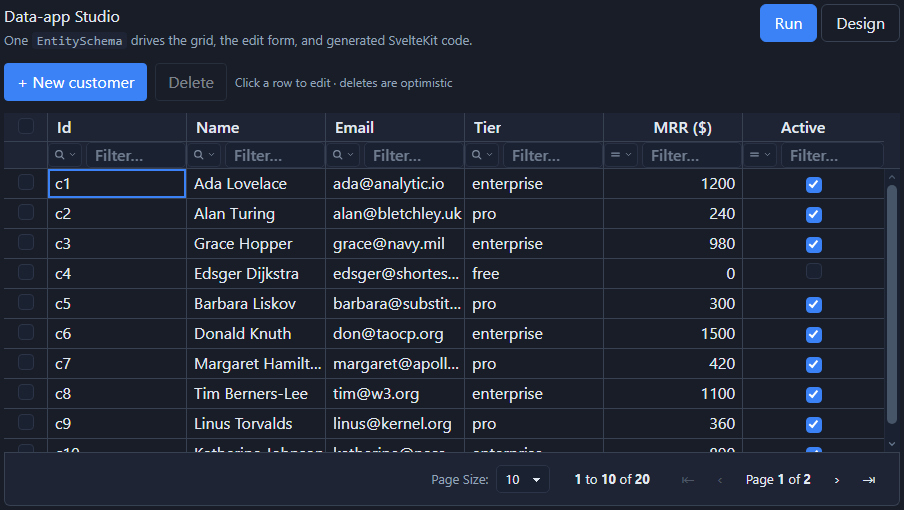
Studio is the grid-centric data-app layer in @svgrid/enterprise: turn a
database or schema into a production-ready CRUD screen - grid, edit form,
and SvelteKit API route - in seconds. One EntitySchema drives the grid
columns, the edit form, validation, and the generated code.
It is part of the Enterprise license, and you can evaluate it without a key: loaded without one, everything runs and the watermark and the console message about the Enterprise package are displayed. See licensing.
Just want to run it? One command scaffolds a complete, working app - no manual setup, no database required:
npm create @svgrid/studio@latest my-app
cd my-app && npm install && npm run dev
You'll be asked to pick a theme (one of
@svgrid/grid's 19 built-in presets) and light or dark mode - or skip the prompts with-- --theme material --dark. Openhttp://localhost:5173and you have a real SvelteKit app - nav shell, Customers and Orders screens (linked by a searchable lookup), grid + modal create/edit/delete, seeded data. Nothing to configure. See Getting started for what to do next.
Want to build it yourself, step by step? Follow the Getting started guide - from an empty app to a working Customers screen, no prior SvGrid experience assumed.
Prefer not to write code? Build the same app visually - point, click, preview, then press one button to generate it. Try it right now, no install, at svgrid.com/studio - or see Launch the designer for the local CLI version (auto-saves to disk, generates straight into a folder), or open a one-click sample app.
Live demos: Live SQL (the whole stack over real Postgres in the browser via PGlite) · Supabase (your own hosted Postgres, straight from the browser) · Chart (a live chart panel beside the grid; click to filter).
A CRUD app in under a minute
This assumes you already have a SvelteKit app and a customers table in your
database. Starting from nothing? Use Getting started
instead - it builds the same screen from an empty folder, no database required.
npm i @svgrid/grid @svgrid/enterprise pg   # pg = driver for your database
npx @svgrid/studio add customers --db postgres --url "$DATABASE_URL"
npm run dev            # open /customers
add customers introspects the customers table and writes three files - the
entity schema, a SvelteKit +server.ts API route, and a +page.svelte screen -
giving you a working /customers page with search, sort, pagination,
multi-select delete, and create/edit. Re-running add is safe: only the
svgrid:managed regions are regenerated.
The grid themes its own borders, backgrounds, and hover states out of the box. Font is the one thing it inherits from your page rather than forcing - if your app doesn't set one yet (a bare
npx sv createscaffold doesn't), add abody { font-family: ... }rule or a--sg-fonttoken, or the screen renders in the browser's default serif font.
How it fits together
One EntitySchema is the single source of truth. The grid columns, the edit
form, the dashboard, the generated SvelteKit code, and the data layer all derive
from it - so a change to the schema flows everywhere at once.
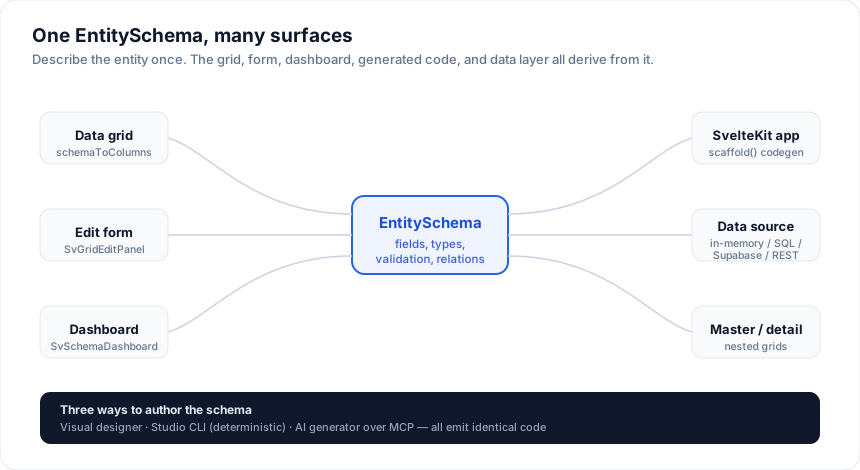
New here? Concepts walks this picture end to end and defines every Studio term (screen, block, project model, managed region).
Data binding options
Studio binds a screen to data through one small contract - ServerDataSource
(read + create + update + delete). Every option below implements it, so the
grid, form, sorting, filtering, and pagination work identically no matter where
the data lives. Pick your source:
| Option | Use it for | Guide |
|---|---|---|
| Databases | PostgreSQL, Supabase, MySQL / MariaDB, SQL Server, SQLite | Databases |
| Drizzle schema | scaffold from a Drizzle schema.ts file (no live DB needed) |
Drizzle schema |
| REST / custom API | an existing HTTP API, or any backend you wire by hand | REST & custom APIs |
| In-memory | prototypes, tests, static data, seeding a schema | In-memory |
New to how binding works? Start with Data binding -
the ServerDataSource contract and how sort / filter / page / CRUD flow.
Three ways to build
All three produce the same output, because they share one scaffold() core.
1. CLI - npx @svgrid/studio add ... (deterministic, no
AI required).
2. AI / MCP - with @svgrid/mcp configured, ask
your agent (Claude Code, Cursor, ...) to build a screen for a table; it calls
introspect_source -> scaffold_entity, and the output is compile-verified
before it's written.
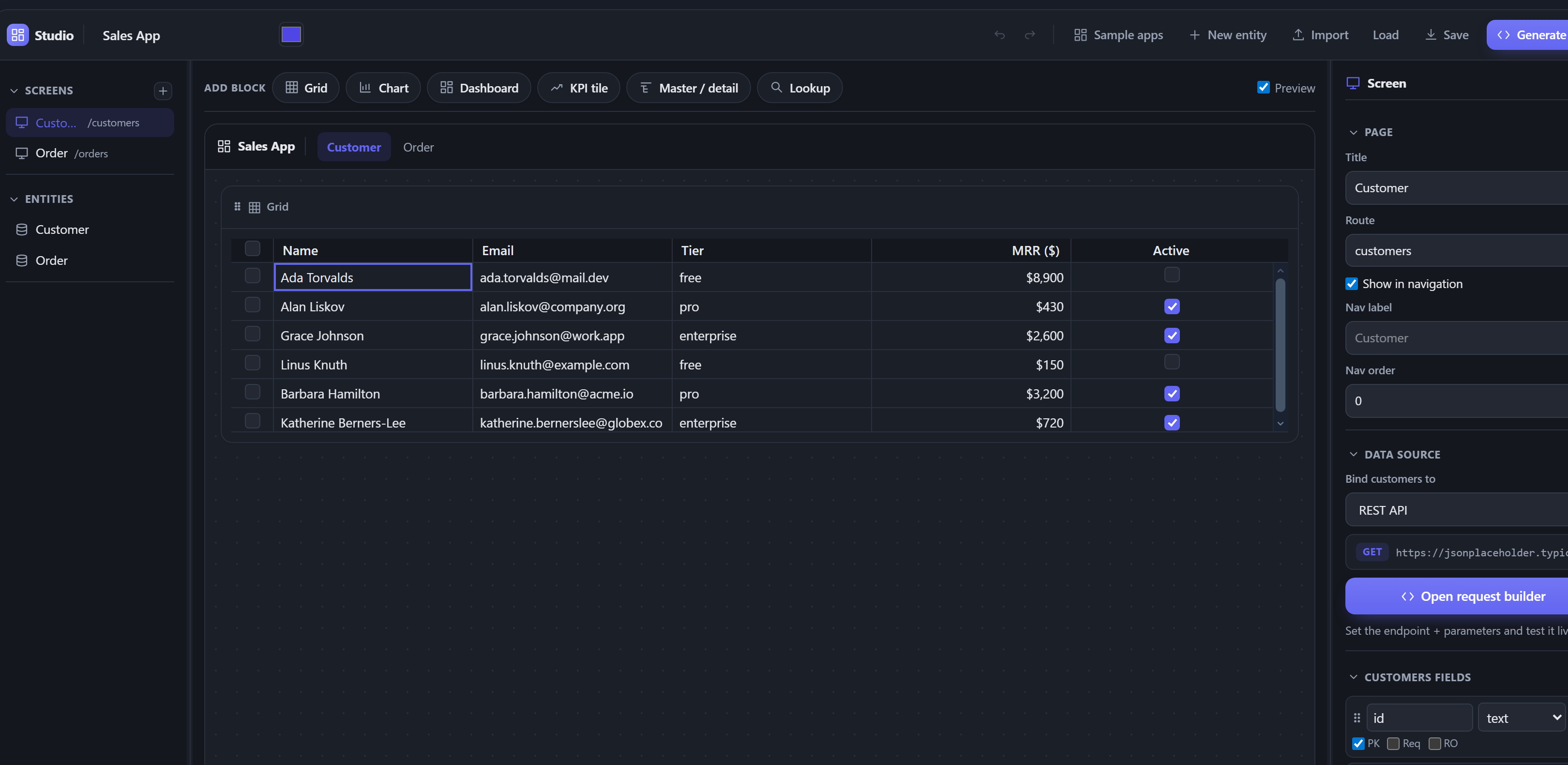
3. Visual app designer - run npx @svgrid/studio designer to open the full app builder (SvStudioDesigner): compose grids, charts,
dashboards, boards, schedulers, and master-detail across many entities and
screens, bind each to real data, write code-behind, and click Generate app.
This is the rich, multi-screen builder you see when you launch Studio.
Want to embed a schema editor in your own app instead? The
<SvSchemaDesigner> component is a smaller,
single-entity widget - author one entity's fields + validation with a live grid
- form preview, and you own where the schema is stored.
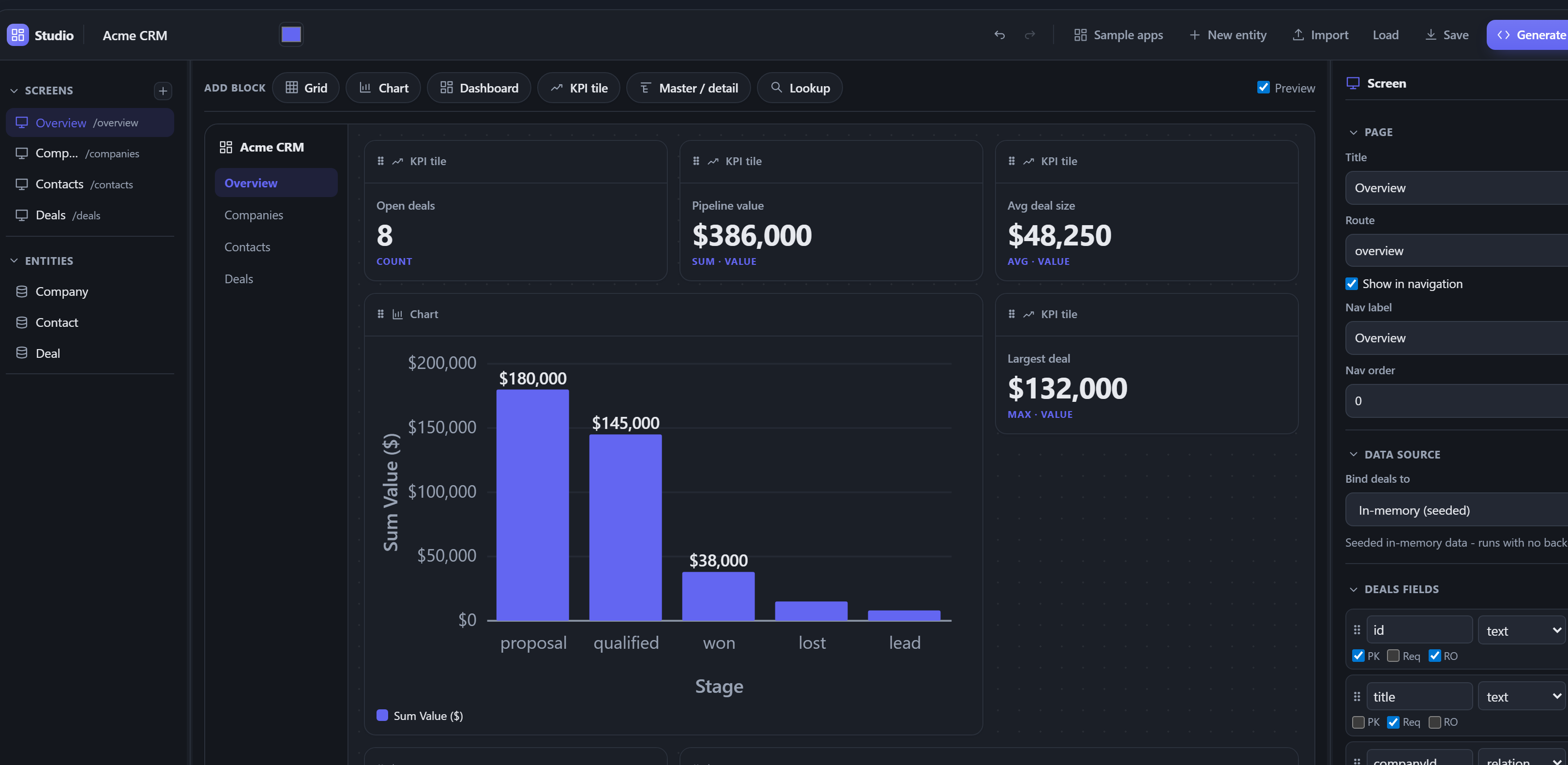
Here a ready-made CRM sample is open in the app designer - a forecast dashboard with KPI tiles and deal-value charts, all built by pointing and clicking, no code:
What you get in a generated screen
A shippable data screen, not a stub:
- Grid with server-side sort, filter, global search, and columns that fit the width.
- Native pagination footer driven by the server row count.
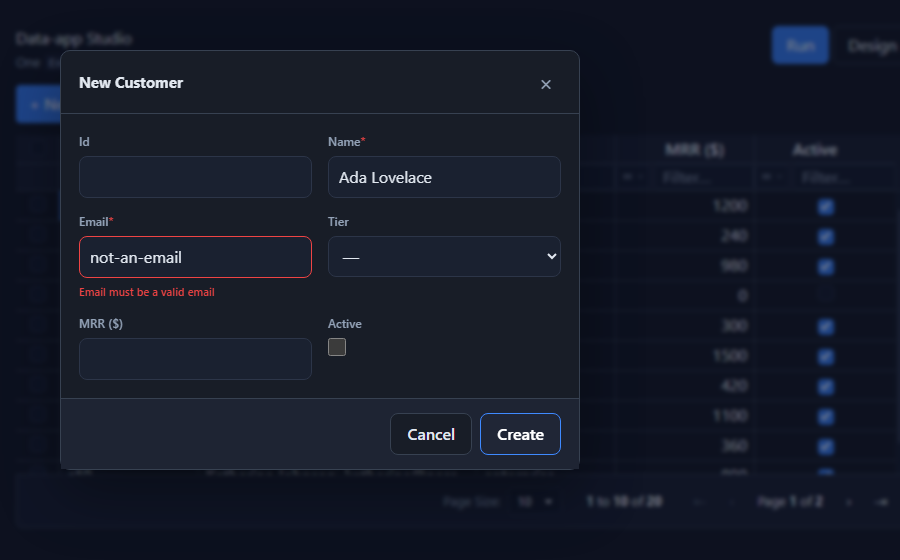
- Create / edit in a themed modal or slide-over panel with built-in validation (required, email/URL, min/max, length, regex, plus any Zod / Standard Schema validator you add).
- Multi-select delete with optimistic updates (rows change instantly, roll back on error).
- Loading, error, and empty states, light/dark theming via the grid tokens.
The building blocks (use them directly)
| Piece | What |
|---|---|
EntitySchema |
one model -> grid columns (schemaToColumns) + form fields (schemaToFormFields) + validation |
SvGridEditPanel |
schema-driven create / edit form (drawer / modal / inline), with FK lookup fields |
createRelationLookup / SvLookupInput |
searchable foreign-key picker over any ServerDataSource (Relations) |
SvGridMasterDetail |
expand a row into a nested grid of related records |
createSqlDataSource |
a ServerDataSource over any SQL client (execute(text, params)) |
createSupabaseDataSource |
a ServerDataSource over a supabase-js client (browser + RLS) |
createSupabaseRealtime |
live grid: refetch / flash rows on Postgres change streams (Real-time) |
SvAuthGate / createSupabaseAuth |
secure a screen behind Supabase Auth; RLS scopes data per user (Auth) |
SvSchemaChart |
a chart bound to the schema; aggregates client-side or via a source's getAggregate (GROUP BY) (Dashboards) |
scaffoldApp |
scaffold a whole multi-entity app - nav + home + every screen |
createRestDataSource |
a ServerDataSource over an HTTP/JSON API (overridable request/response) |
introspectSupabaseTable |
detect a Supabase table's columns -> EntitySchema, from the browser |
createKitDataSource / createKitHandlers |
the SvelteKit client + server transport |
createServerDataSource |
server-side sort / filter / page + optimistic CRUD |
SvSchemaDesigner |
the visual schema designer + live preview + code generation |
The grid renders its own sort, filter, and pagination UI in server mode via
externalSort / externalFilter / externalPagination - you pass rowCount
and pageIndex, it emits change events, you fetch the page.
Production & enterprise ready
- Real code, no lock-in - Studio generates plain SvelteKit files you own and can edit. There is no runtime, no proprietary host.
- No telemetry, no network calls - licensing is validated locally (details); nothing phones home.
- Parameterized SQL - every value is bound, and identifiers come from the schema-whitelisted plan, so there is no injection surface in the data layer.
- SvelteKit-native - server
load/ actions,$lib, SSR-safe, idiomatic Svelte 5 runes. - Bring your own key - the AI generator uses your own model API key; your data and schema never touch our servers.
- One license - Studio is part of the Enterprise license; no separate SKU.
All Studio topics
Every Studio page, in reading order. The sidebar follows the same order.
Start here
- Getting started - zero to a working CRUD screen, step by step
- Concepts - the mental model: one
EntitySchemadrives screens, data, and code - Sample apps - ready-made apps to open, explore, and rebind to your data
- Build a CRM - companies, contacts, deals - a multi-entity app end to end
Three ways to build
- The Studio CLI - the
addcommand + all flags - Launch the designer -
npx @svgrid/studio designer, saved to disk as you edit - Visual app designer - the full multi-screen builder (
SvStudioDesigner) - Schema designer - the embeddable single-entity widget (
SvSchemaDesigner) - AI generation - the MCP server + agents
Connect to data
- Data binding - the
ServerDataSourcecontract; read this one first - Databases - PostgreSQL, Supabase, MySQL / MariaDB, SQL Server, SQLite, Turso
- Local database - Postgres in the browser (PGlite), no server needed
- Supabase - hosted Postgres, from the browser or the server
- Drizzle schema - scaffold from a
schema.tsfile - Prisma schema - scaffold from a
schema.prismafile - REST & custom APIs - any HTTP / bespoke backend
- OData & GraphQL - map the grid request to either protocol
- In-memory - static / prototype data
One-page CRUD tutorials
- Postgres CRUD grid - pick this if you have a Postgres connection string
- Supabase CRUD grid - pick this if your data lives in Supabase
- REST CRUD grid - pick this if you already have an HTTP API
- Supabase Northwind sample - a relational practice dataset, ready to load
Screens & features
- The EntitySchema - the model everything derives from
- Sorting, filtering & paging - the grid's server-mode UI
- Edit forms & validation -
SvGridEditPanel - Relations - foreign keys, lookup pickers, related entities from the schema
- Master-detail - the
SvGridMasterDetailcomponent - Dashboards & charts - KPI tiles +
SvSchemaChartover your entities - Scheduler - a calendar view of any entity with dates
- Dock layout - dockable, floatable panes for workspace screens
- Navigation - drill-through pages and row action buttons
- Real-time - live grid over Supabase change streams
Logic & generated code
- Business logic - computed fields, hooks, server-enforced rules
- Code-behind - typed event handlers that survive regeneration
- Code generation - what's emitted + safe regeneration
Auth & security
- Auth & secured screens - Supabase Auth + RLS per user
- Access control - roles gating screens and write actions
- Audit log - a server-side change trail with a viewer screen
Ship it
- Themes & styling -
--sg-*tokens, light / dark, your design system - Internationalization - message catalog + locale switcher
- Accessibility - what's handled for you and what you own
- Testing - data source, component, and end-to-end layers
- Deploying a Studio app - production checklist
Reference & help
- API index - every Studio export, grouped by area
- Troubleshooting & FAQ - common issues + answers
Enterprise
Live examples
- SvGrid Studio · live SQL - The Studio stack backed by a REAL Postgres running in the browser via PGlite (WASM), no server. createSqlDataSource turns the grid's sort / filter / page requests into parameterized SQL run through PGlite; the executed query is shown live under the toolbar. Full CRUD with optimistic updates against actual Postgres.
- SvGrid Studio · Supabase - The Studio stack over hosted Postgres on Supabase, straight from the browser via supabase-js (PostgREST) and your project's public anon key. createSupabaseDataSource maps the grid's sort / filter / page / CRUD onto the query builder, introspectSupabaseTable adapts to any table AND detects foreign keys (a FK column auto-becomes a searchable lookup in the form), and createSupabaseRealtime makes it LIVE - change a row in the Supabase dashboard and it flashes in the grid (toggle the Live pill). Paste your URL + anon key, run the one-time setup SQL, done. RLS keeps the anon key safe.
- SvGrid Studio · chart - A live chart panel beside the grid, driven by the same data source: rowsToChartSpec aggregates the rows (group by tier / active, reduce MRR by sum / avg / count) and SvGridChart renders bar / pie / line - no external chart library. The chart doubles as a filter control: click a bar or slice to filter the grid to that category. Create / edit / delete and the chart updates.
Related articles
- SvGrid Studio Tips and Tricks: Build Svelte Data Apps, Fast - Practical SvGrid Studio tips - AI app generation, a designer that emits real SvelteKit, schema-driven edit forms, code-behind with ctx.grid, production auth/data/deploy toggles, and real data-source binding - each with a snippet.