Enterprise evaluation
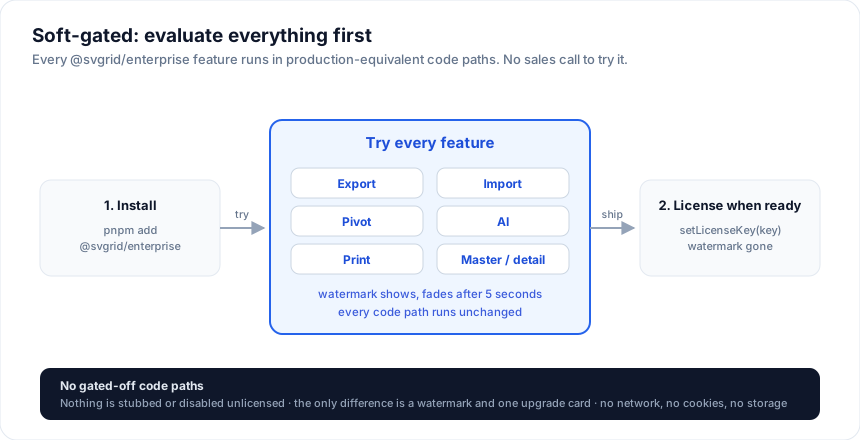
You can try every @svgrid/enterprise feature without a key. Install it
and use it. Nothing is locked; the page shows a small watermark and logs
a console message, and that is the only difference.
1. Install
npm install @svgrid/grid @svgrid/enterprise
npm install jszip pdfmake   # only needed for Excel and PDF export
2. Add Enterprise to a grid
<script>
  import { SvGrid } from '@svgrid/grid'
  import { installEnterprise } from '@svgrid/enterprise'

  let api = $state(null)

  const rows = [
    { name: 'Ada Lovelace', team: 'Engineering', salary: 145000 },
    { name: 'Alan Turing', team: 'Research', salary: 160000 },
  ]
  const columns = [
    { field: 'name', header: 'Name' },
    { field: 'team', header: 'Team' },
    { field: 'salary', header: 'Salary' },
  ]
</script>

<SvGrid data={rows} {columns} onApiReady={(next) => (api = installEnterprise(next))} />

<button onclick={() => api?.exportData({ format: 'xlsx', filename: 'team' })}>
  Export to Excel
</button>
The <SvGrid> component itself stays the same. installEnterprise() adds
the Enterprise methods to the grid API: exportData, importData,
print, pivot and AI.
For a complete page with themes, PDF, CSV and print, see Enterprise getting started.
3. Try the features
The demo gallery has a working demo for every Enterprise feature, with the source next to it. These pages cover each one in detail:
Without a key
You can skip setLicenseKey() entirely. Everything still runs, and you
see:
- a small "www.svgrid.com" watermark on each grid, which fades after 5 seconds
- one console message per page load
- a one-time upgrade card the first time you call an Enterprise feature
None of these make network calls or write cookies or storage (see security).
This works the same on localhost, staging, or a demo deployment. You don't
need to ask anyone for a trial key. When you buy a license, call
setLicenseKey() with your key and the watermark goes away.
Buying
- Indie Developer License, $299 per developer: the enterprise grid for freelancers and companies under $1M revenue, without support.
- Grid Developer License, $599 per developer: the enterprise grid.
- Suite Developer License, $999 per developer: adds the spreadsheet
(
<SvSheet>) and Studio.
All three cover unlimited apps and are perpetual, with a year of updates (and support, except Indie). For 5+ developers, a PO, or redistribution as an SDK, contact sales. Details on the pricing page.
See also
- Enterprise getting started - a complete working page
- Enterprise licensing - key formats, seats, renewals
- Migration guides - moving from another grid
Related articles
- What's New in SvGrid Enterprise - Export, Pivot, Import, Print, and AI - A practical look at @svgrid/enterprise - pivot tables, Excel and PDF export, data import, printing, and an AI assistant. Covers when each feature earns its place and what to watch out for in production.