Enterprise licensing
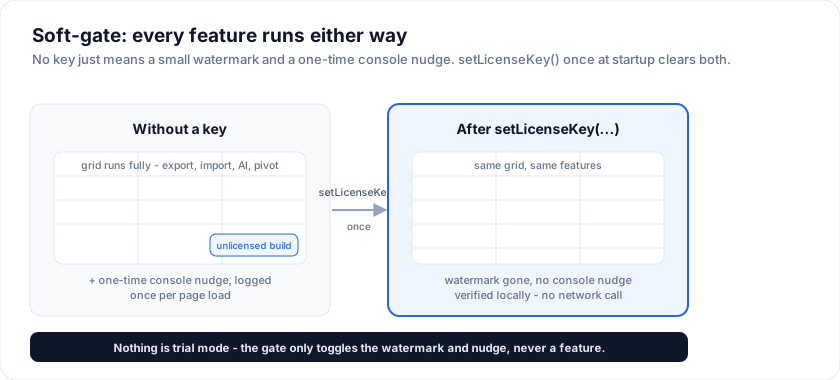
You can evaluate @svgrid/enterprise without asking for a key. Loaded
without a license key, the Enterprise module displays a watermark in the
bottom-right corner of the grid and a console message about the
Enterprise package; every feature still works. Set a key once at app
startup and both disappear.
Setting the key
import { setLicenseKey } from '@svgrid/enterprise'

setLicenseKey(import.meta.env.VITE_SVPRO_KEY)
Call this before the first <SvGrid> mounts. In Vite/SvelteKit,
expose the key as VITE_SVPRO_KEY=YOUR-LICENSE-KEY in your .env (NOT
checked in) - or read it from your config service.
License tiers
Every Enterprise license is a perpetual license that includes 1 year of updates and support. The price shown renews automatically each year to keep updates and support active; cancel anytime and you keep every version released during your paid term.
| License | What it covers | Price (per developer) | Support |
|---|---|---|---|
| Indie Developer License | Grid features, for freelancers and companies under $1M revenue | $299 | None (GitHub issues only), updates only |
| Grid Developer License | Enterprise grid features. No spreadsheet, no Studio | $599 | Email (next business day) + private Slack |
| Suite Developer License | Everything in Grid, plus the spreadsheet and Studio | $999 | Email (next business day) + private Slack |
| Enterprise / volume | Suite, site or organisation-wide | Custom quote | Priority + named contact, NDA / PO |
| OEM / redistribution | Shipping SvGrid to third parties as a component or app builder | Custom quote | Priority + named contact, NDA / PO |
All three developer licenses cover an unlimited number of production apps in your organisation. The line between them is the feature set, not the app count.
Grid ($599) is the enterprise grid: server-side row model, grouping and tree data, pivot, export and import, print, the advanced filter, alerts, the selection bar, and the Kanban, scheduler and Gantt renderers.
Indie ($299) is the Grid feature set for freelancers and for companies with less than $1M in yearly revenue, self-declared at purchase. It comes without support (no email, no Slack; public GitHub issues only, as with the Community tier), and its yearly renewal pays for updates only. Indie orders are fulfilled with a standard Grid key. Grow past the threshold and you move the seats to Grid at your next renewal.
Suite ($999) adds the two things that are their own products:
- the spreadsheet:
<SvSheet>, the<sv-sheet>element, the formula engine, and the.xlsx/.xls/.ods/.csvreaders and writers; - Studio: the designer, the code generator, and the SQL data sources.
Priced per developer - engineers who write or modify code that imports
@svgrid/enterprise. Production seats / end users are unlimited. One license key activates every grid in scope - no per-page or per-component accounting. Teams of 5+ and multi-year terms get volume discounts; email[email protected].
When you need an OEM license
A developer seat covers your own application, including a SaaS product your
customers pay for. It does not cover handing SvGrid to third parties as
something they build with: shipping it as a component or SDK, embedding it in an
app builder or low-code platform where your customers author their own screens,
or reselling it white-labelled. Those need an OEM license, priced separately from
seats. Section 4A of the EULA has the exact test. If you are
not sure which side of the line you are on, email [email protected] and
describe the product; the answer is usually one message.
The license key
Every customer receives the same license key, a GUID, in the order email. Set
it once at app startup with setLicenseKey(); it covers every edition and
carries no expiry date. Your edition, seat count and updates term are recorded
on your order and governed by the EULA, not encoded in the
key.
The check is client-side and no network call is ever made to validate, so
air-gapped deployments work out of the box. The package keeps only a SHA-256 of
the key and compares the key you set against it
(packages/enterprise/src/license-core.ts), so the key is not readable in
node_modules.
A key that is not the license key (a typo, or an SVENTERPRISE-... string from
before October 2026) never throws: the features still run, with the watermark
and a one-time console warning, exactly as if no key were set.
It is not DRM. Anyone with devtools can read a key out of a deployed bundle, which is why the key file must never be committed to a public repository. The license is a legal agreement, not a technical lock, and we would rather say so than imply a scheme that isn't there.
Per-environment keys
Different keys for different deployment stages so revoking is surgical:
const KEY = {
  development: import.meta.env.VITE_SVPRO_DEV_KEY,
  staging:     import.meta.env.VITE_SVPRO_STAGING_KEY,
  production:  import.meta.env.VITE_SVPRO_PROD_KEY,
}[import.meta.env.MODE] ?? ''

setLicenseKey(KEY)
What happens without a key
| Surface | Behaviour |
|---|---|
| Grid render | Works. |
| Editing, sort, filter | Works. |
pro.exportData(...) |
Works. |
pro.importData(...) |
Works. |
pro.ai.* |
Works. |
createPivotModel(...) |
Works. |
| Studio: designer / panels | Works. |
Studio: createSqlDataSource |
Works. |
| Studio: MCP generator | Works; output carries a one-line notice. |
| Watermark | Visible on every grid instance. |
| Console message | About the Enterprise package, logged once per page load. |
That is the evaluation: every feature, with the watermark and the console message until a key is set. Once you're sold, drop in a key.
A Grid key on a Suite feature
The same rule, for the same reason. A Grid Developer License that opens
<SvSheet>, calls the formula engine, or reaches a Studio data source gets the
watermark and a one-time console notice naming the feature. Nothing stops
working and nothing is hidden, so a Grid-tier team can try the spreadsheet in
their own app before deciding to upgrade, exactly as an unlicensed team can.
import { licenseCovers } from '@svgrid/enterprise'

licenseCovers('spreadsheet') // false on a GRID key, true on SUITE
Use licenseCovers if you want to hide a Suite-only entry point in your own UI
rather than let it nudge.
Studio (data-app generator)
The Studio - the schema designer, edit panel, master-detail, the SQL, REST and Supabase data sources, and the AI generator - is covered by the Suite Developer License. There is no Studio-only key and no per-feature entitlement inside it: a Suite key covers the whole Studio together with the spreadsheet and the grid. Loaded without a Suite key, every Studio surface still works and displays the watermark and the console message about the Enterprise package, as the rest of the package does.
It has two places you set the key, because it runs in two places:
1. In your app (the browser) - the same setLicenseKey() you
already call. The designer, edit panel, master-detail, and data sources
all read it. Nothing new to do.
import { setLicenseKey } from '@svgrid/enterprise'
setLicenseKey(import.meta.env.VITE_SVPRO_KEY)
2. In the AI generator (the MCP server) - the generator runs in a
Node process (Claude Code / Desktop), so it reads the key from the
SVGRID_LICENSE_KEY environment variable in your MCP config. Set it
once:
{
  "mcpServers": {
    "svgrid": {
      "command": "npx",
      "args": ["@svgrid/mcp"],
      "env": { "SVGRID_LICENSE_KEY": "YOUR-LICENSE-KEY" }
    }
  }
}
Without it, the generator still produces code - it just prepends a
one-line commercial notice, and the generated app carries the usual
watermark until you call setLicenseKey() in it. Same honor-system,
same key format, no network calls.
License renewal
The license itself is perpetual; what renews each year is your updates-and-support term. It renews automatically until you cancel (cancel anytime). The key keeps validating every version released during a paid term, and if you cancel or let the term lapse, your installed version keeps working - you just stop receiving new releases and support.
- 60 days before the term ends: yellow nudge on the watermark
- 30 days: orange
- 7 days: red
- After the term ends (if you cancelled): features keep working; only versions released after your paid term need a renewed term
We never disable working features on a paying customer.
Audit trail
Each license key has a stable ID embedded. The same key activates as many builds as you want; the ID is what we cross-reference against your subscription in support tickets. No telemetry is sent - support uses the ID you give us, not anything we phoned home for.
See also
- Enterprise evaluation - trying Enterprise without a key
- Enterprise support - SLAs, escalation, contact channels
- Pricing - canonical pricing source
Related articles
- Open-Source vs Commercial Svelte Data Grids - A practical breakdown of licensing trade-offs for Svelte data grids - what open-source actually costs you, what commercial actually buys you, and how to think about total cost of ownership before you commit.
- What's New in SvGrid Enterprise - Export, Pivot, Import, Print, and AI - A practical look at @svgrid/enterprise - pivot tables, Excel and PDF export, data import, printing, and an AI assistant. Covers when each feature earns its place and what to watch out for in production.