Code generation
Studio generates plain SvelteKit code you own - there is no runtime and no
lock-in. The same scaffold() core powers the CLI, the
AI generator, and the visual designer, so
all three emit identical files.
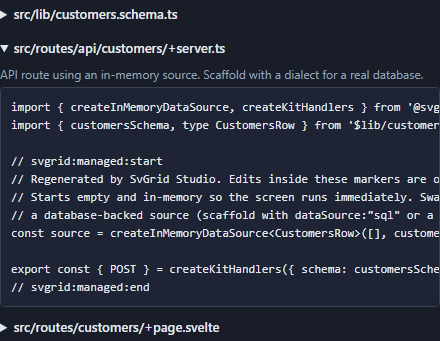
What gets generated
From one EntitySchema, three files:
| File | Contents |
|---|---|
src/lib/<name>.schema.ts |
The EntitySchema literal + a typed row type. |
src/routes/api/<name>/+server.ts |
The API route - createKitHandlers over a data source. |
src/routes/<name>/+page.svelte |
The screen - grid + edit panel, wired to the route. |
The generated page is a full data screen: server-side sort, filter, and global
search; a native pagination footer; a validated create / edit modal;
multi-select optimistic delete; and loading / error / empty states. Any
relation (foreign-key) field also gets a searchable lookup wired to the
related entity's API route (Relations).
The three files, up close
1. The schema is the single source of truth - a plain literal you can edit by hand or regenerate:
// src/lib/customers.schema.ts
import type { EntitySchema } from '@svgrid/enterprise'

export type CustomersRow = {
  id: string; name: string; email: string; mrr: number; active: boolean
}

export const customersSchema: EntitySchema<CustomersRow> = {
  name: 'customers',
  idField: 'id',
  fields: [
    { field: 'id', type: 'text', primaryKey: true, readonly: true },
    { field: 'name', type: 'text', required: true },
    { field: 'email', type: 'text', format: 'email', required: true },
    { field: 'mrr', type: 'number', min: 0 },
    { field: 'active', type: 'boolean' },
  ],
}
2. The API route is a single POST endpoint. createKitHandlers speaks one
JSON wire protocol for read + create + update + delete, so the client needs just
the one handler:
// src/routes/api/customers/+server.ts
import { createInMemoryDataSource, createKitHandlers } from '@svgrid/enterprise'
import { customersSchema, type CustomersRow } from '$lib/customers.schema'

const source = createInMemoryDataSource<CustomersRow>([], customersSchema)

export const { POST } = createKitHandlers({ schema: customersSchema, source })
Swap createInMemoryDataSource for a SQL, Supabase, or REST source and the page
does not change - that is the ServerDataSource contract at
work.
3. The screen wires the grid and the edit panel to that route through the
controller - server-side sort / filter / page, the create-edit modal, and
optimistic delete. It is a normal +page.svelte you own; see the
Studio live SQL demo for the
whole thing running.
Managed regions & safe regeneration
Every generated file wraps its body in markers:
// svgrid:managed:start
// Regenerated by SvGrid Studio. Edits inside these markers are overwritten.
...generated code...
// svgrid:managed:end
Re-running generation replaces only the managed region and preserves everything outside it. So you can:
- Add imports, helpers, and layout outside the markers - they survive regeneration.
- Re-run
addafter a schema or database change to pull in new columns without losing your customizations.
This idempotent regeneration is what makes the generator safe to keep using, rather than a one-shot scaffold you fork away from.
Choosing the data source
The generated +server.ts backend depends on how you scaffold:
| Scaffold | Backend |
|---|---|
--db <dialect> |
Connected to that driver via process.env.DATABASE_URL. |
--sql |
createSqlDataSource with an execute() stub to fill in. |
--from (no --db) |
In-memory, so the screen runs immediately. |
See Databases and Data binding.
Render mode: SPA or SSR per screen
An ssr screen emits idiomatic server-rendered SvelteKit: a
+page.server.ts with a load function and form actions, URL-driven sort /
filter / page state, and progressive enhancement. A spa screen emits a
client page where the browser talks to the API route through the data-source
controller.
New apps get ssr wherever a screen qualifies. When you generate an app -
svgrid-studio init, the designer's New app wizard, or crudAppFromSchemas -
every qualifying screen on a SQL, REST, or in-memory entity starts in ssr. You
can still switch any screen either way in the app designer,
and a screen you set to spa stays spa.
In-memory data is held once, on the server. The seeded rows live in
src/lib/server/store.ts, and every screen reaches them through the entity's
/api/<entity> route, the same way a SQL entity does. So a server-rendered screen
and a client screen read and write the same rows, and the route's validation,
access rules, and triggers apply to both. See
In-memory for what that means in a deployed app.
PGlite apps stay spa: PGlite keeps its rows in the browser's IndexedDB, which
the server cannot read.
How the app is wired
Once an app has at least one server-rendered screen, the root src/routes/+layout.ts
leaves SvelteKit's own default in place - server rendering on - and each
client-only screen opts out in its own +page.ts:
// src/routes/<screen>/+page.ts
export const ssr = false
So the nav shell, the home page, and the sign-in pages all render on the server,
and only the screens that fetch in the browser skip it. An app with nothing to
server-render keeps the single export const ssr = false in the root layout, as
before.
Not every screen shape can emit as SSR. The rules:
- The screen must be entity-bound, without a code-behind companion.
- Its data source must be
memoryorsql(both reuse the entity's/apiroute viaevent.fetch), orreston an absolute URL (the server calls the remote API directly; a relative URL has no origin to resolve against there, so it stays SPA).supabaseandpglitescreens stay SPA - PGlite only exists in the browser, and a Supabase read carries the signed-in user's token, which a server-side call with the anon key would silently drop. - A grid, optionally with a facet panel, emits as load + form actions (no
tree data, no scheduler view). The facet panel becomes a plain
GETform whose controls are named for the URL params theloadreads, so filtering works with JavaScript off and every filtered view has a shareable URL. - Read-only block screens - any mix of chart, pivot, dashboard, KPI, gauge, tree, detail, and master-detail - emit as a load-only page.
- Anything else (boards, calendars, UI component blocks, containers, grids with extras) stays SPA.
The designer only offers the toggle when the screen qualifies; a screen set to
ssr that stops qualifying falls back to the SPA emit.
Verification
The AI path compiles the generated page (via the Svelte compiler) before handing it back, and the recommended final step everywhere is your project's own check:
npx svelte-check
See also
Related articles
- We Asked Claude Code for a Svelte Table. It Wrote Its Own Every Time, Until the Project Said Otherwise - Ten fresh Claude Code sessions, one prompt, a bare SvelteKit app. With no hint it hand-wrote a DataTable component, even for 10,000 rows. One paragraph in AGENTS.md changed that.
- SvGrid Studio Tips and Tricks: Build Svelte Data Apps, Fast - Practical SvGrid Studio tips - AI app generation, a designer that emits real SvelteKit, schema-driven edit forms, code-behind with ctx.grid, production auth/data/deploy toggles, and real data-source binding - each with a snippet.