In-memory
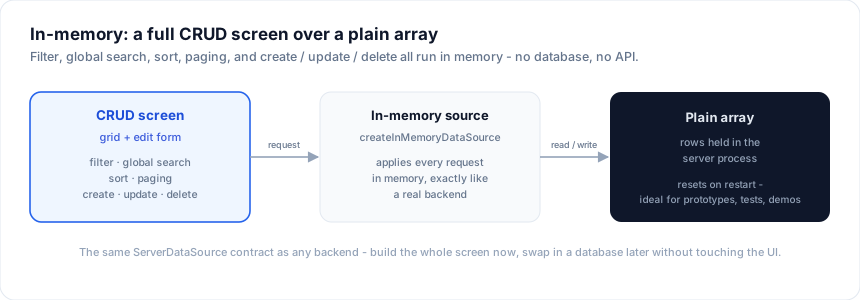
The in-memory source runs a full CRUD data screen against a plain array - no database, no API. It applies the grid's filter, global search, sort, and paging in memory, and supports create / update / delete. Ideal for prototyping a schema, tests, demos, static reference data, or seeding a screen before the backend exists.
It is the default backend the CLI emits when you scaffold from a
Drizzle schema without --db, so the screen runs the moment you
npm run dev.
Usage
import { createServerDataSource } from '@svgrid/grid'
import { createInMemoryDataSource } from '@svgrid/enterprise'
import { customersSchema, type CustomersRow } from '$lib/customers.schema'

const seed: CustomersRow[] = [
  { id: '1', name: 'Ada Lovelace', email: '[email protected]', mrr: 1200, active: true },
  { id: '2', name: 'Alan Turing', email: '[email protected]', mrr: 240, active: true },
  // ...
]

const source = createInMemoryDataSource(seed, customersSchema)

const controller = createServerDataSource(source, {
  pageSize: 25,
  optimistic: true,
  getRowId: (r) => r.id,
  onChange: (s) => (view = s),
})
controller.refresh()
createInMemoryDataSource(rows, schema) returns a full ServerDataSource
(read + create + update + delete). Everything the grid asks for - filter
operators, facet selections, global search, multi-column sort, paging - is
applied to the array, exactly like a real backend, so you can build the whole
screen and swap in a database later without changing the UI.
Server route
To expose it behind a SvelteKit API route (as the generated code does):
// src/routes/api/customers/+server.ts
import { createInMemoryDataSource, createKitHandlers } from '@svgrid/enterprise'
import { customersSchema, type CustomersRow } from '$lib/customers.schema'

const source = createInMemoryDataSource<CustomersRow>([], customersSchema)
export const { POST } = createKitHandlers({ schema: customersSchema, source })
Reseeding and fixtures
createInMemoryDataSource(rows, schema) copies the rows in - the array you pass
is a seed, not a live binding. Load it from a JSON fixture to keep sample data out
of your components:
import seed from '$lib/fixtures/customers.json'
const source = createInMemoryDataSource(seed, customersSchema)
Because the data lives inside the source, a fresh createInMemoryDataSource(...)
is a clean slate - handy between tests, or behind a "reset demo data" button.
In tests
The source is a plain object implementing ServerDataSource, so you can exercise
the whole screen's data behaviour directly - no DOM, no database:
import { describe, it, expect } from 'vitest'
import { createInMemoryDataSource } from '@svgrid/enterprise'
import { customersSchema, type CustomersRow } from '$lib/customers.schema'

describe('customers screen data', () => {
  it('filters, sorts, creates, and deletes', async () => {
    const source = createInMemoryDataSource<CustomersRow>([
      { id: '1', name: 'Ada Lovelace', email: '[email protected]', mrr: 1200, active: true },
      { id: '2', name: 'Alan Turing', email: '[email protected]', mrr: 240, active: false },
    ], customersSchema)

    // read a page exactly the way the grid asks (see Data binding)
    const page = await source.getRows({
      startRow: 0, endRow: 25, pageIndex: 0, pageSize: 25,
      sortModel: [{ id: 'mrr', desc: true }],
      filterModel: { columns: { active: { operator: 'equals', value: 'true' } } },
    })
    expect(page.rowCount).toBe(1)
    expect(page.rows[0]!.name).toBe('Ada Lovelace')

    const created = await source.createRow!({ name: 'Grace Hopper', email: '[email protected]', mrr: 900, active: true })
    await source.deleteRow!(created.id)
  })
})
It is the same ServerRequest the grid sends at runtime, so a test that passes
here is a screen that behaves.
In a Studio app
A Studio-generated app holds its in-memory rows on the server. Three files carry it:
src/lib/server/store.ts- the seeded rows of every in-memory entity, onecreateInMemoryDataSourceeach. Only server code imports it, so the seed data stays out of the browser bundle.src/routes/api/<entity>/+server.ts-createKitHandlersover that store, with the same validation, access rules, triggers, and audit hook a SQL route gets.src/lib/data.ts- the browser side: acreateKitDataSourceclient per entity, pointed at its route.
Server-rendered screens read through the same route (with SvelteKit's
event.fetch), so every screen sees the same rows whichever way it renders.
The server also assigns ids: a create that arrives with no id, or with one that
is already taken, gets the next free one, so two open tabs cannot hand out the
same id.
What that means once the app is deployed:
- Everyone using the app shares one copy of the data. An edit one person makes is what the next person sees.
- A restart, a redeploy, or a dev-server reload of
store.tsputs the seed rows back. - On a serverless host each instance holds its own copy, so two requests can land on different data.
When to move on
The in-memory source keeps its data in the server process, so it resets on restart and is not shared across instances. When you are ready for persistence, switch to a database or a custom source - the schema, grid, and form stay exactly the same.