REST & custom APIs
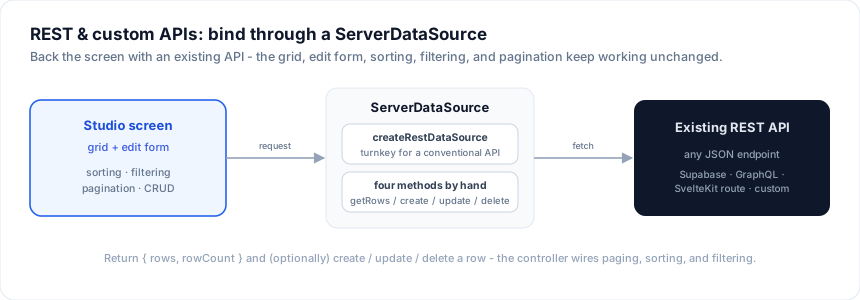
Not every backend is a database Studio can introspect. When you have an existing
REST API - or any bespoke data layer - back the screen with a ServerDataSource.
Use the built-in createRestDataSource for a conventional JSON API, or
implement the four methods by hand for full control. Either way the grid, edit
form, sorting, filtering, and pagination keep working unchanged.
Turnkey: createRestDataSource
Point it at a collection URL and you're done:
import { createRestDataSource } from '@svgrid/enterprise'
import { customersSchema, type Customer } from '$lib/customers'

export const customersSource = createRestDataSource<Customer>({
  url: '/api/customers',
  schema: customersSchema,          // resolves the id field for update/delete
  headers: () => ({ authorization: `Bearer ${getToken()}` }),  // optional
})
Default wire format (every part is overridable):
| Call | Request |
|---|---|
| read | GET {url}?offset&limit&sort&search&<col>=<op>:<value> |
| create | POST {url} with the new row as JSON |
| update | PATCH {url}/{id} with the patch |
| delete | DELETE {url}/{id} |
sort is a comma list with - for descending (-createdAt,name). Totals come
from a rowCount / total field, or a Content-Range header for array
responses. When your API differs, pass buildQuery(request) to shape the read
params and parse(body, response) to read rows + total out of your response:
createRestDataSource<Customer>({
  url: '/api/customers',
  schema: customersSchema,
  buildQuery: (req) => ({ page: String(req.pageIndex + 1), size: String(req.pageSize) }),
  parse: (body) => ({ rows: body.results, rowCount: body.count }),
})
Adapters for common APIs
A buildQuery + parse pair is a wire-format adapter. A few ready-made ones
cover the shapes public and third-party APIs usually speak - spread one into the
config instead of hand-writing both:
import {
  createRestDataSource,
  dummyJsonAdapter,   // skip/limit + sortBy/order, rows under `products`, count in `total`
  jsonServerAdapter,  // _start/_limit + _sort/_order, bare array + X-Total-Count
  offsetLimitAdapter, // the configurable base the others build on
} from '@svgrid/enterprise'

// DummyJSON (or any {skip,limit}+{sortBy,order} API returning { products, total })
createRestDataSource<Product>({ url: 'https://dummyjson.com/products', ...dummyJsonAdapter() })

// json-server / JSONPlaceholder
createRestDataSource<Post>({ url: 'https://jsonplaceholder.typicode.com/posts', ...jsonServerAdapter() })

// Anything offset/limit-shaped: name the params + response keys
createRestDataSource<Item>({
  url: 'https://api.example.com/items',
  ...offsetLimitAdapter({
    offsetParam: 'from', limitParam: 'size', searchParam: 'q',
    sortByParam: 'sortBy', orderParam: 'order',
    rowsKey: 'data', totalKey: 'count',
  }),
})
See the live example: Live REST (public API)
fetches real rows from dummyjson.com through dummyJsonAdapter.
In the designer: a REST entity's Configure builder has an API format picker - Manual mapping, Offset + Limit, DummyJSON, or json-server. Choosing one is the no-code equivalent of spreading the adapter above: the generated grid does real server-side paging and sort (not a single fetched page), and the live preview pages through the same adapter. Offset + Limit exposes the param-name / response-key fields so you can match any offset/limit API. Leave it on Manual mapping to keep the old rows-path / total-path behavior.
Browser demos: a client-side app can only reach CORS-enabled APIs, and must never carry a secret key. For private backends, put the fetch behind a SvelteKit
+server.tsroute and pointcreateRestDataSourceat that.
Import an OpenAPI spec
Have an OpenAPI (JSON) description of your API? One command turns it into a
Studio project - each collection path becomes an entity with a REST source, and
the component schemas become EntitySchemas:
npx @svgrid/studio openapi ./openapi.json # or a URL
It writes studio.config.json (and prints any paths it could not map). Open it
in the designer to review the entities and generate the app, or
continue with introspectOpenApi programmatically.
Full control: implement ServerDataSource by hand
For an unusual API, supply the four methods yourself - translate the grid's request into your calls:
import type { ServerDataSource, ServerRequest } from '@svgrid/grid'

type Customer = { id: string; name: string; email: string }

export const customersSource: ServerDataSource<Customer> = {
  async getRows(req: ServerRequest) {
    const params = new URLSearchParams({
      offset: String(req.startRow),
      limit: String(req.pageSize),
    })
    if (req.filterModel.global) params.set('q', req.filterModel.global)
    const sort = req.sortModel[0]
    if (sort) params.set('sort', `${sort.desc ? '-' : ''}${sort.id}`)

    const res = await fetch(`/api/customers?${params}`)
    const body = await res.json()
    // Return the page + the TOTAL count (for the pager).
    return { rows: body.data, rowCount: body.total }
  },

  createRow: (input) =>
    fetch('/api/customers', { method: 'POST', body: JSON.stringify(input) }).then((r) => r.json()),

  updateRow: (id, patch) =>
    fetch(`/api/customers/${id}`, { method: 'PATCH', body: JSON.stringify(patch) }).then((r) => r.json()),

  deleteRow: (id) =>
    fetch(`/api/customers/${id}`, { method: 'DELETE' }).then(() => undefined),
}
Then wrap it in the controller and render the grid exactly as with any other source (see Data binding):
const controller = createServerDataSource(customersSource, {
  pageSize: 25,
  optimistic: true,
  getRowId: (r) => r.id,
  onChange: (s) => (view = s),
})
Server-side paging, sorting, and filtering are already wired - the grid emits
onSortingChange / onFiltersChange / onPaginationChange and the controller
turns them into new getRows requests.
The SvelteKit transport (no boilerplate)
If your API is your SvelteKit app, skip the hand-written fetch calls. The
built-in transport gives you a typed client + a ready request handler over one
JSON endpoint:
// src/routes/api/customers/+server.ts (server)
import { createKitHandlers } from '@svgrid/enterprise'
import { customersSchema } from '$lib/customers.schema'
import { customersBackend } from '$lib/server/customers' // any ServerDataSource
export const { POST } = createKitHandlers({ schema: customersSchema, source: customersBackend })
// client
import { createKitDataSource } from '@svgrid/enterprise'
const source = createKitDataSource({ endpoint: '/api/customers' })
createKitDataSource implements ServerDataSource for you - it posts the grid's
request to the endpoint, and createKitHandlers runs it against your backend
source and returns JSON.
Supabase, GraphQL, gRPC, ...
The same pattern covers any client:
- Supabase - use the built-in
createSupabaseDataSource; no hand-mapping needed. - GraphQL -
getRowsruns a paged query; mapsortModel/filterModelto your query variables. - Anything - as long as you can return
{ rows, rowCount }and (optionally) create / update / delete a row.
Helpers for SQL-shaped backends
If your API speaks SQL under the hood, planQuery + planToSql turn the grid's
request into portable, parameterized SQL you can send anywhere - see
Databases and createSqlDataSource.
Common gotchas
| Symptom | Cause and fix |
|---|---|
| Pager stuck at page 1, or "1 to 10 of 10" when there are more | getRows did not return the total rowCount. Return it from a total/rowCount field or a Content-Range header (parse reads it). |
| Create / edit fails, or edits hit the wrong row | The source can't find the id. Pass schema (so it resolves idField), and make sure your API echoes the created row with its id. |
| CORS errors for a third-party API | The browser blocks cross-origin calls. Proxy through your own +server.ts route (which can also hold the API key) instead of calling the third party from the client. |
| Filter operators ignored | Only the default wire format maps operators automatically; a custom API needs buildQuery to translate req.filterModel.columns into your params. |
| Token expired mid-session | Use the headers callback (not a static object) so a fresh token is read on every request. |
See also
- Data binding - the
ServerDataSourcecontract in full - Databases · In-memory
Related articles
- Status Badge Cells in SvGrid - Turn a plain text status column into colored, accessible pill badges without breaking sort, filter, or virtualization - using SvGrid's snippet cell renderer.
- Sparkline Cells in a Svelte Data Grid - Show inline trend sparklines inside grid cells using SvGrid's built-in sparkline column property - no charting library needed, just a field that holds a number array.
- Progress and Percentage Bar Cells in SvGrid - Build in-cell progress bars in your Svelte 5 data grid - with color thresholds, accessible markup, and sorting that still works.