Data binding
Every Studio screen binds to data through one small, uniform contract:
ServerDataSource. Read a page of rows, and (optionally) create, update, and
delete. Because sorting, filtering, pagination, and the edit form all speak to
this one interface, the grid works the same whether your data comes from
PostgreSQL, a REST API, or an in-memory array.
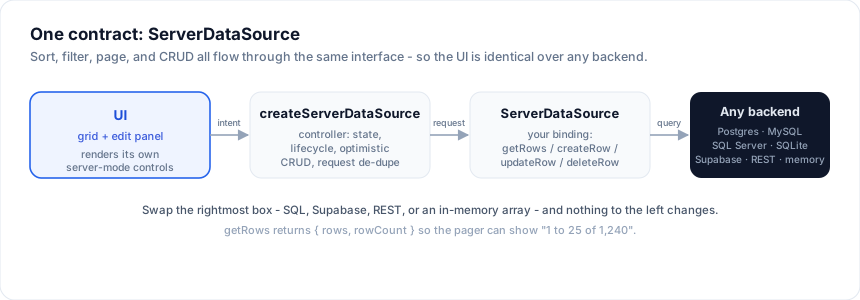
 UI (grid + edit panel)
        │  sort / filter / page / create / update / delete
        ▼
 createServerDataSource   ← controller: state + lifecycle + optimistic CRUD
        │  getRows(request) / createRow / updateRow / deleteRow
        ▼
 ServerDataSource         ← YOUR binding (SQL, REST, in-memory, ...)
        │
        ▼
 PostgreSQL · MySQL · SQL Server · SQLite · Supabase · REST · memory
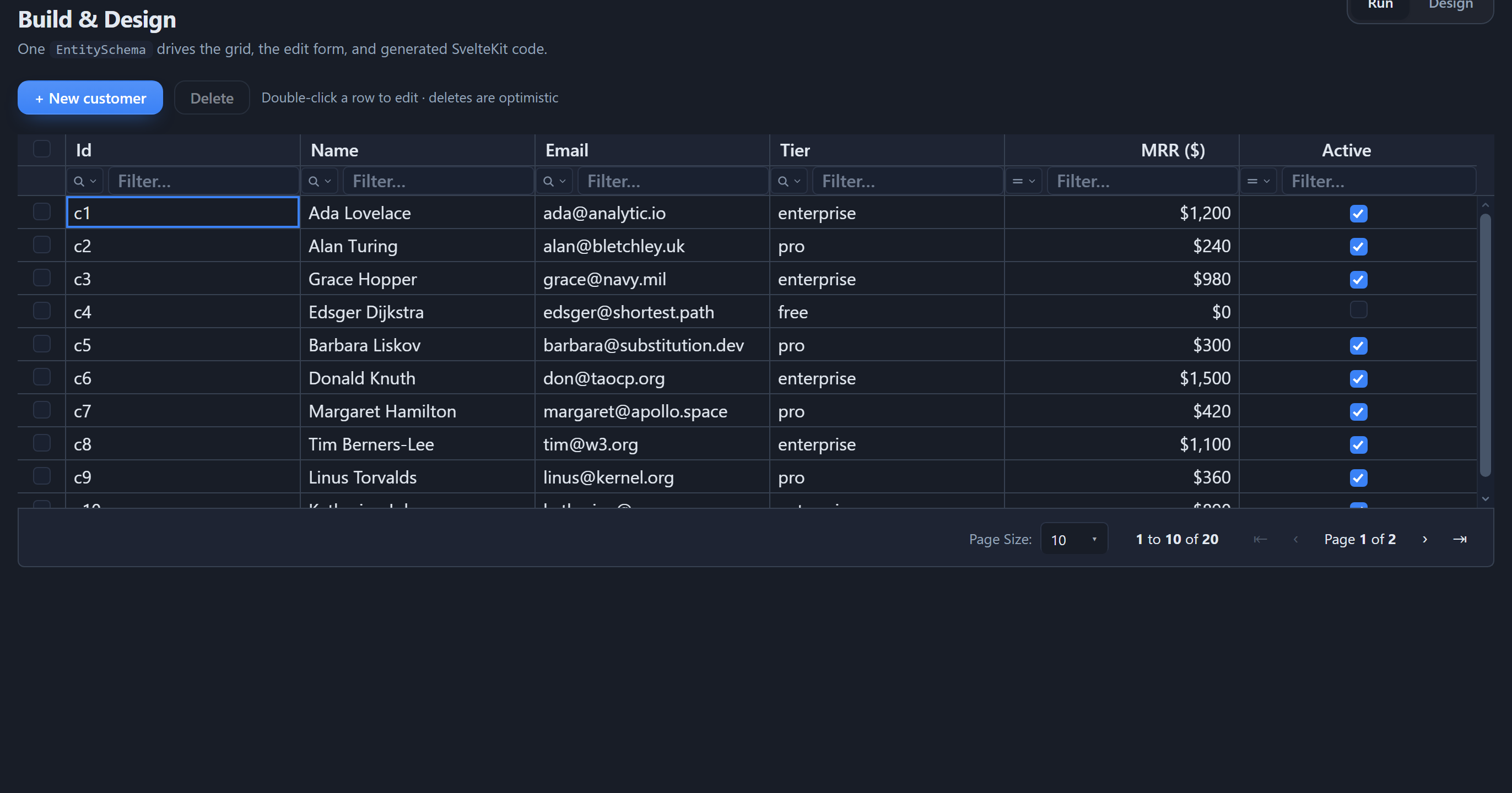
Whatever backend you pick, the screen is the same - a full CRUD grid with server-side sort, filter, search, and paging over that one contract:
The contract
import type { ServerDataSource, ServerRequest } from '@svgrid/grid'

type ServerDataSource<TData> = {
  // Read one page. `request` carries paging + the sort and filter state.
  getRows(request: ServerRequest): Promise<{ rows: TData[]; rowCount: number }>

  // Optional writes - implement the ones your backend supports.
  createRow?(input: Partial<TData>): Promise<TData>
  updateRow?(id: string, patch: Partial<TData>): Promise<TData>
  deleteRow?(id: string): Promise<void>
}
The request your getRows receives:
type ServerRequest = {
  startRow: number        // first row index (inclusive)
  endRow: number          // last row index (exclusive)
  pageIndex: number
  pageSize: number
  sortModel: Array<{ id: string; desc: boolean }>
  filterModel: {
    global?: string       // free-text search
    columns?: Record<string, {
      operator: string; value: string; valueTo?: string; selectedValues?: string[]
    }>
  }
}
Return the rows for that page plus the total rowCount (so the pager can
show "1 to 10 of 240").
The controller
createServerDataSource wraps any ServerDataSource into a reactive controller
that owns the request lifecycle - it de-dupes in-flight requests, tracks
loading / saving / error, and exposes the methods the grid calls:
import { createServerDataSource } from '@svgrid/grid'

const controller = createServerDataSource(source, {
  pageSize: 25,
  optimistic: true,               // update/delete apply instantly, roll back on error
  getRowId: (r) => String(r.id),
  onChange: (state) => (view = state),
})
controller.refresh()

// controller.setSort(...) / setFilter(...) / setPage(...) / setPageSize(...)
// controller.createRow(...) / updateRow(id, ...) / deleteRow(id)
Wire it to the grid's native server-mode UI and you are done:
<SvGrid data={view.rows} {columns}
  sortable externalSort onSortingChange={(s) => controller.setSort(s)}
  filterable externalFilter onFiltersChange={mapFilters}
  showPagination externalPagination rowCount={view.total}
  pageIndex={view.pageIndex} pageSize={view.pageSize}
  onPaginationChange={({ pageIndex, pageSize }) => ...} />
Bind data in the designer (no code)
You don't have to write any of the above by hand. In the visual designer, open Data model, and each entity has a Data source dropdown - In-memory, Local database, SQL, Supabase, or REST. Every option carries a one-line description so it's clear which to pick:
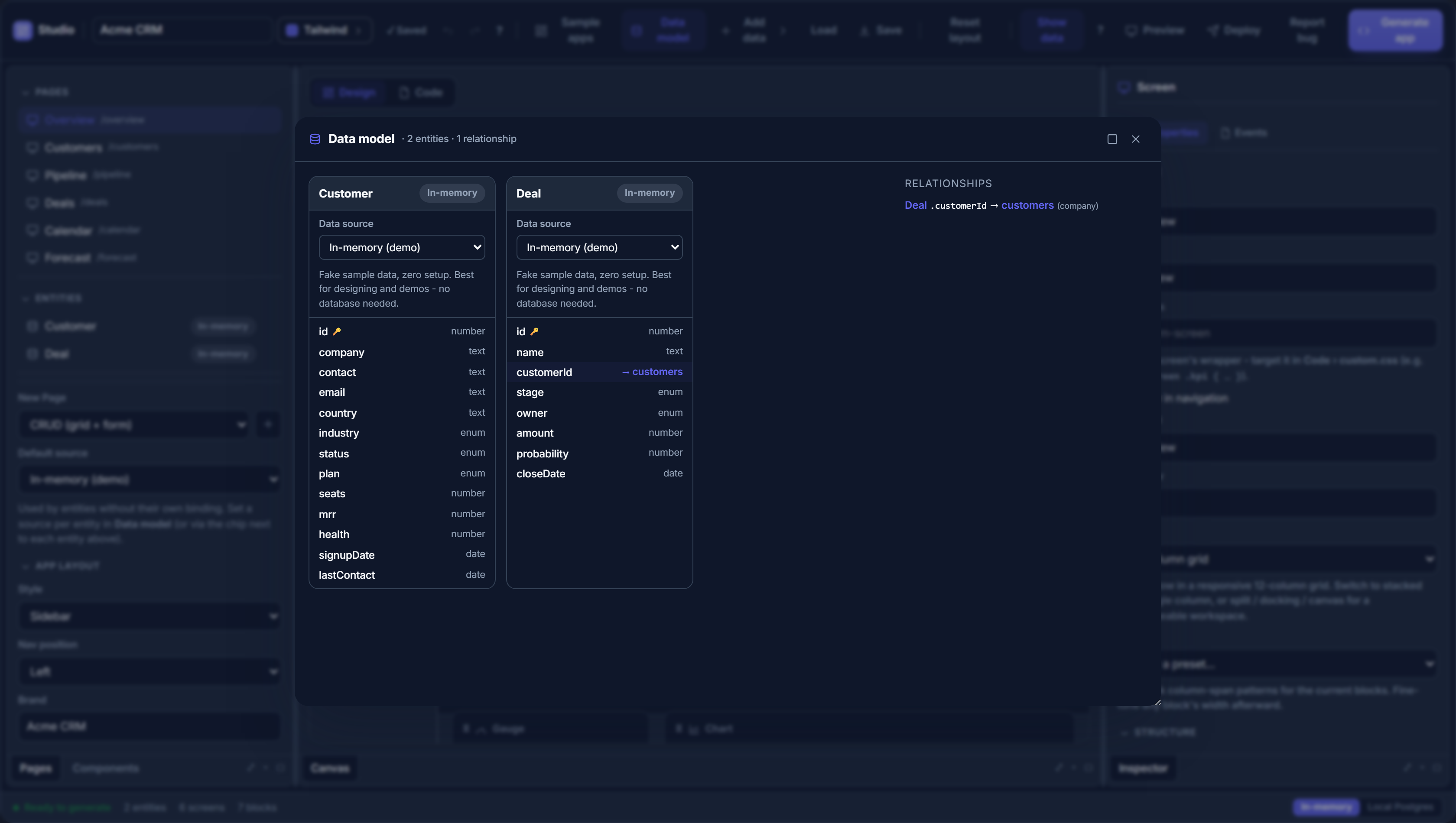
- In-memory - seeded sample data, zero setup. Best for designing and demos.
- Local database - a real Postgres that runs in the browser (PGlite), saved on the machine. No server, no sign-up.
- Supabase - a free hosted Postgres with a web dashboard; works right in the browser via its REST API.
- SQL - your own Postgres / MySQL / SQL Server / SQLite database.
- REST - an existing web API that returns JSON.
Pick a remote source (SQL / Supabase / REST) and a Configure button opens a focused builder - a draggable, resizable, maximizable panel - where you enter the connection, preview your real rows, and (for SQL / Supabase) import the table's columns into the entity. The preview feeds the design canvas, so the grid you are laying out shows your actual data.
Online designer vs. the local designer
A web browser can't open a raw TCP connection to Postgres / MySQL / SQL Server,
and the database driver is a server-side package. So live SQL preview and the
"Connect database" wizard only run in the local designer (npx @svgrid/studio designer), which starts a small Node server that holds the drivers. In the
online designer you still bind an entity to SQL (dialect + table + schema) and
Generate app - the generated app connects to your database for real through
its own DATABASE_URL route.
Supabase and REST work live in the online designer too, because both are reachable over HTTP from the browser. If you want a real database inside the online designer with zero setup, pick Supabase or Local database.
Choose a binding
| Option | Guide |
|---|---|
| A real, persistent database with zero setup (embedded Postgres) | Local database |
| SQL databases (Postgres, Supabase, MySQL, SQL Server, SQLite) | Databases |
A Drizzle schema.ts file |
Drizzle schema |
| An existing REST API, or any custom backend | REST & custom APIs |
| Static / in-memory data | In-memory |
For SQL sources you rarely write getRows yourself:
createSqlDataSource turns a plan into parameterized SQL and
runs it through your client. For REST or bespoke backends you implement the four
methods above directly - see REST & custom APIs.
See also
Related articles
- SvGrid Studio Tips and Tricks: Build Svelte Data Apps, Fast - Practical SvGrid Studio tips - AI app generation, a designer that emits real SvelteKit, schema-driven edit forms, code-behind with ctx.grid, production auth/data/deploy toggles, and real data-source binding - each with a snippet.