AI generation
The @svgrid/mcp server exposes Studio to AI coding agents (Claude Code, Cursor,
Codex, ...) through the Model Context Protocol. Ask your agent to build a screen
for a table and it introspects, scaffolds, and verifies - producing the same code
the CLI and designer do.
How it fits together
The MCP server makes no model calls of its own. It hands your agent a set of tools; the agent's own model decides when to call them. So the loop is:
you  ->  your agent (its model)  ->  svgrid MCP tools  ->  files on disk
                    ^                                          |
                    +--------  svelte-check verify  <----------+
Your schema and data stay on your machine; nothing is sent to our servers.
Configure the MCP server
Add it to your agent's MCP config (the key is passed as an env var, since the server runs in a Node process):
{
  "mcpServers": {
    "svgrid": {
      "command": "npx",
      "args": ["@svgrid/mcp"],
      "env": { "SVGRID_LICENSE_KEY": "YOUR-LICENSE-KEY" }
    }
  }
}
The same block works across hosts - only the file it lives in differs:
| Host | Config location |
|---|---|
| Claude Code | .mcp.json at the project root, or claude mcp add |
| Cursor | .cursor/mcp.json |
| Windsurf | ~/.codeium/windsurf/mcp_config.json |
| Codex / other | the host's mcpServers config |
Restart (or reload) the agent so it picks up the server, then confirm the
svgrid tools are listed.
The tools
Alongside the read-only knowledge tools (examples, docs, API reference), the server exposes two generation tools:
| Tool | What it does |
|---|---|
svgrid_scaffold with schemaOnly: true |
Infer an EntitySchema from a Drizzle schema file (from:"drizzle") or sample JSON rows (from:"json"). Returns a draft to review. |
svgrid_scaffold |
Generate the SvelteKit files - from a Drizzle schema, sample rows, or an EntitySchema you already have, in one call. The output is compile-verified (the generated page is run through the Svelte compiler) before it comes back, and each file carries svgrid:managed markers. |
Drive the whole project model
Beyond single screens, the server exposes the full
project model - the same
studio.config.json the visual designer edits - as four studio_* tools.
Your agent can build a complete multi-screen app, or continue editing one the
designer produced, and hand it back.
They are opt-in. Set SVGRID_MCP_STUDIO=1, or a valid
SVGRID_LICENSE_KEY, in the MCP server's env. Tools that need a licence to be
useful should not cost every other user context on every request.
| Tool | What it does |
|---|---|
studio_project |
new an empty project, load a studio.config.json, describe the current one (entities, screens, block ids, theme, RBAC, auth, deploy), config to get it back as a string for round-tripping, capabilities to list the block kinds, UI component keys, theme presets, source kinds and deploy targets this version supports |
studio_apply |
A batch of model changes applied in order: add_entity, add_screen, add_block, add_component, update_block, remove_block, move_block, update_screen, remove_screen |
studio_configure |
Project-wide settings in one call: theme, auth, access, tenancy, data_layer, job, deploy_target, screen_layout, form_layout, field_conditions, entity_source |
studio_build |
validate the project (errors + warnings), then generate the full runnable SvelteKit app - every file, ready to write and svelte-check |
Call studio_project with action: "capabilities" before applying anything:
it reports exactly what the installed version supports, so the agent uses real
block kinds and component keys rather than plausible-looking ones.
studio_apply takes a batch on purpose. This was 27 separate tools, one per
mutation, which made a five-screen app twenty-odd round trips and cost every
user of the free grid ~3,741 tokens of tool definitions on every request. A
whole screen is now one call:
{
  "ops": [
    { "op": "add_entity", "rows": [{ "id": 1, "subject": "Login fails", "status": "open" }], "name": "tickets" },
    { "op": "add_screen", "title": "Dashboard" },
    { "op": "add_block", "screen": "dashboard", "kind": "kpi", "entity": "tickets" },
    { "op": "add_block", "screen": "dashboard", "kind": "chart", "entity": "tickets" }
  ]
}
If an op fails, the response says which one and what had already applied, so the agent retries the tail rather than the whole batch.
The 27 individual tool names still answer, so an existing prompt keeps working
- they are simply no longer advertised.
A prompt that exercises the loop end to end:
"Using the svgrid MCP: new project 'Support desk'. Add a
ticketsentity from these sample rows, a dashboard screen with a KPI and a chart over tickets, RBAC with an agent role that cannot delete, dark theme, then validate and generate the app."
Step by step
- Point it at a source. A Drizzle schema file, or a handful of sample rows.
- Introspect. The agent calls
svgrid_scaffoldwithschemaOnly: trueand shows you the draftedEntitySchema- field names, types, primary key, guessed formats. - Refine (optional). Correct a type, mark a field hidden or read-only, add validation - in chat, or later in the visual designer.
- Scaffold. The agent calls
svgrid_scaffoldagain withoutschemaOnly; the files come back already run through the Svelte compiler. - Verify. The agent runs your project's
svelte-check; if anything fails it iterates. This is the loop that keeps AI output trustworthy.
Prompts that work
From a Drizzle schema:
"Using the svgrid MCP, build a CRUD screen for the
customerstable insrc/lib/db/schema.ts."
From sample data, when there is no schema yet:
"Here are five example rows of our invoices. Use the svgrid MCP to introspect a schema, then scaffold a CRUD screen at
/invoices."[{ "id": "INV-1", "customer": "Acme", "amount": 4200, "paid": true, "due": "2026-07-01" }]
Refining before you commit:
"Show me the drafted schema first. Mark
internalNoteshidden, makestatusto an enum of draft/sent/paid before scaffolding."
What comes back
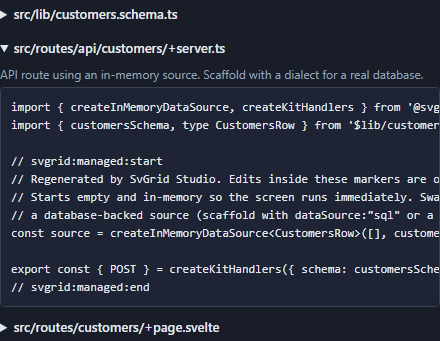
svgrid_scaffold writes three files (the same layout as the CLI and designer):
src/lib/customers.schema.ts     # the EntitySchema + row type
src/routes/api/customers/+server.ts  # createKitHandlers data endpoint
src/routes/customers/+page.svelte    # the grid + edit-panel screen
Each carries svgrid:managed markers so a re-generation updates the managed
regions and leaves your hand-written code untouched. See
code generation for the anatomy of each file.
Bring your own key
The generator uses your agent's model and API key - your schema and data never touch our servers. The MCP server itself makes no model calls; it provides introspection + scaffolding + verification tools that the host agent drives.
Licensing
You can evaluate generation without a key: it runs
and prepends a one-line commercial notice, and the generated app displays
the watermark and the console message about the Enterprise package until
you call setLicenseKey(). Set SVGRID_LICENSE_KEY in the MCP config to license it. See
licensing.
See also
- The Studio CLI - the deterministic, no-AI path
- Visual app designer - refine an AI draft by hand before generating
- Code generation - the anatomy of the emitted files
- MCP server - full MCP reference
Related articles
- SvGrid Studio Tips and Tricks: Build Svelte Data Apps, Fast - Practical SvGrid Studio tips - AI app generation, a designer that emits real SvelteKit, schema-driven edit forms, code-behind with ctx.grid, production auth/data/deploy toggles, and real data-source binding - each with a snippet.