The Studio CLI
@svgrid/studio is the command-line generator. One command reads a schema or a
live database and writes a working CRUD screen into your SvelteKit app.
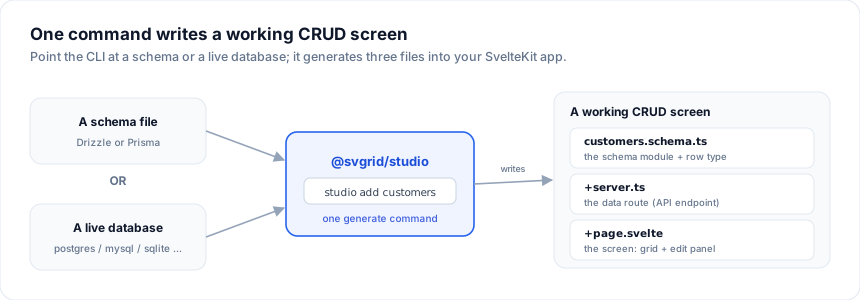
New here? Start with Getting started for the full step-by-step path (create an app, install, first screen). This page is the CLI reference.
npx @svgrid/studio add <name> [--from <schema> | --db <dialect> --url <conn>] [options]
init
The guided path: answer a few questions and get a working app. This is also what
runs when you type npx @svgrid/studio with no arguments in a terminal.
npx @svgrid/studio init [--db <dialect> --url <conn> | --from <schema> | --dataset <id>] [--out <dir>]
It asks where the data comes from, which tables to include, which pages each
table gets, and which theme to use - then writes a runnable SvelteKit app plus a
studio.config.json you can reopen in the designer.
Every table you pick gets a list screen (searchable grid with status pills and totals), a manage screen (grid + editable record panel), and - when other tables relate to it - a record page with a tab per related collection. The app leads with an overview dashboard over its most-referenced table.
| Flag | Description |
|---|---|
--db <dialect> |
Skip the source question and read a live database: postgres | supabase | mysql | mssql | sqlite. The driver is installed for you. |
--url <conn> |
Connection string (or file path for SQLite) for --db. |
--from <path> |
Build from a Drizzle schema.ts or a Prisma schema.prisma: its tables, columns and foreign keys, served from memory with sample rows. |
--supabase-url <url> |
Read a Supabase project over its REST API instead - no driver, no connection string. |
--supabase-key <anon> |
The project's anon key, paired with --supabase-url. |
--dataset <id> |
Start from sample data: customers-orders, products-categories, projects-tasks, employees-departments, tickets-accounts. |
--title <name> |
App name. |
--out <dir> |
Folder to write the app into (default: .). |
--theme <id> |
Design-system preset (see Theming). |
--dark |
Start in dark mode. |
-y, --yes |
Take every default and ask nothing - useful in scripts and CI. |
# guided, from your own database
npx @svgrid/studio init --db postgres --url $DATABASE_URL --out my-app

# from Supabase, over the REST API (no driver to install)
npx @svgrid/studio init --supabase-url https://xxxx.supabase.co --supabase-key $SUPABASE_ANON_KEY

# no questions at all: a seeded sample app
npx @svgrid/studio init --yes --dataset projects-tasks --out demo
The designer's New app button runs the same flow visually, and produces the same project - pick whichever suits you.
designer
Open the visual app designer in your browser, auto-saving
to studio.config.json and generating the app to a folder. See
Launch the designer for the full guide.
npx @svgrid/studio designer [--config <path>] [--out <dir>] [--port <n>] [--no-open]
add
Generates three files for an entity: the schema module, the API route, and the page.
| Flag | Description |
|---|---|
--from <path> |
Introspect a schema file: a Drizzle schema.ts or a Prisma schema.prisma (auto-detected). |
--db <dialect> |
Connect to a live database: postgres | supabase | mysql | mssql | sqlite. |
--url <conn> |
Connection string (or file path for SQLite) for --db. |
--all |
Scaffold a screen for every table/model - works with --from or --db. |
--table <name> |
Which table/model to use (defaults to <name>). |
--sql |
Emit a createSqlDataSource with an execute() stub instead of a live driver. |
--route <seg> |
Route segment (default: <name> / table name). |
--api <path> |
API route path (default: /api/<route>). |
--theme <id> |
Design-system preset for the generated screens (default: ember, the demo theme). The tokens go in the page's <svelte:head> inside @layer svgrid-studio, so an app that already defines its own --sg-* tokens keeps its look. |
--dark |
Start in dark mode. |
--title <name> |
With --all: the app title. Defaults to the title in studio.config.json, then to the one in the current layout. |
-h, --help |
Show help. |
add --all rewrites src/routes/+layout.svelte and the home page. In an app
init generated, the new layout keeps the app.css / custom.css imports, the
app title, and the theme from studio.config.json.
Examples
# from a live database
npx @svgrid/studio add customers --db postgres --url "$DATABASE_URL"

# every table in the database
npx @svgrid/studio add --all --db mysql --url "$DATABASE_URL"

# from a Drizzle schema file, a specific table, custom route
npx @svgrid/studio add orders --from src/lib/db/schema.ts --table orders --route sales/orders

# every model in a Prisma schema (relations become lookups)
npx @svgrid/studio add --all --from prisma/schema.prisma

# SQLite file
npx @svgrid/studio add todos --db sqlite --url ./data.db
What it writes
For add customers:
src/lib/customers.schema.ts          # EntitySchema + row type
src/routes/api/customers/+server.ts  # API route (createKitHandlers + a data source)
src/routes/customers/+page.svelte    # the screen: grid + edit panel
Then npm run dev and open /customers.
A whole app with --all
--all scaffolds every table/model, plus an app shell that ties them
together. It works from a live database (--db) or a schema file (--from
a Drizzle schema.ts or Prisma schema.prisma):
src/routes/+layout.svelte   # nav sidebar linking every entity screen
src/routes/+page.svelte      # home page: a card per entity
src/routes/<entity>/...      # one screen per table/model (as above)
Foreign keys are resolved across the whole set - a Drizzle .references() or a
Prisma @relation becomes a searchable lookup - so each relation points at the
right related screen and every /api/<entity> route it needs exists. The same
output is available programmatically as
scaffoldApp(schemas, options) from @svgrid/enterprise/studio,
fed by introspectDrizzleAll / introspectPrismaAll.
The other commands
designer and add are the daily drivers; the binary has four more:
| Command | What it does |
|---|---|
svgrid-studio dev |
The designer and the running generated app side by side - the designer writes real files into the app folder and Vite hot-reloads them. --app-port <n> sets the app's port. |
svgrid-studio openapi <file|url> |
Import an OpenAPI (JSON) spec: paths + schemas become entities with REST sources in studio.config.json. See REST & custom APIs. |
svgrid-studio eject [--fragment] |
Write the full app (or, with --fragment, a drop-in set of files for an existing app) from studio.config.json without opening the designer. |
svgrid-studio deploy [--target <p>] [--dry-run] |
Build, then deploy through the provider's own CLI. Target: vercel | netlify | cloudflare | node, resolved from the flag, the config, or svelte.config.js. --dry-run prints the commands. |
Useful designer flags beyond the basics: --template crm|ecommerce|projects|support
opens a sample app directly, and --ai enables the built-in
copilot (reads ANTHROPIC_API_KEY from the environment).
Safe regeneration
Every generated file wraps its body in svgrid:managed markers. Re-running
add replaces only the managed region and preserves everything you wrote
outside it - so you can regenerate after a schema change without losing
customizations. See Code generation.
Verification
After writing files, run your project's own check to confirm they compile:
npx svelte-check
Requirements
@svgrid/grid and @svgrid/enterprise in your project, plus the driver for your
database (pg / mysql2 / mssql / better-sqlite3) when using --db. Studio is part of the Enterprise license; it runs
without a key while you evaluate it.
See also
- Databases · Drizzle schema
- AI generation - the same engine, driven by an AI agent
- Visual app designer - the same engine, driven by a UI
Related articles
- SvGrid Studio Tips and Tricks: Build Svelte Data Apps, Fast - Practical SvGrid Studio tips - AI app generation, a designer that emits real SvelteKit, schema-driven edit forms, code-behind with ctx.grid, production auth/data/deploy toggles, and real data-source binding - each with a snippet.
- Smart UI Wins Gold in the 2025 Visual Studio Magazine Readers' Choice Awards - Smart UI, the web-components suite from the team behind SvGrid, earned Gold in the 2025 Visual Studio Magazine Readers' Choice Awards. Here is what that vote actually tells you about the codebase you are running.