Concepts
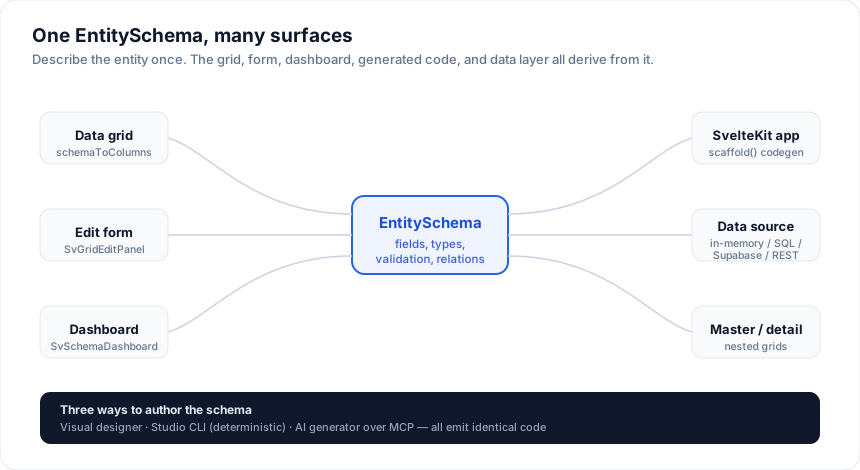
The mental model behind Studio: one EntitySchema drives the screens, the data
binding, and the generated code. This page walks that pipeline once, defines
every Studio term, and ends with a table for picking which build tool fits how
you work. Ten minutes here makes every other Studio page shorter.
The pipeline
Everything in Studio is one flow, left to right:
- An
EntitySchemadescribes your data. Field names, types, validation, labels, relations. You get one by introspection (a live database table, a Drizzle or Prisma schema file, an OpenAPI spec, a CSV, sample JSON) or by authoring it in the designer. See The EntitySchema. - Screens arrange blocks over entities. A screen is one route in your app. It holds blocks - a grid, a chart, a KPI tile, a board, a calendar - each bound to an entity. The visual app designer is where you compose them; the CLI and AI produce the same structures.
- A
ServerDataSourcemoves the data. Read, create, update, delete - one small contract that every backend implements (SQL databases, Supabase, REST, in-memory, Postgres-in-the-browser). Sorting, filtering, paging, and editing work identically no matter where the data lives. See Data binding. - Codegen writes real SvelteKit files. The schema, a
+server.tsAPI route, and a+page.sveltescreen - plain code you own, no runtime, no proprietary host. Generated sections sit insidesvgrid:managedregion markers, so re-generating updates them without touching your edits. See Code generation.
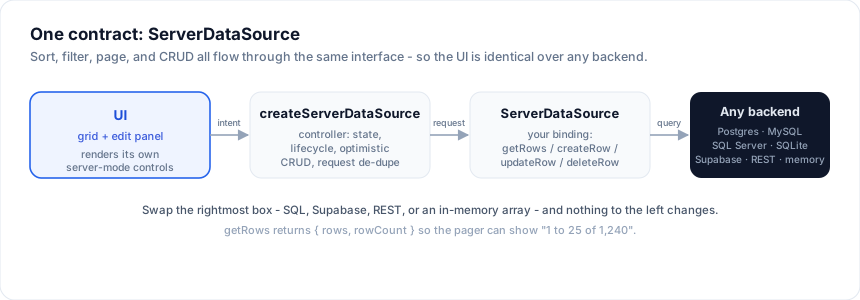
A change flows forward automatically: add a field to the schema and the grid column, the form input, its validation, and the generated code all pick it up.
The project model
The designer edits a single JSON document - the project - with this shape:
- project - title, theme, default data source, plus optional
auth, access control,
audit, i18n, and deploy settings.
- entities - one
EntitySchemaper table / collection. - screens - one per route. Each screen has:
- blocks - the data-bound building pieces (grid, form, chart, dashboard, kpi, gauge, tree, tabs, accordion, master-detail, lookup, pivot, filter, record, board, calendar, detail, component).
- a layout -
grid(12-column flow, the default),stack,split(resizable panes),dock(dockable / floatable panes, see Dock layout), orcanvas(free-form placement on a 12-column cell grid). - a render mode -
ssr(emits idiomatic SvelteKit+page.server.tsload + form actions; the default for screens in a database-backed app) orspa(the page fetches through the data source in the browser). See Code generation. - optional code-behind - a user-owned
handlers.tscompanion for event handlers, written once and never regenerated.
- entities - one
When you run the local designer, the project auto-saves to
studio.config.json in your working folder as you edit; Generate app turns
it into the SvelteKit project. The same file is what the
MCP tools read and write, so a coding agent and the
designer can work on one project interchangeably.
Glossary
| Term | Meaning |
|---|---|
| EntitySchema | The model of one entity: fields, types, validation, labels, relations. Everything else derives from it. Schema |
| Screen | One route / page of the generated app; holds blocks and a layout. App designer |
| Block | A data-bound piece placed on a screen: grid, chart, KPI, board, calendar, and so on. App designer |
| Companion block | A block that works alongside a grid on the same screen and shares its data, like a filter panel or a record panel. App designer |
| Project model | The single JSON document (studio.config.json) holding entities, screens, sources, theme, auth. This page, above |
| ServerDataSource | The read + create + update + delete contract every backend implements. Data binding |
| Managed region | A svgrid:managed marker pair in a generated file; regeneration rewrites only what is inside. Code generation |
| Code-behind | A user-owned handlers.ts next to a generated screen for typed event handlers; created once, never overwritten. Code-behind |
| Scaffold | The codegen step: schema in, SvelteKit files out. Shared by the CLI, the designer, and the AI path. CLI |
| Introspection | Reading an existing source (database table, Drizzle / Prisma schema, OpenAPI spec, CSV) to produce an EntitySchema. Databases |
| Evaluation period | Enterprise licensing without a hard stop: no key needed to evaluate; without a key a watermark and a console message about the Enterprise package when the module loads, nothing breaks. Licensing |
Which tool when
All three build paths share one scaffold core and produce the same output, so this is a workflow choice, not a feature choice - and you can switch anytime.
| Tool | Pick it if | Page |
|---|---|---|
CLI - npx @svgrid/studio add ... |
you want one deterministic command per screen, in scripts or CI, no AI involved | The Studio CLI |
AI via MCP - @svgrid/mcp |
you already work in a coding agent (Claude Code, Cursor, ...) and want to describe screens in plain language | AI generation |
Visual designer - npx @svgrid/studio designer |
you want to see the app while composing it, or you are not writing code at all | Visual app designer |
See also
- Getting started - build your first screen step by step
- Data binding - the
ServerDataSourcecontract in detail - Code generation - the emitted files and safe regeneration
Related articles
- Optimistic UI Explained - What optimistic UI means, why it makes apps feel instant, and how to implement it safely with rollback - using a data grid as the real-world example.
- Immutable Data Updates in Svelte 5 - Svelte 5 runes track both mutation and reassignment, but for grids and lists, the way you update data determines whether re-renders are surgical or wasteful. Here are the patterns that actually hold up.
- Debounce vs Throttle (for Grids and Beyond) - Debounce and throttle are not interchangeable. Here is when each one belongs in your data grid, with real code for filter inputs, live feeds, and scroll.