Access control (RBAC)
Studio has authentication (who you are, via SvAuthGate +
Supabase) and, separately, authorization - what a signed-in user may do.
Role-based access control (RBAC) gates screens and write actions
(create / update / delete) per role, and it is enforced in two places: the
generated UI and the generated API route. Server enforcement is the point - a
tampered client can hide the buttons all it likes; the route still rejects the
write.
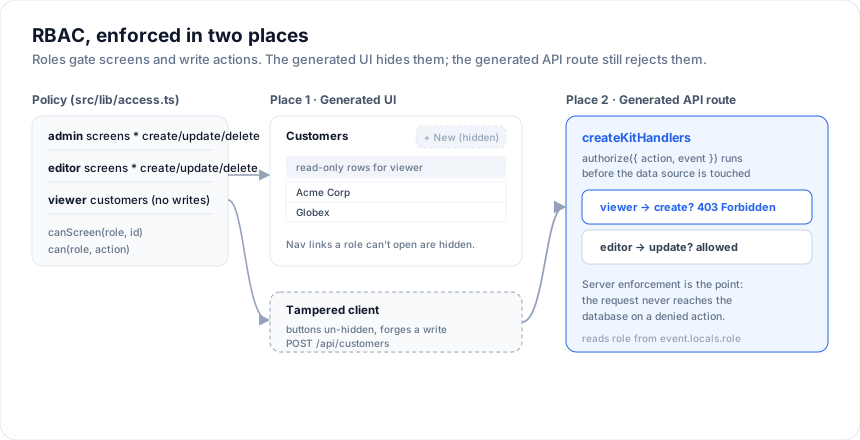
Reads are implied by screen access: if a role can open a screen, it can read that entity. The three gated actions are create, update, delete.
Turn it on
In the visual designer, open the inspector with no block
selected and expand Access control (app-wide). Tick Enable role-based
access and you get three starter roles - admin, editor, viewer - which
you can rename, remove, or add to. For each role, choose:
- Actions - create / update / delete checkboxes (all three ticked = full write).
- Screens - All screens, or a specific subset.
Pick a Default role - the fallback when the app can't resolve one from the session (it default-denies writes, so make it your least-privileged role).
The same policy lives in the project model, so it round-trips through
studio.config.json:
import type { StudioProject } from '@svgrid/enterprise'

const access: StudioProject['access'] = {
  enabled: true,
  defaultRole: 'viewer',
  roles: [
    { role: 'admin',  screens: '*',            actions: '*' },
    { role: 'editor', screens: '*',            actions: ['create', 'update', 'delete'] },
    { role: 'viewer', screens: ['customers'],  actions: [] },
  ],
}
What gets generated
With RBAC on, Generate app emits src/lib/access.ts - the single policy
module shared by every screen and route:
import { writable } from 'svelte/store'

export type AppRole = 'admin' | 'editor' | 'viewer'
export const currentRole = writable<AppRole>('viewer') // set this after login

export function canScreen(role: AppRole, screenId: string): boolean { /* ... */ }
export function can(role: AppRole, action: 'create' | 'update' | 'delete'): boolean { /* ... */ }

// server-side
export function getServerRole(event: { locals?: Record<string, unknown> }): AppRole { /* reads event.locals.role */ }
export function authorizeAction(role: AppRole, action: 'read' | 'create' | 'update' | 'delete'): boolean { /* ... */ }
- The layout hides nav links a role can't open (
canScreen($currentRole, id)). - Each screen hides the + New button without
createand blocks the edit form / inline edits withoutupdate. - Each SQL / Supabase API route passes an
authorizehook tocreateKitHandlers, so the server rejects unauthorized writes with403.
Wire the role
Two ends to connect, both one-liners:
Client - set currentRole once you know the user (after SvAuthGate signs
them in, or from +layout's data):
<script lang="ts">
  import { currentRole } from '$lib/access'
  import { onMount } from 'svelte'
  onMount(() => currentRole.set(mySession.role)) // 'admin' | 'editor' | 'viewer'
</script>
Server - put the role on event.locals in hooks.server.ts so
getServerRole finds it (this is what actually enforces access):
// src/hooks.server.ts
export const handle = async ({ event, resolve }) => {
  const session = await getSession(event) // your auth
  event.locals.role = session?.role ?? 'viewer'
  return resolve(event)
}
The authorize hook (hand-written apps too)
RBAC is built on a hook you can use without Studio. createKitHandlers accepts
an authorize callback run before every op; return false (or throw) to reject:
import { createKitHandlers } from '@svgrid/enterprise'

export const { POST } = createKitHandlers({
  schema: customersSchema,
  source,
  authorize: ({ action, event }) => {
    const role = event.locals?.role
    if (action === 'read') return true
    return role === 'admin' || role === 'editor'
  },
})
action is 'read' | 'create' | 'update' | 'delete', and event carries the
SvelteKit locals so you can read the session. It runs before the data
source is touched, so an unauthorized request never reaches your database.
Layering with Row-Level Security
RBAC decides which actions a role may perform. To also scope which rows a user sees, combine it with database Row-Level Security - RBAC in the app for actions + screens, RLS in Postgres for row visibility. The two are complementary: keep both on for defense in depth.
Multi-tenancy
RBAC answers "what may this role do?". Multi-tenancy answers a different question - "whose rows are these?" - and the two compose: a role gates the action, the tenant gates the data.
project.tenancy = { enabled: true }                        // column: tenantId
project.tenancy = { enabled: true, field: 'orgId' }        // custom column
project.tenancy = { enabled: true, sharedEntities: ['currencies'] }
One database, one deployment, rows partitioned by a tenant column. The tenant comes from the signed-in user's session - never from anything the client sends.
It is enforced on the server, on all four paths. Scoping reads alone is not isolation, so the generated API route also:
| Operation | What the route does |
|---|---|
| read | merges the tenant predicate into the query, written last so a client-supplied tenantId filter cannot widen it |
| create | stamps the tenant onto the row, overriding whatever was sent, and after any business-rule hook |
| update / delete | re-reads the target row under the scope first and returns 403 if it isn't yours - otherwise guessing an id would reach across tenants |
| update (patch) | re-stamps the tenant, so a patch cannot hand a row to someone else |
If the tenant cannot be resolved, requireTenant throws and the request
fails with 403. That is deliberate: returning "no tenant" would run the query
unscoped, which is the one failure mode multi-tenancy cannot have.
What it generates
src/lib/server/tenant.ts-getTenant/requireTenantoffevent.localsscope: ...on every scoped entity's+server.ts- a not-null tenant column on each scoped table and on
auth_users, in the same migration as everything else - the tenant on
event.localsinhooks.server.ts
The column is added to the database schema, not to the entity's field list, so it stays out of forms and grids - it is infrastructure, not data your users edit.
Requirements
Needs the auth starter (to know the tenant), the
typed data layer (so the column exists), and at least one
SQL-bound entity. Missing any of them it degrades to off rather than
emitting a half-enforced scope; the studio_set_tenancy MCP tool says so
explicitly rather than letting you believe an unscoped app is scoped.
sharedEntities stay global - reference tables like currencies or countries
that every tenant reads get no column and no scope.
Using the primitive directly
Outside Studio, the same mechanism is one option on createKitHandlers:
export const { POST } = createKitHandlers({
  schema, source,
  scope: ({ event }) => ({ field: 'tenantId', value: requireTenant(event) }),
})
Return null to skip scoping for a caller (a super-admin), or throw to reject.
See also
- Auth & secured screens - authentication + RLS
- Code generation · Databases - the API routes RBAC guards
- The visual designer - where you author the policy
Related articles
- SvGrid Studio Tips and Tricks: Build Svelte Data Apps, Fast - Practical SvGrid Studio tips - AI app generation, a designer that emits real SvelteKit, schema-driven edit forms, code-behind with ctx.grid, production auth/data/deploy toggles, and real data-source binding - each with a snippet.