Auth & secured screens
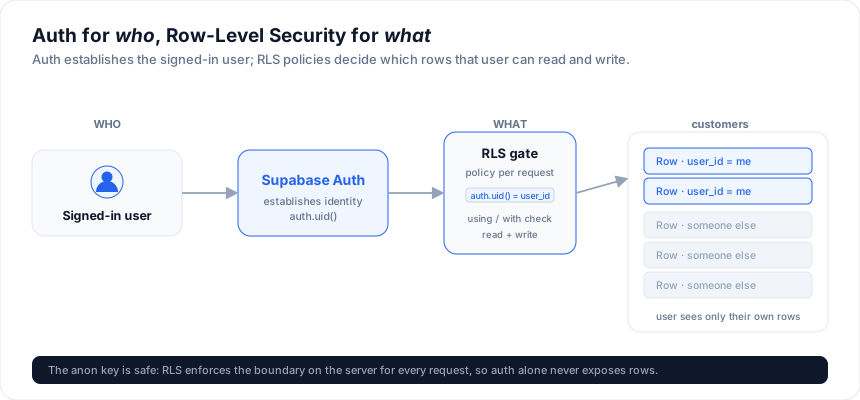
Put a Studio screen behind a login and scope its data per user. The pattern is Supabase Auth for who, Row-Level Security for what - auth establishes the signed-in user; RLS policies decide which rows that user can read and write.
Live demo: Data-app Studio · secured
- the grid sits behind a login (mock auth; any email + password).
In the designer (no code)
In the designer, open Authentication, turn it on, and set Provider to
Supabase Auth. Studio then wraps the whole app in SvAuthGate over the shared
Supabase client (from connections.ts) - email/password sign-in, sign-up, and
sign-out - and skips the built-in cookie-session scaffold entirely. It needs a
Supabase connection (set the shared project URL / anon key, or bind an entity to
Supabase); the designer flags it if one is missing.
Because Supabase Auth signs in on the client, it does not populate a server-side role, so it does not drive server route guards. Enforce per-user access with Row-Level Security on your tables (below) - that is the right model with Supabase anyway. The other provider, Built-in, is the dependency-free cookie-session starter with server-side roles; pick that when you want RBAC route guards without Supabase.
The built-in auth starter
Provider: Built-in generates a complete, dependency-free auth stack the app
owns: cookie sessions, a login screen, server-side route guards, and its own
user store - no external service. It is what powers
access control role checks on the server. The options,
all toggles in the designer's Authentication panel (or
studio_set_auth from an
agent):
| Option | What it adds |
|---|---|
| Protect | Require sign-in for every screen (route guards, not just hidden nav). |
| Register | Self-service sign-up, with new users landing in the default role. |
| User admin | An admin Users screen: create users, assign roles, reset passwords. Needs RBAC enabled. |
| OAuth | Sign in with GitHub, Google, or any OIDC provider, next to email + password. |
| Two-factor | Email-code second factor at sign-in. |
| Real email delivery (Resend or SMTP) for verification / reset / 2FA codes; without it, codes land in the server log for development. |
Register, user admin, OAuth, and two-factor persist users in your database, so they need the Drizzle data layer enabled and a SQL-bound entity; the designer points this out when a prerequisite is off. Seed users per role can be defined in the panel so a fresh app has accounts to sign in with.
Gate the UI with SvAuthGate
Wrap your screen. SvAuthGate shows a login / sign-up form when signed out and
your content when signed in, with a "signed in as ... / Sign out" bar:
<script lang="ts">
  import { createClient } from '@supabase/supabase-js'
  import { PUBLIC_SUPABASE_URL, PUBLIC_SUPABASE_ANON_KEY } from '$env/static/public'
  import { SvAuthGate } from '@svgrid/enterprise'
  import CustomersScreen from './CustomersScreen.svelte'

  const client = createClient(PUBLIC_SUPABASE_URL, PUBLIC_SUPABASE_ANON_KEY)
</script>

<SvAuthGate {client} title="Sign in">
  <CustomersScreen />
</SvAuthGate>
That's the whole gate. It uses createSupabaseAuth under the hood and re-renders
when the session changes (sign in, sign out, token refresh, or another tab).
Scope data per user with RLS
Auth alone doesn't hide data - add a policy. Give your table a user_id and let
each user see only their rows:
alter table customers add column user_id uuid default auth.uid();
alter table customers enable row level security;

create policy "own rows" on customers
  for all to authenticated
  using (auth.uid() = user_id)
  with check (auth.uid() = user_id);
Now the same createSupabaseDataSource screen automatically
shows each signed-in user only their own customers - the anon key is safe because
RLS enforces the boundary on every request.
Custom login UI with createSupabaseAuth
Prefer to build your own form? createSupabaseAuth is the reactive controller
SvAuthGate is built on:
import { createSupabaseAuth } from '@svgrid/enterprise'

let authState = $state<{ user: unknown; loading: boolean; error: unknown }>({ user: null, loading: true, error: null })
const auth = createSupabaseAuth({ client, onChange: (s) => (authState = s) })

// auth.signIn(email, password)
// auth.signUp(email, password)
// auth.signOut()
// auth.dispose()   // on unmount
| Member | Purpose |
|---|---|
signIn / signUp / signOut |
the three auth actions (async) |
getState() |
{ user, loading, error } snapshot |
onChange |
called on every session change |
dispose() |
unsubscribe from auth events |
Roles & finer gating
user carries the id and email. For role-based gating, read a role from the
user's metadata or a profiles table and branch in your UI (hide the delete
button, a whole screen, ...). Enforce it on the data with RLS too - never trust
the client alone:
create policy "admins delete" on customers
  for delete to authenticated
  using ((select role from profiles where id = auth.uid()) = 'admin');
See also
- Supabase - connect +
createSupabaseDataSource - Real-time - live updates (RLS-gated too)
- Deploying a Studio app
Related articles
- SvGrid Studio Tips and Tricks: Build Svelte Data Apps, Fast - Practical SvGrid Studio tips - AI app generation, a designer that emits real SvelteKit, schema-driven edit forms, code-behind with ctx.grid, production auth/data/deploy toggles, and real data-source binding - each with a snippet.