Deploying a Studio app
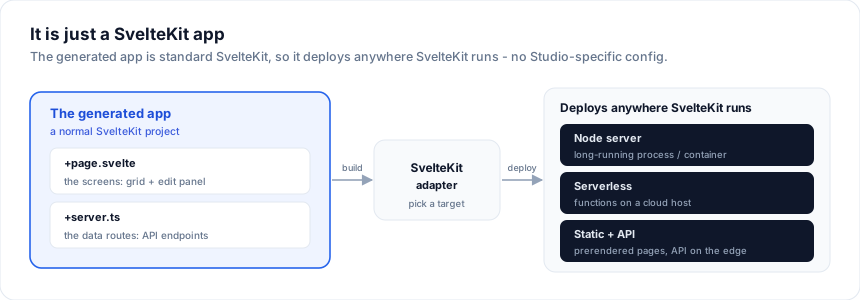
A Studio-generated app is a normal SvelteKit app - the screens are +page.svelte
files and the data endpoints are +server.ts routes. It deploys anywhere
SvelteKit runs. This page is the production checklist.
Checklist
- License key set - call
setLicenseKey(...)at startup to remove the unlicensed watermark in production. -
DATABASE_URLconfigured on the server (never in client code). - Database driver installed (
pg/mysql2/mssql/better-sqlite3). - Connection pooling appropriate for your host (see below).
- Auth / access control on the API routes if the data is protected.
-
npx svelte-checkandnpm run buildpass.
License key
The generated screens import @svgrid/enterprise, which shows an unlicensed
watermark until a key is set. Set it once at app startup:
// src/routes/+layout.ts (or a startup module)
import { setLicenseKey } from '@svgrid/enterprise'
setLicenseKey(import.meta.env.VITE_SVPRO_KEY)
Use per-environment keys so revoking one stage does not affect another. Validation is fully local - no network call.
Environment variables
The generated +server.ts reads the connection string from
process.env.DATABASE_URL. Set it in your host's environment (Vercel / Netlify /
Fly / a container), not in the repo:
DATABASE_URL="postgres://user:pass@host:5432/app"
Deploy (from the designer)
The visual designer has a Deploy button (and a Deploy target picker in the
panel). Choose Vercel, Netlify, Cloudflare Pages, Node, or
Auto-detect, and Generate app bundles the matching SvelteKit adapter and
provider config for you - the download deploys with no hand-editing of config.
It is not literally one click: you still git push (then import the repo) or run
the provider's CLI one-liner - but there is nothing SvelteKit-specific left to wire:
| Target | Adapter emitted | Extra config | One-liner |
|---|---|---|---|
| Auto-detect (default) | @sveltejs/adapter-auto |
none | npx vercel --prod |
| Vercel | @sveltejs/adapter-vercel |
none | npx vercel --prod |
| Netlify | @sveltejs/adapter-netlify |
netlify.toml |
npx netlify deploy --build --prod |
| Cloudflare Pages | @sveltejs/adapter-cloudflare |
wrangler.toml |
npm run build && npx wrangler pages deploy .svelte-kit/cloudflare |
| Node server | @sveltejs/adapter-node |
none | npm run build && node build |
The Deploy panel shows the copy-paste CLI command and a link to the provider's
import-from-Git page; the generated README.md carries the same steps. Apps
whose entities all use Local database (PGlite) or In-memory need no server
environment at all - push and deploy. SQL / Supabase entities still need their
connection set in the host's environment variables (below).
Adapters
The API routes are standard SvelteKit endpoints, so any adapter works -
adapter-node, adapter-vercel, adapter-netlify, adapter-cloudflare
(with a Workers-compatible database driver), etc. No Studio-specific
configuration is required. (The designer's Deploy target wires the adapter
below for you; pick a target and re-generate to switch.)
| Host | Adapter | Notes |
|---|---|---|
| Node / container | @sveltejs/adapter-node |
One module-level pool per process; DATABASE_URL in the environment. |
| Vercel | @sveltejs/adapter-vercel |
Serverless: use a pooler URL (see below). Set DATABASE_URL in project env. |
| Netlify | @sveltejs/adapter-netlify |
Same as Vercel - functions are short-lived, so pool small. |
| Cloudflare | @sveltejs/adapter-cloudflare |
Needs a Workers-compatible driver (e.g. Postgres over HTTP / Hyperdrive); the classic pg socket driver will not run on Workers. |
Install and point svelte.config.js at the adapter, set DATABASE_URL in the
host's env, and deploy - there is nothing Studio-specific to configure:
npm i -D @sveltejs/adapter-vercel # or -node / -netlify / -cloudflare
Connection pooling
- Long-running servers (Node, containers): a single
pg.Pool/mysql.createPoolper process is fine - reuse the module-level pool the generator creates. - Serverless / edge (Vercel, Netlify functions): connections are scarce.
Use a pooler - Supabase's pooler URL (port
6543), PgBouncer, or your provider's connection pooling - and keep the pool small.
Security
- Parameterized SQL - every value is bound and identifiers come from the schema, so the data layer has no injection surface.
- Supabase RLS - if you use
supabase-jswith row-level security, bind through a custom source so RLS is enforced per user.
Protect the data route
The generated +server.ts exports a single POST handler and is public by
default. createKitHandlers returns that handler as a value, so wrap it with
your own auth check before re-exporting - the wrapper runs first and the data
handler only runs for authorized callers:
// src/routes/api/customers/+server.ts
import { error, type RequestEvent } from '@sveltejs/kit'
import { createSqlDataSource, createKitHandlers } from '@svgrid/enterprise'
import { customersSchema } from '$lib/customers.schema'
import { execute } from '$lib/db' // your parameterized SQL client: (text, params) => rows

const source = createSqlDataSource({ schema: customersSchema, table: 'customers', execute })
const handlers = createKitHandlers({ schema: customersSchema, source })

export async function POST(event: RequestEvent) {
  const session = await event.locals.getSession?.() // your auth (Lucia, Auth.js, Supabase, ...)
  if (!session) throw error(401, 'Unauthorized')
  return handlers.POST(event)
}
For a whole app, do the check once in src/hooks.server.ts and gate every
/api/* route there instead of per-file. If you also want per-user row scoping,
enforce it in the data source (a WHERE user_id = ... in your SQL, or Supabase
RLS), not just at the route.
Migrations & schema drift
After a database migration, re-run the generator to pull new columns in:
npx @svgrid/studio add customers --db postgres --url "$DATABASE_URL"
Only the svgrid:managed regions regenerate - your customizations survive. See
Code generation.
See also
Related articles
- SvGrid Studio Tips and Tricks: Build Svelte Data Apps, Fast - Practical SvGrid Studio tips - AI app generation, a designer that emits real SvelteKit, schema-driven edit forms, code-behind with ctx.grid, production auth/data/deploy toggles, and real data-source binding - each with a snippet.