Code behind (Code view)
The visual designer covers layout, data, validation, and no-code business rules.
When you need real logic - run something on load, react to a click, change a grid
option at runtime - open a screen's Code view and write TypeScript against a
typed ctx object. Your code lives in a user-owned file (handlers.ts) that
regeneration never overwrites, and ctx is fully typed by a generated
page-context.ts, so autocomplete offers every block and every grid operation on
the screen.
Code behind complements the no-code layers - it does not replace them. Prefer computed fields & hooks for data rules and the visual Methods panel for simple actions; drop into code when you want the full API.
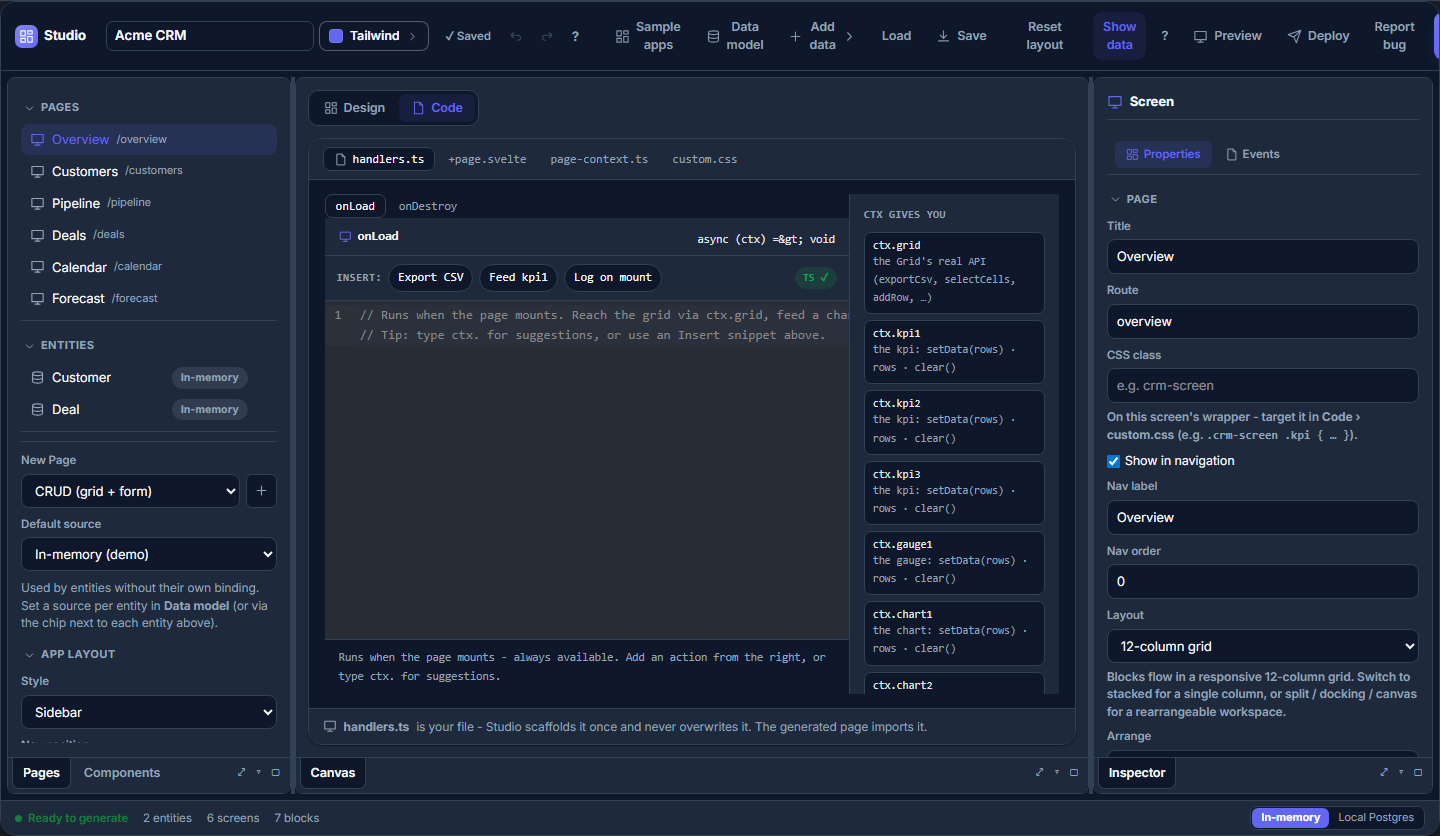
Where it runs. Your
onLoadruns both in the designer's full-screen preview (click Preview) and in the generated app -ctx.grid.setSort(...),ctx.grid.sortable = true, and friends drive the real grid in both. It does not run on the static design canvas (that just renders your blocks), so open the preview to see code-behind take effect.
The ctx object
Every handler receives one argument, ctx (PageContext). It exposes a typed
handle per block on the screen, plus a few page-level batteries:
ctx.grid- the grid's full imperativeSvGridApi. Call any operation (ctx.grid.exportCsv(),ctx.grid.setFilter(...),ctx.grid.addRow(...),ctx.grid.selectCells(...),ctx.grid.startEditing(...),ctx.grid.setSort(...)), subscribe to grid events, and set grid options live (both below).ctx.<chart>/ data-viz handles -setData(rows)to feed a chart or KPI your own rows,.rowsto read them,clear()to follow the screen data again.ctx.<component>/ UI handles - for a button, input, etc.:ctx.button1.setLabel('Save'),ctx.button1.set('variant', 'danger'),ctx.button1.onclick = fn.ctx.data- the screen's dataset. On an entity screen with a grid:ctx.data.rows(the current page) andctx.data.reload(). On a freestanding data grid the page owns its rows:ctx.data.setRows(rows)andctx.data.rows.ctx.goto(path)- navigate to another route.ctx.params- the page's URL query params (Record<string, string>).
Change grid options at runtime
You can set any grid option through ctx.grid and it takes effect immediately:
ctx.grid.sortable = true
ctx.grid.zebraRows = false
ctx.grid.density = 'compact'
if (ctx.grid.editable) { /* reads work too */ }
Why not just re-render <SvGrid sortable={...}>? In Svelte 5 a component's props
are one-way - the parent owns them, and a child can't assign back to a prop it
received. So Studio routes ctx.grid.<prop> = value to the grid API's
setOption (a reactive override the grid applies on top of its props), and
reads route to getOption. The upshot: you flip options from code without
re-wiring the template, and it type-checks and autocompletes because the settable
surface is generated from the grid's real option list.
The same setOption / getOption methods exist on SvGridApi directly if you
hold your own reference outside Studio:
api.setOption('sortable', true)
api.getOption('density')
api.resetOptions()   // drop all overrides, back to the props
Subscribe to grid events
Assign an on<Event> on the grid handle to react to what the user does:
ctx.grid.onRowClick = (e) => ctx.goto(`/orders/${e.row.id}`)
ctx.grid.onCellValueChanged = (e) => console.log('edited', e.field, e.newValue)
Your handler runs alongside any behavior the designer already wired for that event (they compose - yours doesn't clobber the built-in one). Event params are typed with the screen's row type.
Lifecycle: onLoad and onDestroy
The two screen lifecycle hooks live in handlers.ts. onLoad runs when the
screen mounts (after the grid API is ready); onDestroy on unmount - use it to
tear down anything you started.
// src/routes/orders/handlers.ts
import type { PageContext } from './page-context'

export function onLoad(ctx: PageContext) {
  // Deep-link: /orders?status=open -> filter + a tighter layout.
  const status = ctx.params.status
  if (status) {
    ctx.grid.setFilter({ columns: { status: { operator: 'equals', value: status } } })
    ctx.grid.density = 'compact'
  }
}

export function onDestroy(_ctx: PageContext) {
  // clean up timers / subscriptions started in onLoad
}
A button's click handler (wired in the designer, or by name here) gets the same
ctx:
export function refresh(ctx: PageContext) {
  ctx.button1.setLabel('Refreshing…')
  ctx.data.reload()
}
Regeneration-safe
handlers.ts is yours - the generator never rewrites it. page-context.ts
(the ctx type) and the screen markup are regenerated from the model, so they
stay in sync with the blocks you add in the designer, while your logic survives.
Keep custom helpers in their own modules and import them; don't edit inside the
svgrid:managed markers of the generated screen. See
Code generation.
See also
- App designer - the visual layout + data binding
- Computed fields & hooks - no-code data rules
- Studio API reference - the enterprise symbols the generated app uses
Related articles
- We Asked Claude Code for a Svelte Table. It Wrote Its Own Every Time, Until the Project Said Otherwise - Ten fresh Claude Code sessions, one prompt, a bare SvelteKit app. With no hint it hand-wrote a DataTable component, even for 10,000 rows. One paragraph in AGENTS.md changed that.
- SvGrid Studio Tips and Tricks: Build Svelte Data Apps, Fast - Practical SvGrid Studio tips - AI app generation, a designer that emits real SvelteKit, schema-driven edit forms, code-behind with ctx.grid, production auth/data/deploy toggles, and real data-source binding - each with a snippet.
- 15 Years of UI Components - The Story Behind jQWidgets and Smart UI - How a team spent 15 years shipping data grids - from jQuery widgets in 2011 to web components to a Svelte 5 native grid - and what actually changed each time.