Computed fields & hooks
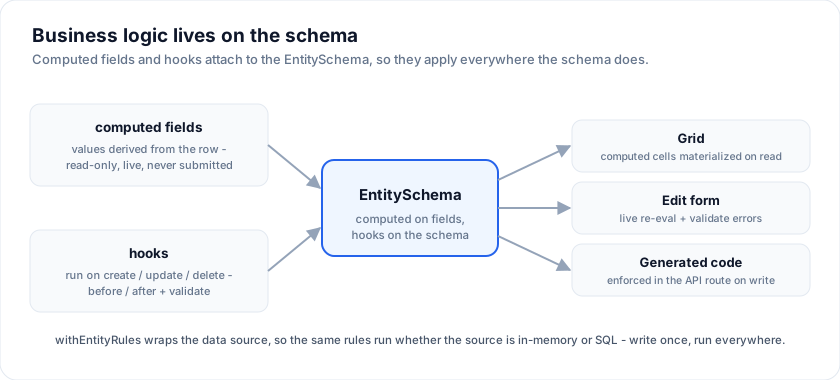
Two ways to put business logic on an EntitySchema: computed fields (values
derived from the row) and hooks (logic that runs when rows are created,
updated, or deleted). Both live on the schema, so they apply everywhere the
schema does - grid, edit form, and generated code.
No-code, in the designer. You don't have to write these by hand. In the visual designer, a field's editor has a ƒ formula box (e.g.
qty * price,first + ' ' + last) that compiles intocomputed, and a Business rules (validation) section builds cross-field rules (price ≥ qty, "required", min/max length, ...) with custom messages that compile intohooks.validate. Bare field names resolve to the row. The sections below are what that generates - and what you'd write directly for anything more complex.
Computed fields
A computed field's value is derived from the row, never stored. Give the field a
computed function:
import type { EntitySchema } from '@svgrid/enterprise'

type Order = { id: string; qty: number; price: number; total: number }

const orderSchema: EntitySchema<Order> = {
  name: 'orders',
  idField: 'id',
  fields: [
    { field: 'id', type: 'text', primaryKey: true, readonly: true },
    { field: 'qty', type: 'number', required: true, min: 1 },
    { field: 'price', type: 'number', required: true, min: 0 },
    // Derived from the row - read-only, never submitted.
    { field: 'total', type: 'number', label: 'Total ($)', computed: (r) => r.qty * r.price },
  ],
}
A computed field is:
- read-only in the grid and the edit form,
- live in the form - it re-evaluates as you edit the fields it depends on,
- never sent in a create / update payload (it's derived, not stored).
To make the grid show, sort, and filter the value, materialize it onto the rows
with withEntityRules (below) or applyComputed(schema, row).
Computed columns sort / filter within the fetched page (they're materialized client-side). For a value the database can sort across all pages, use a real column instead.
Hooks
schema.hooks run business logic at the mutation boundary. Before-hooks can
transform the payload or throw to reject; after-hooks are side effects; and
validate does cross-field form validation.
const orderSchema: EntitySchema<Order> = {
  name: 'orders',
  idField: 'id',
  fields: [ /* ... */ ],
  hooks: {
    // Transform the create payload (e.g. stamp a timestamp).
    beforeCreate: (values) => ({ ...values, createdAt: new Date().toISOString() }),
    // Cross-field validation: return { field: message } or null.
    validate: (values) => (values.qty <= 0 ? { qty: 'Quantity must be at least 1' } : null),
    // Side effects.
    afterCreate: (row) => console.log('created', row.id),
    afterUpdate: (row) => console.log('updated', row.id),
    beforeDelete: (id) => { /* throw to veto */ },
  },
}
The validate hook runs in two places, so a rule is written once:
- the edit form merges its errors alongside the per-field ones (per-field wins), and
withEntityRulesruns it again as a write guard.
Wiring it up: withEntityRules
withEntityRules(source, schema) wraps any ServerDataSource so computed fields
are materialized on read and hooks run on writes. It's transparent - pass the
result to createServerDataSource (or the grid) exactly as before:
import { withEntityRules, createSqlDataSource } from '@svgrid/enterprise'

const source = withEntityRules(createSqlDataSource(/* ... */), orderSchema)
getRows-> each row throughapplyComputed.createRow/updateRow->validate+beforeCreate/Update(may transform or throw), thenapplyComputedon the returned row, thenafterCreate/Update.deleteRow->beforeDelete(throw to veto) thenafterDelete.
Optional write methods stay optional, and extra capabilities (getAggregate)
pass through. Because every method returns the same computed row shape, the
controller's optimistic updates stay correct.
Server-enforced validation at the route
withEntityRules runs your hooks.validate, but the declarative field
constraints (required, min / max, minLength / maxLength, pattern,
email / url) are data on the schema - and the API route can re-check them on
every write, independent of the client. Pass validate: true to
createKitHandlers:
import { createKitHandlers } from '@svgrid/enterprise'

export const { POST } = createKitHandlers({
  schema: orderSchema,
  source,
  validate: true, // reject bad writes with 422 { error, fieldErrors }
})
- On create, the whole payload is validated; on update, only the fields present in the patch (a patch legitimately omits the rest).
- A failure returns
422with a{ field: message }map - the same shape the edit form uses, so a custom client can surface the errors inline. - It runs before the source is touched, so invalid data never reaches your database - even if a client skipped its own form validation or posted directly.
Prefer your own logic? Pass a function instead of true:
validate: ({ action, values, event }) =>
  values.total < 0 ? { total: 'Total cannot be negative' } : null,
Studio generates this for you. Every connected (
SQL/ Supabase) route the app generator emits already includesvalidate: true, so a generated app is server-validated out of the box. This pairs with RBAC, which adds theauthorizeguard on the same route.
No-code triggers in the designer
Everything above is code you write. The designer offers the same power as
Triggers on an entity - no-code server-side rules that compile into the
generated route's hooks. Six events, matching the hook points:
beforeCreate, afterCreate, beforeUpdate, afterUpdate, beforeDelete,
afterDelete. Each event holds a list of steps:
| Step | What it does |
|---|---|
| Set field | Assign a value (a literal, another field, or an expression) - a transform before the write. |
| Require field | Reject the write when a field is empty, with your message. |
| Reject when | Reject the write when a condition holds - a cross-field guard. |
| Branch | If / else over a condition, each side its own step list. |
| Code | Escape hatch: a snippet for anything the steps cannot say. |
Before-hooks transform and validate; after-hooks are for side effects. The
steps are stored in the project model and enforced on the server route of
SQL-bound entities - the same place validate: true runs - so they hold even
against direct API calls.
A worked example
Computed subtotal / tax / total, a cross-field guard, and a delete veto -
all on one schema:
type Invoice = {
  id: string; qty: number; rate: number; taxRate: number
  subtotal: number; tax: number; total: number
  status: 'draft' | 'sent' | 'paid'
}

const invoiceSchema: EntitySchema<Invoice> = {
  name: 'invoices',
  idField: 'id',
  fields: [
    { field: 'id', type: 'text', primaryKey: true, readonly: true },
    { field: 'qty', type: 'number', required: true, min: 1 },
    { field: 'rate', type: 'number', required: true, min: 0, label: 'Rate ($)' },
    { field: 'taxRate', type: 'number', min: 0, max: 1, defaultValue: 0.2 },
    { field: 'subtotal', type: 'number', computed: (r) => r.qty * r.rate },
    { field: 'tax', type: 'number', computed: (r) => r.qty * r.rate * r.taxRate },
    { field: 'total', type: 'number', label: 'Total ($)', computed: (r) => r.qty * r.rate * (1 + r.taxRate) },
    { field: 'status', type: 'enum', options: [
      { value: 'draft', label: 'Draft' }, { value: 'sent', label: 'Sent' }, { value: 'paid', label: 'Paid' },
    ] },
  ],
  hooks: {
    // cross-field guard, shown in the form and enforced on write
    validate: (v) => (v.taxRate != null && (v.taxRate < 0 || v.taxRate > 1)
      ? { taxRate: 'Tax rate must be between 0 and 1' } : null),
    // (id, values) - stamp an audit field on update
    beforeUpdate: (id, patch) => ({ ...patch, updatedAt: new Date().toISOString() }),
    // veto a delete by throwing
    beforeDelete: (id) => { /* if (await isPaid(id)) throw new Error('Paid invoices cannot be deleted') */ },
  },
}
Only qty, rate, taxRate, and status are ever submitted - subtotal,
tax, and total are derived on every read. Wrap the source with
withEntityRules and the exact same rules apply whether the source is in-memory
(client-side) or SQL (inside the API route) - write the logic once, run it
everywhere.
Live demo: Computed fields & hooks.
Scheduled jobs
Triggers run when someone changes a row. For work that runs on a clock - a nightly digest, a cleanup pass - add a scheduled job:
project.jobs = [
  { id: 'daily-digest', name: 'Daily order digest', cron: '0 6 * * *',
    kind: 'email', entity: 'orders', to: '[email protected]' },
  { id: 'cleanup', name: 'Purge stale drafts', cron: '0 3 * * *',
    kind: 'code', code: "await db.delete(drafts).where(/* ... */)" },
]
Two kinds: email sends a summary of an entity (row count plus the newest
rows) through the generated email layer, and code runs a body you write.
This generates two files - src/lib/server/jobs.ts (the handlers, keyed by
job id) and src/routes/api/cron/+server.ts - plus the schedule config for
your deploy target: vercel.json crons on Vercel, a GitHub Actions schedule
everywhere else.
Three things to know:
- It runs on the server, unlike
createSchedulerin@svgrid/enterprise, which only ticks while a browser tab is open. - The endpoint is secret-guarded. Set
CRON_SECRETin the app's environment and send it asAuthorization: Bearer <secret>(or?secret=). With noCRON_SECRETset the route refuses to run rather than leaving a public "do work" URL open. The Actions workflow stays inert until you add theCRON_URLandCRON_SECRETrepository secrets, so CI is green before you configure it. - One failing job does not stop the others. Each handler is caught individually and the response reports per-job status.
An email job needs the auth email layer switched on; without it
the handler slot is still emitted with a warning, so the schedule is real and
the gap is visible rather than silently dropped. enabled: false keeps a
handler callable via ?job=<id> while dropping it from the scheduled run.
See also
- Edit forms · Schema
- Dashboards - schema-driven KPI + chart views
Related articles
- SvGrid Studio Tips and Tricks: Build Svelte Data Apps, Fast - Practical SvGrid Studio tips - AI app generation, a designer that emits real SvelteKit, schema-driven edit forms, code-behind with ctx.grid, production auth/data/deploy toggles, and real data-source binding - each with a snippet.