MCP server
The SvGrid MCP server does two things for an AI client (Claude Code, Claude Desktop, Cursor, Zed, Codex, custom agents): it answers questions about SvGrid from the files this repository ships, and it checks the code the model writes against the real exported surface of the version you have installed. No API key either way.
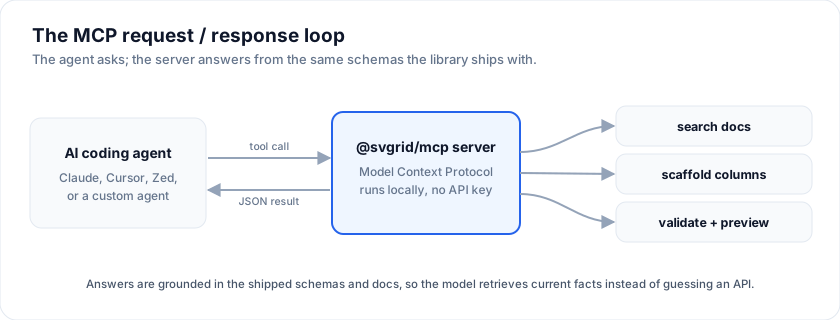
What is MCP? Model Context Protocol is the open standard (modelcontextprotocol.io) for exposing tools to LLM clients. SvGrid ships an MCP server so the model your team already uses can "see" the grid without you having to copy-paste docs into prompts.
It runs either way you like: as a local process
(@svgrid/mcp on npm), or as
a hosted endpoint at https://mcp.svgrid.com/mcp that needs no install at
all. Both are listed in the official MCP registry as com.svgrid/svgrid.
Two ways to connect
Hosted (nothing to install). Point any MCP client at the URL:
https://mcp.svgrid.com/mcp
claude mcp add --transport http svgrid https://mcp.svgrid.com/mcp
One click: Add to Cursor · Add to VS Code
It carries seven tools - search, fetch, list_examples,
get_example_source, get_api_reference, check_svgrid_code and
svgrid_preview - and needs no Node, no config file, and no key.
In an AI app builder, add the same URL as a custom MCP server with no authentication: Bolt.new and Lovable both take it.
Local (npx @svgrid/mcp). Everything the hosted server has, plus
the Studio tools, the docs and demos as MCP resources, ready-made
prompts, and a svgrid_check_code that additionally compiles the file
with the Svelte compiler rather than checking it statically. Use it when
you want the compile pass, the Studio tools, or no third-party endpoint
in the loop.
| Hosted | Local | |
|---|---|---|
| Setup | a URL | npx @svgrid/mcp |
| Needs Node | no | yes |
| Code check compiles | no, static checks only | yes |
| Resources and prompts | yes | yes |
| Visual preview | yes | yes |
studio_* tools |
no | yes, opt-in |
| Works offline | no | yes |
Install
No install step is required - npx fetches it on demand:
# One-shot, from any project
npx -y @svgrid/mcp
To pin it as a dev dependency instead:
pnpm add -D @svgrid/mcp
The local server is a Node binary (svgrid-mcp) that speaks MCP over
stdio. There is no daemon to maintain. The hosted server needs no install
step at all - skip to Wire it into your AI client
and use the URL.
Wire it into your AI client
Every snippet below shows the local (stdio) form and the hosted (HTTP) form. Pick one - running both connects the same tools twice.
Claude Code
The plugin is the shortest path: it installs the Agent Skill and the hosted server together, so the model gets the house style and the checker in one step.
/plugin marketplace add sv-grid/sv-grid
/plugin install svgrid@svgrid
Or add the server on its own:
# hosted, nothing to install
claude mcp add --transport http svgrid https://mcp.svgrid.com/mcp

# or local
claude mcp add svgrid -- npx -y @svgrid/mcp
Then run /mcp in a session and you will see svgrid listed.
To share the server with your team, add --scope project. That writes
a .mcp.json at the repository root which you can commit, so everyone
who clones the repo gets the same tooling with no per-machine setup:
claude mcp add svgrid --scope project -- npx -y @svgrid/mcp
Claude Desktop
Edit ~/Library/Application Support/Claude/claude_desktop_config.json
(macOS) or %APPDATA%\Claude\claude_desktop_config.json (Windows):
{
  "mcpServers": {
    "svgrid": {
      "command": "npx",
      "args": ["-y", "@svgrid/mcp"]
    }
  }
}
Or the hosted server, with nothing to install:
{
  "mcpServers": {
    "svgrid": {
      "type": "http",
      "url": "https://mcp.svgrid.com/mcp"
    }
  }
}
Restart Claude Desktop, then ask "using svgrid, build me a grid that groups by department" to confirm the tools are exposed.
Cursor
One click: Add to Cursor
Or by hand, in Settings -> MCP -> Add new MCP server:
{ "url": "https://mcp.svgrid.com/mcp" }
{ "command": "npx", "args": ["-y", "@svgrid/mcp"] }
Zed
~/.config/zed/settings.json:
{
  "context_servers": {
    "svgrid": {
      "command": "npx",
      "args": ["-y", "@svgrid/mcp"],
      "env": {}
    }
  }
}
VS Code
One click: Add to VS Code
Or create .vscode/mcp.json in the workspace. Note that VS Code uses
servers rather than the mcpServers wrapper:
{
  "servers": {
    "svgrid": {
      "type": "http",
      "url": "https://mcp.svgrid.com/mcp"
    }
  }
}
{
  "servers": {
    "svgrid": {
      "type": "stdio",
      "command": "npx",
      "args": ["-y", "@svgrid/mcp"]
    }
  }
}
Custom agents (OpenAI Agents SDK, Anthropic SDK, LangChain)
Point your client's MCP stdio transport at npx -y @svgrid/mcp, or its
streamable-HTTP transport at https://mcp.svgrid.com/mcp. Any client that
speaks either transport works.
The hosted server names its two retrieval tools search and fetch
exactly, which is what a connector needs to index it.
Tools exposed
Five, by default. tools/list is sent on every request, so the tool
surface is pure overhead on every turn - and this server used to spend
~4,710 tokens of it on 36 tools, 79% of them Studio tools that most
sessions never call once.
| Tool | What it does |
|---|---|
svgrid_search |
Search the docs, every demo and the API surface in one call. No arguments returns an index. |
svgrid_get |
Read one thing in full: a doc slug, a demo id, or api. |
svgrid_check_code |
Verify code against the real exported surface before the user sees it. |
svgrid_preview |
Render a live, interactive grid in the conversation from columns + rows. |
svgrid_scaffold |
Turn a Drizzle schema, sample rows or an EntitySchema into runnable SvelteKit files. |
Studio adds four more, and only when you ask for them - set
SVGRID_MCP_STUDIO=1 or a licence key in the server's env. They need a
licence to be useful, so they are not charged to everyone else's context
window.
svgrid_scaffold and the Studio tools run on @svgrid/enterprise, which the
server loads only when it is installed beside it. npx -y @svgrid/mcp leaves
it out so the server starts fast. To scaffold, install both in the project and
run the local server:
npm i -D @svgrid/mcp @svgrid/enterprise
claude mcp add svgrid -- npx svgrid-mcp
Without -y, npx runs the installed copy instead of downloading one, so
there is no install on the first connect.
The hosted server carries search, fetch, list_examples,
get_example_source, get_api_reference, check_svgrid_code and
svgrid_preview, plus the same resources and prompts. The first two are named
that way deliberately: those exact names are what a one-click connector needs to
index a remote server. It also answers to svgrid_search, svgrid_get and
svgrid_check_code, so a model that learned the npm package's names is never
told "unknown tool".
What it does not have is the compile pass (the Svelte compiler cannot run in a Worker), the Studio tools (they need a filesystem), and the offline guarantee
- it is a remote server, so by definition your query reaches it. Use the local one when any of those matter.
Verification
svgrid_check_code
Checks a file against the version you have installed and returns
line-numbered diagnostics with the exact replacement for each: unknown
<SvGrid> props, wrong ColumnDef keys, api methods that do not
exist, imports that will not resolve, and Svelte 5 runes mistakes. It
also compiles the component, so a syntax error surfaces here rather
than in the user's terminal.
This is the tool that makes the rest worth having. Retrieval alone still lets a model write a confident, wrong grid; nothing else in the server stops it. Run it on every file you write, fix what it reports, and run it again.
Finding and reading
svgrid_search
One call across all three corpora, because "how do I pin a column" does not announce whether it is answered by a doc page, a demo, or an API name:
{ "query": "pin a column" }
Returns ranked doc hits with excerpts, matching demos, and matching API
names - each with the reference you pass to svgrid_get. Narrow with
kind (docs | examples | api), trade tokens for completeness
with detail (concise | full), and cap with limit (max 50).
Call it with no arguments for an index of doc sections, demo categories and API groups - the cheapest way to orient before searching.
svgrid_get
{ "ref": "help/columns/column-definitions" }
{ "ref": "11-stock-market" }
{ "ref": "api" }
The kind is inferred from the reference; pass kind to force it. A
reference that does not resolve comes back with near matches rather
than a bare "not found".
It fixes what it finds
svgrid_check_code does not stop at telling you what is wrong. Where the
correction is exact it returns the corrected file too:
{
  "diagnostics": [ ... ],
  "applied": ["rowData -> data (line 7)", "accessorKey -> field (line 3)"],
  "fixed": "<the corrected source>"
}
Both fields are omitted when there is nothing mechanically fixable, so a clean check stays small.
The rules are deliberately narrow, because this tool's whole worth is that it never cries wolf - and rewriting raises the stakes from wasting a turn to corrupting working code. Only exact renames are applied (a known rename, or a close-enough spelling), only on word boundaries, and only on the line the diagnostic reported. Advice that is ambiguous - "this has no equivalent, remove it" - stays advice. A test asserts that running auto-fix across every demo in this repository changes nothing at all.
It knows which version you have
The result carries the version it checked against:
{ "version": { "corpus": "3.0.0", "installed": "2.6.8", "warning": "..." } }
The server reads the @svgrid/grid in your project and says plainly when it
disagrees with the corpus it ships, so a model is told to hedge instead of
confidently citing an API you do not have. A server that answers from a remote
backend cannot do this - it has no idea what is in your node_modules.
Nothing leaves your machine
This server makes no network calls. Not for docs, not for the API surface, not for verification - the whole corpus (every demo, every doc page, the full exported API) ships inside the package, which is why it is megabytes rather than kilobytes. There is no API key, no licence check on the wire, and no telemetry.
It works on a plane, behind a corporate proxy, and inside an air-gapped
network. tools/mcp-offline.test.ts enforces it: the server is driven through
a full session with every network primitive booby-trapped, and the test fails if
anything is even attempted.
The one honest exception: the preview loads the grid from a CDN to draw it. That happens in your client's sandboxed iframe, never in this server, and only when you actually render a preview.
Seeing the grid, not just reading about it
svgrid_preview renders a real, interactive SvGrid inside the
conversation - sortable, filterable, scrollable. Not a screenshot and not a
mock table: the same <sv-grid> custom element a page would use, loaded from
the CDN, with the columns and rows you passed.
{
  "title": "Team roster",
  "columns": [{ "field": "name", "header": "Name" }, { "field": "amount", "header": "Amount" }],
  "data": [{ "name": "Ada", "amount": 20000 }],
  "sortable": true
}
It uses MCP Apps,
the official UI extension: the tool points at a ui:// resource through
_meta, the client loads that HTML in a sandboxed iframe, and the tool's
structuredContent arrives over a postMessage bridge. Supported in Claude
(web and desktop), VS Code and ChatGPT.
Clients without UI support are not left out - they ignore the _meta and get
a text summary of the same grid, so it is always safe to call. That is the
extension's own rule, and it is why the text half describes the grid rather
than pointing at a picture the reader cannot see.
Pass demo instead of columns / data and you get the demo's source: a
demo is a Svelte component, not data, so there is nothing to hand the element
and rendering an empty grid would just look broken.
Resources and prompts
The docs and demos are also exposed as MCP resources, so a user can attach a page or a demo directly instead of hoping the model thinks to search for it:
svgrid://doc/help/columns/column-definitions
svgrid://example/11-stock-market
And three prompts ship ready to run: build_grid, explain_api
and review_grid_code. Each is written to make the model use this
server rather than recall SvGrid from training data, and each ends at
svgrid_check_code.
SvGrid Studio (commercial)
Off unless enabled. Set SVGRID_MCP_STUDIO=1, or a valid
SVGRID_LICENSE_KEY, in the server's env, and run the server from a project
that has @svgrid/enterprise installed beside it
(npm i -D @svgrid/mcp @svgrid/enterprise, then npx svgrid-mcp). Without it
these tools answer with those steps instead of running.
svgrid_scaffold
Point it at a Drizzle schema, sample JSON rows, or an EntitySchema
you already have, and it infers the schema and generates the $lib
schema module, a +server.ts API route and a +page.svelte with
SvGrid + SvGridEditPanel - in one call. Pass schemaOnly: true to
stop after inference. Generated bodies carry svgrid:managed markers,
so regenerating preserves your edits outside them.
The studio_* tools
Four tools drive the same validated project model the visual designer uses:
| Tool | What it does |
|---|---|
studio_project |
new, load, describe, config, capabilities |
studio_apply |
A batch of model changes - entities, screens, blocks, components - applied in order |
studio_configure |
Theme, auth, access, tenancy, data layer, jobs, deploy target, layouts, in one call |
studio_build |
validate, then generate the full runnable SvelteKit app |
Call studio_project with action: "capabilities" first: it reports
exactly what the installed version supports, so the agent does not have
to guess block kinds or component keys.
studio_apply takes a batch on purpose. Building a five-screen app was
twenty-odd round trips when every block was its own tool; now a whole
screen is one call, and a failure reports which op failed and what
already applied.
The pre-3.0 names
Every tool name from before 3.0 still answers - search_docs,
get_doc, list_examples, get_example_source, list_docs,
get_api_reference, check_svgrid_code, introspect_source,
scaffold_entity and all 27 individual studio_* tools. They are not
listed, because listing is what costs context and answering a name
you did not advertise costs nothing. Saved prompts and scripts keep
working; nobody pays for the compatibility.
Their JSON response shape follows 3.0, not 2.x. A model reads either without trouble; a script that parsed the old shape by hand needs a look.
Licensing
The documentation and example tools are free. The Studio code generators are part of the commercial offering. You can evaluate them without a key: they run, but prepend a notice comment to generated files. To license them, set the key in your MCP client's server config:
{
  "mcpServers": {
    "svgrid": {
      "command": "npx",
      "args": ["-y", "@svgrid/mcp"],
      "env": { "SVGRID_LICENSE_KEY": "YOUR-LICENSE-KEY" }
    }
  }
}
Enterprise features and the trial
Most of SvGrid is the MIT @svgrid/grid package. Export to Excel and PDF,
pivot tables, the Kanban board, the scheduler, the spreadsheet and the
server-side row model are in @svgrid/enterprise, which is commercial.
The server tells your assistant which is which. In svgrid_search results a
paid doc or demo carries "enterprise": true, and when a question is about a
paid feature the answer says so once, with the trial link.
svgrid_get puts the same line at the top of a paid doc or demo, and
svgrid_check_code adds it when the fix is to install the package. Nothing
is sent anywhere to do this; it is part of the answer text.
@svgrid/enterprise runs without a license key and shows a watermark until
one is set, so you can try a feature before deciding. The
30-day trial adds a download of
every demo and 30 days of email support.
Verifying it works
Ask your model: "What MCP tools do you have from svgrid?" The local
server lists five, including svgrid_check_code (four Studio tools more when
enabled); the hosted server lists seven.
Then give it something to catch:
Check this with svgrid:
<SvGrid rowData={rows} {columns} />
It should come back with rowData is not a SvGrid prop, use data. If
it explains the code instead of calling a tool, the server is not
connected.
If nothing is listed at all, check your client's MCP log. For the local
server the usual cause is npx not being on PATH - use the absolute path
to the binary. For the hosted one, confirm the endpoint answers:
curl https://mcp.svgrid.com/health
Security model
The two ways of running it differ here, so pick deliberately.
Local (npx @svgrid/mcp)
- Runs on your machine over stdio. No telemetry, no outbound network calls, no API key.
- Serves a documentation and example corpus bundled into the package at build time, so answers are pinned to the version you installed.
svgrid_check_codereads the source you pass it in-process and never sends it anywhere.
Hosted (https://mcp.svgrid.com/mcp)
- Your client sends tool arguments to a Cloudflare Worker we operate.
Anything you pass to a tool leaves your machine, and for
check_svgrid_codethat means the source you ask it to check. - Each call is recorded: tool name, duration, whether it succeeded, the
query or id it was given, how many pages matched, and whether the answer
mentioned the Enterprise trial. For
check_svgrid_codeonly the byte length of the submitted source and the names of the rules that fired are recorded, never the source itself. The records stay in Cloudflare (Workers logs, and an Analytics Engine dataset kept three months) and are read in aggregate to see what people ask for. - No account, no key, no cookies. Requests are not tied to a user.
- If your code cannot leave the building, use the local server. That is what it is for.
Both
- The Studio tools return generated files as data. Writing them to disk is your client's decision, not the server's.
- See security for the general supply-chain posture.
Building your own MCP integrations
The same docs manifest, JSON Schemas (column definitions, the grid's
options, export options, and the chart spec at schemas/chart-spec.json,
which svgrid_get also serves for "chart spec schema"), and llms.txt
files are also served directly from the docs site:
const docs    = await fetch('https://svgrid.com/docs.json').then((r) => r.json())
const schemas = await fetch('https://svgrid.com/schemas/index.json').then((r) => r.json())
const llms    = await fetch('https://svgrid.com/llms-full.txt').then((r) => r.text())
If you do not want to run the MCP server, building these into your agent's system prompt gives most of the same grounding.
Without the MCP server
An agent that can only fetch pages gets the same material over plain HTTP, in pieces small enough for one fetch (fetch tools cut a response near 100 KB):
| URL | What it holds |
|---|---|
/llms.txt |
The docs index, with links to everything below. /llms/<product>.txt (grid, ui, enterprise, sheet, base, studio, compare) is one product's part of it |
/docs/<slug>.md |
One docs page as markdown |
/demos.md, /demos/<id>.md |
Every live demo, and one demo with what it shows and its full source |
/api.json |
Every export of @svgrid/grid and @svgrid/enterprise by module, with the member names of each type |
/api/<name>.json |
One symbol's doc comment and signature, by its lowercased name: /api/svgridapi.json, /api/createreview.json |
/.well-known/mcp.json |
Where this server is: the remote endpoint, the npm package, the setup commands |
const index = await fetch('https://svgrid.com/api.json').then((r) => r.json())
const api   = await fetch('https://svgrid.com/api/svgridapi.json').then((r) => r.json())
const demo  = await fetch('https://svgrid.com/demos/702-change-review.md').then((r) => r.text())
In a browser with WebMCP (document.modelContext), svgrid.com registers
four tools for an agent driving the page: svgrid_search, svgrid_get_doc,
svgrid_get_demo and svgrid_lookup_api. They answer from the files
above.
Frequently asked questions
What is the SvGrid MCP server?
A Model Context Protocol server that lets AI clients (Claude Code, Claude Desktop, Cursor, Zed, custom agents) query SvGrid's documentation, read real demo source, scaffold SvelteKit CRUD apps, and check the code they write against the real API - grounded in the files the package ships, so the model answers from current facts instead of guessing.
Do I need an API key to run it?
No, on either transport. A SVGRID_LICENSE_KEY is optional and only affects
the commercial Studio code generators.
Local or hosted - which should I use?
Hosted (https://mcp.svgrid.com/mcp) if you want it working in one paste,
with no Node and no config file. Local (npx @svgrid/mcp) if you want the
Svelte compiler pass in svgrid_check_code, the Studio tools, offline
use, or your source never leaving the machine. See
Security model for what each one sends.
How does it help AI assistants write better SvGrid code?
Two ways. It exposes the docs, example sources, and API reference as tools,
so the assistant retrieves version-pinned answers instead of hallucinating an
API from training data. And svgrid_check_code closes the loop: the model
runs what it wrote past the real exported surface and gets told exactly what
is wrong before you see it. That matters most for Svelte 5, where models
routinely mix in outdated Svelte 4 syntax.
Does it work with a version of SvGrid I have not upgraded to?
The local server answers for the version bundled in the @svgrid/mcp release
you install, so pin it alongside @svgrid/grid if you are behind. The hosted
server always tracks the current release. Either way, every
svgrid_check_code result names the version it checked against in its
checkedAgainst field.
See also
- Agent Skill - the always-on house-style layer; the Claude Code plugin installs it together with this server
- LLM grounding - the same files used by the MCP server, but documented for direct LLM consumption
- Agents - how to build an AI agent that drives the live grid
- AI assistant - the in-grid AI features (filter / smart-fill / classify / summarise), free in @svgrid/grid
Related articles
- Using SvGrid with Cursor, Zed, and Windsurf - Wire the SvGrid MCP server into Cursor, Zed, Windsurf, or Claude so AI assistants generate grid code that compiles on the first try - no invented props, no wrong import names.
- Going AI-Native: The SvGrid MCP Server - Most AI assistants invent data grid APIs. We built an MCP server so they look up the real one instead.
- Build Svelte Grids Faster with AI and the SvGrid MCP Server - The @svgrid/mcp server grounds Claude, Cursor, and other AI assistants in real SvGrid API docs so generated grid code compiles the first time.