SvGrid in Lovable
Lovable builds React apps, so SvGrid goes in through @svgrid/grid-wc, the
web-component build of the grid with a React wrapper. It is the same grid as
the Svelte package, compiled into a custom element, so the React app needs no
Svelte toolchain.
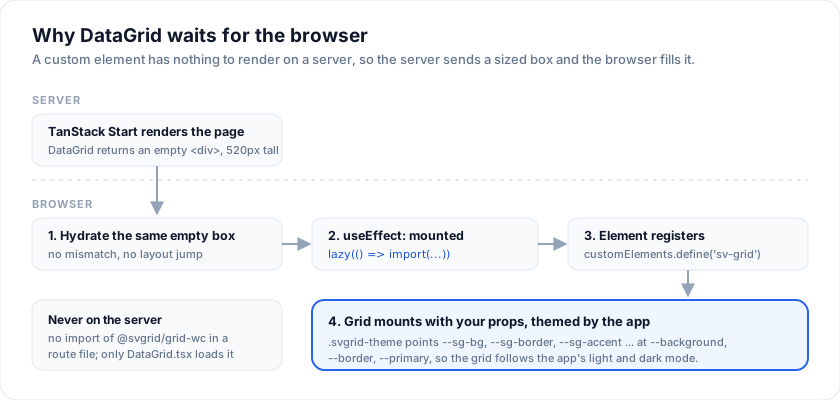
One file does the integration: DataGrid.tsx, which loads the grid in the
browser only. Lovable's default template since May 2026 is TanStack Start,
which renders pages on the server, and a custom element has nothing to render
there. With DataGrid in place, everything else is ordinary props.
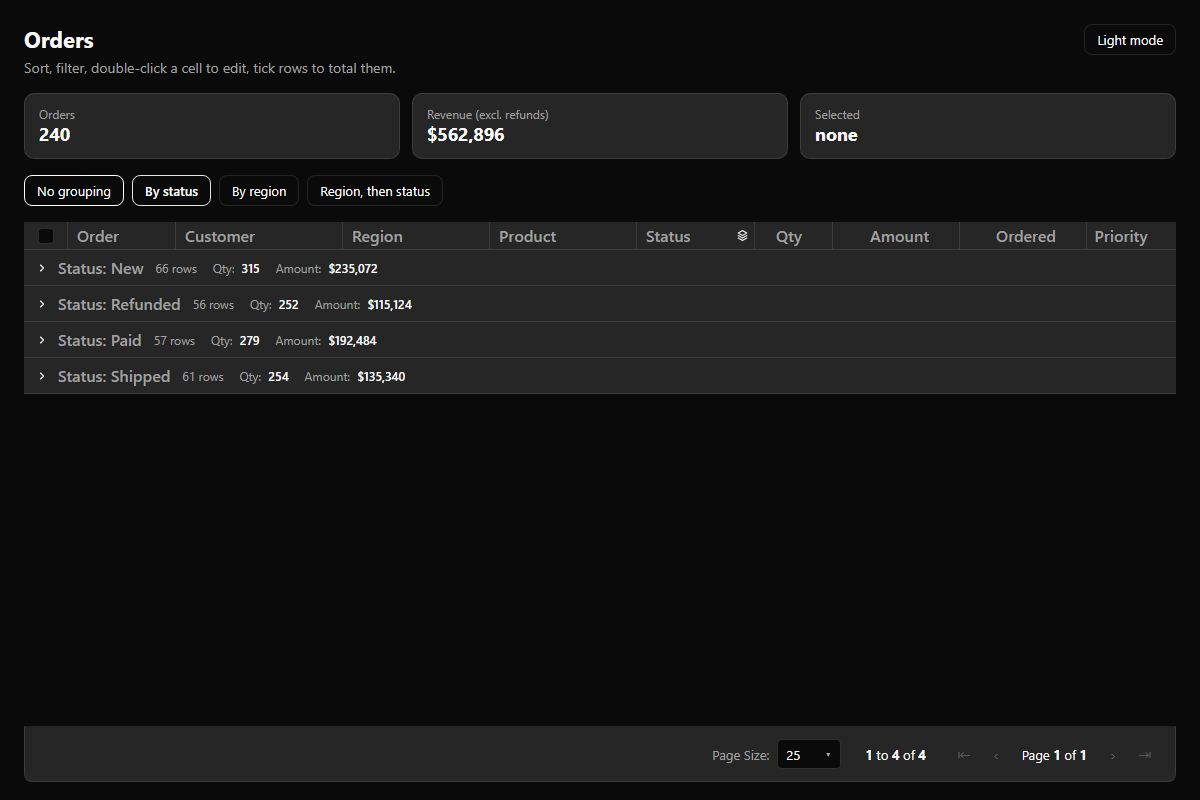
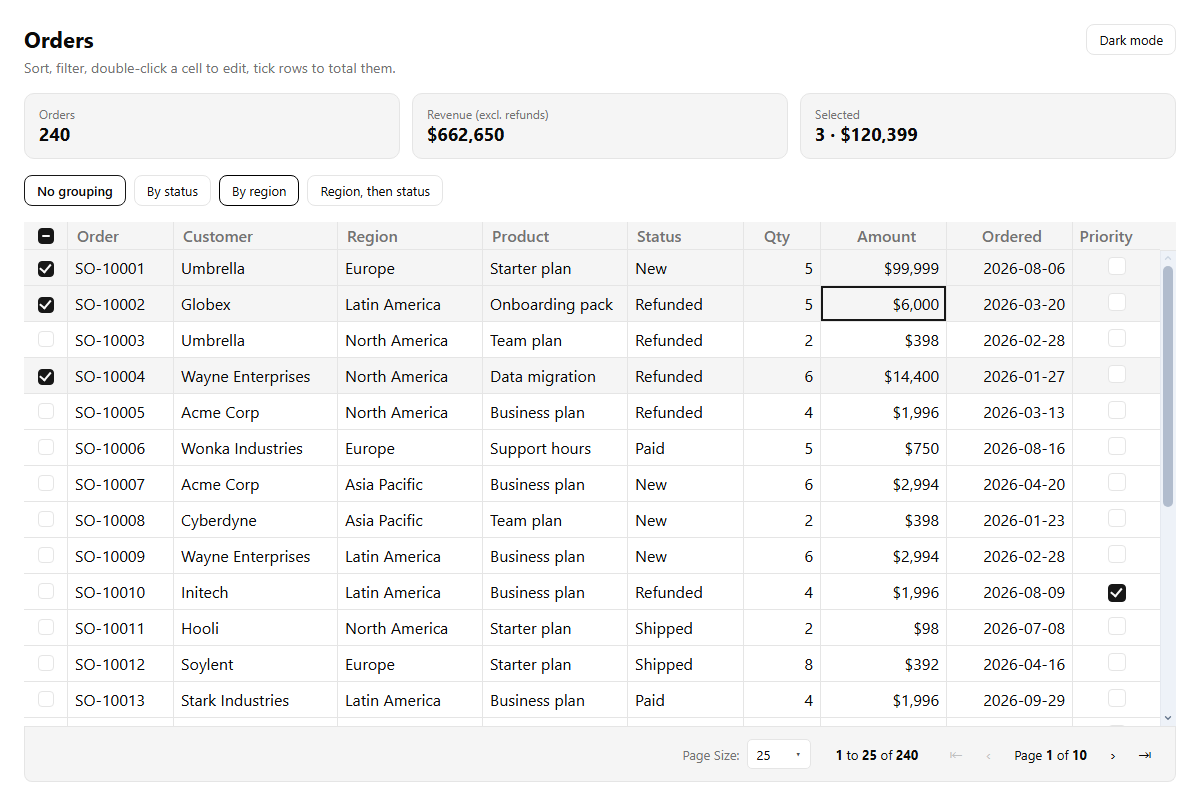
Start from a prompt
Lovable's Build with URL
opens a new project with a prompt already in the chat box. It waits for you
to press send. This prompt carries the DataGrid file and the theme block
verbatim, so the agent does not have to invent either:
Build an orders admin page with a data grid.

Use SvGrid through the npm package @svgrid/grid-wc; its React wrapper is @svgrid/grid-wc/react. Do not install @svgrid/grid, which is the Svelte version.

1. Create src/components/DataGrid.tsx with exactly this code. It loads the grid in the browser only, because the grid is a custom element and this app renders on the server:

import { forwardRef, lazy, Suspense, useEffect, useState, type CSSProperties } from 'react'
import type { SvGridHandle, SvGridProps } from '@svgrid/grid-wc/react'

const SvGrid = lazy(() => import('@svgrid/grid-wc/react').then((m) => ({ default: m.SvGrid })))

export type DataGridProps = Omit<SvGridProps, 'className' | 'style'> & {
  height?: CSSProperties['height']
  className?: string
  style?: CSSProperties
}

export const DataGrid = forwardRef<SvGridHandle, DataGridProps>(function DataGrid(
  { height = 480, className, style, ...props },
  ref,
) {
  const [mounted, setMounted] = useState(false)
  useEffect(() => setMounted(true), [])
  return (
    <div className={`svgrid-theme ${className ?? ''}`.trim()} style={{ height, ...style }}>
      {mounted && (
        <Suspense fallback={null}>
          <SvGrid ref={ref} {...props} />
        </Suspense>
      )}
    </div>
  )
})

2. Never import @svgrid/grid-wc anywhere except DataGrid.tsx.

3. Add this to the main CSS file, after the shadcn variables, so the grid uses the app's colors and dark mode. If the variables hold bare HSL parts (0 0% 100%), wrap each as hsl(var(--background)):

.svgrid-theme {
  --sg-bg: var(--background);
  --sg-fg: var(--foreground);
  --sg-muted: var(--muted-foreground);
  --sg-border: var(--border);
  --sg-header-bg: var(--muted);
  --sg-header-fg: var(--muted-foreground);
  --sg-bg-subtle: var(--muted);
  --sg-muted-bg: var(--muted);
  --sg-row-alt-bg: var(--background);
  --sg-row-hover-bg: var(--accent);
  --sg-selection-bg: var(--accent);
  --sg-input-bg: var(--background);
  --sg-input-border: var(--input);
  --sg-accent: var(--primary);
  --sg-on-accent: var(--primary-foreground);
  --sg-focus-ring: var(--ring);
  --sg-radius: calc(var(--radius) - 2px);
}

4. Build an Orders page with 200 sample orders (id, customer, region, status: New/Paid/Shipped/Refunded, quantity, amount, orderedOn, priority). Render:
<DataGrid height={560} data={orders} columns={columns} getRowId={(row) => row.id} sortable filterable editable pageable pageSize={25} showRowSelection groupable />
Columns look like { field: 'amount', header: 'Amount', width: 130, align: 'right', editorType: 'number', format: { type: 'currency', currency: 'USD' } }. Region and status use editorType 'select' with editorOptions; priority uses editorType 'checkbox'.

5. The grid never changes the data array. In onCellValueChange(e) update state with e.row, e.columnId and e.newValue. Show the total amount of the selected rows in a card above the grid; onRowSelectionChange(e) gives e.rows.

Docs written for agents: https://svgrid.com/docs/help/lovable.md
What Lovable writes from a prompt varies from run to run. The starter below is the tested reference: the same screen, with every file in place.
Try the starter without Lovable
Open the starter in StackBlitz · Source on GitHub
Lovable cannot import a GitHub repository, so the starter is a plain React +
Vite app you can run anywhere. It is laid out the way a Lovable project is
(src/components, src/lib, shadcn variables in src/index.css); the two
pieces to carry into Lovable are src/components/DataGrid.tsx and the
.svgrid-theme block.
Why the grid waits for the browser
The file, with its comments:
import { forwardRef, lazy, Suspense, useEffect, useState, type CSSProperties } from 'react'
import type { SvGridHandle, SvGridProps } from '@svgrid/grid-wc/react'

// Loaded on first render in the browser, never on the server.
const SvGrid = lazy(() => import('@svgrid/grid-wc/react').then((m) => ({ default: m.SvGrid })))

export type DataGridProps = Omit<SvGridProps, 'className' | 'style'> & {
  /** The grid fills this box, so the box needs a height. Default 480. */
  height?: CSSProperties['height']
  className?: string
  style?: CSSProperties
}

export const DataGrid = forwardRef<SvGridHandle, DataGridProps>(function DataGrid(
  { height = 480, className, style, ...props },
  ref,
) {
  // false on the server and on the first client render, so both emit the
  // same empty box: no hydration mismatch, no layout jump.
  const [mounted, setMounted] = useState(false)
  useEffect(() => setMounted(true), [])

  return (
    <div className={`svgrid-theme ${className ?? ''}`.trim()} style={{ height, ...style }}>
      {mounted && (
        <Suspense fallback={null}>
          <SvGrid ref={ref} {...props} />
        </Suspense>
      )}
    </div>
  )
})
Three things it settles:
- Server rendering. The
import typeline is erased at build time, and the real import runs insidelazy, which only fires in the browser.@svgrid/grid-wc3.0.35 and earlier threwcustomElements is not definedwhen a server imported it; later releases guard that, but the grid still has nothing to draw on a server, so loading it in the browser stays the right call. - Height. The grid fills its parent.
heightsizes the box on the server too, so the page does not jump when the grid arrives. - Props and the ref pass straight through to the wrapper. Every prop on
SvGrid in React works, and
refgives youapiandelementonce the grid has mounted.
Match the app's theme
The grid draws with --sg-* CSS custom properties. Lovable apps keep their
palette in shadcn variables (--background, --border, --primary), with
dark mode as a .dark class on <html>. The .svgrid-theme block in the
prompt points one set at the other, so the grid follows the app's colors and
switches with its dark mode; DataGrid puts the class on its box.
The block assumes variables that hold whole colors, such as
--background: oklch(1 0 0). Older shadcn projects store bare HSL parts,
--background: 0 0% 100%; there, write each value as
hsl(var(--background)).
To use one of the grid's own palettes instead, drop the block and set the tokens yourself; Theme and density lists them.
Ground the agent
Project knowledge
Project settings, Knowledge. Project knowledge holds up to 10,000 characters; this is well under:
## Tables and data grids

This project uses SvGrid for tables and data grids, through `@svgrid/grid-wc`
(MIT), the web-component build with a React wrapper. For any table that sorts,
filters, edits, pages, groups or holds many rows, render `<DataGrid>` from
`src/components/DataGrid.tsx` instead of writing a table component.

- Never import `@svgrid/grid-wc` or `@svgrid/grid-wc/react` anywhere except
  `DataGrid.tsx`. The grid is a custom element; `DataGrid` loads it in the
  browser only, which keeps server rendering (TanStack Start, Next.js) working.
- Do not install `@svgrid/grid`. It is the Svelte component; this is a React app.
- Features are boolean props, all off by default:
  `<DataGrid data={rows} columns={columns} sortable filterable editable pageable height={520} />`.
- Columns: `{ field, header, width, align, editorType, editorOptions, format, aggregate }`.
  `editorType` is `'text' | 'number' | 'date' | 'select' | 'checkbox'`;
  `format` is for example `{ type: 'currency', currency: 'USD' }`.
- The grid does not write into `data`. Apply an edit in `onCellValueChange`
  (`e.row`, `e.columnId`, `e.newValue`) and save it there.
- Selected rows arrive in `onRowSelectionChange` as `e.rows` (with `showRowSelection`).
- `pageSize` is the initial page size, read once when the grid mounts.
- A cell cannot render a React component. Use column `format` for numbers,
  currency and dates.
- Colors come from the `--sg-*` custom properties. The `.svgrid-theme` block
  in `src/index.css` points them at the shadcn variables, so the grid follows
  the app's theme and `.dark`. Do not restyle the grid with Tailwind classes.
- Docs written for agents: https://svgrid.com/llms.txt and
  https://svgrid.com/docs/help/web-components/react.md
It is the starter's AGENTS.md from the second heading down. Workspace
knowledge takes the same text if every project in the workspace should know it.
The MCP server as a chat connector
Connectors, Add custom, MCP server:
| Field | Value |
|---|---|
| Server name | svgrid |
| Server URL | https://mcp.svgrid.com/mcp |
| Authentication | No authentication |
Lovable offers custom MCP servers on all plans. A chat connector feeds the
agent while it builds and is never part of the published app. The server is
public and read-only; its search, get_api_reference and
get_example_source tools answer the agent's API questions, and
check_svgrid_code checks a snippet. The examples it returns are Svelte, so
the knowledge block above is what keeps the agent on DataGrid.
Troubleshooting
customElements is not defined during server rendering. Something
imports @svgrid/grid-wc outside DataGrid.tsx, usually a route file the
agent edited. Move the usage to <DataGrid>.
The grid area stays empty. Give DataGrid a height. Inside a flex
column, the box also needs min-height: 0 to shrink.
Columns show [object Object] or the grid is empty with no error. The
code renders the raw <sv-grid> element in React 18 or earlier, which sets
arrays as attributes. Use DataGrid; the wrapper assigns them as properties.
pageSize is ignored and the grid shows 10 rows a page. A bug in the
React wrapper of @svgrid/grid-wc 3.0.35 and earlier, which assigned props
after the grid had mounted. Update the package.
The agent installed @svgrid/grid. That is the Svelte component and will
not render in React. Remove it and keep @svgrid/grid-wc; the knowledge block
prevents a repeat.
Cells need a button or a badge. A cell cannot render a React component.
Column format covers numbers, currency and dates; for more, see
what crosses the boundary.
Frequently asked questions
Can I use a data grid component in Lovable?
Yes. Install @svgrid/grid-wc and render it through a DataGrid component
that loads the grid in the browser only. Sorting, filtering, inline editing,
row selection, grouping and paging are boolean props.
Does SvGrid work with TanStack Start server rendering?
Yes, through DataGrid. The server renders an empty box with the grid's
height and the browser loads the grid after hydration. Importing
@svgrid/grid-wc at the top of a route file throws
customElements is not defined on the server in versions 3.0.35 and earlier.
Will the grid match my Lovable app's shadcn theme?
Yes. The .svgrid-theme block points the grid's --sg-* tokens at the shadcn
variables, so it follows the app's palette and its .dark mode.
Is it free?
@svgrid/grid-wc is MIT and needs no key. Excel and PDF export, import and
pivot are in the paid @svgrid/enterprise package, which also runs from React.
See also
- SvGrid in AI app builders - Lovable and Bolt side by side
- SvGrid in React - every prop, event and example of the wrapper
- SvGrid in Bolt.new - the Svelte path
- MCP server - the hosted endpoint and its tools
- Web component limitations
Related articles
- Using SvGrid with Cursor, Zed, and Windsurf - Wire the SvGrid MCP server into Cursor, Zed, Windsurf, or Claude so AI assistants generate grid code that compiles on the first try - no invented props, no wrong import names.
- SvGrid vs TanStack Table - A Deep Dive - A concrete architectural comparison of SvGrid and TanStack Table's Svelte adapter - how each handles reactivity, rendering, and feature composition, with code that shows exactly where they diverge.
- SvGrid vs svelte-headless-table - A practical comparison of SvGrid and svelte-headless-table covering reactivity model, rendering approach, feature scope, and when each is the right choice for a Svelte 5 project.