SvGrid in AI app builders
Bolt.new and Lovable install npm packages, so either one can put SvGrid in the app it builds. What differs is the framework each builder writes, and that decides the package:
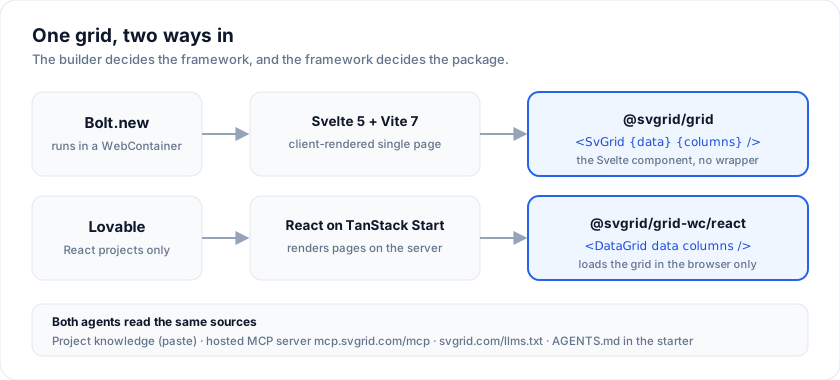
| Bolt.new | Lovable | |
|---|---|---|
| What it builds | Whatever you ask for, Svelte included | React, on TanStack Start since May 2026 |
| Package | @svgrid/grid |
@svgrid/grid-wc |
| Component | <SvGrid> |
<DataGrid>, one short file you add once |
| Starter | templates/bolt-svelte-grid |
templates/lovable-react-grid |
| Open a starter | bolt.new/~/github.com/... link |
No repo import; start from a prompt link |
| Watch out for | Vite 8 fails in the WebContainer | Server rendering: load the grid in the browser |
| Tutorial | SvGrid in Bolt.new | SvGrid in Lovable |
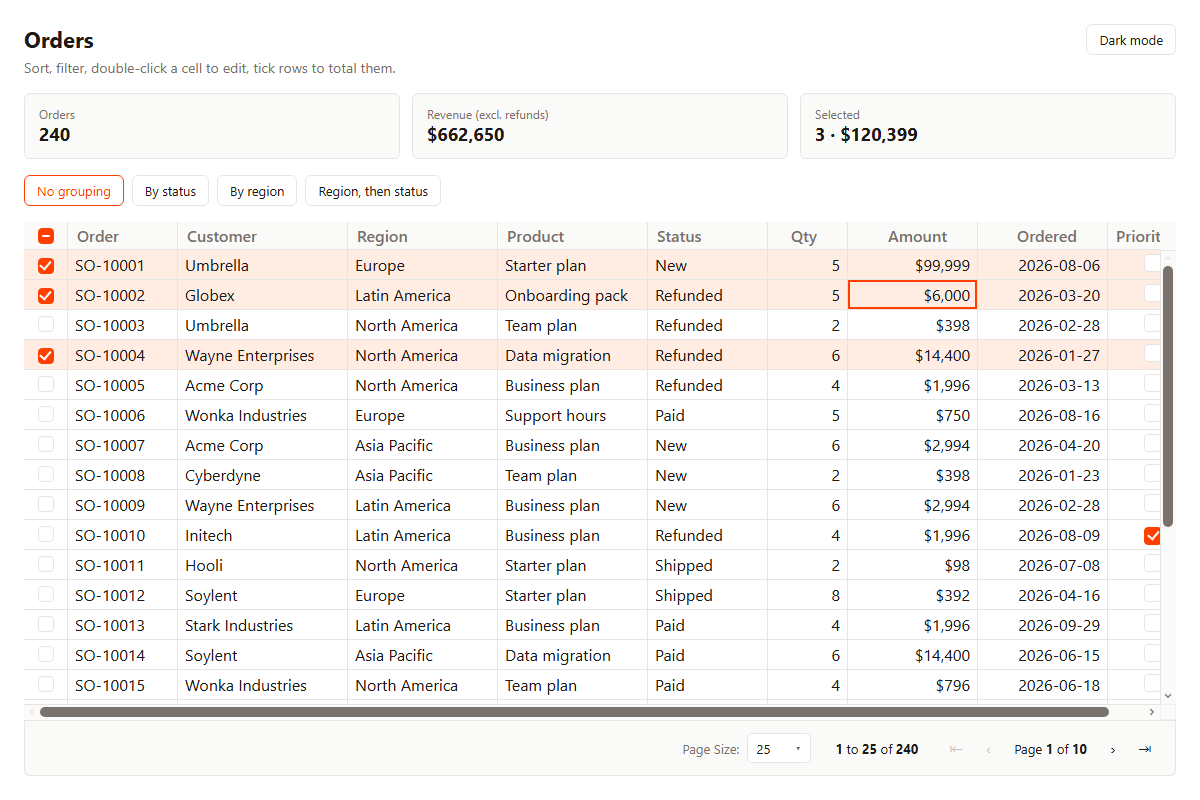
Both starters render the same orders screen: 240 rows, sorting, a filter per column, inline editing with select, number, date and checkbox editors, row selection with a running total, grouping and paging.
Give the agent the facts first
An agent that has not seen SvGrid writes its own <table>, or guesses at an
API. Each builder has the same three places to put the facts, and both
tutorials walk through them:
- Project knowledge. Persistent instructions for one project. Both tutorials have a block to paste, under Lovable's 10,000-character limit.
- The hosted MCP server,
https://mcp.svgrid.com/mcp. No install and no key, so it works as a custom connector in both builders. Its tools search the docs, return example source and the API reference, and check a snippet before the agent shows it to you. See MCP server. AGENTS.mdin the starter, which the agent reads along with the rest of the project.
Other builders and coding agents (Cursor, Claude Code, v0, Replit) take the
same inputs: LLM grounding covers llms.txt, the
Agent Skill and project files.
Frequently asked questions
Can I use SvGrid in Bolt.new or Lovable?
Yes. In Bolt, ask for a Svelte 5 app on Vite 7 and install @svgrid/grid, or
open the Bolt starter from GitHub. In Lovable, which builds React apps, install
@svgrid/grid-wc and render the grid through a DataGrid component that
loads it in the browser only.
Is it free?
Both packages are MIT, and everything the starters use (sorting, filtering,
editing, selection, grouping, paging) is in them. Excel and PDF export, import
and pivot are in @svgrid/enterprise, a paid add-on.
Why not use the same package in both?
@svgrid/grid is a Svelte 5 component and Lovable builds React apps.
@svgrid/grid-wc wraps the same grid as a custom element with a React
component on top, so a React app gets the same grid without a Svelte build.
Does a Bolt or Lovable app need a license key?
No. @svgrid/grid and @svgrid/grid-wc do not read a license key. Only
@svgrid/enterprise does.
See also
- SvGrid in Bolt.new - the Svelte path, step by step
- SvGrid in Lovable - the React path, step by step
- SvGrid in React - every prop and event of the wrapper
- MCP server - hosted endpoint, tools, other clients
Related articles
- Using SvGrid with Cursor, Zed, and Windsurf - Wire the SvGrid MCP server into Cursor, Zed, Windsurf, or Claude so AI assistants generate grid code that compiles on the first try - no invented props, no wrong import names.
- SvGrid vs TanStack Table - A Deep Dive - A concrete architectural comparison of SvGrid and TanStack Table's Svelte adapter - how each handles reactivity, rendering, and feature composition, with code that shows exactly where they diverge.
- SvGrid vs svelte-headless-table - A practical comparison of SvGrid and svelte-headless-table covering reactivity model, rendering approach, feature scope, and when each is the right choice for a Svelte 5 project.