AI assistant
Bring a language model into your grid with helpers that stay strictly model-agnostic: natural-language filter, smart fill, summarise, classify, chart-this, find anomalies, and natural-language export. Built in and free in @svgrid/grid - no license key, no separate package. They ship no model client and do nothing until you register a provider, so they add nothing to your bundle unless you import them.
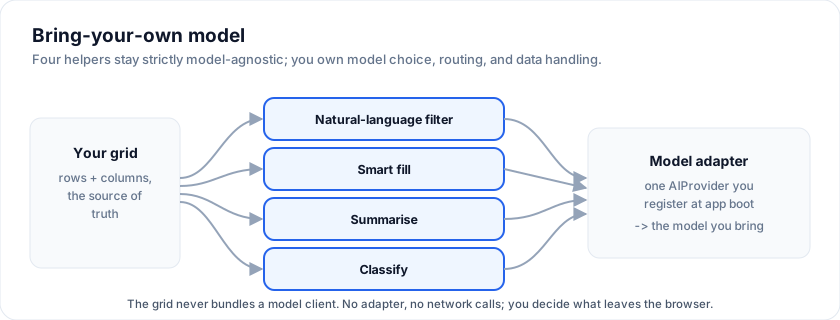
Run all four helpers live - the demo below is wired to the bundled
deterministic mockAIProvider, so no keys required:
What it is
Import the helpers from @svgrid/grid and call them with your grid api
(the one you get from onApiReady):
import {
  aiFilter, aiSmartFill, aiSummarize, aiClassify, aiExport, aiFindAnomalies,
} from '@svgrid/grid'

aiFilter(api, query, opts?)        // NL query -> filter + sort plan
aiSmartFill(api, opts)             // examples -> proposed column values
aiSummarize(api, opts)             // row / selection / group / all -> text + bullets
aiClassify(api, opts)              // free-text cells -> bucketed labels
aiExport(api, query, opts?)        // NL query -> filter + group + format, then export*
aiFindAnomalies(api, opts?)        // scan a slice for outliers / bad values
Every call routes through one AIProvider you register at app boot.
The grid never bundles a model client - you keep full control of model
choice, routing, and data handling.
*
aiExportplans the export for free; writing the enterprise formats (xlsx / pdf) uses the@svgrid/enterpriseexport engine when it is installed, otherwise it returns the plan without downloading a file.
When to use it
- NL filter is the highest-leverage feature: it replaces a dozen per-column filter operators with one search box for analyst users.
- Smart fill is the killer feature for spreadsheet-style entry: type one or two examples in a column, accept the rest with one click.
- Summarise is for dashboards where the user wants a "what's interesting here?" paragraph without clicking through every cell.
- Classify is for triage workflows where free-text rows need a consistent bucket label before downstream automation runs.
If you don't need natural-language anywhere, just don't import these helpers - they tree-shake away and cost nothing.
Setting up the provider
The grid talks to your model through a single async function. Wire it once at app startup:
import { setAIProvider, type AIProvider } from '@svgrid/grid'

const myProvider: AIProvider = async ({ prompt, responseFormat, signal, task, maxOutputTokens }) => {
  const r = await fetch('/api/ai', {
    method: 'POST',
    headers: { 'content-type': 'application/json' },
    body: JSON.stringify({ prompt, responseFormat, task, maxOutputTokens }),
    signal,
  })
  if (!r.ok) throw new Error(`AI provider returned ${r.status}`)
  return r.text()
}

setAIProvider(myProvider)
A few design points worth knowing:
responseFormat: 'json'is whataiFilter,aiSmartFill,aiSummarize, andaiClassifyall request. Tell your model to return strict JSON only; the gridJSON.parses the result. (A common resilience trick: the grid strips a single markdown code fence automatically so models that wrap JSON in```json ... ```still parse cleanly.)signalis forwarded so consumers can cancel in-flight calls when the user moves on.taskis a tag ('filter' | 'smart-fill' | 'summarize' | 'classify')- useful when you want to route different tasks to different models (a cheap one for filter, a stronger one for summarise).
maxOutputTokensis a soft hint, also useful for cost routing.
For testing or for demo purposes, the package ships a deterministic
mockAIProvider that returns plausible canned shapes per task. Wire it
in development:
import { setAIProvider, mockAIProvider } from '@svgrid/grid'
setAIProvider(mockAIProvider)
1. Natural-language filter
Translate a sentence into a filter + sort plan against the current grid's columns. The grid embeds the column schema (names, types, sample values) in the prompt so the model picks real field names rather than hallucinating.
const plan = await aiFilter(api, 'accounts losing momentum in EMEA, by NPS')
// {
//   filters: [
//     { field: 'region', operator: 'equals', value: 'EMEA' },
//     { field: 'nps',    operator: 'lessThan', value: '30' },
//   ],
//   sort: [{ field: 'nps', desc: false }],
//   rationale: 'EMEA region, low NPS, sorted ascending.',
// }
By default aiFilter returns the plan but does not apply it to the
grid - that lets you show a preview ("here's what I'd do, accept?")
before committing. Pass { apply: true } to apply directly:
await aiFilter(api, 'big EMEA deals', { apply: true })
Hallucination guard
If the model invents a column name that doesn't exist in your data, the
helper silently drops that clause rather than passing it to setFilter,
which would otherwise throw. This is intentional: you'd rather lose a
clause than crash the page.
2. Smart fill
User provides one or two worked examples for a column; the grid asks the model to propose values for the remaining empty cells.
const result = await aiSmartFill(api, {
  field: 'tier',
  examples: [
    { input: { company: 'Northwind' }, output: 'enterprise' },
    { input: { company: 'Helios' },    output: 'growth' },
  ],
})
// result.predictions: [{ rowIndex, value, confidence }, ...]
You decide what to do with the predictions - accept-all, accept-per-cell,
write them to a proposedTier field on the row data and render a "✓"
button in the cell, etc. The example demo does per-cell accept with a
confidence-coloured pill.
If targetRowIndices is omitted, the helper auto-selects rows whose
current field value is null, undefined, or ''.
3. Summarise
Drop a slice of the grid into the model and ask for a one-paragraph + bulleted summary. Four target modes:
await aiSummarize(api, { target: { kind: 'all' } })
await aiSummarize(api, { target: { kind: 'row', rowIndex: 5 } })
await aiSummarize(api, { target: { kind: 'selection', rowIndices: [1,2,3] } })
await aiSummarize(api, { target: { kind: 'group', field: 'region', value: 'EMEA' } })
For large slices the grid samples rows uniformly so the prompt stays under a sensible token budget. The response shape:
{
  text: 'One paragraph...',
  bullets: ['punchy bullet 1', 'punchy bullet 2', ...],
  highlightedFields: ['arr', 'nps'],   // columns the summary leans on
}
The optional question parameter biases the summary toward the columns
that answer the question.
The read-only helpers (aiSummarize, aiClassify, aiSmartFill,
aiFindAnomalies, and aiFilter without apply) only read rows, so they
also take an AIRowSource: any object with getData(). Use it to summarize
data that is not on screen in a grid, such as a chat answering questions
about an account list:
import { aiSummarize, type AIRowSource, type TableFeatures } from '@svgrid/grid'

type Account = { name: string; region: string; arr: number }
declare const accounts: Account[]

const source: AIRowSource<TableFeatures, Account> = { getData: () => accounts }
const { text } = await aiSummarize(source, { target: { kind: 'all' }, question: 'How is EMEA doing?' })
4. Classify
Bucket free-text cells into one of a known set of labels:
const r = await aiClassify(api, {
  inputField: 'notes',
  outputField: 'sentiment',
  classes: ['at-risk', 'expanding', 'steady'],
  classDescriptions: {
    'at-risk':   'churn signals, escalations, lost champion',
    'expanding': 'new modules, more seats, additional regions',
    'steady':    'no signals in either direction',
  },
})
The helper filters out any predictions whose value is not in classes,
so downstream code can trust the output is a clean enum.
5. Natural-language export
Describe an export in plain English; the model returns a
{ format, filters, sort, groupBy } plan, which is applied to the grid and
handed to exportData:
const plan = await aiExport(api, 'export EU orders from Q2 as a grouped PDF by country')
// -> { format: 'pdf', filters: [...], groupBy: ['country'], rationale: '...' }
| Option | Type | Default | Notes |
|---|---|---|---|
apply |
boolean |
false |
Also apply the filter/sort/grouping to the grid view. Off by default so the export never disturbs the grid. |
run |
boolean |
true |
Download the file. Set false to preview the plan first. |
filename |
string |
'export' |
Base name (no extension). |
The export is self-contained: it computes its own rows from the plan
(filter + sort + group applied to the full dataset), so the download is correct
regardless of the grid's current view, and the grid is left untouched unless
you pass apply: true. It reuses the same hallucination guard as filter
(unknown column names are dropped) and clamps format to a supported value
(default xlsx). Preview before committing with { run: false }, show the
rationale, then re-run.
6. Find anomalies
Scan a slice (all / selection / group) for outliers and inconsistent values:
const { anomalies, summary } = await aiFindAnomalies(api, { target: { kind: 'all' } })
// anomalies: [{ rowIndex?, field?, value?, reason, severity: 'low'|'medium'|'high' }]
rowIndex is relative to the scanned slice. Pairs naturally with export -
find the odd rows, then export just those.
Subscribing the grid to predictions
Cell snippets cache their output by (row, column). If you store
predictions in a separate state ref - e.g. a Map<rowIndex, value>
that the snippet looks up at render time - the grid won't know to
re-render when that map changes. Write the proposal onto the row
itself instead:
async function runClassify() {
  const result = await aiClassify(api, { /* ... */ })
  const byIdx = new Map(result.predictions.map((p) => [p.rowIndex, p]))
  // Re-assign the data array - Svelte 5 reactivity picks this up and the
  // grid re-renders every visible cell.
  accounts = accounts.map((a, i) => {
    const p = byIdx.get(i)
    return p ? { ...a, proposedSentiment: p.value, sentimentConfidence: p.confidence } : a
  })
}
Then your cell snippet reads props.row.proposedSentiment and re-renders
exactly when expected.
No license gate
The AI helpers are built into the free @svgrid/grid and are never gated -
no key, no watermark, no nudge. The only license interaction is aiExport's
final write step: emitting an enterprise format (xlsx / pdf) goes through
@svgrid/enterprise's export engine, which carries the usual enterprise
watermark until your license key is set. Planning the export, and every
other AI helper, is unconditionally free.
Frequently asked questions
What AI features does SvGrid have?
The @svgrid/grid package ships built-in, free, model-agnostic AI helpers:
natural-language filter, smart fill, summarise, classify, chart-this, find
anomalies, and natural-language export. They run through a bring-your-own-model
adapter, so you wire in your own LLM endpoint.
Which LLM does SvGrid use?
None by default - it is model-agnostic. You supply an adapter for OpenAI, Anthropic Claude, a local model, or anything else. The demo ships a mock provider so you can evaluate the flow without an API key.
Is my grid data sent to an AI provider?
Only if you wire one up and invoke a helper. SvGrid itself makes no network calls; the AI helpers send exactly the prompt you construct to the adapter you configure, so you control what leaves the browser.
More examples
NL filter bar (AI)
Type "EMEA active over 50k" - the AI Platform parses your phrase into api.setFilter / setSort / topN calls. Demo ships a rule-based fallback so you can evaluate without a key; production wiring needs an AI Platform key.
AI: chart this
Open the Chart panel, press the AI button, and describe the chart in words - the model reads the grid's column schema and returns a ChartSpec the built-in panel renders. Ships with a deterministic mock provider; swap in your own via setAIProvider.
It can ask for any type the panel builds from a dimension, a measure and an optional split: bar, line, area, pie, treemap, funnel, waterfall, radar, heatmap, box plot, gauge, calendar and sankey. Scatter, candlestick and OHLC are deliberately out - they need a second (or a fourth) measure that a chart plan cannot express, so asking for one would return a plan the panel draws as an empty frame.
Every plan is validated against the real schema before it is applied, including its shape: a heatmap or sankey without a split, or a calendar whose dimension is not a date column, falls back to a bar rather than rendering nothing.
The Explain button beside it runs aiExplainChart(api) on the active chart
(or a spec you pass): the prompt is grounded on chartSummary(spec), the
plain-language reading the chart hands to screen readers, plus a compact
table of the first 50 categories, so the model comments on numbers it was
given rather than on a picture. It returns { summary, insights }, and
enableAiCharting(api) registers both handlers.
const { summary, insights } = await aiExplainChart(api)
// summary:  'Revenue rises 42% from 1.2k at Jan to 1.7k at Dec, peaking at 2.0k at Aug.'
// insights: ['The growth is front-loaded: ...', 'Compare the peak against ...']
AI export + anomaly scan
Natural-language export: describe an export in English and the AI provider turns it into a filter + group + format plan, applies it, and downloads. Plus a one-click anomaly scan. Runs on the bundled mock model.
Open the live example: AI export + anomaly scan (Data Export & Import)
See also
- Demo 21 - Export + Print - the
Enterprise export engine that
aiExportwrites through when it is installed. - Demo 51 - AI assistant - the full demo this page documents, with all four helpers wired to the mock provider.
Live examples
- AI assistant - NL filter / smart-fill / summarise / classify driven by a BYO model adapter. Runs end-to-end against the bundled mock provider so no API key is required.
- NL filter bar (AI) - Type "EMEA active over 50k" - the AI Platform parses your phrase into api.setFilter / setSort / topN calls. Demo ships a rule-based fallback so you can evaluate without a key; wire your own model with setAIProvider.
- AI: chart this - Open the Chart panel, press the AI button, and describe the chart in words - the model reads the grid's column schema and returns a ChartSpec the built-in panel renders. Ships with a deterministic mock provider; swap in your own via setAIProvider.
- AI export + anomaly scan - Natural-language export: describe an export in English and the AI provider turns it into a filter + group + format plan, applies it, and downloads. Plus a one-click anomaly scan. Runs on the bundled mock model.
- Export + Print - Enterprise feature pack: download to Excel, PDF, CSV, TSV, HTML, or open a printable view in a new window.