Testing a Studio app
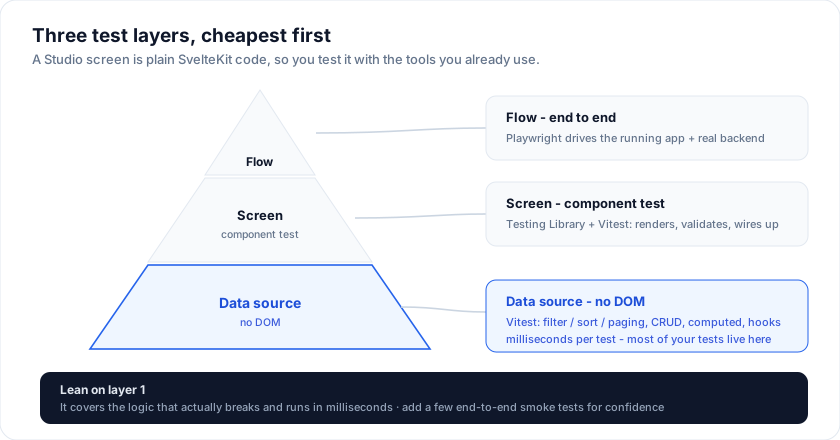
A Studio screen is plain SvelteKit code, so you test it with the tools you already use. Three layers, cheapest first: the data source (no DOM), the screen (a component test), and the flow (end to end).
1. The data source (fastest)
Every backend is a plain object implementing ServerDataSource,
so you can exercise read, filter, sort, and CRUD directly - no DOM, no database.
Use the in-memory source for a deterministic fixture:
import { describe, it, expect } from 'vitest'
import { createInMemoryDataSource } from '@svgrid/enterprise'
import { customersSchema, type CustomersRow } from '$lib/customers.schema'

describe('customers data', () => {
  const source = () => createInMemoryDataSource<CustomersRow>([
    { id: '1', name: 'Ada', email: '[email protected]', tier: 'enterprise', mrr: 1200, active: true },
    { id: '2', name: 'Alan', email: '[email protected]', tier: 'pro', mrr: 240, active: false },
  ], customersSchema)

  it('filters + sorts like the grid asks', async () => {
    const page = await source().getRows({
      startRow: 0, endRow: 25, pageIndex: 0, pageSize: 25,
      sortModel: [{ id: 'mrr', desc: true }],
      filterModel: { columns: { active: { operator: 'equals', value: 'true' } } },
    })
    expect(page.rowCount).toBe(1)
    expect(page.rows[0]!.name).toBe('Ada')
  })

  it('creates and deletes', async () => {
    const s = source()
    const created = await s.createRow!({ name: 'Grace', email: '[email protected]', tier: 'pro', mrr: 900, active: true })
    await s.deleteRow!(created.id)
  })
})
It is the same ServerRequest shape the grid sends at runtime, so a passing test
is a screen that behaves.
Business logic
If your schema has computed fields or hooks, wrap the
source in withEntityRules and assert them the same way - computed values appear
on read, and a validate hook or beforeCreate runs on write:
import { withEntityRules } from '@svgrid/enterprise'

const source = withEntityRules(createInMemoryDataSource(seed, orderSchema), orderSchema)
const [row] = (await source.getRows(fullPageRequest)).rows
expect(row.total).toBe(row.qty * row.price)   // computed on read
2. The screen (component test)
Mount the page and assert the rendered rows with
@testing-library/svelte.
Point it at an in-memory source so there is no network:
import { render, screen } from '@testing-library/svelte'
import { expect, it } from 'vitest'
import CustomersPage from '../routes/customers/+page.svelte'

it('renders the seeded customers', async () => {
  render(CustomersPage)
  expect(await screen.findByText('Ada Lovelace')).toBeInTheDocument()
})
Run component tests under Vitest's browser mode (or jsdom) - the grid virtualizes, so browser mode gives the most faithful layout.
3. The flow (end to end)
Drive the real app with Playwright: create a row, edit it, delete it, and assert the grid.
import { test, expect } from '@playwright/test'

test('create, edit, delete a customer', async ({ page }) => {
  await page.goto('/customers')
  await expect(page.getByText('Ada Lovelace')).toBeVisible()

  await page.getByRole('button', { name: '+ New customer' }).click()
  await page.getByLabel('Name').fill('Katherine Johnson')
  await page.getByLabel('Email').fill('[email protected]')
  await page.getByRole('button', { name: 'Save' }).click()
  await expect(page.getByText('Katherine Johnson')).toBeVisible()
})
For CRUD against a real database, point the run at a disposable schema (a test
database, or a transaction rolled back in afterEach) so runs stay isolated.
What to test where
| Layer | Tool | Good for |
|---|---|---|
| Data source | Vitest | filter / sort / paging logic, CRUD, computed fields, hooks |
| Screen | Testing Library + Vitest | the page renders, the form validates, the edit flow wires up |
| Flow | Playwright | the whole thing against a running app + real backend |
Most of the value is in layer 1 - it is milliseconds per test and covers the logic that actually breaks. Add a few layer-3 smoke tests for confidence.
See also
- In-memory - the fixture source these tests use
- Business logic - computed fields + hooks to assert
- Accessibility - and how to test it with axe
Related articles
- SvGrid Studio Tips and Tricks: Build Svelte Data Apps, Fast - Practical SvGrid Studio tips - AI app generation, a designer that emits real SvelteKit, schema-driven edit forms, code-behind with ctx.grid, production auth/data/deploy toggles, and real data-source binding - each with a snippet.
- Documenting SvGrid in Storybook - Set up a living component catalog for your SvGrid configurations - bounded containers, reactive story args, and play functions that drive the API.
- Smart UI Wins Gold in the 2025 Visual Studio Magazine Readers' Choice Awards - Smart UI, the web-components suite from the team behind SvGrid, earned Gold in the 2025 Visual Studio Magazine Readers' Choice Awards. Here is what that vote actually tells you about the codebase you are running.