Keep a base in a database
A base can keep its records in your database instead of the page. Give a
table a source and <SvBase> loads the records from it when it opens, then
writes every change back: a cell edit, a pasted range, a new record, a
deleted one, a link made from either side. Postgres, MySQL, SQLite, Supabase
and any REST API work the same way, because each is reached through the
data source contract the grid already uses.
The demo above is SvGrid Base on a real Postgres database running in the
page (PGlite). Change a status and the log shows the UPDATE it ran.
How it fits together
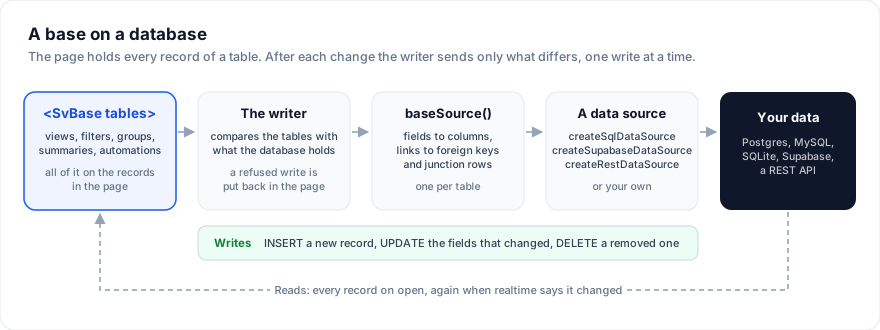
- The page holds every record of a table. Views, filters, groups,
summaries, colors and automations all work on those records, so they stay
instant. A table loads up to 10,000 records by default (
limit). - The writer sends what changed. After each change it compares the
tables with what the database holds and queues an
INSERTfor a new record, anUPDATEwith only the fields that changed, or aDELETE. The writes go one at a time, in order, so an update never overtakes the insert of its own record. - A refused write goes back. When the database says no (a constraint, a row level security policy, a network error), the cell returns to what the database holds, the end of the tab bar says why, and a notice shows the message.
- Changes made elsewhere come in. With
realtime, the base reads a table again when someone else changed it and takes what moved, without writing anything back.
Give a table a source
baseSource wraps any data source:
import { baseSource, type BaseTable } from '@svgrid/enterprise/base'
import { createRestDataSource } from '@svgrid/enterprise'

const tasks: BaseTable = {
  id: 'tasks',
  name: 'Tasks',
  primaryField: 'name',
  data: [],
  columns: [
    { field: 'name', header: 'Task', fieldType: 'text' },
    { field: 'status', header: 'Status', fieldType: 'singleSelect', fieldProps: { options: [{ value: 'Todo' }, { value: 'Done' }] } },
  ],
  source: baseSource(createRestDataSource({ url: '/api/tasks' })),
}
<script lang="ts">
  import { SvToaster } from '@svgrid/grid'
  import { SvBase, enableBase, type BaseTable } from '@svgrid/enterprise/base'

  enableBase()
  let { tables }: { tables: BaseTable[] } = $props()
</script>

<SvBase bind:tables editable />
<SvToaster />
data can start empty: the base fills it. <SvToaster /> shows the notice
when a write is refused; leave it out and the tab bar still says so.
The data sources that ship with @svgrid/enterprise:
| Source | Talks to | Tutorial |
|---|---|---|
createSupabaseDataSource |
Supabase (PostgREST), from the browser | Build a base on Supabase |
createSqlDataSource |
Any SQL database, through an execute(sql, params) you write |
Build a base on Postgres |
createKitDataSource |
Your SvelteKit endpoint, which runs createSqlDataSource on the server |
Build a base on Postgres |
createRestDataSource |
A JSON API: GET, POST, PATCH, DELETE |
Build a base on your API |
createInMemoryDataSource |
An array, for tests and prototypes |
Your own source works too: an object with getRows, createRow,
updateRow and deleteRow (the grid's ServerDataSource).
Link fields
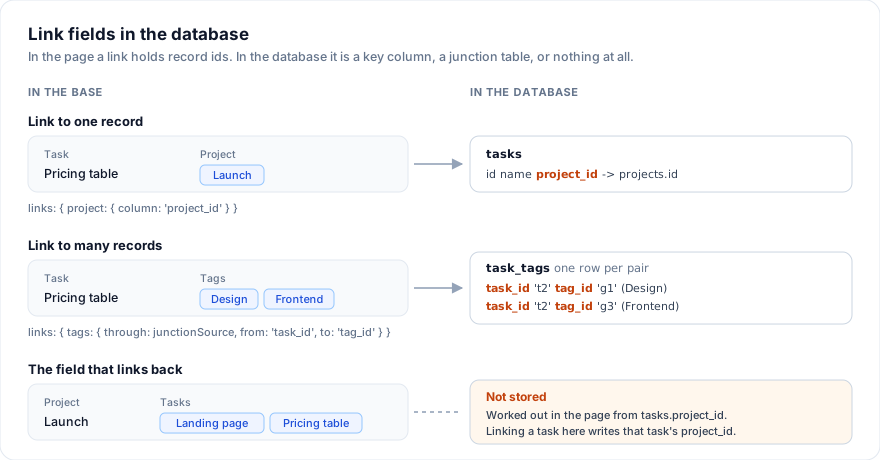
In the page a link field holds record ids. links says how each one is kept:
import { baseSource } from '@svgrid/enterprise/base'
import { createRestDataSource } from '@svgrid/enterprise'

const taskTags = createRestDataSource({ url: '/api/task_tags' })

const source = baseSource(createRestDataSource({ url: '/api/tasks' }), {
  links: {
    // A link to one record: the column with the linked record's id.
    project: { column: 'project_id' },
    // A link to many records: a junction table, one row per pair.
    tags: { through: taskTags, from: 'task_id', to: 'tag_id' },
  },
})
The field that links back (a project's Tasks, when tasks have a Project
field) is worked out in the page from the other side and never stored. Link
a task from the project's side and the base writes that task's
project_id. A link field that is neither in links nor the other side of
one is written as it is, a list of ids, which suits a Postgres text[] or a
jsonb column.
Record ids
A new record gets an id in the page at once, so it can be edited and linked before the database answers. By default that id is its key in the database too: give the key column a text type.
When the database makes the key (a serial column, a uuid with a default),
set serverIds: true. The record is inserted without the page's id, and the
writer keeps the page id for the grid and translates to the database id for
every later write and every link that points at the record.
What is not written
Fields the page works out are never sent: formula, lookup, rollup, count and
button fields, and the field that links back. Add any other field to skip
to keep it in the page only.
Changes made elsewhere
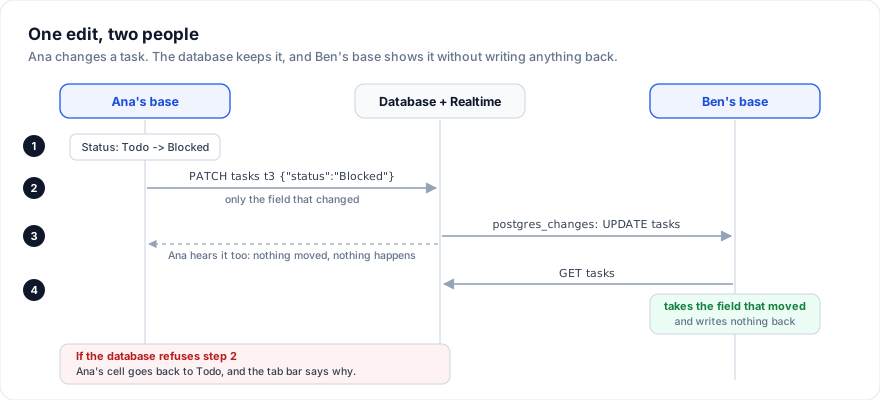
realtime takes a function that calls onChange when the table changed and
returns a function that stops listening. With Supabase:
import { baseSource } from '@svgrid/enterprise/base'
import {
  createSupabaseDataSource,
  createSupabaseRealtime,
  type EntitySchema,
  type SupabaseClientLike,
  type SupabaseRealtimeClientLike,
} from '@svgrid/enterprise'

// Your supabase-js client: createClient(url, anonKey).
declare const client: SupabaseClientLike & SupabaseRealtimeClientLike
declare const schema: EntitySchema

const source = baseSource(createSupabaseDataSource({ client, table: 'tasks', schema }), {
  realtime: (onChange) => createSupabaseRealtime({ client, table: 'tasks', onChange }),
})
Any other feed works the same way: a WebSocket message, a server-sent event, a poll.
Status and errors
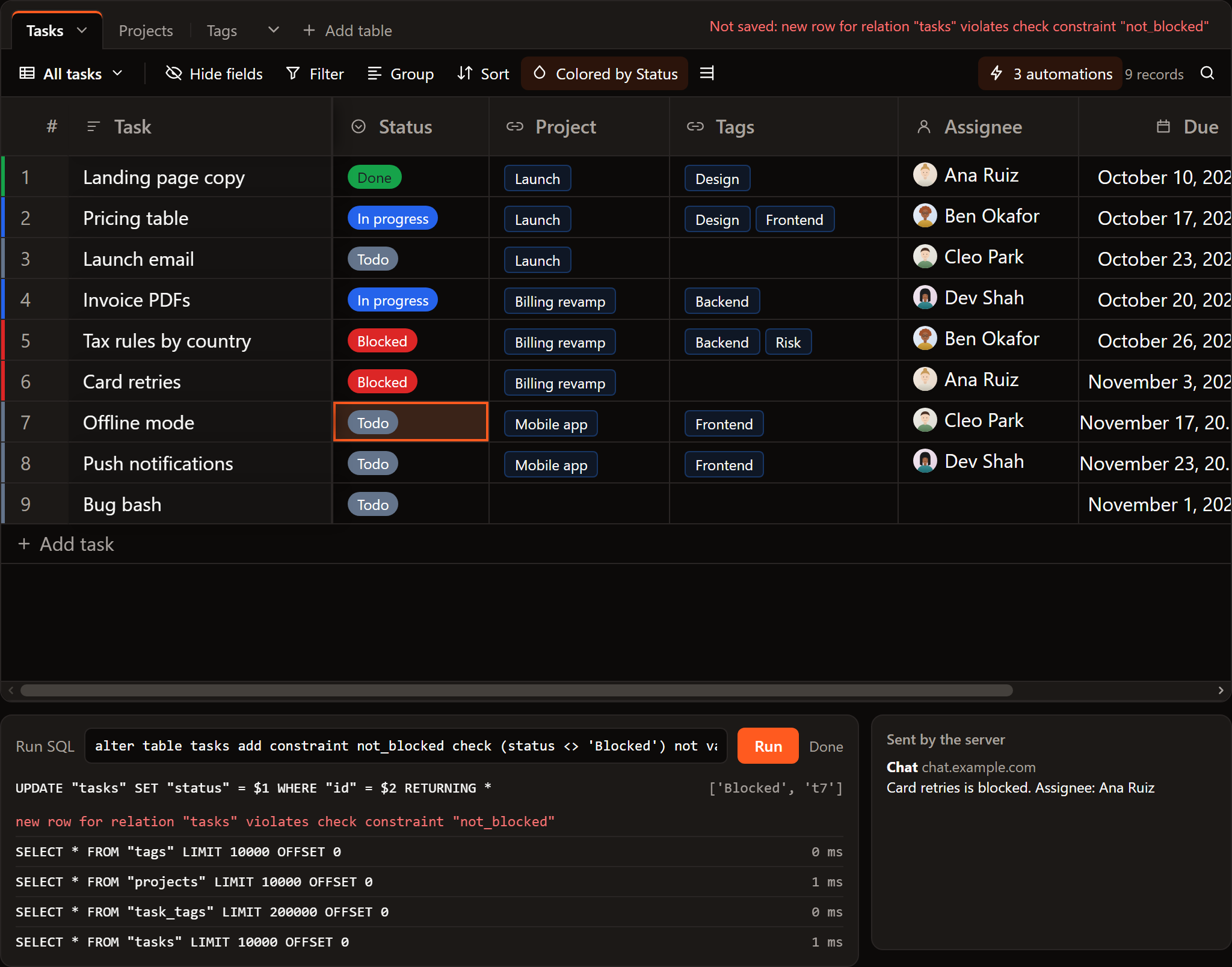
The end of the tab bar says what the base is doing:
| It reads | When |
|---|---|
| Loading records... | The tables are loading |
| Saving... | Writes are on their way |
| All changes saved | The last write went through |
| Not saved: message | A write was refused; the cell went back |
| Tasks: the first 10,000 records | A table has more records than limit |
Options
baseSource(dataSource, options):
| Option | Default | What it does |
|---|---|---|
links |
none | How link fields are stored: { column } or { through, from, to } |
columns |
none | Column names that differ from field names: { dueDate: 'due_date' } |
idField |
'id' |
The key column |
serverIds |
false |
The database makes the key of a new record |
realtime |
none | Hear of changes made elsewhere |
skip |
none | Fields kept in the page only |
limit |
10000 |
The most records a table loads |
Build a base from your database
baseTablesFromSchemas makes the tables from your database's own
description of them: a number column becomes a number field, an enum a
single select with its values, a foreign key a link with a field in the
other table that links back. Read the descriptions with
introspectSupabaseTable, introspectDatabase or introspectOpenApi, or
write them out:
import { baseTablesFromSchemas } from '@svgrid/enterprise/base'
import { createRestDataSource, type EntitySchema } from '@svgrid/enterprise'

const schemas: EntitySchema[] = [
  {
    name: 'deals',
    fields: [
      { field: 'id', type: 'text', primaryKey: true },
      { field: 'title', type: 'text' },
      { field: 'stage', type: 'enum', options: [{ value: 'Open', label: 'Open' }, { value: 'Won', label: 'Won' }] },
      { field: 'company_id', type: 'relation', relation: { entity: 'companies', labelField: 'name' } },
    ],
  },
  { name: 'companies', fields: [{ field: 'id', type: 'text', primaryKey: true }, { field: 'name', type: 'text' }] },
]

const tables = baseTablesFromSchemas(schemas, (schema) => createRestDataSource({ url: `/api/${schema.name}`, schema }))
The result is ordinary BaseTable objects: change a field's type, add views,
rename a table. Build a base on your API does this end to end.
The other way round, baseToSql(tables) writes a base as Postgres SQL:
tables, foreign keys, the tables behind links to many, and the records, with
svgrid: comments for the field settings, views and automations that SQL
has no type for. The tables it makes have text keys with a
gen_random_uuid() default, so a record added later gets its key from the
database. See Take a base to a database.
When to use the grid instead
A base works on every record of a table in the page, which is right for the
thousands of records a team keeps in a tracker, a CRM or an inventory. For a
table of millions of rows, use <SvGrid> with the
server row model, which sorts, filters and
groups in the database and loads only what is on screen.
Related articles
- A Svelte Data Grid with SvelteKit and Supabase - Wire SvGrid to a Supabase Postgres backend with server-side pagination, sorting, and filtering - keeping credentials on the server and queries fast with proper indexing.
- A Live Svelte Data Grid with Firebase Firestore - Wire Firestore onSnapshot to SvGrid in Svelte 5 - reactive listeners, query-driven sort and filter, cursor pagination, and the subtle cleanup detail most implementations get wrong.
- A Svelte Data Grid with PocketBase - Wire SvGrid to PocketBase for server-side paging, sorting, and filtering via getList, plus live row updates through PocketBase realtime subscriptions.