Build a base on your API
When your data sits behind an API you already have, a base can use it as it
is: it reads a table with one GET, and writes each change with POST,
PATCH or DELETE. This tutorial builds a small CRM, Deals, Companies and
Contacts, from the API's own description of its tables.
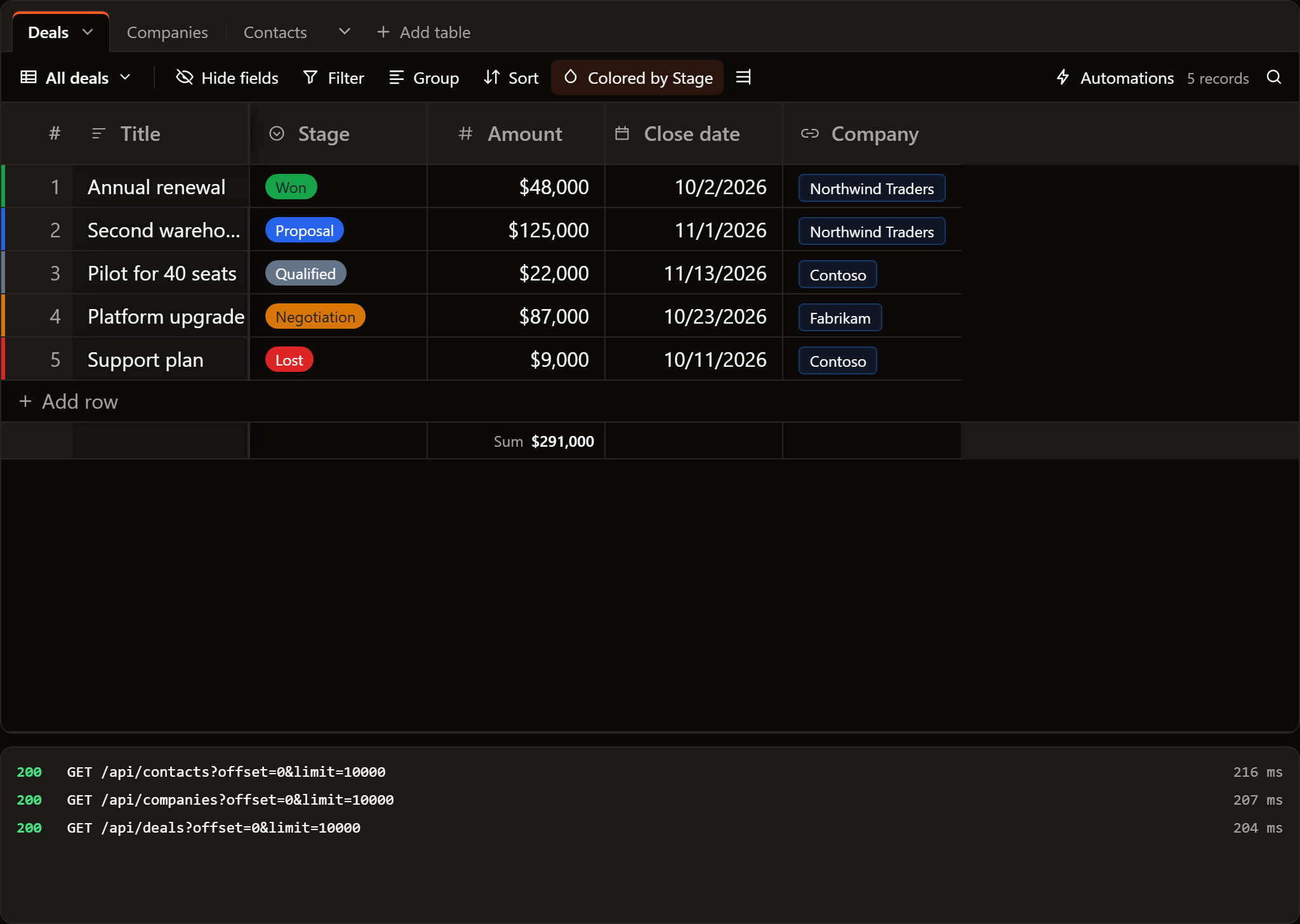
1. What the API answers
For each table, four routes. The shapes below are the defaults; the next section shows how to read others.
| Request | Answer |
|---|---|
GET /api/deals?offset=0&limit=10000 |
200 with { "rows": [...], "rowCount": 5 }, or a plain array |
POST /api/deals with the new record |
201 with the record as stored, its id included |
PATCH /api/deals/d3 with the changed fields only |
200 with the record as stored |
DELETE /api/deals/d3 |
204 |
A foreign key is a plain field: a deal has company_id. To refuse a write,
answer with a 4xx status and { "error": "Amount must be 0 or more" };
the base puts the cell back and shows that sentence.
2. Read another shape
createRestDataSource takes buildQuery (the query string for a read) and
parse (the rows and count from the answer). For an API that pages with
page and per_page and answers { "data": [...], "meta": { "total": 5 } }:
import { createRestDataSource } from '@svgrid/enterprise'

const deals = createRestDataSource({
  url: 'https://api.example.com/v2/deals',
  headers: () => ({ authorization: `Bearer ${localStorage.getItem('token') ?? ''}` }),
  buildQuery: (request) => ({ page: '1', per_page: String(request.endRow - request.startRow) }),
  parse: (body) => {
    const b = body as { data: Record<string, unknown>[]; meta: { total: number } }
    return { rows: b.data, rowCount: b.meta.total }
  },
})
offsetLimitAdapter, jsonServerAdapter and dummyJsonAdapter are
ready-made pairs for common shapes.
3. Describe the tables
baseTablesFromSchemas makes base tables from a description of each table:
its columns and their types. Write the description out, or read it from an
OpenAPI document with introspectOpenApi(spec).entities:
// src/lib/crm.ts
import { baseTablesFromSchemas, type BaseTable } from '@svgrid/enterprise/base'
import { createRestDataSource, type EntitySchema } from '@svgrid/enterprise'

const STAGES = ['Qualified', 'Proposal', 'Negotiation', 'Won', 'Lost'].map((value) => ({ value, label: value }))

const SCHEMAS: EntitySchema[] = [
  {
    name: 'deals',
    fields: [
      { field: 'id', type: 'text', primaryKey: true },
      { field: 'title', type: 'text' },
      { field: 'stage', type: 'enum', options: STAGES },
      { field: 'amount', type: 'number' },
      { field: 'close_date', type: 'date', label: 'Close date' },
      { field: 'company_id', type: 'relation', relation: { entity: 'companies', labelField: 'name' } },
    ],
  },
  {
    name: 'companies',
    fields: [
      { field: 'id', type: 'text', primaryKey: true },
      { field: 'name', type: 'text' },
      { field: 'website', type: 'text', format: 'url' },
    ],
  },
  {
    name: 'contacts',
    fields: [
      { field: 'id', type: 'text', primaryKey: true },
      { field: 'name', type: 'text' },
      { field: 'email', type: 'text', format: 'email' },
      { field: 'company_id', type: 'relation', relation: { entity: 'companies', labelField: 'name' } },
    ],
  },
]

export function crmTables(): BaseTable[] {
  return baseTablesFromSchemas(
    SCHEMAS,
    (schema) => createRestDataSource({ url: `/api/${schema.name}`, schema }),
    // The API picks the id of a new record.
    () => ({ serverIds: true }),
  )
}
What comes out:
| In the description | In the base |
|---|---|
text, with format: 'url' or 'email' |
Text, URL or Email field |
number |
Number field |
date, datetime |
Date field, with the time for datetime |
enum with options |
Single select with those options |
boolean |
Checkbox |
relation (company_id) |
A Company link, stored as company_id, and a field in Companies that links back |
| The primary key | The record's id, not a field |
The first text field is each table's primary field. Companies gets a Deals field and a Contacts field that link back; they are worked out in the page and never sent to the API.
4. Adjust the fields
The tables are plain objects. Show Amount as currency with a total, and give Deals a Kanban view by stage:
import type { BaseTable } from '@svgrid/enterprise/base'
import { crmTables } from '$lib/crm'

const tables: BaseTable[] = crmTables().map((t) =>
  t.id !== 'deals'
    ? t
    : {
        ...t,
        columns: t.columns.map((c) =>
          c.field === 'amount' ? { ...c, fieldProps: { format: 'currency', symbol: '$', precision: 0, summary: 'sum' } } : c,
        ),
        views: [
          { id: 'grid', name: 'All deals', type: 'grid', color: { mode: 'field', field: 'stage' } },
          { id: 'pipeline', name: 'Pipeline', type: 'kanban', stackBy: 'stage' },
        ],
      },
)
5. The page
<script lang="ts">
  import { SvToaster } from '@svgrid/grid'
  import { SvBase, enableBase } from '@svgrid/enterprise/base'
  import { crmTables } from '$lib/crm'

  enableBase()
  let tables = $state.raw(crmTables())
</script>

<div style="height: 640px">
  <SvBase bind:tables editable sortable summary containerHeight="100%" />
</div>
<SvToaster />
Open it and the base makes one GET per table. Change a stage and it sends
PATCH /api/deals/d3 with { "stage": "Won" }. Link a contact to a company
from the Companies tab and it sends PATCH /api/contacts/p2 with
{ "company_id": "c1" }.
Next
- Keep a base in a database: links, record ids, changes made elsewhere and every option.
- Build a base on Supabase and on Postgres.
Related articles
- Build vs Buy - Should You Build Your Own Svelte Data Table? - A working engineer's breakdown of when a hand-rolled Svelte table is the right call, when it will cost you three sprints, and what the headless middle path actually looks like in code.
- Building a SaaS Billing and Usage Table in Svelte - How to build a production billing grid with locale-aware currency formatting, grouped subtotals by cost category, and CSV export that matches what is on screen.
- A Right-Click Context Menu for Your Svelte Data Grid - Build a right-click context menu that wires row actions, handles multi-row selection, and stays out of the way of SvGrid's own event handling.