Build a base on Supabase
This tutorial puts a project tracker in a Svelte app with its records in Supabase: two tables, Projects and Tasks, a link between them stored as a foreign key, and edits from other people arriving through Supabase Realtime. It takes about fifteen minutes and a free Supabase project.
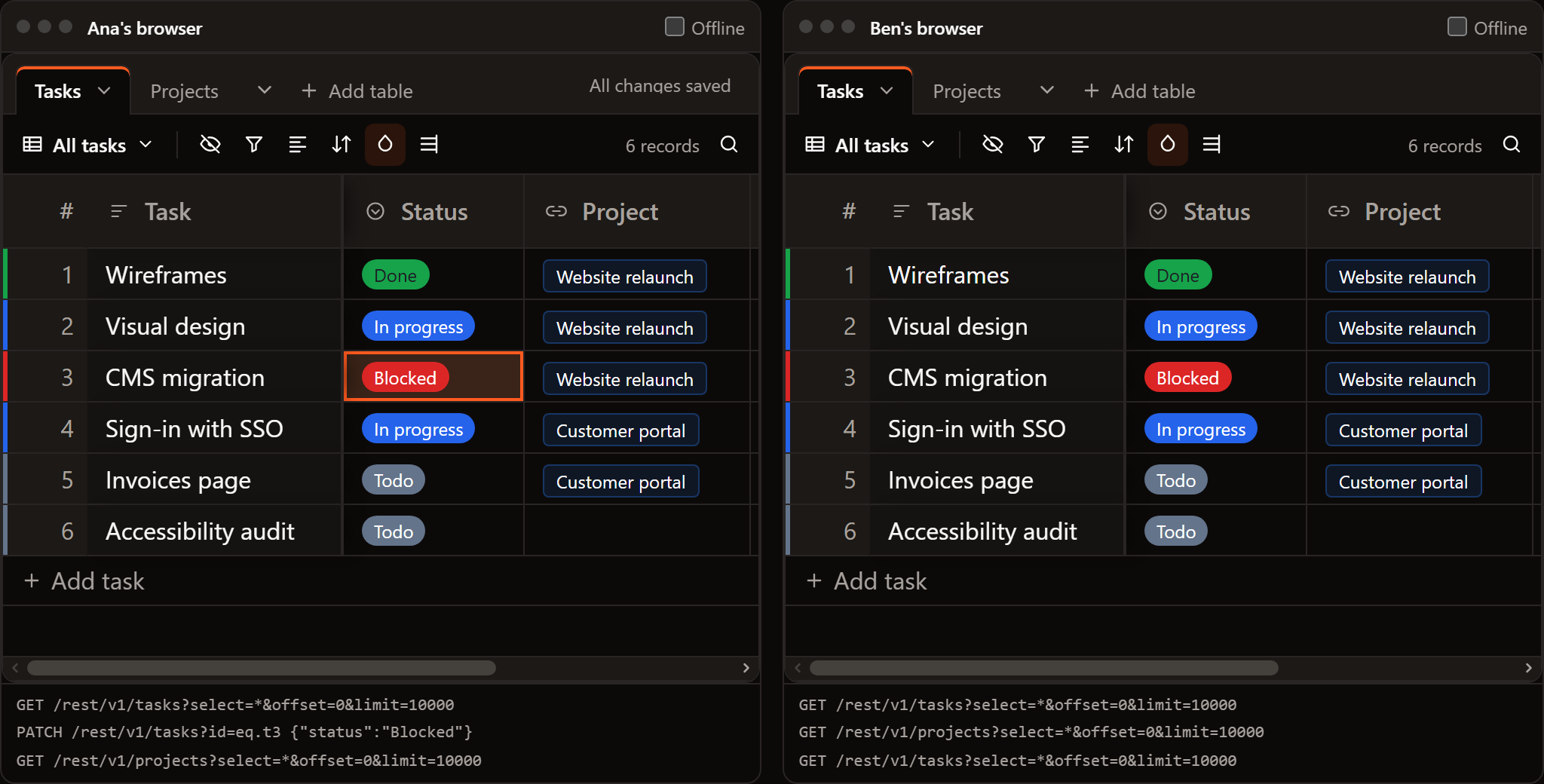
Try it first in the page, with a stand-in for the Supabase project. Change a task on one side and watch the other:
SvGrid Base and the Supabase source are part of the Suite edition of
@svgrid/enterprise. Without a key they run with a watermark, so you can follow this tutorial before you buy.
1. Create the tables
In the Supabase dashboard, open the SQL editor and run:
create table projects (
  id uuid primary key default gen_random_uuid(),
  name text not null default '',
  owner text
);

create table tasks (
  id uuid primary key default gen_random_uuid(),
  name text not null default '',
  status text default 'Todo',
  due date,
  project_id uuid references projects(id) on delete set null
);

insert into projects (name) values ('Website relaunch'), ('Customer portal');
insert into tasks (name, status, project_id)
  select 'Wireframes', 'Done', id from projects where name = 'Website relaunch';
The keys are uuids the database makes. A task's project is the
project_id foreign key; the Projects table has no column for its tasks.
The base works that list out from project_id.
2. Let signed-in people read and write
Row level security decides what each person can do. For a team tracker where everyone who is signed in can edit everything:
alter table projects enable row level security;
alter table tasks enable row level security;

create policy "team reads and writes projects" on projects
  for all to authenticated using (true) with check (true);
create policy "team reads and writes tasks" on tasks
  for all to authenticated using (true) with check (true);
Narrow the policies as your app needs; the base talks to Supabase as the signed-in person, so a write a policy refuses comes back to them as an error and the cell goes back.
3. Turn on Realtime for the tables
alter publication supabase_realtime add table projects, tasks;
Without this the base still works; it just does not see other people's changes until it is opened again.
4. Install
npm i @svgrid/grid @svgrid/enterprise @supabase/supabase-js
Put the project URL and the anon key in .env:
PUBLIC_SUPABASE_URL=https://your-project.supabase.co
PUBLIC_SUPABASE_ANON_KEY=your-anon-key
5. Describe the tables to the base
A base table names its fields by type; the Supabase source needs the columns it reads. Both go in one file:
// src/lib/tracker.ts
import { createClient } from '@supabase/supabase-js'
import { baseSource, type BaseTable } from '@svgrid/enterprise/base'
import { createSupabaseDataSource, createSupabaseRealtime, type EntitySchema } from '@svgrid/enterprise'
import { PUBLIC_SUPABASE_ANON_KEY, PUBLIC_SUPABASE_URL } from '$env/static/public'

export const supabase = createClient(PUBLIC_SUPABASE_URL, PUBLIC_SUPABASE_ANON_KEY)

// The columns of each table, as the Supabase source reads them.
const schemas: Record<string, EntitySchema> = {
  projects: {
    name: 'projects',
    fields: [
      { field: 'id', type: 'text', primaryKey: true },
      { field: 'name', type: 'text' },
      { field: 'owner', type: 'text' },
    ],
  },
  tasks: {
    name: 'tasks',
    fields: [
      { field: 'id', type: 'text', primaryKey: true },
      { field: 'name', type: 'text' },
      { field: 'status', type: 'text' },
      { field: 'due', type: 'date' },
      { field: 'project_id', type: 'text' },
    ],
  },
}

/** A table on Supabase: loads it, writes back, and listens for other people's changes. */
const onSupabase = (table: string, links = {}) =>
  baseSource(createSupabaseDataSource({ client: supabase, table, schema: schemas[table]! }), {
    links,
    // The database makes the uuid of a new record.
    serverIds: true,
    realtime: (onChange) => createSupabaseRealtime({ client: supabase, table, onChange }),
  })

export function trackerTables(): BaseTable[] {
  return [
    {
      id: 'tasks',
      name: 'Tasks',
      primaryField: 'name',
      data: [],
      columns: [
        { field: 'name', header: 'Task', width: 220, fieldType: 'text' },
        {
          field: 'status', header: 'Status', width: 130, fieldType: 'singleSelect',
          fieldProps: { options: [{ value: 'Todo', color: '#64748b' }, { value: 'In progress', color: '#2563eb' }, { value: 'Blocked', color: '#dc2626' }, { value: 'Done', color: '#16a34a' }] },
        },
        { field: 'project', header: 'Project', width: 170, fieldType: 'link', fieldProps: { table: 'projects', multiple: false, inverse: 'tasks' } },
        { field: 'due', header: 'Due', width: 140, fieldType: 'date', fieldProps: { dateFormat: 'friendly' } },
      ],
      views: [
        { id: 'all', name: 'All tasks', type: 'grid', color: { mode: 'field', field: 'status' } },
        { id: 'board', name: 'Board', type: 'kanban', stackBy: 'status' },
      ],
      // The Project field is the project_id column.
      source: onSupabase('tasks', { project: { column: 'project_id' } }),
    },
    {
      id: 'projects',
      name: 'Projects',
      primaryField: 'name',
      data: [],
      columns: [
        { field: 'name', header: 'Project', width: 200, fieldType: 'text' },
        { field: 'owner', header: 'Owner', width: 160, fieldType: 'text' },
        // Worked out from tasks.project_id: never stored.
        { field: 'tasks', header: 'Tasks', width: 300, fieldType: 'link', fieldProps: { table: 'tasks', multiple: true, inverse: 'project' } },
      ],
      source: onSupabase('projects'),
    },
  ]
}
The Project field and the Tasks field name each other (inverse), so they
stay in step: link a task to a project from either table and the task's
project_id is written.
6. Put the base on a page
<!-- src/routes/tracker/+page.svelte -->
<script lang="ts">
  import { SvToaster } from '@svgrid/grid'
  import { SvBase, enableBase } from '@svgrid/enterprise/base'
  import { trackerTables } from '$lib/tracker'

  enableBase()
  let tables = $state.raw(trackerTables())
</script>

<div style="height: 640px">
  <SvBase bind:tables editable sortable containerHeight="100%" />
</div>
<SvToaster />
Run npm run dev and open /tracker. The tab bar says "Loading records..."
and then shows the tasks. Change a status, and in the Supabase table editor
the row has the new value. Open the page in a second browser, change
something there, and the first one shows it.
The base runs in the browser, so turn off server rendering for the route
(export const ssr = false in +page.ts) or sign the person in before it
loads, so the requests carry their session.
7. Let Supabase describe the tables
Step 5 writes the fields out, which gives you control over each one. To
start from the database instead, read each table's columns with
introspectSupabaseTable and let baseTablesFromSchemas make the fields and
the links:
import { baseTablesFromSchemas, type BaseTable } from '@svgrid/enterprise/base'
import { createSupabaseDataSource, introspectSupabaseTable, type SupabaseClientLike } from '@svgrid/enterprise'

export async function tablesFromSupabase(client: SupabaseClientLike, url: string, key: string): Promise<BaseTable[]> {
  const schemas = await Promise.all(['projects', 'tasks'].map((table) => introspectSupabaseTable({ url, key, table })))
  return baseTablesFromSchemas(
    schemas,
    (schema) => createSupabaseDataSource({ client, table: schema.name, schema }),
    () => ({ serverIds: true }),
  )
}
project_id becomes a Project link with a Tasks field in Projects that links
back. Adjust the result like any other tables: give Status its colors, add a
Kanban view.
When something goes wrong
| What you see | Why |
|---|---|
| Not saved: new row violates row-level security policy | A policy refused the write. Check the policies in step 2 and that the person is signed in. |
| Other people's changes do not show | The table is not in the supabase_realtime publication (step 3). |
| Not saved: Failed to fetch | The network dropped. The cell went back; make the change again when the connection returns. |
| Tasks: the first 10,000 records | The table has more records than limit. Raise it, or show that table with the grid and a server row model. |
Next
- Keep a base in a database: how the writer works, links, record ids and every option.
- Build a base on Postgres: the same base with your own server and database.
Related articles
- A Svelte Data Grid with SvelteKit and Supabase - Wire SvGrid to a Supabase Postgres backend with server-side pagination, sorting, and filtering - keeping credentials on the server and queries fast with proper indexing.
- Building a SaaS Billing and Usage Table in Svelte - How to build a production billing grid with locale-aware currency formatting, grouped subtotals by cost category, and CSV export that matches what is on screen.
- Building a Real-Time Trading Grid in Svelte - How to wire a WebSocket tick feed into SvGrid without dropping frames - one array replacement per animation frame, stable row identity, up/down flashes, and which of the grid's two update paths to use for what.