Build a base on Postgres
This tutorial keeps a base in your own Postgres database, behind your own SvelteKit server. The browser never sees a database password: it calls one endpoint per table, and the endpoint runs parameterized SQL. Three tables, Tasks, Projects and Tags, with a foreign key and a junction table between them.
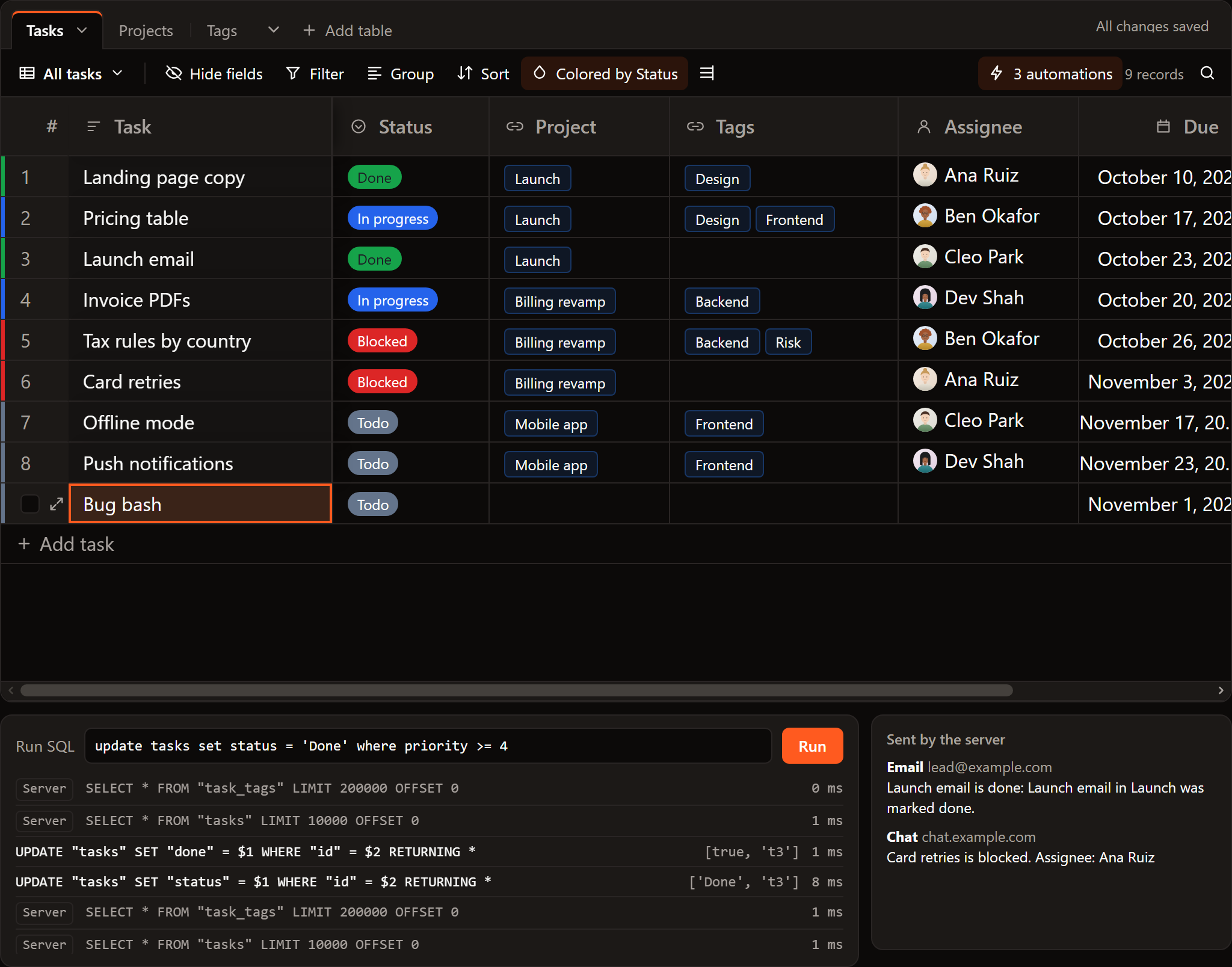
The demo below is the finished base on a real Postgres running in the page (PGlite), with the SQL each change runs listed under it:
SvGrid Base and the SQL source are part of the Suite edition of
@svgrid/enterprise. Without a key they run with a watermark.
1. Create the tables
create table projects (
  id text primary key,
  name text not null default '',
  due date
);
create table tags (
  id text primary key,
  name text not null default ''
);
create table tasks (
  id text primary key,
  name text not null default '',
  status text,
  priority int,
  due date,
  done boolean not null default false,
  project_id text references projects(id) on delete set null
);
create table task_tags (
  id serial primary key,
  task_id text not null references tasks(id) on delete cascade,
  tag_id text not null references tags(id) on delete cascade,
  unique (task_id, tag_id)
);
The record keys are text: a new record gets its id in the page, and that id
is its key here. (With serial or uuid keys the database makes, set
serverIds: true on the source; see record ids.)
2. Install
npm i @svgrid/grid @svgrid/enterprise pg
# .env
DATABASE_URL=postgres://user:password@localhost:5432/tracker
3. One endpoint per table
createSqlDataSource turns the base's reads and writes into SQL for one
table; createKitHandlers serves it as a SvelteKit endpoint. A helper makes
both from a table name and its columns:
// src/lib/server/tables.ts
import pg from 'pg'
import { createKitHandlers, createSqlDataSource, type EntitySchema } from '@svgrid/enterprise'
import { DATABASE_URL } from '$env/static/private'

const pool = new pg.Pool({ connectionString: DATABASE_URL })

const text = (field: string) => ({ field, type: 'text' as const })
const SCHEMAS: Record<string, EntitySchema> = {
  projects: { name: 'projects', fields: [{ ...text('id'), primaryKey: true }, text('name'), { field: 'due', type: 'date' }] },
  tags: { name: 'tags', fields: [{ ...text('id'), primaryKey: true }, text('name')] },
  tasks: {
    name: 'tasks',
    fields: [
      { ...text('id'), primaryKey: true },
      text('name'),
      text('status'),
      { field: 'priority', type: 'number' },
      { field: 'due', type: 'date' },
      { field: 'done', type: 'boolean' },
      text('project_id'),
    ],
  },
  task_tags: { name: 'task_tags', fields: [{ field: 'id', type: 'number', primaryKey: true }, text('task_id'), text('tag_id')] },
}

/** The POST handler for one table: reads, inserts, updates and deletes as SQL. */
export function tableEndpoint(table: string) {
  const schema = SCHEMAS[table]!
  const source = createSqlDataSource({
    schema,
    table,
    dialect: { placeholders: '$', ilike: true },
    execute: async (sql, params) => (await pool.query(sql, params)).rows,
  })
  return createKitHandlers({ schema, source })
}
Then a route that serves any of the four tables:
// src/routes/api/[table]/+server.ts
import { error } from '@sveltejs/kit'
import { tableEndpoint } from '$lib/server/tables'

const TABLES = new Set(['projects', 'tags', 'tasks', 'task_tags'])

export async function POST(event: { params: { table: string }; request: Request; locals: Record<string, unknown> }) {
  if (!TABLES.has(event.params.table)) error(404, 'No such table')
  return tableEndpoint(event.params.table).POST(event)
}
Every statement uses parameters ($1, $2), so no value the base sends is
ever part of the SQL text. Using Drizzle? Pass execute the same pg.Pool
you gave drizzle().
Who may do what belongs here too: createKitHandlers takes authorize
(return false to refuse an operation), scope (each person sees only
their rows) and audit (log every write). See
access control.
4. The tables in the browser
On the client each table's source is createKitDataSource, which talks to
the endpoint:
// src/lib/tracker.ts
import { baseSource, type BaseTable } from '@svgrid/enterprise/base'
import { createKitDataSource } from '@svgrid/enterprise'

const api = (table: string) => createKitDataSource({ endpoint: `/api/${table}` })

const STATUS = [
  { value: 'Todo', color: '#64748b' },
  { value: 'In progress', color: '#2563eb' },
  { value: 'Blocked', color: '#dc2626' },
  { value: 'Done', color: '#16a34a' },
]

export function trackerTables(): BaseTable[] {
  return [
    {
      id: 'tasks',
      name: 'Tasks',
      primaryField: 'name',
      data: [],
      columns: [
        { field: 'name', header: 'Task', width: 220, fieldType: 'text' },
        { field: 'status', header: 'Status', width: 130, fieldType: 'singleSelect', fieldProps: { options: STATUS } },
        { field: 'project', header: 'Project', width: 160, fieldType: 'link', fieldProps: { table: 'projects', multiple: false, inverse: 'tasks' } },
        { field: 'tags', header: 'Tags', width: 190, fieldType: 'link', fieldProps: { table: 'tags', multiple: true, inverse: 'tasks' } },
        { field: 'due', header: 'Due', width: 150, fieldType: 'date', fieldProps: { dateFormat: 'friendly' } },
        { field: 'priority', header: 'Priority', width: 110, fieldType: 'rating', fieldProps: { max: 5 } },
        { field: 'done', header: 'Done', width: 70, fieldType: 'checkbox' },
      ],
      source: baseSource(api('tasks'), {
        links: {
          project: { column: 'project_id' },
          tags: { through: api('task_tags'), from: 'task_id', to: 'tag_id' },
        },
      }),
    },
    {
      id: 'projects',
      name: 'Projects',
      primaryField: 'name',
      data: [],
      columns: [
        { field: 'name', header: 'Project', width: 200, fieldType: 'text' },
        { field: 'due', header: 'Due', width: 150, fieldType: 'date' },
        { field: 'tasks', header: 'Tasks', width: 300, fieldType: 'link', fieldProps: { table: 'tasks', multiple: true, inverse: 'project' } },
        { field: 'count', header: 'Open', width: 90, fieldType: 'count', fieldProps: { linkField: 'tasks' } },
      ],
      source: baseSource(api('projects')),
    },
    {
      id: 'tags',
      name: 'Tags',
      primaryField: 'name',
      data: [],
      columns: [
        { field: 'name', header: 'Tag', width: 180, fieldType: 'text' },
        { field: 'tasks', header: 'Tasks', width: 300, fieldType: 'link', fieldProps: { table: 'tasks', multiple: true, inverse: 'tags' } },
      ],
      source: baseSource(api('tags')),
    },
  ]
}
What each change runs:
| In the base | In the database |
|---|---|
| Set a task's Status | UPDATE "tasks" SET "status" = $1 WHERE "id" = $2 RETURNING * |
| Pick a Project for a task | UPDATE "tasks" SET "project_id" = $1 WHERE "id" = $2 RETURNING * |
| Add a task to a project from the Projects tab | the same UPDATE on the task |
| Add a tag to a task | INSERT INTO "task_tags" ("task_id", "tag_id") VALUES ($1, $2) RETURNING * |
| Remove a tag | DELETE FROM "task_tags" WHERE "id" = $1 |
| "+ Add task" | INSERT INTO "tasks" (...) VALUES (...) RETURNING * |
| Delete a task | DELETE FROM "tasks" WHERE "id" = $1 |
The Count field and the Tasks fields of Projects and Tags are worked out in the page and never written.
5. The page
<!-- src/routes/tracker/+page.svelte -->
<script lang="ts">
  import { SvToaster } from '@svgrid/grid'
  import { SvBase, enableBase } from '@svgrid/enterprise/base'
  import { trackerTables } from '$lib/tracker'

  enableBase()
  let tables = $state.raw(trackerTables())
</script>

<div style="height: 680px">
  <SvBase bind:tables editable sortable showRowNumbers expandRows containerHeight="100%" />
</div>
<SvToaster />
6. When the database says no
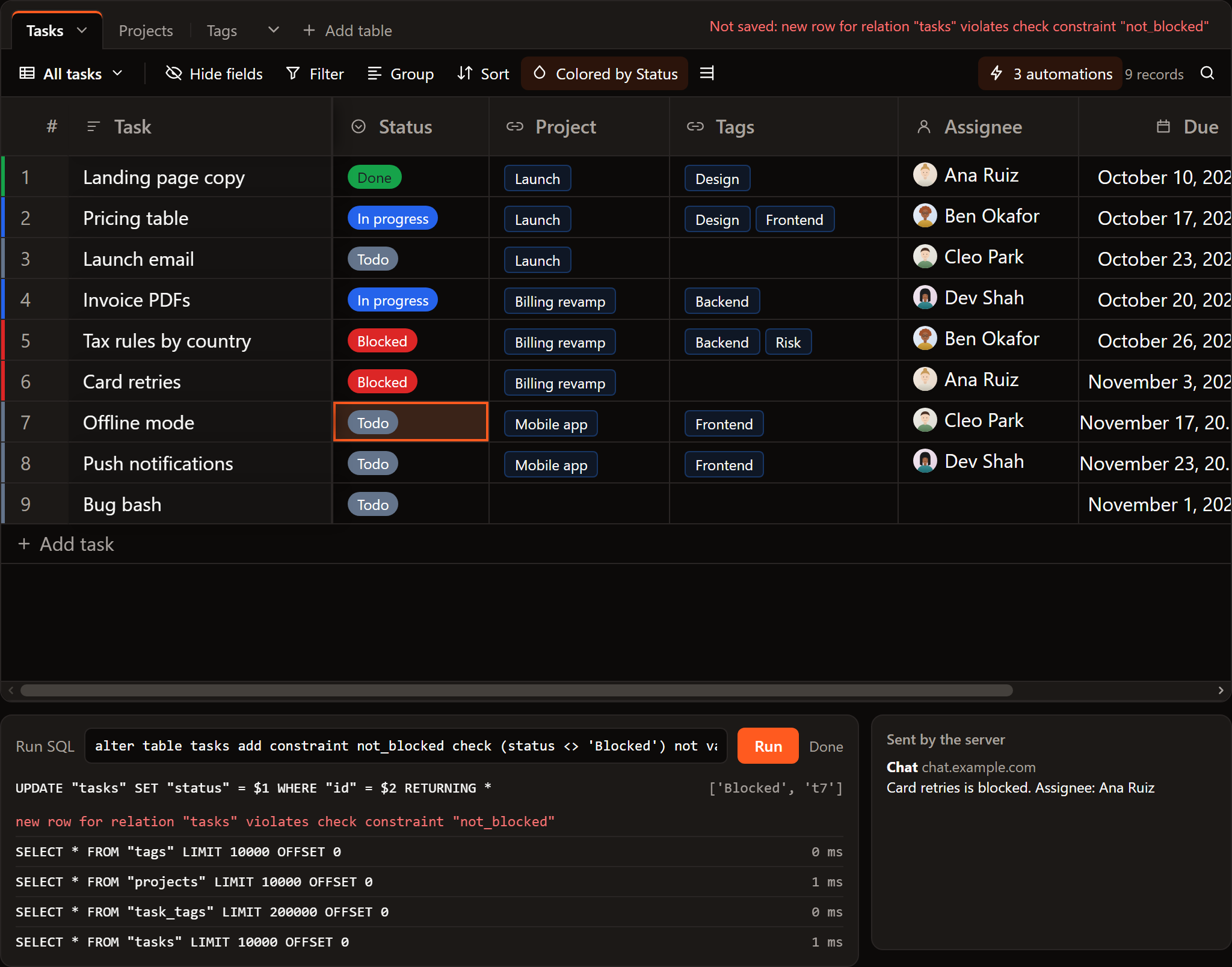
Constraints keep working: the database has the last word. Add one:
alter table tasks add constraint not_blocked check (status <> 'Blocked') not valid;
and set a task to Blocked. The UPDATE fails, the cell goes back to what
the database holds, and the base says why:
7. Changes made by others
The base reads a table again when its source's realtime says it changed.
Postgres can tell you with LISTEN/NOTIFY: a trigger notifies on every
change, your server forwards it to the browser over server-sent events or a
WebSocket, and the client calls onChange:
import { baseSource } from '@svgrid/enterprise/base'
import { createKitDataSource } from '@svgrid/enterprise'

const tasksSource = baseSource(createKitDataSource({ endpoint: '/api/tasks' }), {
  links: { project: { column: 'project_id' } },
  realtime: (onChange) => {
    // Your endpoint that streams a line whenever the tasks table changes.
    const events = new EventSource('/api/changes?table=tasks')
    events.onmessage = () => onChange()
    return () => events.close()
  },
})
Without realtime, people see each other's changes when they open the base
again.
Next
- Keep a base in a database: how the writer works and every option.
- Build a base on Supabase: the same, with Supabase doing the server part.
Related articles
- Building a SaaS Billing and Usage Table in Svelte - How to build a production billing grid with locale-aware currency formatting, grouped subtotals by cost category, and CSV export that matches what is on screen.
- Building a Real-Time Trading Grid in Svelte - How to wire a WebSocket tick feed into SvGrid without dropping frames - one array replacement per animation frame, stable row identity, up/down flashes, and which of the grid's two update paths to use for what.
- Building a Project / Task Board with a Svelte Data Grid - How to build a task management grid with grouping by status or assignee, inline edits, subtask tree rows, and saved views - without reaching for a dedicated project management tool.