A Live Svelte Data Grid with Firebase Firestore
Wire Firestore onSnapshot to SvGrid in Svelte 5 - reactive listeners, query-driven sort and filter, cursor pagination, and the subtle cleanup detail most implementations get wrong.
Firestore's onSnapshot and Svelte 5's $effect are a natural pair - both are reactive, both have cleanup semantics, and together they produce a live grid without a single polling loop. The wiring is roughly 40 lines. What trips people up is the cleanup, not the wiring.
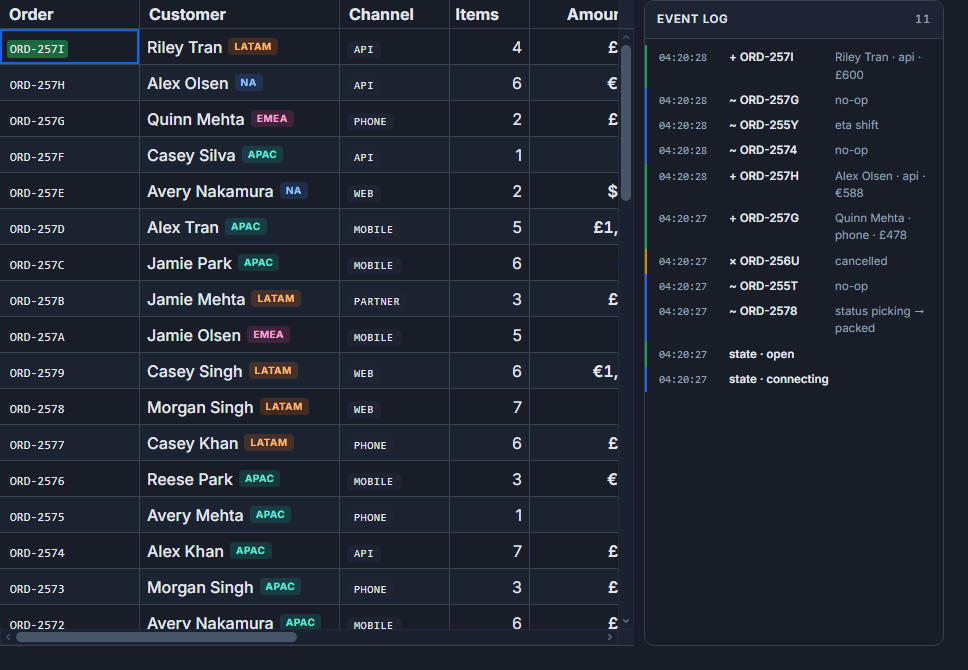
Most first attempts forget that $effect re-runs whenever tracked state changes. Each re-run without a returned cleanup function stacks another active listener. Click a filter button three times, flip the sort direction twice, and you have five listeners writing to the same rows array, each slightly out of phase. The grid flickers, reads spike, and the bug is invisible until you watch the Firebase console.
The pattern below avoids that.
The data model and query strategy
The example uses an orders collection updated at 5-20 writes per second in production. Each document has a numeric createdAt field (Unix milliseconds) that serves as both the sort key and the cursor anchor for pagination.
// src/lib/types.ts
export type Order = {
  id: string
  customer: string
  region: 'NA' | 'EMEA' | 'APAC' | 'LATAM'
  amount: number
  currency: 'USD' | 'EUR' | 'GBP'
  status: 'pending' | 'confirmed' | 'shipped' | 'delivered' | 'cancelled'
  priority: 'low' | 'std' | 'high' | 'rush'
  createdAt: number
}
Picking a monotonically increasing numeric field for the cursor matters. String-based cursors on document IDs can produce inconsistent ordering when combined with orderBy on another field. createdAt keeps ordering stable and makes startAfter predictable even when documents arrive while the user is mid-page.
Combining where('region', '==', ...) with orderBy('createdAt', ...) requires a composite index in Firestore. Create it before writing any grid code - the Firebase console will generate a direct link in the runtime error message when it is missing, but an empty grid with no visible error is a harder debugging experience.
Wiring the listener to the grid
The component below manages all query state reactively. Sort direction, the active region filter, and the cursor stack are each $state variables. The $effect reads all three, builds the Firestore query, subscribes with onSnapshot, and returns the unsubscribe function. Svelte calls that function before every re-run and on component destroy - one listener, always.
<!-- src/routes/orders/+page.svelte -->
<script lang="ts">
  import {
    SvGrid,
    tableFeatures,
    rowSortingFeature,
    columnFilteringFeature,
    type ColumnDef,
  } from '@svgrid/grid'
  import {
    collection,
    query,
    orderBy,
    limit,
    where,
    startAfter,
    onSnapshot,
    type DocumentSnapshot,
    type QueryConstraint,
  } from 'firebase/firestore'
  import { db } from '$lib/firebase'
  import type { Order } from '$lib/types'

  const features = tableFeatures({ rowSortingFeature, columnFilteringFeature })

  const columns: ColumnDef<typeof features, Order>[] = [
    { field: 'customer', header: 'Customer',  width: 180 },
    { field: 'region',   header: 'Region',    width: 100 },
    {
      field: 'amount',
      header: 'Amount',
      width: 130,
      align: 'right',
      format: { type: 'currency', currency: 'USD', options: { maximumFractionDigits: 0 } },
    },
    { field: 'status',   header: 'Status',    width: 130 },
    { field: 'priority', header: 'Priority',  width: 100 },
    {
      field: 'createdAt',
      header: 'Created',
      width: 160,
      format: { type: 'date', options: { dateStyle: 'medium', timeStyle: 'short' } },
    },
  ]

  const PAGE_SIZE = 50

  let sortDir      = $state<'asc' | 'desc'>('desc')
  let regionFilter = $state<string | null>(null)
  // cursors[n] is the startAfter cursor for page n; index 0 is null (no cursor = first page)
  let cursors      = $state<(DocumentSnapshot | null)[]>([null])
  let page         = $state(0)

  let rows    = $state<Order[]>([])
  let lastDoc = $state<DocumentSnapshot | null>(null)

  $effect(() => {
    const constraints: QueryConstraint[] = [
      orderBy('createdAt', sortDir),
      limit(PAGE_SIZE),
    ]
    if (regionFilter) {
      constraints.splice(1, 0, where('region', '==', regionFilter))
    }
    const cursor = cursors[page]
    if (cursor) constraints.push(startAfter(cursor))

    const q = query(collection(db, 'orders'), ...constraints)
    const unsub = onSnapshot(q, (snap) => {
      rows    = snap.docs.map((d) => ({ id: d.id, ...d.data() }) as Order)
      lastDoc = snap.docs.at(-1) ?? null
    })

    return unsub  // critical - tears down the listener before the next effect run
  })

  function nextPage() {
    if (!lastDoc) return
    cursors = [...cursors.slice(0, page + 1), lastDoc]
    page += 1
  }

  function prevPage() {
    if (page > 0) page -= 1
  }

  function applyRegion(r: string | null) {
    regionFilter = r
    cursors = [null]  // reset cursor history whenever filter changes
    page = 0
  }
</script>

<div class="toolbar">
  <button onclick={() => applyRegion(null)}>All</button>
  {#each ['NA', 'EMEA', 'APAC', 'LATAM'] as r}
    <button onclick={() => applyRegion(r)} class:active={regionFilter === r}>{r}</button>
  {/each}
  <button onclick={() => { sortDir = sortDir === 'asc' ? 'desc' : 'asc'; cursors = [null]; page = 0 }}>
    {sortDir === 'desc' ? '↑ Newest first' : '↓ Oldest first'}
  </button>
</div>

<SvGrid data={rows} {columns} {features} rowId="id" height={520} />

<div class="pager">
  <button onclick={prevPage} disabled={page === 0}>Previous</button>
  <span>Page {page + 1}</span>
  <button onclick={nextPage} disabled={!lastDoc || rows.length < PAGE_SIZE}>Next</button>
</div>
How cursor pagination works here
cursors is an array acting as page history. Index 0 is always null, which means no startAfter constraint - that is the first page. When the user clicks Next, lastDoc (the final document from the current snapshot) is appended at cursors[page + 1] before incrementing page. Going back just decrements page, and the effect re-reads the already-stored cursor for that page number.
Changing the sort direction resets the cursor array because the cursor is a document position inside a specific ordered result set. A cursor from a descending query is meaningless in an ascending one - you would land somewhere arbitrary, not page 2 of the new order.
The same reset applies when the filter changes. Changing from "NA" to "EMEA" is a completely different result set; page 2 of one has no relationship to page 2 of the other.
Highlighting changed rows
Firestore snapshots carry change metadata. Instead of replacing rows blindly on every snapshot, you can use snap.docChanges() to identify only the modified documents and apply a flash class to those cells.
<script lang="ts">
  import { SvGrid, type SvGridApi } from '@svgrid/grid'

  let api = $state<SvGridApi | null>(null)
  let rows = $state<Order[]>([])
  let flashSet = $state(new Set<string>())

  $effect(() => {
    const q = query(collection(db, 'orders'), orderBy('createdAt', 'desc'), limit(50))

    const unsub = onSnapshot(q, (snap) => {
      // collect ids of docs that changed (added or modified)
      const changed = new Set<string>()
      for (const change of snap.docChanges()) {
        if (change.type === 'added' || change.type === 'modified') {
          changed.add(change.doc.id)
        }
      }

      rows = snap.docs.map((d) => ({ id: d.id, ...d.data() }) as Order)

      if (changed.size > 0) {
        flashSet = new Set([...flashSet, ...changed])
        setTimeout(() => {
          flashSet = new Set([...flashSet].filter((id) => !changed.has(id)))
        }, 800)
      }
    })

    return unsub
  })
</script>

<SvGrid
  data={rows}
  {columns}
  rowId="id"
  height={520}
  rowClass={({ row }) => (flashSet.has(row.id) ? 'row-flash' : '')}
  onApiReady={(a) => { api = a }}
/>

<style>
  :global(.row-flash) {
    background: color-mix(in srgb, var(--sg-accent) 15%, transparent);
    transition: background 0.8s ease-out;
  }
</style>
The 800 ms timeout matches the CSS transition duration. The Set dance is necessary because multiple documents can change at different times - removing only the IDs from the current batch leaves any other currently-flashing rows alone.
When to keep sorting and filtering client-side
Rebuilding the Firestore query on every sort or filter change is right for large collections where the full dataset does not fit in 50 rows. For collections under 500 documents, loading everything once and letting SvGrid handle sorting and filtering in memory is simpler and eliminates the composite index requirement.
<script lang="ts">
  import { SvGrid, tableFeatures, rowSortingFeature, columnFilteringFeature } from '@svgrid/grid'
  import { collection, query, onSnapshot } from 'firebase/firestore'
  import { db } from '$lib/firebase'

  const features = tableFeatures({ rowSortingFeature, columnFilteringFeature })
  let rows = $state<Order[]>([])

  $effect(() => {
    // No orderBy, no where - load everything, let SvGrid handle it
    const q = query(collection(db, 'orders'))
    const unsub = onSnapshot(q, (snap) => {
      rows = snap.docs.map((d) => ({ id: d.id, ...d.data() }) as Order)
    })
    return unsub
  })
</script>

<SvGrid data={rows} {columns} {features} rowId="id" sortable filterable height={520} />
The grid's sort and filter controls become fully interactive against the in-memory array. New snapshot deliveries replace the array and the grid re-applies the current sort and filter state automatically. The trade-off is obvious: you are reading every document in the collection on every listener open, and Firestore charges per read.
For the query-driven approach with a collection that grows unbounded, the investment in composite indexes pays off immediately. For a 200-row admin dashboard, the client-side approach is the right call.
The one thing most implementations miss
When the $effect body reads sortDir, regionFilter, and cursors[page], it registers a reactive dependency on each of them. The moment any one changes, Svelte calls the cleanup function (the returned unsub) and re-runs the effect. That cleanup guarantee is what makes the listener management safe.
The pattern breaks if you move the onSnapshot call outside the $effect - for example into a separate function called from button handlers. Then you are responsible for tracking and cancelling the previous subscription yourself, and the re-run-on-state-change behavior disappears. Keep the entire listener lifecycle inside a single $effect and let Svelte own the teardown.
Related reading
- Live demo: Real-time / streaming
- Docs: Real-time / streaming updates
- A Reactive Svelte Data Grid with Convex
- A Svelte Data Grid with PocketBase
- Using SvGrid with TanStack Query in Svelte
- A Svelte Data Grid with SvelteKit and Supabase
- Documenting SvGrid in Storybook
Tagged: Real-time data