From a database to an app
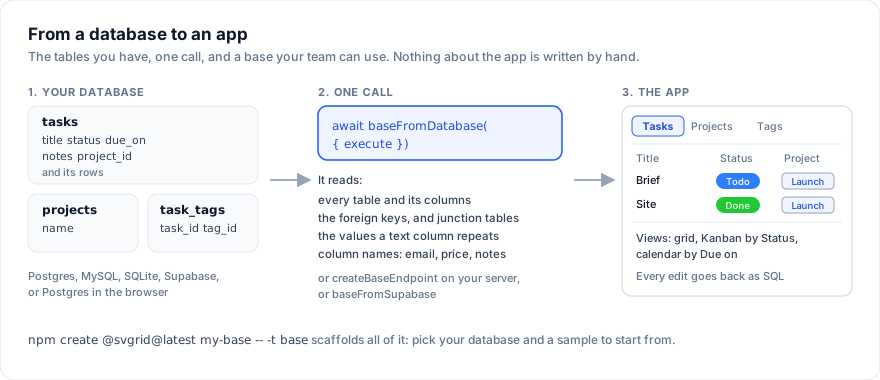
You have a database. One call reads its tables and <SvBase> turns them
into an app your team can use: a tab per table, fields typed from the
columns, links from the foreign keys, colored selects, a Kanban board and a
calendar. Every edit goes back to the database.
Airtable is a registered trademark of Formagrid Inc dba Airtable. SvGrid is not affiliated with Airtable.
Try it: pick a sample database, change its SQL if you like, and press "Make the app". The tables are created in a real Postgres running in the page.
Start a new app
npm create @svgrid@latest my-base -- --template base
The wizard asks two things:
  Where is your data?
    1. Postgres in the browser - nothing to set up, try it now
    2. Your Postgres - DATABASE_URL, behind a SvelteKit endpoint
    3. Supabase - your project, live through Realtime
  Start with which template?
    1. Project tracker - tasks and milestones
    2. Sales CRM - deals, accounts and contacts
    3. Content calendar - posts and campaigns
    4. Product roadmap - features and feedback
    5. Hiring tracker - candidates and roles
    6. Inventory - items and suppliers
    7. Bug tracker - bugs and releases
    8. Event planning - events, attendees, checklist
    9. OKRs - objectives and key results
    10. Expense approvals - expenses and budgets
    11. Employee onboarding - people, checklist, departments
    12. My own tables - an empty db/schema.sql to fill in
The templates are the ready-to-use bases, as SQL: their tables, records, views and automations. Or answer on the command line:
npm create @svgrid@latest my-base -- -t base --data postgres --sample sales-crm
The app is a SvelteKit project. The tables it starts with are in
db/schema.sql, and the other templates in db/templates/. With
Postgres in the browser it runs straight away, saved in the browser.
With your Postgres, set DATABASE_URL in .env and run
npm run db:setup. With Supabase, run db/schema.sql and
db/policies.sql in the SQL editor and put the project URL and anon key in
.env. Skip the schema to show tables you already have.
Take a base to a database
A base you built in the page goes to a database the same way: "All tables"
in the tab bar, then Download as SQL. The file creates the tables, the
foreign keys and the tables behind links to many, and inserts the records.
Run it with psql, in the Supabase SQL editor, or on PGlite, and the
base opens from that database as it was. In code:
import { baseToSql } from '@svgrid/enterprise/base'

const sql = baseToSql(tables)   // tables: the BaseTable[] you pass to <SvBase>
SQL has no column type for a select's colors, a formula, a view or an
automation. Those go into comments on the tables and columns
(comment on column ... is 'svgrid:{...}'), and baseFromDatabase,
createBaseEndpoint and baseFromSupabase read them back. Remove them and
the base still opens, read from the columns alone. Dates near today are
written as current_date + 3, so sample data stays current whenever it
runs; baseToSql(tables, { relativeDays: 0 }) writes every date as it is,
and { data: false } leaves the records out.
Add it to an app you have
Postgres (or MySQL, SQLite) behind your server. Two files. The endpoint reads the database and serves its tables; the page shows them:
// src/routes/api/base/+server.ts
import pg from 'pg'
import { createBaseEndpoint } from '@svgrid/enterprise/base'
import { env } from '$env/dynamic/private'

const pool = new pg.Pool({ connectionString: env.DATABASE_URL })

export const { GET, POST } = createBaseEndpoint({
  execute: async (sql, params) => (await pool.query(sql, params)).rows,
})
<!-- src/routes/base/+page.svelte (with `export const ssr = false` in +page.ts) -->
<script lang="ts">
  import { SvToaster } from '@svgrid/grid'
  import { SvBase, baseFromEndpoint, enableBase } from '@svgrid/enterprise/base'

  enableBase()
  const tables = baseFromEndpoint('/api/base')
</script>

{#await tables then tables}
  <SvBase {tables} editable sortable />
{/await}
<SvToaster />
The page never sees the connection string. Every read and write is
parameterized SQL, and only the tables the endpoint described can be
reached. createBaseEndpoint takes tables to show only some, dialect
('mysql', 'sqlite', 'mssql'), authorize to decide who may do what,
and audit to run server automations.
Supabase. One call in the page; other people's changes arrive through Realtime:
import { createClient } from '@supabase/supabase-js'
import { baseFromSupabase } from '@svgrid/enterprise/base'

const supabase = createClient('https://your-project.supabase.co', 'your-anon-key')
const tables = await baseFromSupabase({ client: supabase, url: 'https://your-project.supabase.co', key: 'your-anon-key' })
Postgres in the browser (PGlite), for prototypes and offline tools:
import { PGlite } from '@electric-sql/pglite'
import { baseFromDatabase } from '@svgrid/enterprise/base'

const db = new PGlite('idb://my-base')
const tables = await baseFromDatabase({ execute: async (sql, params) => (await db.query(sql, params)).rows as Record<string, unknown>[] })
What it reads from your database
| In the database | In the base |
|---|---|
| A table | A tab; the table that links to the most others comes first |
| A text column | A text field; email, url, phone in the name give those fields, notes or description a long text |
A text column that repeats a few values (status, priority) |
A single select, one color per value |
| A number column | A number; price, amount, budget show as currency, rating as stars |
A date or timestamp column |
A date field, with the time for a timestamp |
A boolean column |
A checkbox |
A foreign key (project_id) |
A link to that table, and a field there that links back |
A table that only pairs two others (task_tags) |
A link to many records, stored in that table |
A key the database makes (serial, a default uuid) |
New records get theirs from the database |
A column named name or title |
The primary field, first and pinned |
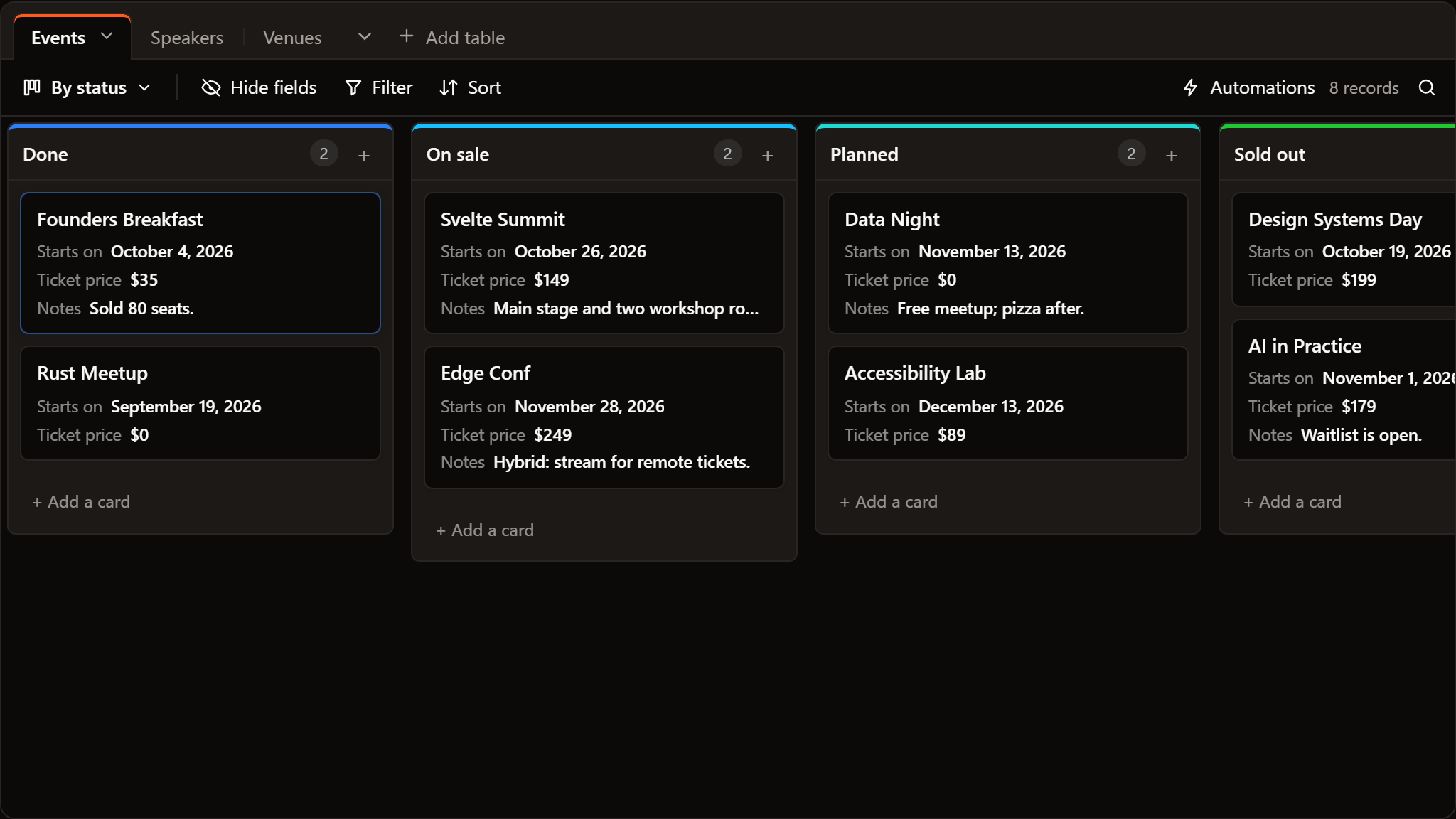
Each table also gets views: a grid colored by its first select, a Kanban board by that select, and a calendar by its first date.
Make it yours
The base is ordinary BaseTable objects: change a field, add a view, set
automations. What you change in the app (field types,
views, colors) lives in the page; to keep it, store the tables
onTablesChange hands you and start from them next time. The records
always stay in your database.
Next
- Keep a base in a database: how the writes work, links, record ids, realtime.
- Ready-to-use bases: templates to start from.
- Automations.