Importing CSV into a Svelte Data Grid
Parse a user-uploaded CSV file into objects, map its headers to grid columns, validate rows before committing, and handle the edge cases that actually bite you in production.
CSV is the file format that never dies. Every enterprise client has a spreadsheet export they want to "just upload," and no two of them look the same. Quoted commas, BOM characters, inconsistent date formats, trailing newlines - the actual parsing is maybe five percent of the work. The rest is defense.
With SvGrid the rendering side is trivial: get an array of objects and set it as data. The challenge is building a pipeline that transforms an untrusted file into something the grid can display without silent data corruption.
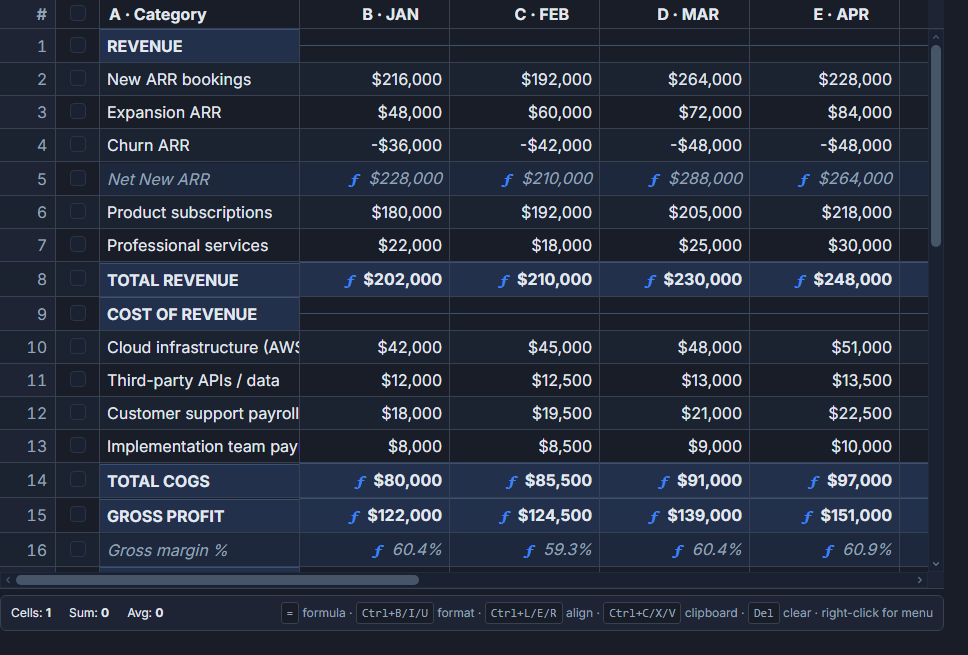 A spreadsheet-style SvGrid grid loaded with imported data.
Getting the file into memory
Start with a plain file input scoped to CSV types. The browser's File API gives you a text() method that returns the raw content as a string - no library needed for this part.
<script lang="ts">
  import SvGrid from '@svgrid/grid'
  import { type ColumnDef, tableFeatures, rowSortingFeature,
           columnFilteringFeature } from '@svgrid/grid'

  type Row = Record<string, string | number>

  let importedRows = $state<Row[]>([])
  let parseError = $state<string | null>(null)

  const features = tableFeatures({ rowSortingFeature, columnFilteringFeature })

  const columns: ColumnDef<typeof features, Row>[] = [
    { id: 'name', field: 'name', header: 'Name', width: 200 },
    { id: 'email', field: 'email', header: 'Email', width: 240 },
    { id: 'amount', field: 'amount', header: 'Amount', width: 120, type: 'number' },
    { id: 'date', field: 'date', header: 'Date', width: 140 },
  ]

  async function onFile(e: Event) {
    parseError = null
    const file = (e.target as HTMLInputElement).files?.[0]
    if (!file) return

    try {
      const text = await file.text()
      const rows = parseCsv(text)
      importedRows = rows
    } catch (err) {
      parseError = err instanceof Error ? err.message : 'Failed to parse file'
    }
  }
</script>

<input type="file" accept=".csv,text/csv" onchange={onFile} />

{#if parseError}
  <p class="error">{parseError}</p>
{:else if importedRows.length > 0}
  <SvGrid
    data={importedRows}
    {columns}
    sortable
    filterable
    showGlobalFilter={true}
    virtualization={true}
  />
{/if}
Why naive splitting fails
The first instinct is row.split(','). That works until someone uploads a CSV where a field value contains a comma - like "Smith, John" or "$1,200.00". RFC 4180 allows commas inside quoted fields, and real exports from Excel, Google Sheets, and every accounting system use them constantly.
A correct parser needs to handle: quoted fields with embedded commas, escaped quotes (""), newlines inside quoted fields, and optionally a UTF-8 BOM at the start of the file. Writing that from scratch is doable but tedious. There are small, well-tested libraries (PapaParse being the most popular) or you can write a state-machine parser once and reuse it.
Here is a minimal but correct parser that covers the cases that actually come up:
function parseCsv(raw: string): Record<string, string>[] {
  // strip UTF-8 BOM if present
  const text = raw.startsWith('') ? raw.slice(1) : raw

  const lines: string[][] = []
  let current: string[] = []
  let field = ''
  let inQuotes = false

  for (let i = 0; i < text.length; i++) {
    const ch = text[i]

    if (inQuotes) {
      if (ch === '"') {
        if (text[i + 1] === '"') {
          field += '"'
          i++
        } else {
          inQuotes = false
        }
      } else {
        field += ch
      }
    } else {
      if (ch === '"') {
        inQuotes = true
      } else if (ch === ',') {
        current.push(field)
        field = ''
      } else if (ch === '\n' || (ch === '\r' && text[i + 1] === '\n')) {
        if (ch === '\r') i++
        current.push(field)
        field = ''
        if (current.some(Boolean)) lines.push(current)
        current = []
      } else {
        field += ch
      }
    }
  }

  if (field || current.length) {
    current.push(field)
    if (current.some(Boolean)) lines.push(current)
  }

  if (lines.length < 2) throw new Error('CSV has no data rows')

  const [headers, ...body] = lines
  return body.map((cells) =>
    Object.fromEntries(headers.map((h, i) => [h.trim(), (cells[i] ?? '').trim()]))
  )
}
The BOM strip is easy to forget and causes undefined values when the first column header is name instead of name. It shows up in every Excel-exported CSV.
Validating rows before they hit the grid
Loading raw strings into the grid and calling it done is how you end up with NaN in number columns and broken sorts. Do a validation pass after parsing: coerce types, flag bad rows, and give the user a chance to see what will be skipped.
type ValidationResult = {
  valid: Row[]
  invalid: Array<{ row: Record<string, string>; reason: string; index: number }>
}

function validateRows(
  raw: Record<string, string>[],
  fieldMap: Record<string, string>
): ValidationResult {
  const valid: Row[] = []
  const invalid: ValidationResult['invalid'] = []

  raw.forEach((rawRow, index) => {
    const mapped: Row = {}
    let reason: string | null = null

    for (const [csvHeader, field] of Object.entries(fieldMap)) {
      const raw = rawRow[csvHeader] ?? ''

      if (field === 'amount') {
        const n = parseFloat(raw.replace(/[,$]/g, ''))
        if (isNaN(n)) {
          reason = `Row ${index + 2}: "${raw}" is not a valid amount`
          break
        }
        mapped[field] = n
      } else if (field === 'email') {
        if (raw && !raw.includes('@')) {
          reason = `Row ${index + 2}: "${raw}" is not a valid email`
          break
        }
        mapped[field] = raw
      } else {
        mapped[field] = raw
      }
    }

    if (reason) {
      invalid.push({ row: rawRow, reason, index })
    } else {
      valid.push(mapped)
    }
  })

  return { valid, invalid }
}
The fieldMap parameter is a mapping from CSV header names to your grid's field names - which brings up the next real-world problem.
Header mapping
Users rarely export a file where the column names match your schema. Their file has Full Name, yours expects name. Their file has Invoice Total (USD), yours expects amount.
The right approach is an explicit mapping step: show the CSV headers on the left, offer a dropdown of your grid columns on the right, and auto-select when the names are close enough. For exact matches you can auto-map; for everything else let the user decide.
A minimal mapping state in Svelte 5 looks like:
<script lang="ts">
  // csvHeaders: string[] extracted from the first row
  // gridFields: string[] from your column definitions

  let mapping = $state<Record<string, string>>({})

  function autoMap(csvHeaders: string[], gridFields: string[]) {
    const norm = (s: string) => s.toLowerCase().replace(/[^a-z0-9]/g, '')
    const result: Record<string, string> = {}
    for (const h of csvHeaders) {
      const match = gridFields.find(f => norm(f) === norm(h))
      if (match) result[h] = match
    }
    return result
  }

  // initialize when headers are known
  $effect(() => {
    if (csvHeaders.length) mapping = autoMap(csvHeaders, gridFields)
  })
</script>

{#each csvHeaders as header}
  <label>
    {header} ->
    <select bind:value={mapping[header]}>
      <option value="">-- skip --</option>
      {#each gridFields as field}
        <option value={field}>{field}</option>
      {/each}
    </select>
  </label>
{/each}
The normalization function (norm) handles the common case where Full Name should match fullName or full_name. Beyond that, you need human judgment, and the UI should make that easy.
Large files and the UI thread
For files under a few thousand rows, synchronous parsing is fine. For anything larger - say 50,000 rows from a data export - parsing on the main thread will freeze the browser briefly. The right fix is a Web Worker: post the raw text, get back the parsed rows.
Once the data is in the grid, virtualization handles rendering. SvGrid only renders the visible viewport regardless of how many rows exist, so 100,000 imported rows scroll the same as 100. Set virtualization={true} (it defaults on for large datasets) and you do not need to page the data client-side.
Showing a preview before committing
For any destructive or bulk operation, a preview step pays for itself in support tickets avoided. After parsing and validation, show the grid with a count of valid and invalid rows, let the user scan the data, and only then offer a "Confirm import" button. Calling api.applyTransaction({ add: validRows }) on confirm means you can also support incremental imports into an existing dataset rather than replacing the whole thing.
<script lang="ts">
  let api: import('@svgrid/grid').SvGridApi<typeof features, Row> | null = $state(null)

  function confirmImport() {
    if (!api) return
    api.applyTransaction({ add: validRows })
    showPreview = false
  }
</script>

{#if showPreview}
  <div class="import-preview">
    <p>{validRows.length} rows will be imported, {invalidRows.length} skipped.</p>
    <SvGrid data={validRows} {columns} onApiReady={(a) => { api = a }} />
    <button onclick={confirmImport}>Confirm import</button>
  </div>
{/if}
The pattern works for CSV today and for XLSX or JSON tomorrow - the grid does not care how the data arrived, only that it is an array of objects that match the column field names.
Related reading
- Live demo: Excel / CSV import
- Docs: Data import - Enterprise
- Saved Views - Persist Grid Layout and Filters
- Sync Grid State to the URL in Svelte
- Row Drag-and-Drop Reordering in a Svelte Data Grid
- A Right-Click Context Menu for Your Svelte Data Grid
- Progress and Percentage Bar Cells in SvGrid
Tagged: CSV