Row Drag-and-Drop Reordering in a Svelte Data Grid
Wire up drag-to-reorder rows in SvGrid using a handle cell, native HTML5 drag events, and a reactive state array - no library required.
Drag-to-reorder is one of those features that looks simple and hides a handful of sharp edges. The browser's HTML5 Drag and Drop API is just stateful enough to be confusing, and data grids add another layer: the visual row order, the underlying data array, and any active sort state all need to stay in sync at the moment of a drop.
SvGrid makes the reactive part straightforward. The grid is a controlled component - it renders whatever you put in data. If you reorder the array, the grid reorders with it, no internal mutation tracking required. The work is in wiring the drag events and keeping row identity stable through the operation.
What we're building
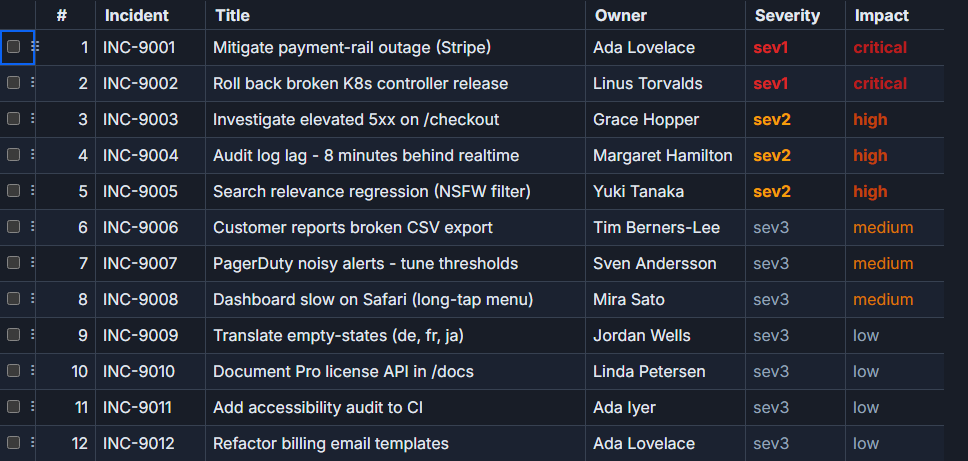
A prioritized incident backlog: 12 tasks with a stable id, a rank integer representing display order, and a few display fields. Users drag rows by a handle in the leftmost column. On drop, the array is spliced, ranks are renumbered to match array indices, and the new order is sent to the server.
type Task = {
  id: string
  rank: number
  title: string
  owner: string
  severity: 'sev1' | 'sev2' | 'sev3'
  points: number
}

const initialTasks: Task[] = [
  { id: 'INC-9001', rank: 1,  title: 'Mitigate payment-rail outage',        owner: 'Ada Lovelace',      severity: 'sev1', points: 13 },
  { id: 'INC-9002', rank: 2,  title: 'Roll back broken K8s controller',      owner: 'Linus Torvalds',    severity: 'sev1', points:  8 },
  { id: 'INC-9003', rank: 3,  title: 'Investigate 5xx on /checkout',         owner: 'Grace Hopper',      severity: 'sev2', points:  5 },
  { id: 'INC-9004', rank: 4,  title: 'Audit log lag - 8 min behind realtime',owner: 'Margaret Hamilton',  severity: 'sev2', points:  3 },
  { id: 'INC-9005', rank: 5,  title: 'Search relevance regression',          owner: 'Yuki Tanaka',        severity: 'sev2', points:  5 },
  { id: 'INC-9006', rank: 6,  title: 'Broken CSV export',                    owner: 'Tim Berners-Lee',    severity: 'sev3', points:  2 },
  { id: 'INC-9007', rank: 7,  title: 'PagerDuty noisy alerts',               owner: 'Sven Andersson',     severity: 'sev3', points:  3 },
  { id: 'INC-9008', rank: 8,  title: 'Dashboard slow on Safari',             owner: 'Mira Sato',          severity: 'sev3', points:  3 },
  { id: 'INC-9009', rank: 9,  title: 'Translate empty-states (de, fr, ja)',  owner: 'Jordan Wells',       severity: 'sev3', points:  2 },
  { id: 'INC-9010', rank: 10, title: 'Document Pro license API',             owner: 'Linda Petersen',     severity: 'sev3', points:  2 },
  { id: 'INC-9011', rank: 11, title: 'Add a11y audit to CI',                 owner: 'Ada Iyer',           severity: 'sev3', points:  5 },
  { id: 'INC-9012', rank: 12, title: 'Refactor billing email templates',     owner: 'Ada Lovelace',       severity: 'sev3', points:  3 },
]
The rank field is what the server persists. After every drop we renumber all rows so rank always matches the array index. That keeps the # column, the persistence payload, and the visual order in lockstep.
The drag-handle column and event plumbing
The handle is a narrow first column that renders a custom snippet via renderSnippet. All drag state lives in two $state variables: the ID of the row being dragged and the ID of the current drop target (for hover highlighting).
<script lang="ts">
import {
SvGrid,
tableFeatures,
rowSortingFeature,
renderSnippet,
type ColumnDef,
type SvGridApi,
} from '@svgrid/grid'
const features = tableFeatures({ rowSortingFeature })
let tasks = $state<Task[]>(initialTasks)
let draggingId = $state<string | null>(null)
let dropTargetId = $state<string | null>(null)
function startDrag(taskId: string, e: DragEvent) {
draggingId = taskId
e.dataTransfer!.effectAllowed = 'move'
e.dataTransfer!.setData('text/plain', taskId)
}
function onDragOver(taskId: string, e: DragEvent) {
e.preventDefault() // required - without this ondrop never fires
e.dataTransfer!.dropEffect = 'move'
dropTargetId = taskId
}
function onDrop(targetId: string) {
if (!draggingId || draggingId === targetId) {
draggingId = dropTargetId = null
return
}
const from = tasks.findIndex((t) => t.id === draggingId)
const to = tasks.findIndex((t) => t.id === targetId)
if (from === -1 || to === -1) return
// splice then reassign - both steps are needed for Svelte 5 reactivity
const moved = tasks.splice(from, 1)[0]
tasks.splice(to, 0, moved)
tasks = tasks.map((t, i) => ({ ...t, rank: i + 1 }))
draggingId = dropTargetId = null
persistOrder(tasks)
}
function onDragEnd() {
draggingId = dropTargetId = null
}
async function persistOrder(ordered: Task[]) {
await fetch('/api/tasks/reorder', {
method: 'PATCH',
headers: { 'Content-Type': 'application/json' },
body: JSON.stringify(ordered.map((t) => ({ id: t.id, rank: t.rank }))),
})
}
let api = $state<SvGridApi<typeof features, Task> | null>(null)
const columns: ColumnDef<typeof features, Task>[] = [
{
id: 'drag',
header: '',
width: 40,
enableSorting: false,
cell: (ctx) => renderSnippet(HandleSnippet, { task: ctx.row.original }),
},
{ field: 'rank', header: '#', width: 52 },
{ field: 'id', header: 'ID', width: 96 },
{ field: 'title', header: 'Title', width: 340 },
{ field: 'owner', header: 'Owner', width: 160 },
{ field: 'severity', header: 'Severity',width: 90 },
{ field: 'points', header: 'Points', width: 72 },
]
</script>
{#snippet HandleSnippet(p: { task: Task })}
<span
class="drag-handle"
class:dragging={draggingId === p.task.id}
class:drop-target={dropTargetId === p.task.id}
draggable="true"
role="button"
tabindex="0"
aria-label="Drag to reorder row {p.task.rank}"
ondragstart={(e) => startDrag(p.task.id, e)}
ondragover={(e) => onDragOver(p.task.id, e)}
ondrop={() => onDrop(p.task.id)}
ondragend={onDragEnd}
>⋮⋮</span>
{/snippet}
<SvGrid
{features}
data={tasks}
{columns}
height={520}
onApiReady={(g) => { api = g }}
/>
<style>
.drag-handle {
display: flex;
align-items: center;
justify-content: center;
width: 100%;
height: 100%;
cursor: grab;
color: #aaa;
font-size: 14px;
user-select: none;
}
.drag-handle:active { cursor: grabbing; }
.drag-handle.dragging { opacity: 0.35; }
.drag-handle.drop-target { outline: 2px solid var(--sg-accent, #4f8ef7); outline-offset: -2px; }
</style>
Why splice-then-reassign, and why findIndex on id
Two things in the onDrop function are deliberate, not accidental.
First, tasks.splice(from, 1) mutates the array in-place. In Svelte 5 that alone does not trigger reactivity - the signal hasn't changed reference. You must follow it with tasks = tasks.map(...) (or at minimum tasks = [...tasks]) to produce a new reference the grid and any derived values will notice.
Second, findIndex uses t.id, not a comparison against the row object. Row object references can change during hot-reload, after a map, or when TypeScript rebuilds module scope. The stable id is the only safe anchor. This becomes especially important if you later add selection, because selection state is keyed by row ID and needs to survive a reorder without jumping.
Sort state conflict - the one thing most examples miss
If a user sorts the "Severity" column and then drags a row, the visual row order no longer matches the tasks array order. The from index computed by findIndex is the array index, but the visual slot the user dragged from is determined by the sort. The drop inserts at the wrong position.
The clean fix: clear any active sort before a drag begins.
function startDrag(taskId: string, e: DragEvent) {
  draggingId = taskId
  e.dataTransfer!.effectAllowed = 'move'
  e.dataTransfer!.setData('text/plain', taskId)

  // clear sort so visual order matches array order
  if (api) api.setSort(null as never, false)
}
Alternatively, set enableSorting: false on every column when the backlog is in "manual order" mode and toggle it back when the user switches to a read-only sorted view. This is the pattern the live demo at /demos/105-row-reorder uses - a toggle in the toolbar that swaps between "drag to prioritize" and "sort to inspect" modes.
Drag on the handle, not the row
A common temptation is to put draggable="true" on the entire row element. That makes every click anywhere on the row start a drag, which breaks text selection, button clicks inside cells, and inline editors. The snippet above puts draggable only on the span inside the handle cell, so the rest of the row behaves normally.
Touch and mobile
The HTML5 Drag and Drop API does not work on iOS Safari or most Android browsers. If your users are on mobile, you need a pointer-event approach: pointerdown to start, pointermove to track position, document.elementFromPoint to find the drop target, and pointerup to commit. That is roughly 60 lines of additional code. A small library like svelte-dnd-action (under 4 KB gzipped) handles the pointer-event fallback and integrates cleanly with the same onDrop logic shown here - you replace the HTML5 drag attributes with the library's action directives and keep the array-mutation logic unchanged.
Dragging multiple selected rows at once
The example above drags one row at a time. For multi-row drag, check whether the dragged row ID is part of the current selection in startDrag. If it is, collect all selected IDs into a draggingIds: string[] array. In onDrop, splice all of them out as a group before reinserting them at the target index:
function onDrop(targetId: string) {
  if (!draggingIds.length || draggingIds.includes(targetId)) {
    draggingIds = []
    dropTargetId = null
    return
  }
  const toMove = tasks.filter((t) => draggingIds.includes(t.id))
  const rest   = tasks.filter((t) => !draggingIds.includes(t.id))
  const insertAt = rest.findIndex((t) => t.id === targetId)
  if (insertAt === -1) return

  rest.splice(insertAt, 0, ...toMove)
  tasks = rest.map((t, i) => ({ ...t, rank: i + 1 }))
  draggingIds = []
  dropTargetId = null
  persistOrder(tasks)
}
Note that toMove preserves the relative order of the selected rows, which is usually what users expect. If you want them collapsed to contiguous positions in their original sequence rather than the drag sequence, sort toMove by their current rank before splicing.
Pagination and reorder
Drag-to-reorder across pages is awkward for users and hard to implement correctly. The safe answer is to disable dragging when pagination is active, or limit reordering to within the current page and persist per-page ranks. Cross-page reordering almost always works better as a rank input field, not a drag target.
Related reading
- Conditional Row Styling in SvGrid
- A Density (Row-Height) Toggle for SvGrid
- A Sticky Summary / Footer Row in SvGrid
- Saved Views - Persist Grid Layout and Filters
- A Right-Click Context Menu for Your Svelte Data Grid
Tagged: Rows