Saved Views - Persist Grid Layout and Filters
Give users named, switchable snapshots of column order, sorting, filters, and grouping - persisted to localStorage or a server adapter - using SvGrid's createNamedViews API.
Every power user of a data grid has a ritual. Open the app, sort by date descending, hide two columns, set a status filter, drag the deal-value column to second position. They do this every morning because the app forgot everything overnight. Named saved views are the fix: capture the entire grid configuration as a serializable snapshot, give it a name, and let users switch between "My pipeline", "Overdue", and "This quarter" in one click.
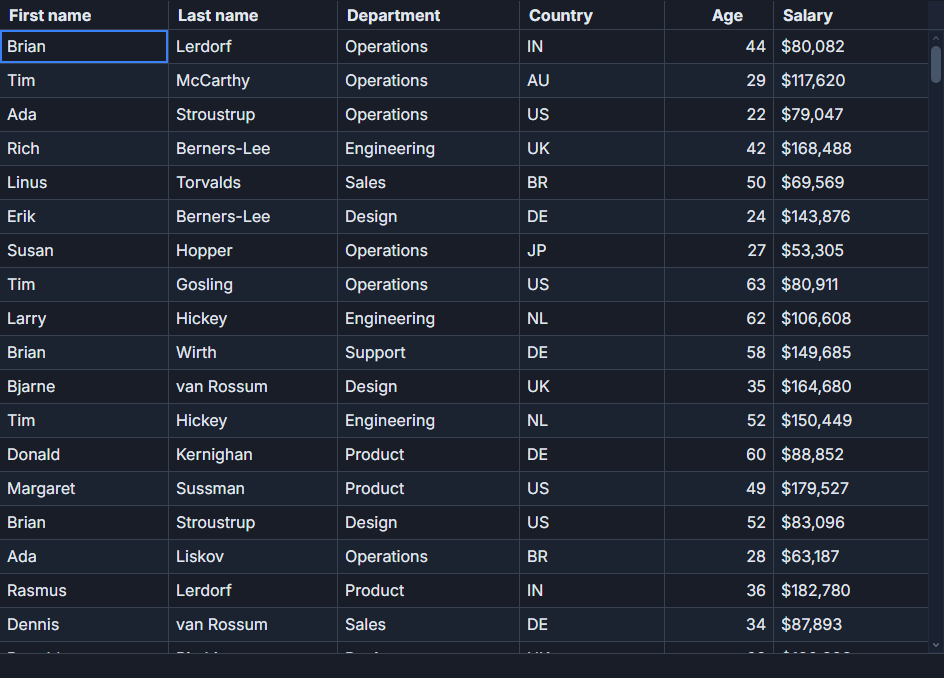
SvGrid ships createNamedViews and localStorageViews for exactly this. The wiring is about 25 lines; the rest is UI chrome.
What gets captured
createNamedViews delegates to api.getState() and api.setState() - the canonical read/write surface for the full grid state object. One call to api.getState() returns everything:
// Shape of the snapshot api.getState() produces.
// You never construct this manually; SvGrid builds it.
type GridSnapshot = {
  sorting:          { id: string; desc: boolean }[]
  filters:          Record<string, unknown>
  columnOrder:      string[]
  columnWidths:     Record<string, number>
  columnVisibility: Record<string, boolean>
  columnPinning:    { left: string[]; right: string[] }
  groupBy:          string[]
}
For a 7-column grid, a snapshot serializes to roughly 800 bytes of JSON. Even with 50 saved views, you're well inside localStorage's 5 MB per-origin limit. Column order, widths, visibility, pinning, active sort, active filters, and grouping travel together as one atomic unit - setState applies them all before the next render frame so there's no visible intermediate state.
Setting up the manager
Initialize createNamedViews inside onApiReady. The API object doesn't exist until the grid mounts, so this is the only safe place:
import {
  createNamedViews,
  localStorageViews,
  type SvGridApi,
} from '@svgrid/grid'

let manager: ReturnType<typeof createNamedViews> | null = $state(null)
let views = $state<{ name: string }[]>([])
let activeView = $state<string | null>(null)

function onApiReady(api: SvGridApi<typeof features, Row>) {
  manager = createNamedViews(api, {
    storage: localStorageViews('crm-pipeline-views'),
  })
  views = manager.list()
}

function saveView(name: string) {
  if (!manager || !name.trim()) return
  manager.save(name.trim())
  activeView = name.trim()
  views = manager.list()
}

function loadView(name: string) {
  manager?.load(name)
  activeView = name
}

function deleteView(name: string) {
  manager?.remove(name)
  if (activeView === name) activeView = null
  views = manager?.list() ?? []
}
The localStorageViews('crm-pipeline-views') call sets the storage namespace. If you have multiple grids on the same page or same origin, use distinct keys. Views from a contacts grid and a pipeline grid should never share storage.
A self-contained example
This is a complete component for a 300-row pipeline grid with a fully working view toolbar:
<script lang="ts">
  import {
    SvGrid,
    tableFeatures,
    rowSortingFeature,
    columnFilteringFeature,
    rowSelectionFeature,
    createNamedViews,
    localStorageViews,
    type ColumnDef,
    type SvGridApi,
  } from '@svgrid/grid'

  type Stage = 'Lead' | 'Qualified' | 'Proposal' | 'Negotiation' | 'Closed Won' | 'Closed Lost'
  type Row = {
    id: number
    name: string
    company: string
    stage: Stage
    dealValue: number
    owner: string
    region: string
  }

  // Deterministic fake data - no fetch needed
  let seed = 0x53564752
  const rand = () => { seed = (seed * 1664525 + 1013904223) >>> 0; return seed / 0xffffffff }
  const pick = <T>(arr: T[]) => arr[Math.floor(rand() * arr.length)]!

  const STAGES: Stage[] = ['Lead','Qualified','Proposal','Negotiation','Closed Won','Closed Lost']
  const NAMES   = ['Sarah Chen','Marcus Rodriguez','Priya Patel','James Williams','Yuki Tanaka']
  const COMPANIES = ['Northwind Industries','Acme Robotics','Vanguard Materials','Helios Sensors']
  const OWNERS  = ['B. Markov','A. Lindberg','D. Watanabe','R. Greene']
  const REGIONS = ['Americas','EMEA','APAC']

  const rows: Row[] = Array.from({ length: 300 }, (_, i) => ({
    id: i + 1,
    name: pick(NAMES),
    company: pick(COMPANIES),
    stage: pick(STAGES),
    dealValue: Math.round(rand() * 250_000 + 10_000),
    owner: pick(OWNERS),
    region: pick(REGIONS),
  }))

  const features = tableFeatures({ rowSortingFeature, columnFilteringFeature, rowSelectionFeature })

  const columns: ColumnDef<typeof features, Row>[] = [
    { id: 'name',      field: 'name',      header: 'Name',       width: 160 },
    { id: 'company',   field: 'company',   header: 'Company',    width: 180 },
    { id: 'stage',     field: 'stage',     header: 'Stage',      width: 130 },
    { id: 'dealValue', field: 'dealValue', header: 'Deal Value', width: 130, align: 'right' },
    { id: 'owner',     field: 'owner',     header: 'Owner',      width: 130 },
    { id: 'region',    field: 'region',    header: 'Region',     width: 110 },
  ]

  let manager = $state<ReturnType<typeof createNamedViews> | null>(null)
  let gridApi  = $state<SvGridApi<typeof features, Row> | null>(null)
  let views    = $state<{ name: string }[]>([])
  let active   = $state<string | null>(null)
  let newName  = $state('')

  function onApiReady(api: SvGridApi<typeof features, Row>) {
    gridApi  = api
    manager  = createNamedViews(api, { storage: localStorageViews('pipeline-views') })
    views    = manager.list()
  }

  function save() {
    const n = newName.trim()
    if (!n || !manager) return
    manager.save(n)
    active  = n
    newName = ''
    views   = manager.list()
  }

  function load(name: string) {
    manager?.load(name)
    active = name
  }

  function remove(name: string) {
    manager?.remove(name)
    if (active === name) active = null
    views = manager?.list() ?? []
  }

  function reset() {
    gridApi?.clearSort()
    gridApi?.clearAllFilters()
    gridApi?.setColumnOrder(columns.map(c => c.id!))
    for (const col of columns) gridApi?.setColumnVisible(col.id!, true)
    active = null
  }
</script>

<div class="toolbar">
  {#each views as v}
    <button
      class="view-btn"
      class:active={active === v.name}
      onclick={() => load(v.name)}
    >{v.name}</button>
    <button class="del-btn" onclick={() => remove(v.name)} aria-label="Delete view">x</button>
  {/each}
  <input bind:value={newName} placeholder="View name" onkeydown={(e) => e.key === 'Enter' && save()} />
  <button onclick={save} disabled={!newName.trim()}>Save</button>
  <button onclick={reset}>Reset</button>
</div>

<SvGrid
  {features}
  {rows}
  {columns}
  sortable
  filterable
  height={540}
  {onApiReady}
/>

<style>
  .toolbar {
    display: flex;
    gap: 6px;
    align-items: center;
    flex-wrap: wrap;
    margin-bottom: 8px;
  }
  .view-btn {
    padding: 4px 10px;
    border-radius: 4px;
    border: 1px solid #ccc;
    cursor: pointer;
    background: #fff;
  }
  .view-btn.active {
    background: #2563eb;
    color: #fff;
    border-color: #2563eb;
  }
  .del-btn {
    padding: 2px 5px;
    border: none;
    background: none;
    color: #aaa;
    cursor: pointer;
    font-size: 11px;
    margin-left: -4px;
  }
  input {
    border: 1px solid #ccc;
    border-radius: 4px;
    padding: 4px 8px;
    width: 150px;
  }
</style>
The toolbar renders a button per view, highlights the active one, and a text input for creating new views. Press Enter or click Save. The grid underneath is a standard SvGrid - no extra props or wrappers needed. The view manager attaches through onApiReady.
Replacing localStorage with a server adapter
localStorageViews is the right default for single-user apps. If views need to follow users across devices or be shared across a team, swap the adapter. The interface is four methods:
import { memoryViews, type SvGridApi } from '@svgrid/grid'

// memoryViews ships as a reference implementation - use it as a template.
// Implement this interface against your own backend:
interface ViewStorage {
  get(name: string): { name: string; state: unknown } | null
  set(name: string, state: unknown): void
  list(): { name: string }[]
  remove(name: string): void
}

// A minimal server-backed adapter:
function serverViews(userId: string): ViewStorage {
  const endpoint = `/api/users/${userId}/grid-views`
  let cache: { name: string; state: unknown }[] = []

  // Hydrate once on construction - you'd await this in practice
  fetch(endpoint).then(r => r.json()).then(d => { cache = d })

  return {
    get: (name) => cache.find(v => v.name === name) ?? null,
    list: () => cache.map(v => ({ name: v.name })),
    set: (name, state) => {
      cache = [...cache.filter(v => v.name !== name), { name, state }]
      fetch(endpoint, { method: 'PUT', body: JSON.stringify({ name, state }) })
    },
    remove: (name) => {
      cache = cache.filter(v => v.name !== name)
      fetch(`${endpoint}/${encodeURIComponent(name)}`, { method: 'DELETE' })
    },
  }
}

// Use it just like localStorageViews:
function onApiReady(api: SvGridApi<typeof features, Row>) {
  manager = createNamedViews(api, { storage: serverViews(currentUserId) })
}
The cache makes reads synchronous (which the interface requires) while writes go to the server in the background. For production use you'd want error handling and optimistic rollback, but the shape above illustrates that replacing the storage layer is mechanical - createNamedViews doesn't care what's behind the adapter.
Two edge cases that will bite you
Schema changes break saved column orders. If you add a column after users have been saving views, restored column orders won't include the new field. The new column will appear in some default position that may surprise users. One approach: after manager.load(name), call api.setColumnOrder with a merged list that appends any columns missing from the saved order. Another approach: namespace your storage key by schema version ('pipeline-views-v3') so old views are abandoned cleanly.
Reset must cover column visibility and order, not just sort and filters. api.clearSort() and api.clearAllFilters() don't restore columns a user hid or reordered. A true reset needs api.setColumnOrder(originalOrder) and a pass through api.setColumnVisible(id, true) for each column. The reset() function in the example above handles this correctly - copy that pattern rather than just clearing sort and filters and wondering why hidden columns stay hidden.
Auto-save without a save button
For apps where you want the grid to automatically remember the last state without requiring a manual save, use attachAutoSavedView from @svgrid/grid. It subscribes to state changes and writes on every change, debounced by default:
import { attachAutoSavedView, localStorageViews, type SvGridApi } from '@svgrid/grid'

function onApiReady(api: SvGridApi<typeof features, Row>) {
  const storage = localStorageViews('pipeline-autosave')
  // Restore the last session state if one was saved
  const saved = storage.get('__autosave__')
  if (saved) api.setState(saved.state)
  // Write every change going forward
  attachAutoSavedView(api, { storage, name: '__autosave__' })
}
This pattern pairs well with a "reset to defaults" button as a safety valve - users who accidentally hide a column they need can escape without understanding the view system at all.
For a live reference implementation, /demos/143 shows named views and /demos/171 shows the auto-save variant side by side.