Server grouping - Enterprise
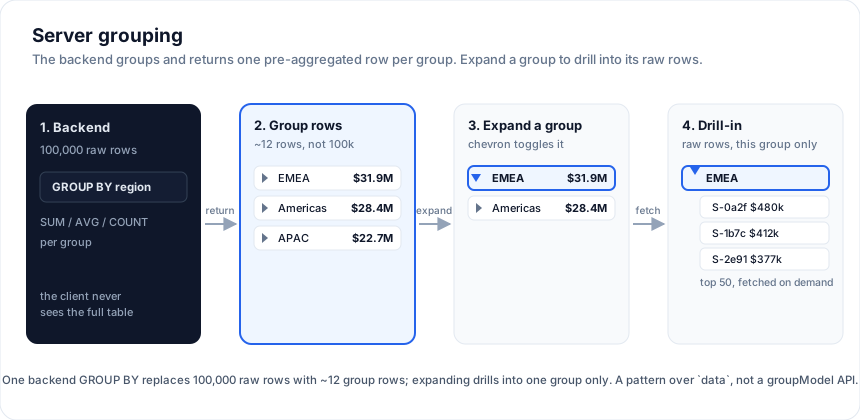
Grouping a hundred thousand rows in the browser means shipping all hundred
thousand rows first. Server grouping flips that: the backend runs the
GROUP BY, and the grid receives one pre-aggregated row per group - a key
plus its subtotals. Expanding a group then lazily drills into the next level (or
the raw rows) for that group only, so the network never carries the full
table.
This is first-class in SvGrid: grouping flows through the same
ServerDataSource.getRows contract as paging, sorting, and filtering.
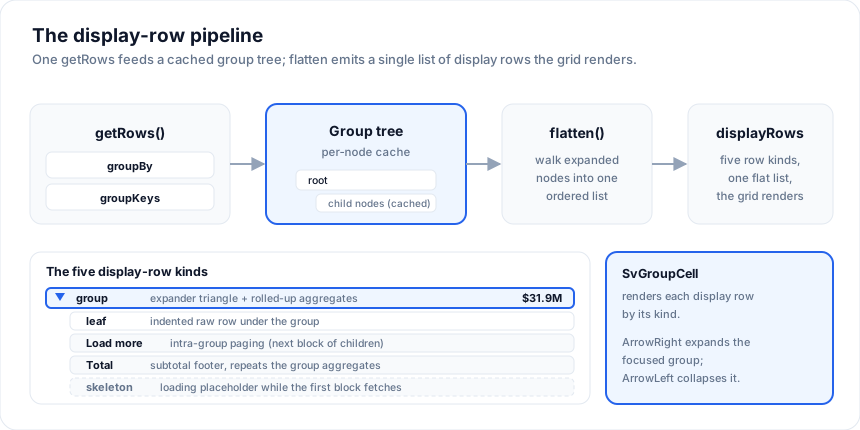
The request carries groupBy (the columns grouped on) and groupKeys (the path
of the group being expanded); createServerRowModel owns the group tree -
a block cache per level, lazy fetch on expand, race-safety, refresh and retry
per route - and the grid mounts it through one rowModel prop.
Open the live example: Server grouping (row model) (Server-Side Row Model)
The contract
One getRows. When groupKeys.length < groupBy.length the server returns
group rows (one per distinct key at that level, carrying the group key and
its aggregates); when they are equal it returns the leaf rows under that
path. Every request carries startRow / endRow as well: a level loads one
block at a time, group rows and leaves alike.
The row model and its chrome ship in @svgrid/enterprise; the datasource
contract they run on, and the grid itself, are free in @svgrid/grid. The
examples on this page import from both:
<script lang="ts">
  import { SvGrid } from '@svgrid/grid'
  import { SvRowGroupPanel } from '@svgrid/enterprise'
</script>
async function getRows(req) {
  const level = req.groupKeys.length
  if (level < req.groupBy.length) {
    // GROUP row level: GROUP BY the column at this level, within groupKeys.
    const col = req.groupBy[level]                       // e.g. 'country', then 'city'
    // SELECT country, SUM(amount) AS amount, COUNT(*) AS childCount
    //   FROM sales WHERE <groupKeys path> GROUP BY country
    //   ORDER BY country LIMIT <endRow - startRow> OFFSET <startRow>
    return { rows: groupRows, rowCount: distinctGroups }
  }
  // LEAF level: the raw rows under the fully-specified path.
  // SELECT * FROM sales WHERE country = $1 AND city = $2 LIMIT ... OFFSET ...
  return { rows: leafRows, rowCount: total }
}
A group row is a plain object: the group column's value under that column's
field, each aggregate under its column (amount: 12345 for sum(amount)),
and optionally childCount, the number of rows the next level holds. The
model reads them straight off the row.
You probably do not have to write that
Mapping the grid's request onto a backend query is the part teams actually
find hard, so @svgrid/enterprise ships adapters that already do it - SQL,
REST and Supabase - including the grouped case above.
import { planQuery, planToSql } from '@svgrid/enterprise'

// In your endpoint. `schema` is the EntitySchema for the table.
const plan = planQuery(schema, request)
const sql = planToSql(plan, { placeholders: '$', ilike: true }) // Postgres

const rows = await db.query(
  plan.groupBy
    // Grouped level: the plan hands you the SELECT list and GROUP BY.
    ? `SELECT ${sql.select} FROM sales ${sql.whereText} ${sql.groupByText}
       ${sql.orderByText} LIMIT ${sql.limit} OFFSET ${sql.offset}`
    // Leaf level: your own columns.
    : `SELECT * FROM sales ${sql.whereText}
       ${sql.orderByText} LIMIT ${sql.limit} OFFSET ${sql.offset}`,
  sql.params,
)
Four details the plan handles that are easy to get wrong by hand:
- The path becomes ordinary predicates.
groupKeysarrives as equality filters inplan.where, so your backend only ever handles "filter, then group by one column" - never a multi-level GROUP BY. - The count means different things at different levels.
sql.countTextisCOUNT(DISTINCT col)when grouping andCOUNT(*)when not, because the grid sizes its scrollbar from the number of groups at a group level. - Aggregates are aliased back to their source column.
SUM("amount") AS "amount", because that is the key the grid reads from the group row. The grouped SELECT also carriesCOUNT(*) AS "childCount". - Groups have an order. A grouped level orders by the key unless the request sorts by the key or an aggregate, so paging over groups is stable.
- Function names are whitelisted, like columns.
fnissum,avg,min,maxorcountout of the box, and any other name your database knows once you list it:planQuery(schema, request, { aggregators: ['median'] }), oraggregatorsoncreateSqlDataSource. A name that is neither is dropped from the plan, andplanToSqlrefuses anything that is not an identifier, because the name is pasted into the statement.ServerAggregation.fnis typed to take any string for that reason: the request carriesmedianuntouched, and the backend decides.
Only fields declared on the EntitySchema reach the plan, so a client cannot
group by or aggregate an identifier you did not declare.
For REST, createRestDataSource sends ?groupBy=region&aggregate=sum:amount
plus the path as ordinary filter params. For Postgres via PostgREST,
createSupabaseDataSource uses aggregate selects (requires PostgREST 12+ with
aggregates enabled). createInMemoryDataSource implements the whole contract
in memory and is the reference to test your own backend against; its request
matrix is a test every shipped backend runs.
Wiring the model
import { createServerRowModel, type ServerRowModelState } from '@svgrid/enterprise'

let view = $state<ServerRowModelState<Sale>>()
const ctl = createServerRowModel<Sale>(source, {
  groupBy: ['country', 'city'],                 // group two levels deep
  aggregations: [{ col: 'amount', fn: 'sum' }], // roll up per group
  childCount: (row) => row.childCount,          // the badge beside the key
  onChange: (s) => (view = s),
})
ctl.refresh() // load the top level
view.displayRows is the flattened tree: top-level groups, with each expanded
group's children spliced in beneath it, and placeholder rows where a block is
still in flight. Every group row carries level (for indentation),
expanded, loading, key, childCount and aggregates.
Rendering the display rows
Hand the model to the grid and add one column for the group cell. The model
supplies the rows, the loading flag, the sort and filter hooks, the visible
range (so each level fetches the blocks on screen), the treegrid keyboard and
the placeholder rows; the shipped SvGroupCell draws the expander,
indentation, the child count, and a spinner in the expander while the
level's block is in flight:
<script lang="ts">
  import { SvGrid, renderComponent } from '@svgrid/grid'
  import { SvGroupCell, serverGroupText } from '@svgrid/enterprise'

  const columns = [
    { id: 'group', header: 'Group', width: 280, sortable: false, filterable: false,
      fieldFn: (row) => serverGroupText(row, 'name'),
      cell: (ctx) => renderComponent(SvGroupCell, {
        row: ctx.row.original, onToggle: () => ctl.group.onToggle(ctx.row.original), leafField: 'name',
      }) },
    { field: 'amount', header: 'Amount', align: 'right',
      format: { type: 'number', options: { style: 'currency', currency: 'USD' } } },
  ]
</script>

<SvGrid rowModel={ctl} {columns} />
A value column shows the subtotal on a group row and the cell value on a leaf,
because each grid row spreads its data. The fieldFn is the text behind the
cell: a group's key, Total, Grand total, a leaf's leafField. Copy,
export and the clipboard read it, and so does a grand total pinned with
grandTotalRow: 'pinnedBottom', which the grid formats from the accessor
rather than through the cell renderer. Want full control? Every grid row
carries a __group marker (the display row), so you can skip SvGroupCell
and render your own cell from it.
Footer and grand-total rows carry the same __groupFooter / __grandTotal
flags the client-side grouping sets, so the grid styles them the way it
styles its own subtotals (.sv-grid-group-footer-row,
.sv-grid-grand-total-row): a heavier top rule and weight, in the list
or pinned.
Every string the group chrome draws is a message you can replace:
SvGroupCell and SvRowGroupPanel take messages (a partial
ServerGroupMessages: the "load more" row, Total {label}, Grand total,
Group by:, Apply, the chip labels for a screen reader, ...), plus
locale on the cell for its numbers, and serverGroupText takes the same
map as its third argument so a copy reads the way the cell does. The two
components are mounted by you, not by the grid, so they cannot read
localization.text; pass one object to all three.
<script lang="ts">
  const groupMessages = { total: 'Summe {label}', grandTotal: 'Gesamtsumme', loadMore: '{count} weitere laden', apply: 'Anwenden', cancel: 'Abbrechen' }
</script>

<SvRowGroupPanel {columns} {groupBy} onChange={...} messages={groupMessages} />
<!-- and in the column: renderComponent(SvGroupCell, { ..., messages: groupMessages, locale: 'de-DE' }) -->
Keyboard and accessibility
The model's group accessor set (rowModel wires it as serverGroup) makes
the grid handle tree navigation itself - no app key handling:
- ArrowRight expands the focused group row; ArrowLeft collapses it; Ctrl+Enter toggles it, and on a leaf opens or closes its detail panel when the grid draws one.
- The grid takes the
treegridrole and setsaria-level+aria-expandedon each row, so screen readers announce the depth and expanded state. - Group rows do not take edits, whatever the column says; a leaf does.
It works for tree mode the same way.
Sticky group rows
A country with 60,000 rows is a long scroll with nothing on screen that
says which country it is. stickyGroupRows keeps the group a row belongs
to under the header - the country row, and the region row above it - while
its rows scroll past, the way a section heading stays put in a long list:
<SvGrid rowModel={ctl} {columns} stickyGroupRows />
Under virtualization the band holds a copy of each ancestor row, drawn by the same renderers (the expander in the copy collapses the group); without virtualization the rows themselves stick. The band comes off the top of the scrolled rows, so nothing jumps when it appears. It is the same prop for client grouping and tree data.
Blocks, per level
Every level - the root and each expanded group - is its own block cache. The
grid reports what is on screen and the model asks each level for the blocks
under the viewport, blockSize rows at a time, keeps at most
maxBlocksInCache loaded blocks per level, runs at most
maxConcurrentRequests requests across all levels, and waits
blockLoadDebounceMs for a scroll to settle. A level shows skeletonRows
placeholders before its first block lands, so an expand never opens onto
nothing.
A sort, a filter or a regroup turns the rows on screen into placeholders
until the new answer arrives. Against a source that answers quickly, that is
a frame of skeletons and an extra render for nothing. keepRowsWhileLoading
(milliseconds) keeps the current rows on screen instead, until the new
answer's first block lands or the time runs out, whichever comes first. A
failed block ends the wait at once, so its Retry shows. The default, 0, shows
the placeholders straight away.
levelParams(level, route) tunes one level: a different blockSize or
maxBlocksInCache, infinite: false to load a level completely as soon as it
opens (which also allows sorting it in the browser, see clientSideSort), or
loadMore: true to load one block per click behind a "Load N more" row, or
initialRowCount to claim a level's size before its first block lands - at
the root of flat data that makes api.scrollToRow(900000) work before
anything has loaded, with placeholders under the viewport and the block
beneath them the one that loads:
createServerRowModel(source, {
  groupBy: ['region', 'country'],
  blockSize: 100,
  levelParams: (level) => (level === 2 ? { loadMore: true, blockSize: 50 } : {}),
})
Refresh, purge, retry
| Method | Does |
|---|---|
refresh({ route, purge }) |
Re-fetch a level in place (route: [] is the root), keeping what is open; purge: true drops that subtree's cache first. |
retryLoads() |
Re-fetch every failed block. The grid draws a failed block as a tinted band with one full-width message and a Retry button. |
expandAll({ includeUnloaded }) / collapseAll() |
Open every loaded group, and with includeUnloaded every group that arrives later, until the next collapse. |
isGroupOpenByDefault(route, row) |
Open a group as soon as it arrives. |
getLevelState(route) / getCacheState() |
Where each level stands: loaded blocks, failed blocks, row count. debug: true logs block lifecycle. |
onStoreRefreshed, onGroupOpened, onLoadError |
Events for the app's own chrome. |
What re-requests, and what does not
Changing a group column (add, remove, reorder) or an aggregated column
reloads the tree: the rows are different rows. Sorting follows the same logic
per level: a sort on a plain column re-fetches the leaf levels only, a sort on
a group column re-fetches that column's level (the children of a group keep
their own order), a sort on an aggregated column re-fetches everything.
sortAllLevels: true makes every sort a full
reload; clientSideSort: true sorts a fully loaded level in the browser with
no request at all.
A filter purges everything by default, as a filtered group may have
different children and different totals. onlyRefreshFilteredGroups: true
re-fetches only the levels whose column changed, and accepts stale counts on
the others as the trade.
Subtotal footers and the grand total
Turn on groupFooters and each expanded group gets a Total row after its
children, carrying the group's aggregates again. grandTotalRow asks the
server for a total across the whole (filtered) result on the first root
request - ServerRequest.needsGrandTotal in, ServerResult.grandTotal out -
and shows it at the 'top' or 'bottom' of the list, or pinned with
'pinnedTop' / 'pinnedBottom'. The row has the fixed id sv-grand-total
and each footer sv-group-total:<route>, so transactions
can address them.
createServerRowModel(source, { groupBy: ['region', 'country'], aggregations, groupFooters: true, grandTotalRow: 'pinnedBottom' })
Paging the tree
pagination pages the top level instead of scrolling it: a page is
pageSize top-level rows, each shown with whatever is open beneath it, or
with paginateChildRows a page of the flattened tree, children counted.
Blocks stay independent of pages. The grid's footer pager drives it through
rowModel (pageable on the grid); pageSizes fills the page-size selector
and autoPageSize fits the page to the grid's height.
createServerRowModel(source, {
  groupBy: ['region', 'country'],
  pagination: { pageSize: 25, pageSizes: [10, 25, 50], paginateChildRows: true },
})
A row-group panel (drag to group)
SvRowGroupPanel is a "group by" bar: it shows the current group columns as
chips you can remove or drag to reorder, plus a menu to add one, and it accepts a
column drop (text/sv-column). Wire its onChange to setGroupBy. With
applyMode="deferred" it collects edits behind Apply / Cancel, so one
session of changes is one reload rather than one per chip. Pending chips
survive a block landing (the model hands out a fresh groupBy array on
every emit; the panel compares by value) and are dropped only when the
grouping really changes from outside:
<script lang="ts">
  import { SvRowGroupPanel } from '@svgrid/enterprise'
  const groupCols = [{ id: 'region', label: 'Region' }, { id: 'country', label: 'Country' }]
</script>

<SvRowGroupPanel columns={groupCols} groupBy={view.groupBy} onChange={(g) => ctl.setGroupBy(g)} applyMode="deferred" />
setLayout({ groupBy, aggregations, pivotBy, pivotMode }) changes several of
those at once with a single reload; it is what the pivot designer sends.
Multi-level grouping is automatic
Set groupBy: ['region', 'industry', 'quarter'] and the model fetches each
level on demand: the top level returns regions, expanding a region fetches its
industries, expanding an industry fetches its quarters, and expanding a quarter
returns the raw rows. You never configure the levels - each expand is just
another getRows with a longer groupKeys. ServerRequest.parentRow carries
the row being expanded, for a backend keyed off it, and context on the model
rides along on every request.
Delivering rows without a request
applyRowData({ route, rows, rowCount, startRow }) fills a level's store
directly, bypassing the datasource: a tree payload that ships children with
their parent, or a socket that pushes a whole level. The blocks it fills are
loaded blocks like any other.
The win
For a 100,000-row sales table grouped by three dimensions, the top level returns a handful of group rows instead of 100,000 raw rows. The client groups nothing and holds almost nothing. Grouping 100k rows in JS runs in hundreds of milliseconds; asking the server for the pre-grouped result returns a few rows in tens of milliseconds, and the payload shrinks by orders of magnitude. The flagship demo runs the whole model over one million rows:
Open the live example: Server-Side Row Model: 1,000,000 rows (Server-Side Row Model)
The options on this page, each with the request log to show what it costs - grand total positions, subtotal footers, open-by-default levels, expand-all over unloaded groups, refresh against purge, and the sort and filter rules:
Open the live example: Server grouping: totals, sort and refresh rules (Server-Side Row Model)
And the SQL a backend runs for each of these requests, per dialect, from
planQuery and planToSql:
Open the live example: Server row model to SQL (Server-Side Row Model)
Master-detail
A leaf can open a detail panel under itself - an order and its line items,
a customer and a chart - without the rows leaving the server. The model
keeps the set of open details and, when it flattens the tree, puts a
display row of kind detail right under its leaf, carrying the leaf as
master. The grid draws it through the same two props client-side
master-detail uses, plus a height the virtualizer can count on:
<SvGrid
  rowModel={ctl}
  {columns}
  isDetailRow={(row) => row.__group?.kind === 'detail'}
  renderDetailRow={Detail}
  detailRowHeight={200}
  showDetailToggle
/>

{#snippet Detail({ row })}
  {@const order = row.__group.master}
  <!-- fetch the lines for order.id here; the panel is 200px and scrolls inside -->
{/snippet}
ctl.toggleDetail(id, open?) opens or closes the panel under the leaf with
that getRowId, isDetailOpen(id) reads it, closeAllDetails() clears,
and state.openDetails lists them. A panel closes with the group that
holds its leaf and goes when the leaf is removed by a transaction.
showDetailToggle draws the chevrons as a
row-header column next to
the row numbers: the model tells the grid which rows are leaves and which
panels are open, so there is nothing to wire; a group row shows no
chevron, since its expander is in the group column. Ctrl+Enter on a
leaf opens or closes its panel from the keyboard, and on the panel row
closes it.
Open the live example: Server row model: master-detail (Server-Side Row Model)
Without the model (manual pattern)
If your backend or UI needs something bespoke, you can still assemble grouping by
hand: fetch pre-grouped rows, render them as ordinary rows, and expand each into
a second <SvGrid data={detailRows}> or an expandable detail row
(isDetailRow + renderDetailRow), keeping the expanded group id and its lazily
fetched detail rows in your own state. The tree toggle pattern
is a third option for a single flat, indented list. createServerRowModel is
the batteries-included version of exactly this.
Open the live example: Server-side grouping + aggregates (Server-Side Data)
Try it
Grouping on the client is a prop; the point of the server version is that the
rollup happens where the rows are. This runs the same shape locally so the
group model is visible - your query returns pre-grouped rows instead.
<SvGrid
  data={people}
  {columns}
  groupBy={['department']}
  groupable
  summary
  sortable
/>
Compare that with what a server has to return: one row per group with its aggregate already computed, plus the leaves for whichever groups are expanded.
Group headers the server computed
When the server does the rollup it sends group rows and leaf rows in one flat list, already ordered. Rendering that is tree data with a parent field - the grid does not need to know a group was computed elsewhere.
<script lang="ts">
  import { SvGrid, type GridColumns } from '@svgrid/grid'

  type Row = { id: string; parentId: string | null; label: string; total: number }

  // What the endpoint returned: two group rows with their totals, plus leaves.
  const fromServer: Row[] = [
    { id: 'g-eng',  parentId: null,    label: 'Engineering', total: 310000 },
    { id: 'p-ada',  parentId: 'g-eng', label: 'Ada Lovelace', total: 142000 },
    { id: 'p-grace',parentId: 'g-eng', label: 'Grace Hopper', total: 168000 },
    { id: 'g-plat', parentId: null,    label: 'Platform',     total: 327000 },
    { id: 'p-linus',parentId: 'g-plat',label: 'Linus Torvalds', total: 155000 },
    { id: 'p-barb', parentId: 'g-plat',label: 'Barbara Liskov', total: 172000 },
  ]

  const columns: GridColumns<Row> = [
    { field: 'label', header: 'Group / person', width: 240 },
    { field: 'total', header: 'Total', width: 140,
      format: { type: 'currency', currency: 'USD' } },
  ]
</script>

<SvGrid
  data={fromServer}
  {columns}
  treeData={{ parentField: 'parentId', idField: 'id', column: 'label' }}
/>
The previous model
createServerGroupModel, serverGroupRows and serverGroupNav - the
block-append model with a "Load N more" button - still ship, unchanged, and
are deprecated in favour of createServerRowModel. The new model does
everything the old one did; levelParams: { loadMore: true } is the
"Load N more" behaviour where you want to keep it.
See also
- Server-Side Row Model - the datasource contract that grouping, paging, sort, and filter all share.
- Server tree data - load-on-demand hierarchies (self-referential trees).
- Server pivot - pivot on the server, with the designer driving the model.
- Server transactions - add, update and remove rows in a loaded level without a request.
- Server selection - select-all as a rule across rows the grid never loaded.
- Tree data - the client-side flat-list + toggle pattern.
Live examples
- Server grouping (row model) - Server-side grouping through one getRows contract: the request carries groupBy + groupKeys, and createServerRowModel owns the group tree - a block cache per level, lazy expand, per-group sums and a subtotal footer, race-safety - mounted through the one rowModel prop. Leaves arrive by scroll, behind a Load N more row, or paged across the whole tree, and the group panel regroups on the fly. Here a 63,000-row in-memory server behind 200ms latency; the grid holds only the groups you expand. The row model ships in @svgrid/enterprise.
- Server-Side Row Model: 1,000,000 rows - One grid, one rowModel prop, a million rows that stay on the server. Sort, filter, global search, grouping to any depth (Region > Country > Rep), infinite scroll or paging, inline edits applied back as transactions with the subtotal following, add and delete, select-all across rows the grid never loaded with a bulk edit by rule, failed blocks with Retry, a request log that shows every call to the columnar warehouse behind it, and a live map of the block cache per level. The row model ships in @svgrid/enterprise; the datasource contract is free.
- Server grouping: totals, sort and refresh rules - The options around a grouped row model with the request log to show what each costs: a grand total in any of four positions, subtotal footers, levels that open on arrival, expand-all that reaches groups not loaded yet, refresh in place versus purge, and the rules for what a sort or a filter re-requests - a plain column re-fetches leaf levels only, a group column its own level, an aggregated column every level; a filter purges all or only the groups it touches.
- Server row model to SQL - What the backend runs for each request: planQuery turns the ServerRequest into a QueryPlan against an entity schema, planToSql renders it for Postgres, MySQL or SQLite, and the panel shows the statements createSqlDataSource would hand your executor for the request that just went out - grouped or flat rows, the count, the grand total, and the two statements a pivot needs. The rows come from the in-memory reference source over the same plan.
- Server row model: master-detail - A detail panel under a leaf of a grouped server row model: the chevron on an order asks the model to open its detail (toggleDetail), the model puts a detail row under the leaf, the grid draws it through renderDetailRow at a height the virtualizer knows (detailRowHeight), and the panel fetches the order's line items from a second endpoint the moment it appears. The tree stays virtualized, and the region row holds under the header (stickyGroupRows) while the panels scroll past.
- Server-side grouping + aggregates - GROUP BY + SUM/AVG pushed to the server; pre-aggregated buckets with on-demand drill-in.
Related articles
- Building a Project / Task Board with a Svelte Data Grid - How to build a task management grid with grouping by status or assignee, inline edits, subtask tree rows, and saved views - without reaching for a dedicated project management tool.
- Going AI-Native: The SvGrid MCP Server - Most AI assistants invent data grid APIs. We built an MCP server so they look up the real one instead.
- Inside SvGrid: Grouping, Trees, and Master-Detail - Three different ways to show hierarchy in a data grid, unified under one expansion model in SvGrid - the design decision and how each feature actually works.