Tree rows (expand / collapse)
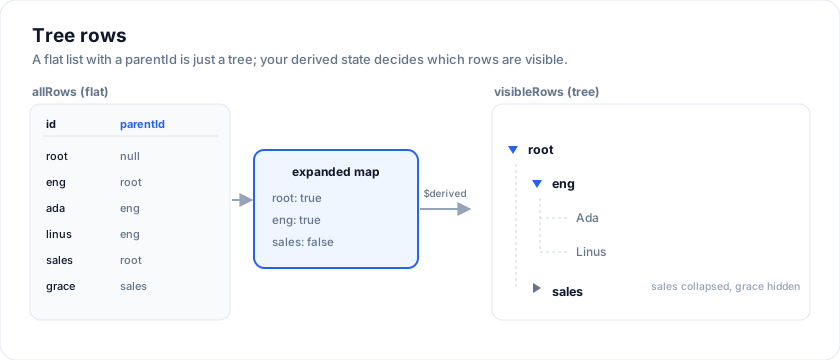
SvGrid does not have a treeData prop. Tree-shaped data renders through
the same data + columns pipeline as any other grid, with the tree
behaviour living in your derived-state code. This is on purpose: a
tree is just "a flat list with a depth field and a collapsible
subtree", and the headless engine doesn't need to know which.
Try the org-chart pattern - click any chevron to expand a branch, or focus a name cell and press Right / Left / Enter:
Open the live example: Org chart tree (Tree & Hierarchy)
What it is
A "tree row" is any row with a depth: number, a childIds: string[]
(or equivalent), and a parent reference. Whether a row is currently
visible depends on its ancestors' expanded state.
The pattern
Three pieces of state, the third one derived:
The examples on this page run against these rows:
<script lang="ts">
  import { SvGrid, type GridColumns, type SvGridApi } from '@svgrid/grid'

  type Person = {
    id: number
    name: string
    department: string
    city: string
    age: number
    salary: number
  }

  const people: Person[] = [
    { id: 1, name: 'Ada Lovelace',   department: 'Engineering', city: 'London',   age: 36, salary: 142000 },
    { id: 2, name: 'Grace Hopper',   department: 'Engineering', city: 'New York', age: 45, salary: 168000 },
    { id: 3, name: 'Linus Torvalds', department: 'Platform',    city: 'Portland', age: 54, salary: 155000 },
    { id: 4, name: 'Radia Perlman',  department: 'Networking',  city: 'Seattle',  age: 49, salary: 161000 },
    { id: 5, name: 'Barbara Liskov', department: 'Platform',    city: 'Boston',   age: 52, salary: 172000 },
  ]

  const columns: GridColumns<Person> = [
    { field: 'name',       header: 'Name',       width: 190 },
    { field: 'department', header: 'Department', width: 150 },
    { field: 'city',       header: 'City',       width: 130 },
    { field: 'age',        header: 'Age',        width: 80 },
    { field: 'salary',     header: 'Salary',     width: 130, format: { type: 'currency', currency: 'USD' } },
  ]
</script>
type Node = { id: string; parentId: string | null; childIds: string[]; depth: number }

let allRows = $state<Node[]>(/* every node, flat */)
let expanded = $state<Record<string, boolean>>({ root: true })

const visibleRows = $derived.by(() => {
  const out: Node[] = []
  const byId = new Map(allRows.map((n) => [n.id, n]))
  function walk(id: string) {
    const node = byId.get(id)
    if (!node) return
    out.push(node)
    if (expanded[id]) for (const cid of node.childIds) walk(cid)
  }
  for (const root of allRows.filter((n) => n.parentId === null)) walk(root.id)
  return out
})
Hand visibleRows to <SvGrid data={visibleRows} ...> like any
other dataset. The grid stays unaware that the data is hierarchical.
The expand-chevron cell
Render the chevron + indentation as part of a custom cell snippet on the leftmost (or "name") column:
{#snippet NameCell(props: { node: Node })}
  {@const canExpand = props.node.childIds.length > 0}
  {@const isOpen = !!expanded[props.node.id]}
  <span class="tree-name" style="padding-left: {props.node.depth * 22}px">
    {#if canExpand}
      <button
        type="button"
        class={`tree-chev ${isOpen ? 'tree-chev-open' : ''}`}
        onclick={() => (expanded = { ...expanded, [props.node.id]: !isOpen })}
        aria-expanded={isOpen}
        aria-label={isOpen ? 'Collapse' : 'Expand'}
      >
        <svg viewBox="0 0 16 16" width="10" height="10"
             fill="none" stroke="currentColor" stroke-width="2.4"
             stroke-linecap="round" stroke-linejoin="round">
          <polyline points="5 3 11 8 5 13" />
        </svg>
      </button>
    {/if}
    <span>{props.node.name}</span>
  </span>
{/snippet}
The corresponding CSS rotates the SVG instead of swapping a character, which animates smoothly:
.tree-chev {
  transition: transform 160ms ease;
}
.tree-chev-open { transform: rotate(90deg); }
Tree connector lines
For visual continuity between parents and children, draw guide lines in absolute position inside the name cell. One vertical guide per ancestor depth, plus a short horizontal "elbow" into the current row:
<span class="tree-name" style="position: relative; padding-left: {4 + node.depth * 22}px">
  {#each Array(node.depth) as _, i (i)}
    <span class="tree-guide" style="left: {4 + i * 22 + 11}px"></span>
  {/each}
  {#if node.depth > 0}
    <span class="tree-elbow" style="left: {4 + (node.depth - 1) * 22 + 11}px"></span>
  {/if}
  ...
</span>
.tree-guide {
  position: absolute;
  top: 0; bottom: 0;
  border-left: 1px dashed rgba(148, 163, 184, 0.35);
}
.tree-elbow {
  position: absolute;
  top: 50%;
  width: 14px;
  border-top: 1px dashed rgba(148, 163, 184, 0.45);
}
Keyboard navigation
The grid's built-in arrow-key handling moves the active cell between columns. To get standard tree-grid keys (Right expands, Left collapses, Enter toggles), intercept at the window level with a capture listener so your handler runs before the grid's:
let activeCol = $state<string>('')
let activeRowIndex = $state<number>(0)

$effect(() => {
  function onKey(e: KeyboardEvent) {
    if (activeCol !== 'name') return                      // not on the tree column
    const node = visibleRows[activeRowIndex]
    if (!node || node.childIds.length === 0) return       // leaves don't toggle
    const isOpen = !!expanded[node.id]
    if (e.key === 'ArrowRight' && !isOpen) {
      e.preventDefault()
      expanded = { ...expanded, [node.id]: true }
    } else if (e.key === 'ArrowLeft' && isOpen) {
      e.preventDefault()
      expanded = { ...expanded, [node.id]: false }
    } else if (e.key === 'Enter' || e.key === ' ') {
      e.preventDefault()
      expanded = { ...expanded, [node.id]: !isOpen }
    }
  }
  window.addEventListener('keydown', onKey, true)
  return () => window.removeEventListener('keydown', onKey, true)
})
Wire SvGrid to track the active cell:
<SvGrid
  data={visibleRows}
  columns={columns}
  onActiveCellChange={(args) => {
    activeCol = args.columnId
    activeRowIndex = args.rowIndex
  }}
  ...
/>
This pattern is non-invasive: regular arrow keys still move the active cell between non-name columns; tree keys only fire when the user is focused on the tree column.
Roll-ups (computed values at non-leaf rows)
When a parent's value is a roll-up of its children (headcount, percent-complete, cost), put the computation in a separate function that runs after every leaf edit and writes the result back onto the parent rows:
type Node = { id: string; childIds: string[]; depth: number; subtotal: number }

function recompute(rows: Node[]): Node[] {
  const byId = new Map(rows.map((r) => [r.id, { ...r }]))
  // post-order DFS: deepest first so each parent already has updated children
  const ordered = [...byId.values()].sort((a, b) => b.depth - a.depth)
  for (const r of ordered) {
    if (r.childIds.length === 0) continue
    let sum = 0
    for (const cid of r.childIds) sum += byId.get(cid)!.subtotal
    r.subtotal = sum
  }
  return rows.map((r) => byId.get(r.id)!)
}
Hook it from onCellValueChange:
<SvGrid
  ...
  onCellValueChange={(e) => {
    const next = allRows.slice()
    const ix = next.findIndex((r) => r.id === e.row.id)
    next[ix] = { ...next[ix], [e.columnId]: e.newValue }
    allRows = recompute(next)
  }}
/>
Lazy load on first expand
For trees that are too large to seed up front, fetch children only when the user expands a node:
async function toggle(id: string) {
  const isOpen = !!expanded[id]
  expanded = { ...expanded, [id]: !isOpen }
  if (isOpen) return  // collapsing - no fetch needed

  const node = allNodes.find((n) => n.id === id)
  if (!node || !node.expandable || node.loadState === 'loaded') return

  allNodes = allNodes.map((n) => (n.id === id ? { ...n, loadState: 'loading' } : n))
  const children = await fetchChildren(id)
  allNodes = allNodes
    .map((n) => n.id === id ? { ...n, loadState: 'loaded', childIds: children.map((c) => c.id) } : n)
    .concat(children)
}
Render a placeholder spinner row in visibleRows while loadState === 'loading'.
More examples
Lazy tree (load on expand)
Region → Country → State → City. Children fetched async on first expand with a "Loading…" placeholder row; subtrees cached on second expand.
Open the live example: Lazy tree (load on expand) (Tree & Hierarchy)
Try it
Tree data is flat: every row carries its own id and its parent's. The grid builds the hierarchy, so the same array still sorts and filters.
<script lang="ts">
  type Node = { id: string; parentId: string | null; name: string; headcount: number }

  const org: Node[] = [
    { id: 'eng',      parentId: null,  name: 'Engineering', headcount: 42 },
    { id: 'eng-web',  parentId: 'eng', name: 'Web',         headcount: 18 },
    { id: 'eng-core', parentId: 'eng', name: 'Core',        headcount: 14 },
    { id: 'eng-infra',parentId: 'eng', name: 'Infra',       headcount: 10 },
    { id: 'des',      parentId: null,  name: 'Design',      headcount: 9 },
    { id: 'des-brand',parentId: 'des', name: 'Brand',       headcount: 4 },
  ]

  const orgColumns: GridColumns<Node> = [
    { field: 'name',      header: 'Team',      width: 240 },
    { field: 'headcount', header: 'Headcount', width: 120 },
  ]
</script>

<SvGrid
  data={org}
  columns={orgColumns}
  treeData={{ parentField: 'parentId', idField: 'id', column: 'name' }}
/>
See also
- Row data - the underlying
dataprop and accessors. - Row sorting - applies to tree rows too, but you
control the order via the
visibleRowsderivation. - Cell components - the custom-cell pattern used for the expand chevron.
Live examples
- Org chart tree - 5-level employee hierarchy with role pills, department, headcount roll-up. Expand/collapse, expand-all/collapse-all.
- Lazy tree (load on expand) - Region → Country → State → City. Children fetched async on first expand with a "Loading…" placeholder row; subtrees cached on second expand.
Related articles
- Displaying Tree Data and Hierarchies in SvGrid - Render parent-child hierarchies - org charts, file trees, category taxonomies - in SvGrid with expandable rows, size rollups, and lazy child loading.
- SvGrid UI Components Tips and Tricks: Svelte 5 Buttons, Inputs, Tree, Forms - Practical tips for the SvGrid UI component kit - SvButton states, a Cmd+K command palette, a virtualized searchable tree, schema-driven forms, a parsing date/time field, and the shared field contract - each with a code snippet.
- Inside SvGrid: Grouping, Trees, and Master-Detail - Three different ways to show hierarchy in a data grid, unified under one expansion model in SvGrid - the design decision and how each feature actually works.