Cell components
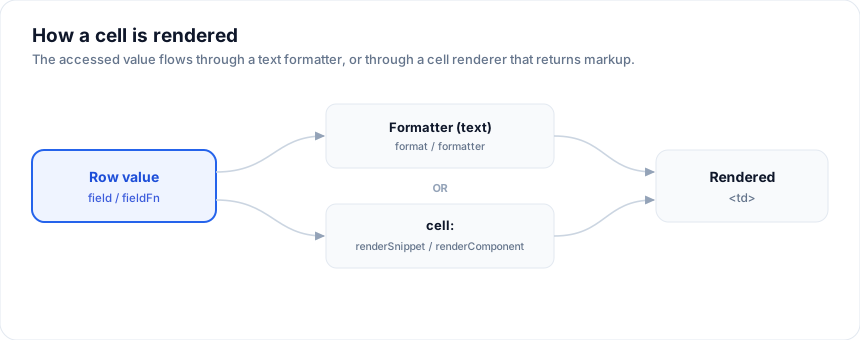
For any cell whose content is more than a string, use cell: with
renderSnippet or renderComponent.
Open the live example: Custom cells + themes (Rows & Cells)
Snippet
The examples on this page run against these rows:
<script lang="ts">
  import { SvGrid } from '@svgrid/grid'

  type Person = {
    id: number
    name: string
    email: string
    department: string
    age: number
    salary: number
    city: string
    startDate: string
    active: boolean
  }
</script>
<script lang="ts">
  import { renderSnippet, type GridColumns } from '@svgrid/grid'

  const columns: GridColumns<Person> = [
    {
      field: 'status',
      header: 'Status',
      cell: (ctx) => renderSnippet(Pill, { value: String(ctx.getValue()) }),
    },
  ]
</script>

{#snippet Pill(p: { value: string })}
  <span class="pill pill-{p.value}">{p.value}</span>
{/snippet}
Snippets are the right choice when the renderer is local to the page and small.
Component
import StatusBadge from './StatusBadge.svelte'
import { renderComponent } from '@svgrid/grid'

{
  field: 'status',
  cell: (ctx) => renderComponent(StatusBadge, { status: ctx.getValue() }),
}
Components are the right choice when the renderer is reused across multiple grids, has its own state, or needs lifecycle hooks.
CellContext
The argument the grid passes to your cell callback:
type CellContext<TData> = {
  cell: Cell<TData>
  row: Row<TData>
  column: Column<TData>
  table: SvGrid<TData>
  getValue: () => unknown
}
getValue()- the accessed value (post-field/fieldFn).row.original- the rawTDataobject.row.getAllCells()- every cell in the row, for sibling reads.column.columnDef- the originalColumnDef.table- the headless grid instance, with state and actions.
Inline string
If your cell content is a plain string and you just want to format it, use
format or formatter - not cell. See
Text formatting.
Performance
Cell renderers run once per visible cell on each grid update. For large virtualized grids, keep them cheap:
- avoid
JSON.stringify - avoid
new Date()per cell - pre-compute formatters at module scope - avoid creating new objects inside the snippet template
Common patterns
- Avatar + name - return a snippet that pulls first/last name from
ctx.row.original. See demo 10. - Status pill - class-derived background. See demo 10.
- Inline progress bar -
<div role="progressbar" aria-valuenow>. See demo 10. - Hyperlink -
<a href="/people/{ctx.row.original.id}">{ctx.getValue()}</a>.
A cell that reads the whole row
renderSnippet passes whatever you give it, so the cell can use fields the
column does not name. That is the difference between rendering a value and
rendering a record.
<script lang="ts">
  import { SvGrid, renderSnippet, type GridColumns, type SvGridApi } from '@svgrid/grid'

  type Person = {
    id: number
    name: string
    department: string
    city: string
    age: number
    salary: number
    active: boolean
  }

  const people: Person[] = [
    { id: 1, name: 'Ada Lovelace',   department: 'Engineering', city: 'London',   age: 36, salary: 142000, active: true },
    { id: 2, name: 'Grace Hopper',   department: 'Engineering', city: 'New York', age: 45, salary: 168000, active: true },
    { id: 3, name: 'Linus Torvalds', department: 'Platform',    city: 'Portland', age: 54, salary: 155000, active: false },
    { id: 4, name: 'Radia Perlman',  department: 'Networking',  city: 'Seattle',  age: 49, salary: 161000, active: true },
  ]

  const columns: GridColumns<Person> = [
    { field: 'name', header: 'Person', width: 260,
      cell: (ctx) => renderSnippet(PersonCell, { row: ctx.row.original }) },
    { field: 'salary', header: 'Salary', width: 140,
      format: { type: 'currency', currency: 'USD' } },
  ]
</script>

{#snippet PersonCell(props: { row: Person })}
  <span style="display: inline-flex; align-items: center; gap: 8px;">
    <span style="width: 24px; height: 24px; border-radius: 50%; display: grid; place-items: center; background: color-mix(in srgb, currentColor 12%, transparent); font-size: 11px;">
      {props.row.name.split(' ').map((w) => w[0]).join('')}
    </span>
    <span>
      <span style="display: block;">{props.row.name}</span>
      <span style="display: block; font-size: 11px; opacity: 0.6;">{props.row.department}</span>
    </span>
  </span>
{/snippet}

<SvGrid data={people} {columns} rowHeight={44} />
Falling back when there is nothing to show
A renderer runs for every row including the empty ones, so decide what an absent value looks like. A dash reads as "none"; a blank cell reads as a bug.
<script lang="ts">
  import { SvGrid, renderSnippet, type GridColumns, type SvGridApi } from '@svgrid/grid'

  type Person = {
    id: number
    name: string
    department: string
    city: string
    age: number
    salary: number
    active: boolean
  }

  const people: Person[] = [
    { id: 1, name: 'Ada Lovelace',   department: 'Engineering', city: 'London',   age: 36, salary: 142000, active: true },
    { id: 2, name: 'Grace Hopper',   department: 'Engineering', city: 'New York', age: 45, salary: 168000, active: true },
    { id: 3, name: 'Linus Torvalds', department: 'Platform',    city: 'Portland', age: 54, salary: 155000, active: false },
    { id: 4, name: 'Radia Perlman',  department: 'Networking',  city: 'Seattle',  age: 49, salary: 161000, active: true },
  ]

  const withGaps = people.map((p, i) => ({ ...p, city: i % 2 ? '' : p.city }))

  const columns: GridColumns<Person> = [
    { field: 'name', header: 'Name', width: 190 },
    { field: 'city', header: 'City', width: 160,
      cell: (ctx) => renderSnippet(CityCell, { value: String(ctx.getValue() ?? '') }) },
  ]
</script>

{#snippet CityCell(props: { value: string })}
  {#if props.value}
    <span>{props.value}</span>
  {:else}
    <span style="opacity: 0.4;">-</span>
  {/if}
{/snippet}

<SvGrid data={withGaps} {columns} />
See also
Related articles
- Status Badge Cells in SvGrid - Turn a plain text status column into colored, accessible pill badges without breaking sort, filter, or virtualization - using SvGrid's snippet cell renderer.
- Sparkline Cells in a Svelte Data Grid - Show inline trend sparklines inside grid cells using SvGrid's built-in sparkline column property - no charting library needed, just a field that holds a number array.
- Snippets vs Slots in Svelte 5 - Svelte 5 replaces slots with snippets - a first-class value you can pass as a prop, store in a variable, or select at runtime. Here is what changed, why it matters for grid cell rendering, and where the edge cases bite.