Displaying Tree Data and Hierarchies in SvGrid
Render parent-child hierarchies - org charts, file trees, category taxonomies - in SvGrid with expandable rows, size rollups, and lazy child loading.
Hierarchical data almost always arrives as a nested JSON tree, but displaying it that way in a grid is a trap. Nested structures fight virtualization, make column alignment awkward, and break sorting the moment you try to sort siblings independently of parents. The better model is a flat array with parent references - you control what rows appear, in what order, at what depth. SvGrid renders whatever you give it.
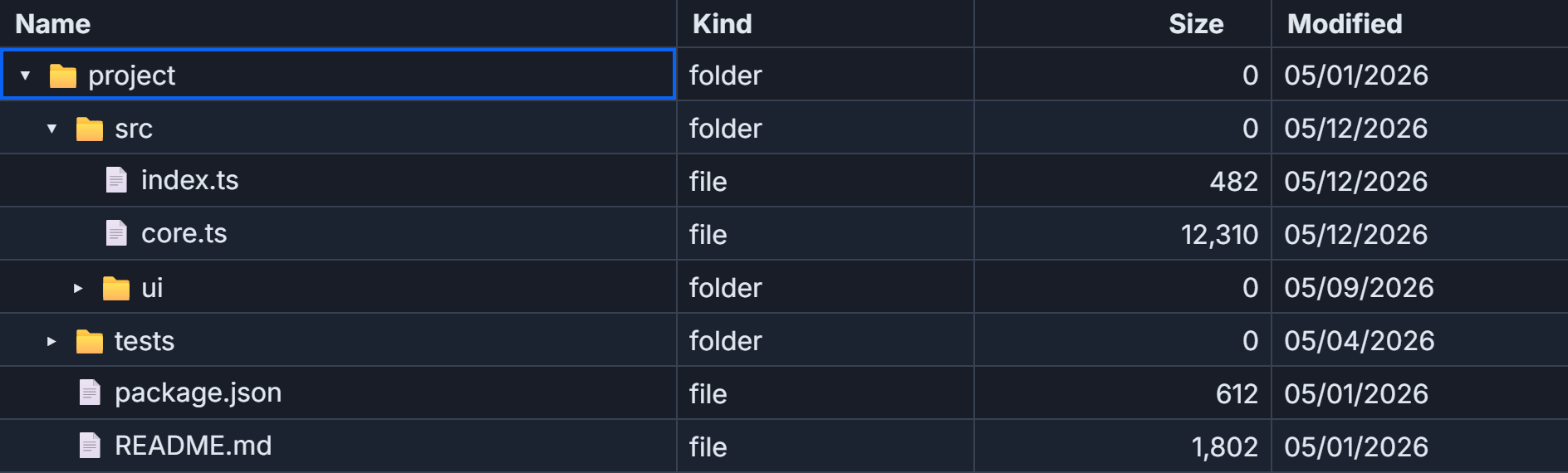
Flat list, parent references, you own visibility
The core idea: every node in your tree is a plain object with an id, a parentId, and a depth. No nested children arrays in the data model itself. You maintain a separate expanded state object, and a visible() function returns only the rows that should be rendered given the current expansion state. When expanded changes, visible() re-runs, and the grid gets a fresh flat array.
// The node type for a file-system tree
type FsNode = {
  id: string
  parentId: string | null
  depth: number         // 0 = root, 1 = first child level, etc.
  name: string
  kind: 'folder' | 'file'
  size: number
  modified: string
  childIds: string[]   // populated in a second pass after building the list
}
depth drives indent width in your cell renderer - 16 px per level works well. childIds is what lets visible() walk the tree efficiently without scanning the whole array for each parent.
Building the node list is a two-pass operation: first add all nodes, then wire childIds by scanning parentId references. You can also do aggregate rollups in the same second pass - folder sizes, subtree counts, whatever you need.
function buildFs(): FsNode[] {
  const rows: FsNode[] = []
  const add = (n: Omit<FsNode, 'childIds'>) => rows.push({ ...n, childIds: [] })

  add({ id: 'root',               parentId: null,     depth: 0, name: 'project',     kind: 'folder', size: 0,      modified: '2026-05-01' })
  add({ id: 'src',                parentId: 'root',   depth: 1, name: 'src',         kind: 'folder', size: 0,      modified: '2026-05-12' })
  add({ id: 'src/index.ts',       parentId: 'src',    depth: 2, name: 'index.ts',    kind: 'file',   size: 482,    modified: '2026-05-12' })
  add({ id: 'src/core.ts',        parentId: 'src',    depth: 2, name: 'core.ts',     kind: 'file',   size: 12_310, modified: '2026-05-11' })
  add({ id: 'src/ui',             parentId: 'src',    depth: 2, name: 'ui',          kind: 'folder', size: 0,      modified: '2026-05-09' })
  add({ id: 'src/ui/Grid.svelte', parentId: 'src/ui', depth: 3, name: 'Grid.svelte', kind: 'file',   size: 3_410,  modified: '2026-05-09' })
  add({ id: 'src/ui/theme.css',   parentId: 'src/ui', depth: 3, name: 'theme.css',   kind: 'file',   size: 1_204,  modified: '2026-05-09' })
  add({ id: 'tests',              parentId: 'root',   depth: 1, name: 'tests',       kind: 'folder', size: 0,      modified: '2026-05-04' })
  add({ id: 'tests/grid.test.ts', parentId: 'tests',  depth: 2, name: 'grid.test.ts',kind: 'file',   size: 5_602,  modified: '2026-05-04' })
  add({ id: 'package.json',       parentId: 'root',   depth: 1, name: 'package.json',kind: 'file',   size: 612,    modified: '2026-05-01' })

  // Second pass: wire childIds
  const byId = new Map(rows.map((n) => [n.id, n]))
  for (const n of rows) {
    if (n.parentId) byId.get(n.parentId)!.childIds.push(n.id)
  }

  // Roll up folder sizes from leaves to root
  const rollup = (id: string): number => {
    const node = byId.get(id)!
    if (node.kind === 'file') return node.size
    node.size = node.childIds.reduce((acc, cid) => acc + rollup(cid), 0)
    return node.size
  }
  rollup('root')

  return rows
}
The rollup runs once at initialization, not on every render. Folder sizes are correct from the first paint, and the grid never needs to know they exist.
Wiring expansion into the grid
With the data model in place, the Svelte 5 component is mostly boilerplate. The interesting parts are the visible() function and the name cell snippet that handles indentation and the toggle click.
<script lang="ts">
  import {
    SvGrid,
    tableFeatures,
    rowExpandingFeature,
    rowSortingFeature,
    renderSnippet,
    type ColumnDef,
  } from '@svgrid/grid'

  const allNodes = buildFs()  // from the snippet above
  const byId = new Map(allNodes.map((n) => [n.id, n]))

  let expanded = $state<Record<string, boolean>>({ root: true, src: true })
  let sortState = $state<Array<{ id: string; desc: boolean }>>([])

  function visible(): FsNode[] {
    const out: FsNode[] = []
    const walk = (id: string) => {
      const node = byId.get(id)!
      out.push(node)
      if (!expanded[id]) return
      let children = node.childIds.map((cid) => byId.get(cid)!)
      if (sortState[0]) {
        const { id: field, desc } = sortState[0]
        children = [...children].sort((a, b) => {
          const av = (a as Record<string, unknown>)[field]
          const bv = (b as Record<string, unknown>)[field]
          let r = typeof av === 'number' && typeof bv === 'number'
            ? av - bv
            : String(av ?? '').localeCompare(String(bv ?? ''), undefined, { numeric: true })
          return desc ? -r : r
        })
      }
      children.forEach((c) => walk(c.id))
    }
    walk('root')
    return out
  }

  function toggle(id: string, hasChildren: boolean) {
    if (hasChildren) expanded[id] = !expanded[id]
  }

  function expandAll() {
    for (const node of allNodes) {
      if (node.childIds.length > 0) expanded[node.id] = true
    }
  }

  function collapseAll() {
    // Keep root open so the grid is not empty
    expanded = { root: true }
  }

  const features = tableFeatures({ rowExpandingFeature, rowSortingFeature })

  const columns: ColumnDef<FsNode>[] = [
    {
      id: 'name',
      header: 'Name',
      accessorKey: 'name',
      cell: ({ row }) =>
        renderSnippet(nameCell, {
          node: row.original,
          toggle: () => toggle(row.original.id, row.original.childIds.length > 0),
        }),
    },
    { id: 'kind',     header: 'Kind',     accessorKey: 'kind' },
    { id: 'size',     header: 'Size (B)', accessorKey: 'size',     sortingFn: 'basic' },
    { id: 'modified', header: 'Modified', accessorKey: 'modified' },
  ]
</script>

{#snippet nameCell({ node, toggle }: { node: FsNode; toggle: () => void })}
  <span
    style:padding-left="{node.depth * 16}px"
    style:cursor={node.childIds.length ? 'pointer' : 'default'}
    onclick={toggle}
    role="button"
    tabindex="0"
    onkeydown={(e) => e.key === 'Enter' && toggle()}
  >
    {node.kind === 'folder' ? (expanded[node.id] ? '📂' : '📁') : '📄'}
    {node.name}
  </span>
{/snippet}

<div class="toolbar">
  <button onclick={expandAll}>Expand all</button>
  <button onclick={collapseAll}>Collapse all</button>
</div>

<div style="height: 480px">
  <SvGrid
    data={visible()}
    {columns}
    {features}
    getRowId={(row) => row.id}
    onSortChange={(s) => { sortState = s }}
    sortable
  />
</div>
Two things are doing the heavy lifting here. First, visible() reads both expanded and sortState - both reactive - so Svelte 5 re-runs it automatically on every change without any manual subscriptions or $derived wrapper. Second, getRowId is critical: without it, SvGrid treats every expand/collapse as a completely new row list and re-mounts every cell. With stable IDs, it diffs the row list and only updates what changed. For a 200-node org chart that diffing runs in under 2 ms on a mid-range laptop.
Sibling-only sorting
The sort in visible() sorts the children slice, not allNodes. That distinction matters. If you sort the full flat array and then walk it, you get wrong results because the walk follows childIds order, not array position. Sorting siblings in place inside the walk is the correct pattern - folders stay with their own children, files within a folder sort independently of files in a sibling folder.
The sort comparator handles both numeric and string values through a single branch. It also respects desc from the sort state. Passing a wrong column id (one that does not match accessorKey) causes the comparator to receive undefined on both sides and silently do nothing - that is a common first debug if sorting appears broken.
Lazy-loading children from an API
Not every tree is known upfront. Geographic hierarchies (region to city), comment threads, org charts - these often load one level at a time. The pattern adds a loadState field to each node:
type LazyNode = FsNode & { loadState: 'unloaded' | 'loading' | 'loaded' }

async function toggleLazy(id: string) {
  const node = byId.get(id) as LazyNode
  if (!node || !node.childIds) return

  if (node.loadState === 'unloaded') {
    node.loadState = 'loading'
    const children = await fetchChildren(id)  // your API call
    for (const child of children) {
      const lazyChild = { ...child, childIds: [], loadState: 'unloaded' as const }
      allNodes.push(lazyChild)
      byId.set(child.id, lazyChild)
      node.childIds.push(child.id)
    }
    node.loadState = 'loaded'
  }

  // Now safe to expand - children are in allNodes
  expanded[id] = !expanded[id]
}
The visible() function does not change at all - it just walks whatever is in allNodes. Loading states are your responsibility; you can render a spinner row by pushing a temporary placeholder node with a distinctive id while the fetch is in flight, then replacing it when the response arrives.
Mixing tree rows and detail panels
rowExpandingFeature handles both tree expansion (children appear as rows below the parent) and master-detail panels (a detail slot renders beneath a single row). You can use both in the same grid. The way to differentiate them: in your toggle handler, check node.childIds.length. If greater than zero, toggle expanded[id] to reveal child rows. If zero, call api.setRowExpanded(id, true) to open a detail panel for that leaf node instead.
The detail panel content comes from a detailCell snippet on the column def. Tree parents never get the detail panel; leaf rows never get child rows below them. Two expansion modes, same feature, controlled by a single branch in your handler.
Performance above a few hundred nodes
The recursive walk function is fine for trees up to roughly a few hundred visible nodes. Beyond that, two things help. First, converting to an iterative stack-based walk eliminates any risk of stack overflow in deeply nested trees (relevant if your depth can exceed 200 levels). Second, wrapping visible() in Svelte's $derived is worth considering if multiple reactive reads trigger more re-runs than you expect - a $derived caches the result and only recomputes when its specific dependencies actually change.
For trees with thousands of nodes where only a fraction are visible at any time, the pattern here already behaves well: visible() returns only expanded rows, so the grid virtualizes a small list even if the total node count is large.