Real-Time Grids - Live WebSocket Updates in SvGrid
How to wire a high-frequency WebSocket feed into SvGrid without frame drops - covering stable row identity, RAF batching, and flash feedback done right.
At 200 messages per second, your grid either handles batching or it visibly falls apart. Most live-data grids fail not because the grid itself is slow, but because every incoming WebSocket message triggers its own render cycle. Browsers paint at 60 fps. If you schedule 200 re-renders per second, you get 200 wasted render attempts and a grid that looks choppy even on a fast machine.
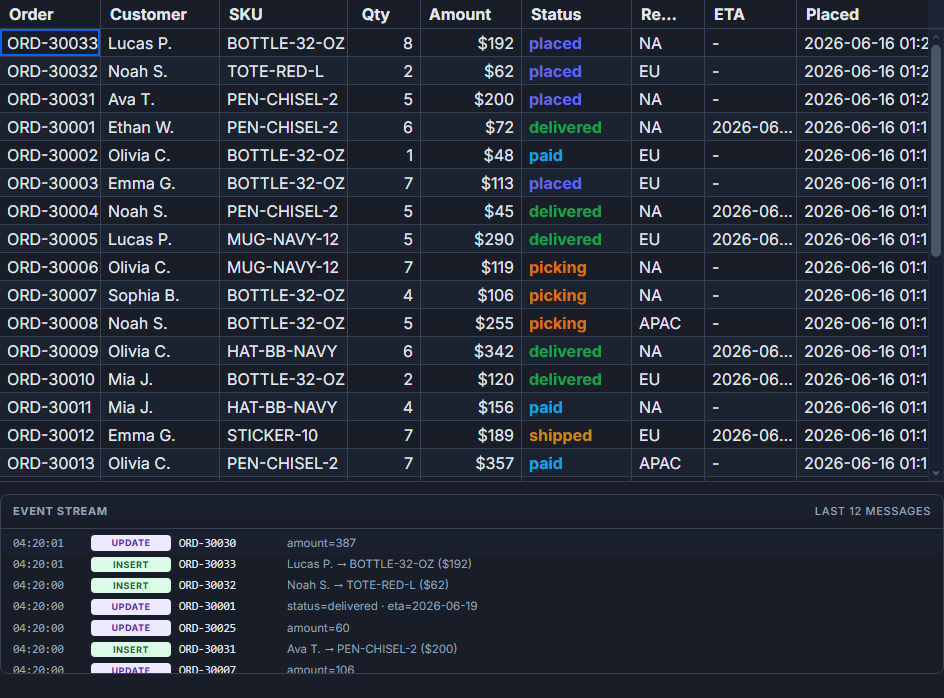
The fix is three small decisions made in the right order: give each row a stable identity, gate all mutations through requestAnimationFrame, and express flash feedback as data rather than DOM imperative code. Here is how those three ideas combine in a real stock ticker component.
Stable row identity comes first
SvGrid tracks rows by the field you name in rowIdField. Without it, the grid treats the data array as positional - row 0 is always "the first row," row 1 is always "the second row." That works fine for static data. It breaks the moment you allow sorting while live data is arriving, because sorting reorders the display array but does not touch the data array. An update targeting data index 3 will repaint the wrong display row.
Setting rowIdField="symbol" (or whatever your natural key is) costs nothing and prevents that class of bug entirely. Do it before anything else.
The second identity concern is the index map. For a 20-row ticker you could scan the array on every tick and it would be fine. For a 500-row order book you want O(1) lookup:
// ticker-types.ts
export type Tick = {
  symbol: string
  last: number
  change: number
  pctChange: number
  direction: 'up' | 'down' | 'flat'
}

export type StockRow = Tick & {
  name: string
  flash: 'up' | 'down' | null
}

export function buildIndex(rows: { symbol: string }[]): Map<string, number> {
  const m = new Map<string, number>()
  rows.forEach((r, i) => m.set(r.symbol, i))
  return m
}
The flash field lives on the row itself. That matters - I'll come back to it.
Frame-bounded batching
requestAnimationFrame is the right tool here. It fires at most once per paint frame, so any number of WebSocket messages that arrive between two frames get collapsed into a single array mutation. The batching code is minimal:
const pending = new Map<string, Tick>()
const flashTimers = new Map<string, ReturnType<typeof setTimeout>>()
let rafId = 0

function scheduleTick(tick: Tick) {
  pending.set(tick.symbol, tick)  // last write wins per symbol per frame
  if (rafId === 0) {
    rafId = requestAnimationFrame(flush)
  }
}

function flush() {
  rafId = 0
  for (const tick of pending.values()) {
    const i = index.get(tick.symbol)
    if (i == null) continue

    rows[i] = {
      ...rows[i],
      last: tick.last,
      change: tick.change,
      pctChange: tick.pctChange,
      direction: tick.direction,
      flash: tick.direction === 'flat' ? null : tick.direction,
    }

    // debounce the flash clear - avoid accumulating timers at high rates
    clearTimeout(flashTimers.get(tick.symbol))
    const sym = tick.symbol
    flashTimers.set(
      sym,
      setTimeout(() => {
        const j = index.get(sym)
        if (j == null) return
        rows[j] = { ...rows[j], flash: null }
        flashTimers.delete(sym)
      }, 400)
    )
  }
  pending.clear()
}
Two things here that are easy to miss. First: pending.set(tick.symbol, tick) overwrites any previous tick for that symbol in the same frame. If AAPL ticks 5 times before the next paint, you apply one update, not five. The screen shows the latest value either way - you just don't do four redundant renders to get there.
Second: the flash timer debounce. Without clearTimeout before each new timer, a symbol ticking 10 times in 400 ms accumulates 10 active timers. They all run and reset flash: null, which is harmless but wasteful. With the debounce, there is exactly one live timer per symbol at any point.
The complete component
<script lang="ts">
  import SvGrid, {
    tableFeatures,
    rowSortingFeature,
    type ColumnDef,
  } from '@svgrid/grid'
  import { buildIndex, type Tick, type StockRow } from './ticker-types'
  import { onDestroy } from 'svelte'

  const features = tableFeatures({ rowSortingFeature })

  let rows = $state<StockRow[]>([
    { symbol: 'AAPL', name: 'Apple Inc.',      last: 187.42, change: 0, pctChange: 0, direction: 'flat', flash: null },
    { symbol: 'MSFT', name: 'Microsoft Corp.', last: 412.11, change: 0, pctChange: 0, direction: 'flat', flash: null },
    { symbol: 'NVDA', name: 'NVIDIA Corp.',    last: 905.34, change: 0, pctChange: 0, direction: 'flat', flash: null },
    { symbol: 'GOOG', name: 'Alphabet Inc.',   last: 158.20, change: 0, pctChange: 0, direction: 'flat', flash: null },
    { symbol: 'AMZN', name: 'Amazon.com',      last: 182.95, change: 0, pctChange: 0, direction: 'flat', flash: null },
    { symbol: 'META', name: 'Meta Platforms',  last: 492.85, change: 0, pctChange: 0, direction: 'flat', flash: null },
    { symbol: 'TSLA', name: 'Tesla Inc.',      last: 174.30, change: 0, pctChange: 0, direction: 'flat', flash: null },
    { symbol: 'JPM',  name: 'JPMorgan Chase',  last: 201.14, change: 0, pctChange: 0, direction: 'flat', flash: null },
  ])

  let index = buildIndex(rows)

  const pending = new Map<string, Tick>()
  const flashTimers = new Map<string, ReturnType<typeof setTimeout>>()
  let rafId = 0

  function scheduleTick(tick: Tick) {
    pending.set(tick.symbol, tick)
    if (rafId === 0) rafId = requestAnimationFrame(flush)
  }

  function flush() {
    rafId = 0
    for (const tick of pending.values()) {
      const i = index.get(tick.symbol)
      if (i == null) continue
      rows[i] = {
        ...rows[i],
        last: tick.last,
        change: tick.change,
        pctChange: tick.pctChange,
        direction: tick.direction,
        flash: tick.direction === 'flat' ? null : tick.direction,
      }
      clearTimeout(flashTimers.get(tick.symbol))
      const sym = tick.symbol
      flashTimers.set(sym, setTimeout(() => {
        const j = index.get(sym)
        if (j == null) return
        rows[j] = { ...rows[j], flash: null }
        flashTimers.delete(sym)
      }, 400))
    }
    pending.clear()
  }

  const ws = new WebSocket('wss://your-feed.example.com/ticks')
  ws.onmessage = (ev) => scheduleTick(JSON.parse(ev.data) as Tick)
  ws.onerror = (e) => console.error('feed error', e)

  onDestroy(() => {
    ws.close()
    if (rafId) cancelAnimationFrame(rafId)
    for (const id of flashTimers.values()) clearTimeout(id)
  })

  const columns: ColumnDef<typeof features, StockRow>[] = [
    { field: 'symbol', header: 'Symbol', width: 90, sortable: true },
    { field: 'name',   header: 'Company', width: 200 },
    {
      field: 'last',
      header: 'Last',
      width: 100,
      align: 'right',
      sortable: true,
      cellClass: (ctx) => ctx.row.original.flash === 'up'
        ? 'flash-up'
        : ctx.row.original.flash === 'down'
          ? 'flash-down'
          : '',
      format: (v) => (v as number).toFixed(2),
    },
    {
      field: 'change',
      header: 'Change',
      width: 90,
      align: 'right',
      sortable: true,
      format: (v) => { const n = v as number; return (n >= 0 ? '+' : '') + n.toFixed(2) },
      cellClass: (ctx) => {
        const d = ctx.row.original.direction
        return d === 'up' ? 'positive' : d === 'down' ? 'negative' : ''
      },
    },
    {
      field: 'pctChange',
      header: '%',
      width: 80,
      align: 'right',
      format: (v) => { const n = v as number; return (n >= 0 ? '+' : '') + n.toFixed(2) + '%' },
    },
  ]
</script>

<style>
  :global(.flash-up)   { background: #bbf7d0; transition: background 400ms ease-out; }
  :global(.flash-down) { background: #fecaca; transition: background 400ms ease-out; }
  :global(.positive)   { color: #16a34a; font-weight: 500; }
  :global(.negative)   { color: #dc2626; font-weight: 500; }
</style>

<SvGrid
  {features}
  {columns}
  data={rows}
  rowIdField="symbol"
  height={400}
  defaultSort={[{ field: 'symbol', dir: 'asc' }]}
/>
Flash as data, not DOM manipulation
The flash field is intentional. The temptation when building live UIs is to reach into the DOM directly - find the cell element, add a class, remove it after a timeout. That works until it does not: the row scrolls out of the virtual viewport, the class is applied to a recycled DOM node, the grid re-renders and the class disappears mid-transition.
Keeping flash state on the row object means the grid's cellClass callback reads it on every render. If a row scrolls out and back in, cellClass re-evaluates and the correct highlight is applied. The CSS transition handles the visual fade. The 400 ms timeout resets the data field. No DOM queries, no imperative class toggling.
The one constraint: Svelte 5 fine-grained reactivity requires that you replace the array element, not mutate it in place. rows[i].flash = 'up' does not trigger an update. rows[i] = { ...rows[i], flash: 'up' } does. This is the single most common mistake I see when people wire up live data feeds to $state arrays.
Extending to inserts and deletes
The pattern above handles field updates only. For an order book or event stream where rows are added and removed, api.applyTransaction is the cleaner path - it handles the index bookkeeping internally:
import type { SvGridApi } from '@svgrid/grid'

let api: SvGridApi

// inside your message handler, after batching:
function flushTransactional(events: Array<{ type: 'add' | 'update' | 'remove', row: StockRow }>) {
  const add = events.filter(e => e.type === 'add').map(e => e.row)
  const update = events.filter(e => e.type === 'update').map(e => e.row)
  const remove = events.filter(e => e.type === 'remove').map(e => e.row)
  api.applyTransaction({ add, update, remove })
}
For a pure field-update feed where rows are stable, direct $state array mutation with a manually maintained index map is simpler and slightly faster. For mixed add/update/remove streams, applyTransaction is worth the minor overhead because it keeps the grid's internal row model consistent without you tracking index shifts manually.
Connection resilience
One thing the examples above omit: reconnect logic. A WebSocket that drops and never reconnects leaves the grid frozen at the last known state with no visual indication. At minimum, handle onclose with an exponential backoff reconnect:
let backoffMs = 1000

function connect() {
  const ws = new WebSocket('wss://your-feed.example.com/ticks')
  ws.onmessage = (ev) => scheduleTick(JSON.parse(ev.data) as Tick)
  ws.onclose = () => {
    setTimeout(() => {
      backoffMs = Math.min(backoffMs * 2, 30_000)
      connect()
    }, backoffMs)
  }
  ws.onopen = () => { backoffMs = 1000 }
  return ws
}
Reset the backoff on successful open so a brief network hiccup does not permanently slow down reconnect attempts.
The demos at /demos/11-stock-market and /demos/34-realtime-orders show both patterns running against a local mock WebSocket server if you want to see the render budget hold up under actual load.
Related reading
- Live demo: WebSocket live updates
- Docs: Real-time / streaming updates
- Building a Real-Time Trading Grid in Svelte
- Building a Logistics / Fleet Tracking Grid in Svelte
- Building an IoT Sensor Dashboard in Svelte
- A Live Svelte Data Grid with Firebase Firestore
- A Reactive Svelte Data Grid with Convex
Tagged: Real-time data