Testing your grid
How to write tests that catch regressions before they ship. SvGrid is
designed for both fast unit tests (Layer 2, the headless engine,
runs in pure node) and slow but accurate browser tests (Layer 3,
the <SvGrid> component, needs a real DOM or jsdom).
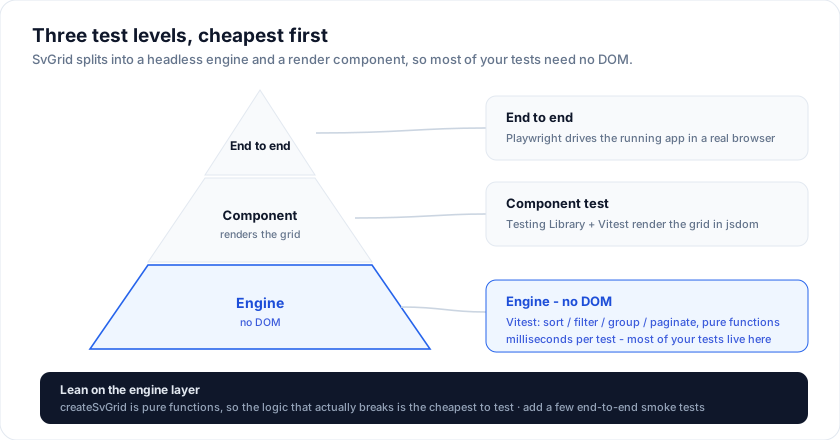
Test pyramid for a grid app
                /─────────────\
               /  Playwright   \   slow,   ~5-15 / page
              /    end-to-end   \  accurate
             /───────────────────\
            /  jsdom + svelte-    \
           /   testing-library     \ ~15-60 / file
          /    component tests      \
         /───────────────────────────\
        /     vitest engine tests     \   fast,   ~50-200 / file
       /     (Layer 2, no DOM, pure)   \  pure JS
      /─────────────────────────────────\
You want a wide base of fast tests (the engine surface), a narrower middle layer of component tests (mount + interact with the renderer), and a small top layer of e2e tests for the journeys that actually matter to your users.
Engine tests (Layer 2, vitest)
Every helper in @svgrid/grid is a pure function. Test them
without a DOM.
import { describe, it, expect } from 'vitest'
import {
  createSvGrid, tableFeatures, rowSortingFeature,
  createCoreRowModel, createSortedRowModel, sortFns,
} from '@svgrid/grid'

describe('sort behaviour', () => {
  it('sorts by a single column ascending', () => {
    type Row = { id: number; name: string }
    const features = tableFeatures({ rowSortingFeature })
    const grid = createSvGrid<typeof features, Row>({
      data: [
        { id: 1, name: 'Charlie' },
        { id: 2, name: 'Alice' },
        { id: 3, name: 'Bob' },
      ],
      columns: [
        { field: 'id', header: 'ID' },
        { field: 'name', header: 'Name' },
      ],
      _features: features,
      // Opt into the row models you assert on. The headless grid composes
      // them explicitly, so a grid built without `sortedRowModel` returns
      // rows in source order no matter what `sorting` says.
      _rowModels: {
        coreRowModel: createCoreRowModel(),
        sortedRowModel: createSortedRowModel(sortFns),
      },
      state: { sorting: [{ id: 'name', desc: false }] },
    })
    const visible = grid.getRowModel().rows.map((r) => r.original.name)
    expect(visible).toEqual(['Alice', 'Bob', 'Charlie'])
  })
})
Engine tests run at ~10k assertions/second on a modern laptop. The
@svgrid/grid package itself ships hundreds of these -
you can model yours after them.
Enterprise feature tests (vitest + jsdom)
The Enterprise helpers need jsdom because importData calls Blob.text()
and exportData builds an <a download>. Set vitest's environment
to 'jsdom' for these files.
import { describe, it, expect } from 'vitest'
import { importData } from '@svgrid/enterprise'

describe('CSV import', () => {
  it('parses, coerces types, and rejects negative prices', async () => {
    const csv = 'id,price\n1,-5\n2,10\n'
    const fakeApi = makeFakeApi()       // see below
    const result = await importData(fakeApi, {
      file: csv,
      format: 'csv',
      validator: (row) => row.price < 0
        ? [{ field: 'price', message: 'must be >= 0' }]
        : [],
    })
    expect(result.rows).toHaveLength(2)
    expect(result.errors).toHaveLength(1)
    expect(result.errors[0].rowIndex).toBe(0)
  })
})
The 48-test suite in packages/enterprise/src/*.test.ts shows the
full pattern, including a fakeApi stub you can copy.
Component tests (svelte-testing-library + jsdom)
For "does the grid actually render the rows", mount the <SvGrid>
component in jsdom:
import { render } from '@testing-library/svelte'
import { describe, it, expect } from 'vitest'
import { SvGrid, tableFeatures, rowSortingFeature, type ColumnDef } from '@svgrid/grid'

type Row = { id: number; name: string }

const features = tableFeatures({ rowSortingFeature })
const columns: ColumnDef<typeof features, Row>[] = [
  { field: 'id',   header: 'ID' },
  { field: 'name', header: 'Name' },
]

describe('<SvGrid>', () => {
  it('renders one row per data entry', () => {
    const { container } = render(SvGrid, {
      props: {
        data: [{ id: 1, name: 'Ada' }, { id: 2, name: 'Linus' }],
        columns,
        features,
      },
    })
    const bodyRows = container.querySelectorAll('tbody tr')
    expect(bodyRows.length).toBe(2)
  })
})
A few caveats:
- Vitest config:
environment: 'jsdom'plusresolve.conditions: ['browser']so vitest picks Svelte's client build. The@svgrid/gridrepo'svite.config.tsshows the exact knobs. - No virtualization in jsdom. jsdom returns
0for every layout metric, so the row virtualizer never advances. Test on small datasets (< 50 rows) at this layer; push virtualization tests to Playwright. - No clipboard.
document.execCommand('copy')is a no-op in jsdom; if you're testing copy/paste, mock the clipboard or skip to Playwright.
End-to-end (Playwright)
For real-DOM behaviours: virtualization, scroll-driven chunk loading,
focus traps, clipboard, the <SvGrid>'s ResizeObserver-driven
layout.
import { test, expect } from '@playwright/test'

test('Sort + filter + paginate together', async ({ page }) => {
  await page.goto('http://localhost:5180/#/demos/02-sort-filter-paginate')
  // Sort by Customer
  await page.locator('thead th', { hasText: 'Customer' }).click()
  // First row should now be alphabetically first.
  const first = await page.locator('tbody tr').first().textContent()
  expect(first?.startsWith('A')).toBe(true)
  // Apply a filter
  await page.locator('thead th', { hasText: 'Region' }).locator('button[aria-label*=Filter]').click()
  await page.locator('.sv-grid-menu-option', { hasText: 'EMEA' }).click()
  // Row count drops
  const visible = await page.locator('tbody tr').count()
  expect(visible).toBeLessThan(50)
})
The demo gallery is the easiest target for e2e: every demo is a URL you can navigate, every behaviour is reachable from the keyboard. Mirror your in-app test flows against a paired demo first; it surfaces bugs at the API layer before they hit your app's code.
Accessibility regression tests
Wrap axe-core into your Playwright suite to catch contrast / role / label regressions on every commit:
import { test, expect } from '@playwright/test'
import { injectAxe, checkA11y } from 'axe-playwright'

test('a11y: quick-start grid', async ({ page }) => {
  await page.goto('http://localhost:5180/#/demos/01-quick-start')
  await injectAxe(page)
  await checkA11y(page, '.sv-grid-shell', {
    detailedReport: false,
    axeOptions: {
      runOnly: { type: 'tag', values: ['wcag2a', 'wcag2aa'] },
    },
  })
})
The default theme is built to clear axe's WCAG 2.1 AA rules, and this is the test to prove it in your own build. If your custom theme breaks contrast, it fails immediately.
Visual regression
For the small set of pixels that matter (header bar height, focus ring
width, the "selected row" highlight), Playwright's toHaveScreenshot()
is a good fit:
test('focused cell matches the design system ring', async ({ page }) => {
  await page.goto('http://localhost:5180/#/demos/01-quick-start')
  await page.locator('tbody tr').first().locator('td').first().click()
  await expect(page.locator('.sv-grid-cell-active')).toHaveScreenshot('active-cell.png')
})
Pin the screenshot to a tight selector and a 1x device-pixel-ratio so your team's various GPUs don't churn the baseline.
Performance regression
The engine suite (pnpm bench) runs the row pipeline against the built
package. Its --check mode is what CI gates, and it deliberately gates
work counters rather than elapsed time: how many times the sort
comparator resolves a column, how many rows materialise their cell array
during a filter. Those are identical on every machine, so the gate cannot
flake; wall-clock on a shared runner can and does.
Worth stealing for your own suite - a perf gate that fails on a busy runner gets disabled, and then it protects nothing.
For your own app, capture two numbers in CI:
- Time to first paint on your largest grid - run a Playwright
trace, look at the timing of the first
tbody trappearing. - Sustained scroll p95 frame time - use Playwright's
page.evaluate(() => performance.timing)or the Chrome DevTools protocol'sPerformance.getMetrics.
Both can fail your CI with a 10% deviation threshold. Pick the threshold from your own baseline spread over a few runs - a shared CI runner is noisy enough that a tight gate on wall-clock will flake.
See Performance benchmarks for what the published package measures, and for which figures there are estimates rather than measured output.
Test data fixtures
A common pitfall: ad-hoc test rows that drift across tests until nothing reuses them.
// tests/fixtures/orders.ts
export function makeOrder(overrides: Partial<Order> = {}): Order {
  return {
    id: 1,
    customer: 'Acme',
    total: 100,
    placedAt: '2024-01-01',
    status: 'pending',
    ...overrides,
  }
}
Every test uses makeOrder() with the diffs it cares about. When the
domain shape changes, ONE fixture changes, not 200 tests.
What NOT to do
- Don't grep DOM classes.
.sv-grid-cell-activeis implementation detail (see API stability). Tests against it break on minor releases. Preferaria-selected="true"or a customdata-testid. - Don't snapshot the entire rendered HTML. Internal markup changes per release; snapshots become churn. Snapshot small specific fragments instead.
- Don't test the framework. SvGrid is well-tested at the package level; you don't need to verify that "click on a sort header sorts". Test YOUR business rules - "rejected orders never appear in the active queue".
See also
- API stability - what's safe to assert against.
- Architecture overview - which layer to test at.
- Performance benchmarks - reference numbers you can use as CI thresholds.
- Accessibility - the a11y contract these tests enforce.
Live examples
- Sort, filter, paginate - Three most-asked-for features wired together against ~5k rows.
- Quick start - A realistic 25-row × 9-column grid with sort, filter, selection, inline editing, and column resize all enabled.
Related articles
- Documenting SvGrid in Storybook - Set up a living component catalog for your SvGrid configurations - bounded containers, reactive story args, and play functions that drive the API.
- End-to-End Testing SvGrid with Playwright - How to write durable Playwright tests for sorting, filtering, editing, and keyboard navigation in SvGrid - using ARIA roles so your tests double as accessibility coverage.
- Unit-Testing SvGrid with Vitest - Three-layer testing strategy for SvGrid - pure accessor logic, headless row model, and rendered component - all with Vitest and no browser required.