Server sorting
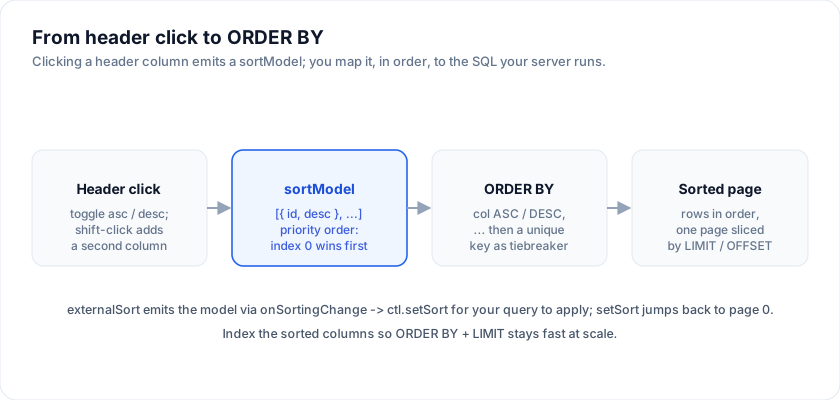
In the Server-Side Row Model the grid never reorders the
data - the server does, because only the server can see all the rows. The grid's
job is to capture the user's intent as a sort model and hand it to the
createServerDataSource controller; your getRows translates that model into an
ORDER BY clause. This page is the deep dive on that model: its exact shape,
multi-column priority, the mapping to SQL, how to wire external sort, and the two
things that keep server sorting correct and fast - a stable tiebreaker and an
index on the sorted columns.
The sort model
The controller carries the sort as a ServerSortModel - an array of column
clauses, each an id and a direction:
The examples on this page run against these rows:
<script lang="ts">
  import { SvGrid, type GridColumns, type SvGridApi } from '@svgrid/grid'

  type Person = {
    id: number
    name: string
    department: string
    city: string
    age: number
    salary: number
  }

  const people: Person[] = [
    { id: 1, name: 'Ada Lovelace',   department: 'Engineering', city: 'London',   age: 36, salary: 142000 },
    { id: 2, name: 'Grace Hopper',   department: 'Engineering', city: 'New York', age: 45, salary: 168000 },
    { id: 3, name: 'Linus Torvalds', department: 'Platform',    city: 'Portland', age: 54, salary: 155000 },
    { id: 4, name: 'Radia Perlman',  department: 'Networking',  city: 'Seattle',  age: 49, salary: 161000 },
    { id: 5, name: 'Barbara Liskov', department: 'Platform',    city: 'Boston',   age: 52, salary: 172000 },
  ]

  const columns: GridColumns<Person> = [
    { field: 'name',       header: 'Name',       width: 190 },
    { field: 'department', header: 'Department', width: 150 },
    { field: 'city',       header: 'City',       width: 130 },
    { field: 'age',        header: 'Age',        width: 80 },
    { field: 'salary',     header: 'Salary',     width: 130, format: { type: 'currency', currency: 'USD' } },
  ]
</script>
type ServerSortModel = Array<{ id: string; desc: boolean }>
It is delivered on every getRows request as request.sortModel, and it is the
exact shape the grid's own onSortingChange emits (the grid's internal
SortingState is the identical Array<{ id: string; desc: boolean }>), so the
two connect with no adapter.
An empty array means "no sort" - fall back to a deterministic default order (see the tiebreaker section).
Multi-column priority
The array is ordered by priority: index 0 is the primary sort, index 1 breaks ties within it, and so on. So this model:
[{ "id": "lastName", "desc": false }, { "id": "age", "desc": true }]
means "last name A to Z, and within the same last name, oldest first". Preserve the array order when you build the clause and the priority is preserved.
Mapping to ORDER BY
Walk the model in order, emit one col dir term per clause, and join with commas:
import type { ServerSortModel } from '@svgrid/grid'

// Map grid column ids to real DB columns - never interpolate the id straight
// into SQL. An allow-list doubles as injection protection.
const COLUMN: Record<string, string> = {
  lastName: 'last_name',
  age: 'age',
  createdAt: 'created_at',
}

function orderBy(model: ServerSortModel): string {
  const terms = model
    .filter((s) => COLUMN[s.id])                 // drop unknown columns
    .map((s) => `${COLUMN[s.id]} ${s.desc ? 'DESC' : 'ASC'}`)

  // Always end on a unique key so the order is total and stable (see below).
  terms.push('id ASC')
  return `ORDER BY ${terms.join(', ')}`
}
The model above produces:
ORDER BY last_name ASC, age DESC, id ASC
Only column names are ever built from the model - column names cannot be bound as parameters, so guard them with the allow-list map. Filter values, by contrast, must always be bound as parameters.
Wiring external sort to the grid
Run the grid in controlled mode. externalSort tells the grid to record the sort
UI state and emit the intent instead of reordering rows locally; onSortingChange
then feeds the model straight into ctl.setSort:
<script lang="ts">
  import { SvGrid } from '@svgrid/grid'
  import { createServerDataSource, type ServerState } from '@svgrid/grid'
  import { source, columns } from './people'

  let view = $state<ServerState<Row>>()
  const ctl = createServerDataSource(source, {
    pageSize: 50,
    onChange: (s) => (view = s),
  })
  ctl.refresh()
</script>

{#if view}
  <SvGrid
    data={view.rows}
    {columns}
    sortable
    externalSort
    loading={view.loading}
    pageable={false}
    onSortingChange={(sorting) => ctl.setSort(sorting)}
  />
{/if}
setSort(model) stores the new model, jumps back to page 0, and re-fetches -
because the first page of the new order is almost never the first page of the old
one. The header's sort arrows reflect view.sortModel since the grid keeps the UI
state even though it defers the actual sorting to you.
Shift-clicking a header adds a column to the model rather than replacing it, so a multi-column sort arrives as a multi-element array without any extra wiring.
A stable sort needs a tiebreaker
Databases do not guarantee a stable order for rows that tie on the sort columns.
If two people share a last name and an age, ORDER BY last_name, age may return
them in either order - and, crucially, in a different order on the next page
fetch. With offset/limit paging that shows up as a row appearing twice or being
skipped at a page boundary.
The fix is to always append a unique, immutable key as the last ORDER BY term -
a primary key is ideal:
ORDER BY last_name ASC, age DESC, id ASC -- id makes the order total
That is what the terms.push('id ASC') line above does. It costs nothing when the
earlier columns already disambiguate, and it makes paging deterministic when they
do not. Apply the same key even when the model is empty, so an "unsorted" grid
still pages consistently.
Null ordering
Decide explicitly where nulls go, because the default differs by database
(Postgres sorts nulls last on ASC and first on DESC; other engines differ). Make
it intentional with NULLS FIRST / NULLS LAST:
function term(s: { id: string; desc: boolean }): string {
  const dir = s.desc ? 'DESC' : 'ASC'
  // e.g. always push empty values to the bottom regardless of direction.
  return `${COLUMN[s.id]} ${dir} NULLS LAST`
}
Whatever you choose, apply it uniformly so a column sorted ascending then descending is a clean mirror and users are not surprised by nulls jumping ends.
Index the sorted columns
ORDER BY ... LIMIT n OFFSET m is only cheap when the database can satisfy the
order from an index instead of sorting the whole table per request. Add an index
that matches your sort - including the tiebreaker key, and in the same column
order and direction as the clause:
CREATE INDEX people_lastname_age_id
  ON people (last_name ASC, age DESC, id ASC);
For a multi-column sort the index column order must match the ORDER BY term
order to be usable. If users can sort by many different columns, index the few
common ones rather than every permutation, and lean on LIMIT keeping each page
small. When you combine sorting with filtering, an index that leads with the
filtered column and continues with the sort columns serves both at once.
More examples
Server-Side Row Model: paged and infinite
The free half of the row model: implement one async getRows({ startRow, endRow, sortModel, filterModel }) and createServerDataSource owns the sort/filter/page lifecycle and races stale responses away. Paged, the grid holds one 50-row page; infinite, a block cache under the scrollbar with placeholders, retry and an LRU. Here a 100,000-row in-memory server behind 250ms latency. Grouping, tree, pivot and transactions on top of the same contract are the Enterprise row model (demo 467).
Open the live example: Server-Side Row Model: paged and infinite (Server-Side Data)
Server grouping (row model)
Server-side grouping through one getRows contract: the request carries groupBy + groupKeys, and createServerRowModel owns the group tree - a block cache per level, lazy expand, per-group sums and a subtotal footer, race-safety - mounted through the one rowModel prop. Leaves arrive by scroll, behind a Load N more row, or paged across the whole tree, and the group panel regroups on the fly. Here a 63,000-row in-memory server behind 200ms latency; the grid holds only the groups you expand. The row model ships in @svgrid/enterprise.
Open the live example: Server grouping (row model) (Server-Side Row Model)
Try it
With externalSort the grid reports the sort and renders whatever you hand
back. The stand-in below sorts locally so the round trip is visible without a
backend; swap the body of query for a fetch and nothing else changes.
<script lang="ts">
  let shown = $state(people)
  let sent = $state('(none)')

  function query(sorting: Array<{ id: string; desc: boolean }>) {
    sent = JSON.stringify(sorting)
    const s = sorting[0]
    if (!s) { shown = people; return }
    shown = [...people].sort((a, b) => {
      const av = a[s.id as keyof Person], bv = b[s.id as keyof Person]
      const cmp = av < bv ? -1 : av > bv ? 1 : 0
      return s.desc ? -cmp : cmp
    })
  }
</script>

<SvGrid data={shown} {columns} sortable externalSort onSortingChange={query} />

<p>Sort model sent to the server: <code>{sent}</code></p>
See also
- Server-Side Row Model - the full datasource contract, controller methods, filtering, and race safety.
- Server paging - the sibling deep dive on offset/limit paging, pageCount, and "Load more".
Live examples
- Server-Side Row Model: paged and infinite - The free half of the row model: implement one async getRows({ startRow, endRow, sortModel, filterModel }) and createServerDataSource owns the sort/filter/page lifecycle and races stale responses away. Paged, the grid holds one 50-row page; infinite, a block cache under the scrollbar with placeholders, retry and an LRU, drawn live as you scroll. Here a 100,000-row in-memory server behind 250ms latency. Grouping, tree, pivot and transactions on top of the same contract are the Enterprise row model (demo 467).
- Server grouping (row model) - Server-side grouping through one getRows contract: the request carries groupBy + groupKeys, and createServerRowModel owns the group tree - a block cache per level, lazy expand, per-group sums and a subtotal footer, race-safety - mounted through the one rowModel prop. Leaves arrive by scroll, behind a Load N more row, or paged across the whole tree, and the group panel regroups on the fly. Here a 63,000-row in-memory server behind 200ms latency; the grid holds only the groups you expand. The row model ships in @svgrid/enterprise.
Related articles
- Server-Side Data - Pagination, Sorting, and Filtering on the Backend - Keep 100,000+ rows on the server. SvGrid owns the UI state for sort, filter, and pagination controls - your API owns the data.
- Going AI-Native: The SvGrid MCP Server - Most AI assistants invent data grid APIs. We built an MCP server so they look up the real one instead.
- Inside SvGrid: The Row Model and Sorting - How sorting shaped SvGrid's row-model pipeline - the decisions made early that every later feature inherited.