Server paging
When the Server-Side Row Model holds one page in memory,
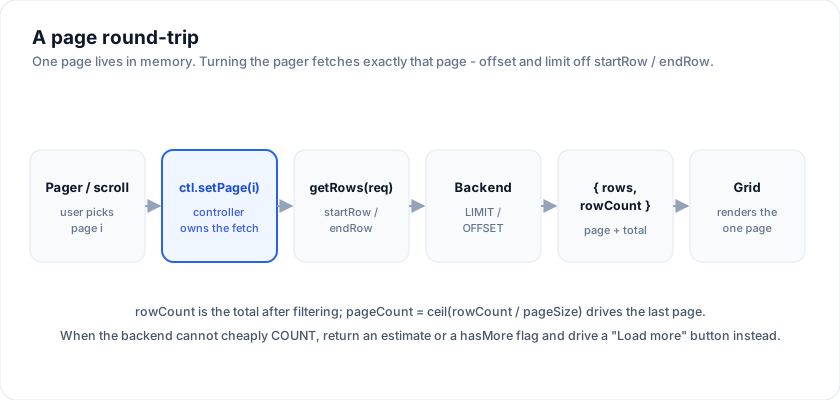
paging is just the act of choosing which page. The createServerDataSource
controller turns a page index into an offset/limit request, asks your backend for
exactly those rows plus a total, and hands both back so a pager can draw itself.
This page is the deep dive on that loop: how the numbers are computed, how to wire
a "Load more" or numbered pager, how to change page size, and what to do when the
backend cannot cheaply count the total.
Open the live example: Server-Side Row Model: paged and infinite (Server-Side Data)
Offset / limit, computed for you
You never compute the offset yourself. When you call setPage(i) or
setPageSize(n), the controller derives the row window from pageIndex and
pageSize and passes all four numbers into every getRows request:
type ServerRequest = {
  startRow: number   // pageIndex * pageSize        -> SQL OFFSET
  endRow: number     // startRow + pageSize (exclusive) -> OFFSET + LIMIT
  pageIndex: number
  pageSize: number
  sortModel: ServerSortModel
  filterModel: ServerFilterModel
}
startRow is inclusive and endRow is one past the last row wanted, so the page
size is exactly endRow - startRow. In SQL that is a plain window:
SELECT * FROM people
ORDER BY id
LIMIT  $pageSize          -- endRow - startRow
OFFSET $startRow;         -- pageIndex * pageSize
Your getRows returns the page and the total:
import { createServerDataSource, type ServerDataSource } from '@svgrid/grid'

type Row = { id: number; name: string }

const source: ServerDataSource<Row> = {
  async getRows({ startRow, endRow }) {
    const limit = endRow - startRow
    const res = await fetch(`/api/people?offset=${startRow}&limit=${limit}`)
    const { rows, total } = await res.json()
    return { rows, rowCount: total } // rowCount = total AFTER filtering
  },
}
rowCount is the total after filtering
rowCount is not the number of rows you returned on this page - it is the total
number of rows the current filter matches across the whole table. The controller
stores it as state.total and, on every emit, computes the page count from it:
// inside the controller, on each state change:
state.pageCount = Math.max(1, Math.ceil(state.total / state.pageSize))
So pageCount is ceil(total / pageSize), clamped to a minimum of 1, and it is
handed to you ready-made on ServerState. When a filter narrows the result set,
your next getRows returns a smaller rowCount, pageCount shrinks, and the
pager redraws with fewer pages. That is why setSort and setFilter both jump
back to page 0: the old page index may no longer exist.
Reading the paging state
onChange fires on every transition with the full snapshot; the paging-relevant
fields are:
type ServerState<Row> = {
  rows: ReadonlyArray<Row>
  total: number       // rowCount from the last fetch (after filtering)
  loading: boolean    // a getRows fetch is in flight
  pageIndex: number   // zero-based
  pageSize: number
  pageCount: number   // ceil(total / pageSize), min 1
  // ...sortModel, filterModel, saving, error
}
Wire it up in Svelte with runes:
<script lang="ts">
  import { SvGrid } from '@svgrid/grid'
  import { createServerDataSource, type ServerState } from '@svgrid/grid'
  import { source, columns } from './people'

  let view = $state<ServerState<Row>>()
  const ctl = createServerDataSource(source, {
    pageSize: 50,
    onChange: (s) => (view = s),
  })
  ctl.refresh()
</script>

{#if view}
  <SvGrid
    data={view.rows}
    {columns}
    loading={view.loading}
    pageable={false}
  />
{/if}
pageable={false} hands paging to your own pager plus the controller - the grid
does not slice or count the data itself, because the server already did.
The shorter form hands the controller to the grid and keeps the built-in
footer pager: the model supplies pageIndex, pageSize and the server's
rowCount, and the footer's page buttons and size selector call
setPage / setPageSize on it.
<SvGrid rowModel={ctl} {columns} pageable />
No pages at all? createServerDataSource(source, { mode: 'infinite' }) is
one block-cached list the user scrolls; see
Server-side infinite scroll. Paging a
grouped tree - a page of top-level groups, or of the flattened rows - is
the Enterprise row model's pagination option, in
Server grouping.
A numbered pager
With pageIndex and pageCount in hand, a numbered pager is setPage calls
against a clamped range. setPage ignores a no-op (the same index) and clamps a
negative index to 0, so you can wire buttons directly:
{#if view}
  <nav aria-label="Pagination">
    <button disabled={view.pageIndex === 0}
            onclick={() => ctl.setPage(view.pageIndex - 1)}>Prev</button>

    <span>Page {view.pageIndex + 1} of {view.pageCount}</span>

    <button disabled={view.pageIndex >= view.pageCount - 1}
            onclick={() => ctl.setPage(view.pageIndex + 1)}>Next</button>
  </nav>
{/if}
setPage does not clamp against pageCount for you - it only floors at 0 - so
disable the Next button (or clamp the argument) at the last page as shown.
"Load more" instead of pages
A "Load more" button is the same controller, accumulating rows in your component
instead of replacing them. Keep a running list, and on each getRows append the
new page rather than swapping it:
<script lang="ts">
  let all = $state<Row[]>([])
  let view = $state<ServerState<Row>>()

  const ctl = createServerDataSource(source, {
    pageSize: 50,
    onChange: (s) => {
      view = s
      // Append the freshly loaded page to what we already have.
      all = s.pageIndex === 0 ? [...s.rows] : [...all, ...s.rows]
    },
  })
  ctl.refresh()

  const hasMore = $derived(!!view && view.pageIndex < view.pageCount - 1)
  const loadMore = () => view && ctl.setPage(view.pageIndex + 1)
</script>

<SvGrid data={all} {columns} loading={view?.loading} pageable={false} />

{#if hasMore}
  <button onclick={loadMore} disabled={view?.loading}>Load more</button>
{/if}
Note that a setSort or setFilter returns to page 0, at which point the
s.pageIndex === 0 branch resets the accumulator - which is exactly what you
want, because the ordering or the matching set just changed.
Changing page size
setPageSize(n) sets a new size, resets to page 0, and re-fetches. It floors the
size at 1, so a bad input can never produce an empty request:
<label>
  Rows per page
  <select onchange={(e) => ctl.setPageSize(Number(e.currentTarget.value))}>
    {#each [25, 50, 100] as n}
      <option value={n} selected={view?.pageSize === n}>{n}</option>
    {/each}
  </select>
</label>
Because pageCount is derived from total / pageSize, changing the size
immediately reshapes the pager on the next emit - no extra bookkeeping.
The unknown-total case
Some backends cannot cheaply produce an exact COUNT(*) for the filtered set -
a large table, an expensive join, or a search API that only reports "there are
more". rowCount still has to be a number, so you have two honest options.
Return an estimate. If your database can give a cheap approximate count (for
example Postgres reltuples), pass it as rowCount. pageCount will be an
estimate too, which is fine for a "Page 4 of ~2,000" label - just don't hard-disable
Next purely on the estimate.
Drive "Load more" from a hasMore flag. When you truly cannot count, over-fetch
by one row to learn whether another page exists, and report an open-ended total so
the controller never thinks it has reached the end:
const source: ServerDataSource<Row> = {
  async getRows({ startRow, endRow }) {
    const limit = endRow - startRow
    // Ask for one extra row than the page needs.
    const res = await fetch(`/api/search?offset=${startRow}&limit=${limit + 1}`)
    const rows: Row[] = await res.json()

    const hasMore = rows.length > limit
    const page = hasMore ? rows.slice(0, limit) : rows

    // No real total: report "at least this many, plus one more page" while
    // there is more, so pageCount always leaves a next page to load.
    const rowCount = hasMore ? startRow + page.length + 1 : startRow + page.length
    return { rows: page, rowCount }
  },
}
Now pair it with the "Load more" pattern above: hasMore (derived from
pageIndex < pageCount - 1) stays true until the last, short page arrives, at
which point rowCount settles to the real running total and the button hides.
Avoid a numbered pager in this mode - the page numbers would be fictional.
In infinite mode there is a third option: return rowCount: -1 and the
controller runs without a total, growing the scrollbar a block past the
highest loaded block until the first short block marks the end.
A paged grid against a fake endpoint
externalPagination means the footer stops slicing and starts reporting. You
give it rowCount, pageIndex and pageSize; it gives you
onPaginationChange, and everything else - the range text, the page count, the
disabled arrows - it works out from those three numbers.
<script lang="ts">
  import { SvGrid, type GridColumns } from '@svgrid/grid'

  type Row = { id: number; name: string; city: string }

  const CITIES = ['London', 'New York', 'Portland', 'Seattle', 'Berlin']
  const ALL: Row[] = Array.from({ length: 137 }, (_, i) => ({
    id: i + 1,
    name: 'Person ' + (i + 1),
    city: CITIES[i % CITIES.length]!,
  }))

  // Stands in for GET /people?offset=&limit=
  async function fetchPage(pageIndex: number, pageSize: number) {
    await new Promise((r) => setTimeout(r, 150))
    const offset = pageIndex * pageSize
    return { rows: ALL.slice(offset, offset + pageSize), total: ALL.length }
  }

  let rows = $state<Row[]>([])
  let total = $state(0)
  let pageIndex = $state(0)
  let pageSize = $state(10)
  let loading = $state(false)

  const columns: GridColumns<Row> = [
    { field: 'id',   header: 'ID',   width: 80 },
    { field: 'name', header: 'Name', width: 180 },
    { field: 'city', header: 'City', width: 150 },
  ]

  async function load() {
    loading = true
    const page = await fetchPage(pageIndex, pageSize)
    rows = page.rows
    total = page.total
    loading = false
  }

  $effect(() => {
    void pageIndex
    void pageSize
    load()
  })
</script>

<p>{loading ? 'Loading...' : total + ' rows on the server'}</p>

<SvGrid
  data={rows}
  {columns}
  showPagination
  externalPagination
  rowCount={total}
  {pageIndex}
  {pageSize}
  onPaginationChange={(p) => {
    pageIndex = p.pageIndex
    pageSize = p.pageSize
  }}
/>
Load more, when a page number is the wrong idea
A feed has no page 7. Keep the grid unpaged, append to the array, and let the button carry the state - the grid never needs to know there is a server behind it. The trade is that you lose the range text, so show a count yourself.
<script lang="ts">
  import { SvGrid, type GridColumns } from '@svgrid/grid'

  type Event_ = { id: number; at: string; kind: string; actor: string }

  const KINDS = ['deploy', 'rollback', 'scale', 'alert']
  const ALL: Event_[] = Array.from({ length: 60 }, (_, i) => ({
    id: i + 1,
    at: '2026-06-' + String((i % 28) + 1).padStart(2, '0'),
    kind: KINDS[i % KINDS.length]!,
    actor: 'svc-' + ((i % 5) + 1),
  }))

  const PAGE = 12

  let rows = $state<Event_[]>(ALL.slice(0, PAGE))
  let loading = $state(false)

  const done = $derived(rows.length >= ALL.length)

  const columns: GridColumns<Event_> = [
    { field: 'at',    header: 'Date',  width: 130 },
    { field: 'kind',  header: 'Event', width: 130 },
    { field: 'actor', header: 'Actor', width: 130 },
  ]

  async function more() {
    loading = true
    await new Promise((r) => setTimeout(r, 200))
    rows = [...rows, ...ALL.slice(rows.length, rows.length + PAGE)]
    loading = false
  }
</script>

<SvGrid data={rows} {columns} containerHeight={220} />

<div>
  <button type="button" onclick={more} disabled={loading || done}>
    {done ? 'All loaded' : loading ? 'Loading...' : 'Load more'}
  </button>
  <span>{rows.length} of {ALL.length}</span>
</div>
Paging a grouped tree
The Enterprise row model pages a grouped tree too: a page of top-level
groups with their children, or of the flattened rows with
paginateChildRows. The demo switches between scroll, "load more" and
paged for the same tree:
Open the live example: Server grouping (row model) (Server-Side Row Model)
See also
- Server-Side Row Model - the full datasource contract, controller methods, writes, and race safety.
- Server-side infinite scroll - the same controller with blocks instead of pages.
- Server sorting - the sibling deep dive on the sort model and ORDER BY.
Live examples
- Server-Side Row Model: paged and infinite - The free half of the row model: implement one async getRows({ startRow, endRow, sortModel, filterModel }) and createServerDataSource owns the sort/filter/page lifecycle and races stale responses away. Paged, the grid holds one 50-row page; infinite, a block cache under the scrollbar with placeholders, retry and an LRU, drawn live as you scroll. Here a 100,000-row in-memory server behind 250ms latency. Grouping, tree, pivot and transactions on top of the same contract are the Enterprise row model (demo 467).
- Server grouping (row model) - Server-side grouping through one getRows contract: the request carries groupBy + groupKeys, and createServerRowModel owns the group tree - a block cache per level, lazy expand, per-group sums and a subtotal footer, race-safety - mounted through the one rowModel prop. Leaves arrive by scroll, behind a Load N more row, or paged across the whole tree, and the group panel regroups on the fly. Here a 63,000-row in-memory server behind 200ms latency; the grid holds only the groups you expand. The row model ships in @svgrid/enterprise.
Related articles
- Going AI-Native: The SvGrid MCP Server - Most AI assistants invent data grid APIs. We built an MCP server so they look up the real one instead.
- Using SvGrid with TanStack Query in Svelte - Wire TanStack Query's caching and background refetch into SvGrid for a server-driven grid that pages instantly and never shows a blank screen.
- A Svelte Data Grid with SvelteKit and Supabase - Wire SvGrid to a Supabase Postgres backend with server-side pagination, sorting, and filtering - keeping credentials on the server and queries fast with proper indexing.