Collect records with forms
A form view asks for some of a table's fields and adds a record when it is sent. Use it for records other people start: a bug report, an expense, a job application. This page builds a hiring tracker's application flow. Candidates apply through a form, the record lands in the Candidates table, and recruiters move it across a Kanban by stage.
In the demo, pick the "Apply" view, fill in the form and press Submit, then switch to "Hiring pipeline": the new candidate is a card in Applied.
SvGrid Base is part of the Suite edition of
@svgrid/enterprise. Without a key it runs with a watermark.
1. Declare the Candidates table
Keep the fields in one module. The base imports them, and so do the public page and the server you build later on this page, so all three agree on field ids and types.
// src/lib/hiring.ts
import type { BaseTable } from '@svgrid/enterprise/base'

export const STAGES = [
  { value: 'Applied', color: '#94a3b8' },
  { value: 'Phone screen', color: '#18bfff' },
  { value: 'Onsite', color: '#2d7ff9' },
  { value: 'Offer', color: '#fcb400' },
  { value: 'Hired', color: '#20c933' },
  { value: 'Rejected', color: '#f82b60' },
]
export const SOURCES = [{ value: 'Careers page' }, { value: 'Referral' }, { value: 'Job board' }]

export const candidateColumns: BaseTable['columns'] = [
  { field: 'name', header: 'Candidate', fieldType: 'text' },
  { field: 'email', header: 'Email', fieldType: 'email' },
  { field: 'phone', header: 'Phone', fieldType: 'phone', description: 'With the country code.' },
  { field: 'role', header: 'Role', fieldType: 'link', fieldProps: { table: 'roles', multiple: false, inverse: 'candidates' } },
  {
    field: 'resume', header: 'Resume', fieldType: 'attachment',
    fieldProps: { accept: '.pdf,.doc,.docx', maxFiles: 1, maxSize: 10 * 1024 * 1024 },
    description: 'One PDF or Word file, up to 10 MB.',
  },
  { field: 'portfolio', header: 'Portfolio', fieldType: 'url', description: 'A site, a repository or a design portfolio.' },
  { field: 'years', header: 'Years of experience', fieldType: 'number', fieldProps: { format: 'integer', allowNegative: false } },
  { field: 'start', header: 'Earliest start', fieldType: 'date', fieldProps: { dateFormat: 'friendly' } },
  { field: 'notes', header: 'Notes', fieldType: 'longText' },
  // The team's fields. The form leaves them out.
  { field: 'stage', header: 'Stage', fieldType: 'singleSelect', fieldProps: { options: STAGES, default: 'Applied' } },
  { field: 'source', header: 'Source', fieldType: 'singleSelect', fieldProps: { options: SOURCES } },
  { field: 'recruiter', header: 'Recruiter', fieldType: 'user' },
  { field: 'applied', header: 'Applied', fieldType: 'createdTime' },
]

export const roleColumns: BaseTable['columns'] = [
  { field: 'name', header: 'Role', fieldType: 'text' },
  { field: 'candidates', header: 'Candidates', fieldType: 'link', fieldProps: { table: 'candidates', multiple: true, inverse: 'role' } },
]

/** What a candidate fills in, in order. */
export const APPLY_FIELDS: string[] = ['name', 'email', 'phone', 'role', 'resume', 'portfolio', 'years', 'start', 'notes']
The form labels each field with the column's header, the type's icon in
front of it. A column's description is the help text: the form shows it in
small grey type under the field, and the grid shows it on the info mark in
the header.
2. Add the form view
A form is a view, next to the pipeline and the grid:
<script lang="ts">
  import { SvBase, enableBase, setFieldUsers, type BaseTable } from '@svgrid/enterprise/base'
  import { APPLY_FIELDS, candidateColumns, roleColumns } from '$lib/hiring'

  enableBase()
  setFieldUsers([{ id: 'u1', name: 'Ana Ruiz' }, { id: 'u2', name: 'Ben Okafor' }])

  let { candidates, roles }: { candidates: Record<string, unknown>[]; roles: Record<string, unknown>[] } = $props()

  let tables = $state.raw<BaseTable[]>([
    {
      id: 'candidates',
      name: 'Candidates',
      primaryField: 'name',
      data: candidates,
      columns: candidateColumns,
      views: [
        { id: 'pipeline', name: 'Pipeline', type: 'kanban', stackBy: 'stage' },
        { id: 'all', name: 'All candidates', type: 'grid', color: { mode: 'field', field: 'stage' } },
        {
          id: 'apply',
          name: 'Apply',
          type: 'form',
          formFields: APPLY_FIELDS,
          formTitle: 'Join the team',
          formDescription: 'Tell us about yourself. We reply to every application within a week.',
          formRequired: ['name', 'email', 'role', 'resume'],
          formSubmitLabel: 'Send application',
        },
      ],
    },
    { id: 'roles', name: 'Roles', primaryField: 'name', data: roles, columns: roleColumns },
  ])
</script>

<SvBase bind:tables editable expandRows containerHeight={640} onTablesChange={(t) => console.log('save', t)} />
Pick "Apply" in the view menu. The grid stays mounted underneath and the form covers it: a card with "Join the team" as the heading, the description under it, and one box per field. A click on a box opens the editor the cell uses: the select panel for a select, the record picker for Role, the date picker for Earliest start, the attachment dialog for Resume, the number box for Years of experience. Tab and Shift+Tab move to the next or previous field from inside an editor.
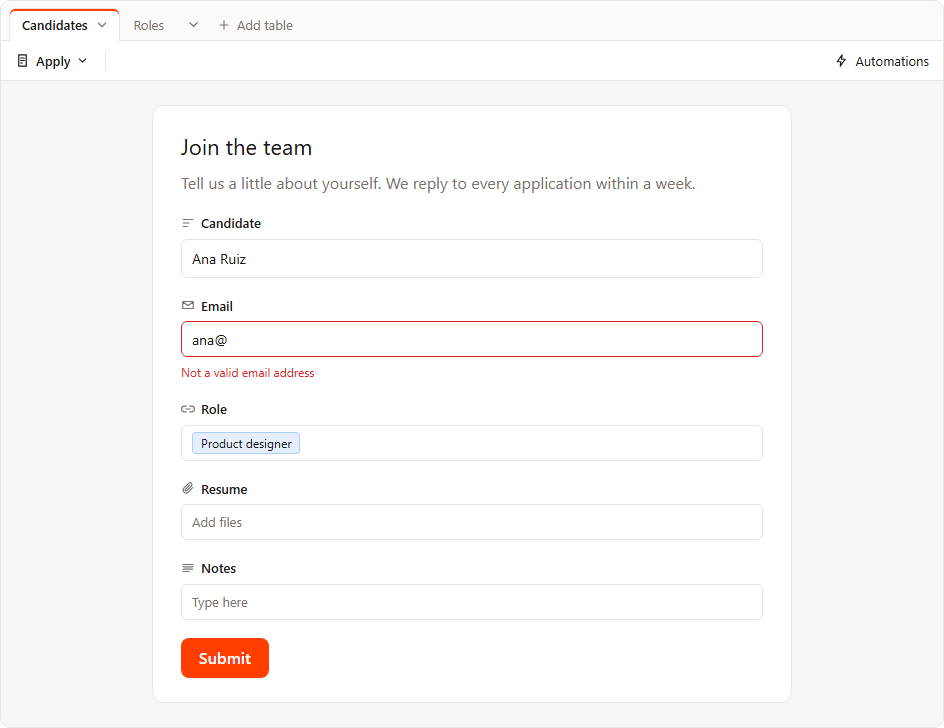
For a form view, the view bar keeps the view menu and, when the base runs automations, the Automations button. Hide fields, Filter, Sort, the record count and search are gone.
Without formFields, the form asks for every field a person can fill in:
the primary field first, then the rest in the grid's column order, hidden
columns included. Computed types (formula, lookup, rollup, count,
autonumber, created and modified time and by, button), columns with
editable: false and columns with a fieldFn are always left out, even
when formFields names them. Without formTitle, the heading is the
view's name.
3. See what a sent form adds
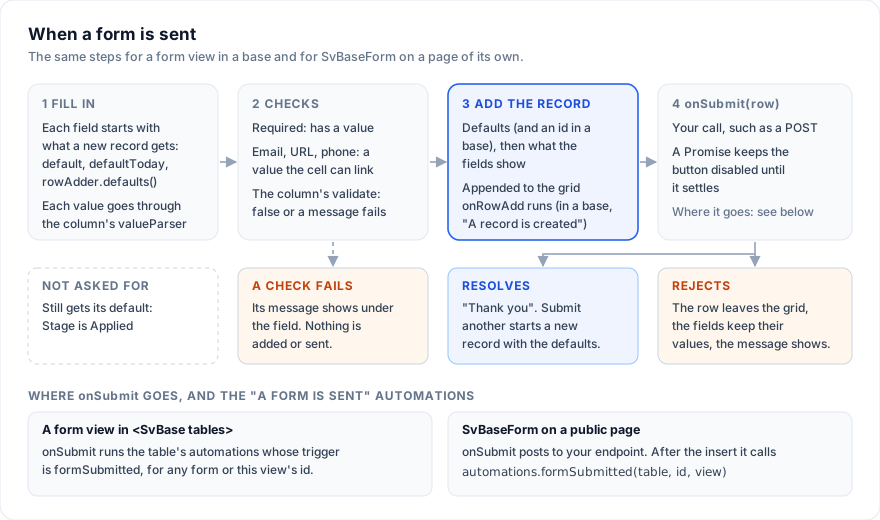
Press Submit and the form runs its checks first (What the form checks). When they pass, it builds the record the way the row adder builds a new row, from three layers, each winning over the one before:
- Each field's own new-row value: a
fieldProps.default, today for a date withdefaultToday, the next autonumber, the created time, the current user for created by. - The grid's
rowAdder.defaults(). In a base, set it in the table'sprops. - What the form's fields show.
Inside <SvBase tables> every new record also gets an id, even in a table
whose props set rowAdder: false.
The first two layers also fill the form when it opens: a field the form
asks for starts with the value the new record would get, and the person
can change it. A field the form does not ask for still gets its value, so a
candidate who never sees Stage lands in Applied because of
default: 'Applied'.
The record is appended to the grid, then the grid's onRowAdd fires with
it, and with tables the base hands the whole list to onTablesChange:
<SvBase bind:tables editable onRowAdd={(e: { row: Record<string, unknown> }) => console.log('new candidate', e.row)} />
The form then shows "Thank you" and "The record was added." with a "Submit another" button, which starts a new record with the defaults again. A form view starts a new record each time it opens, so switching to another view drops what was typed.
A sent record holds values in the shapes the cells use:
| Field type | Value |
|---|---|
text, longText, email, url, phone |
A string, as typed |
number |
A number, rounded to the field's precision |
date without time |
'2026-11-02' |
singleSelect |
The option's value |
link |
An array of record ids, also with multiple: false: ['r2'] |
attachment |
An array of attachments |
user |
The person's id |
Each value goes through the same coercion and column valueParser as a
cell edit, so a custom field type parses the same in a form. A field left
blank is not in the record. A field that showed a default and was cleared
is sent empty ('', null or [], as its editor leaves it): the person
removed the default, so it does not come back.
4. Put the form on a public page
Candidates should not open your base. Give them a page that draws only the form and posts what they send to your server, while the team keeps working in the base.
SvBaseForm is the form the view draws, as a component. It reads its fields
from a grid through that grid's api, so the page mounts a grid with the
Candidates columns and no rows, out of sight:
<!-- src/routes/apply/+page.svelte -->
<script lang="ts">
  import { SvGrid } from '@svgrid/grid'
  import { SvBaseForm, enableBase, registerLinkedTable } from '@svgrid/enterprise/base'
  import { APPLY_FIELDS, candidateColumns } from '$lib/hiring'

  enableBase()

  let { data }: { data: { roles: Array<{ id: string; name: string }> } } = $props()

  // The record picker for Role lists the open roles, and only those. In an
  // effect: it runs in the browser only (the list is page-wide, so a server
  // render must not set it for every visitor), and it unregisters on leave.
  $effect(() => registerLinkedTable({ id: 'roles', name: 'Roles', primaryField: 'name', rows: () => data.roles }))

  // Raw: the form finds the grid by the api object itself.
  let api = $state.raw<any>(null)

  // The form waits on the Promise: thanks when it resolves, the message when it rejects.
  async function send(row: Record<string, unknown>) {
    const res = await fetch('/apply', {
      method: 'POST',
      headers: { 'content-type': 'application/json' },
      body: JSON.stringify(row),
    })
    if (!res.ok) throw new Error('Your application did not reach us. Press Send application again.')
  }
</script>

<div class="store" aria-hidden="true">
  <SvGrid data={[]} columns={candidateColumns} onApiReady={(a) => (api = a)} />
</div>

{#if api}
  <SvBaseForm
    {api}
    fields={APPLY_FIELDS}
    required={['name', 'email', 'role', 'resume']}
    title="Apply to Acme"
    description="Tell us about yourself. We reply to every application within a week."
    submitLabel="Send application"
    onSubmit={send}
  />
{/if}

<style>
  .store { position: absolute; width: 1px; height: 1px; overflow: hidden; visibility: hidden; }
</style>
// src/routes/apply/+page.server.ts
declare const db: { openRoles: () => Promise<Array<{ id: string; name: string }>> }

export async function load() {
  return { roles: await db.openRoles() }
}
A required field shows a red asterisk after its label. Press "Send
application" with Email empty and its box turns red, with "Email is
required" under it; nothing is sent. Type ana@ and the line reads "Not a
valid email address". The message goes away as soon as the field gets a new
value.
send returns a Promise, so the form waits for the server, with the button
disabled. When the Promise resolves, the form shows "Thank you". When it
rejects, the form takes the row back out of the hidden grid, keeps every
field as it was, and shows the error's message above the button; pressing
the button again sends the same record. An error with no message shows "The
record could not be sent. Try again." An onSubmit that returns nothing
shows "Thank you" at once.
The form draws with the --sg-* tokens (--sg-bg, --sg-fg,
--sg-border, --sg-muted, --sg-accent, --sg-accent-fg,
--sg-danger, --sg-font), so the page's theme styles it.
5. Prefill hidden values from the URL
A job post links to /apply?role=r2&source=Referral. The candidate should
not pick the role again, and should never see Source. Read both in load,
check them, and hand them to the hidden grid as its rowAdder.defaults:
the form starts every record from them, and what is typed wins over them.
This load replaces the one in step 4:
// src/routes/apply/+page.server.ts
import { SOURCES } from '$lib/hiring'

declare const db: { openRoles: () => Promise<Array<{ id: string; name: string }>> }

export async function load({ url }: { url: URL }) {
  const roles = await db.openRoles()
  const role = roles.find((r) => r.id === url.searchParams.get('role'))?.id ?? null
  const asked = url.searchParams.get('source')
  const source = SOURCES.some((s) => s.value === asked) ? asked : 'Careers page'
  return { roles, role, source }
}
In the page, leave the role out of the fields when the link named one, and give the hidden grid the defaults. Source is not among the fields, so it stays hidden and still lands in the record. The rest of the page is as in step 4:
<script lang="ts">
  import { APPLY_FIELDS } from '$lib/hiring'
  // ...the other imports, registerLinkedTable, api and send from step 4

  let { data }: { data: { roles: Array<{ id: string; name: string }>; role: string | null; source: string } } = $props()

  const fields = $derived(data.role ? APPLY_FIELDS.filter((f) => f !== 'role') : APPLY_FIELDS)
  const rowAdder = $derived({
    defaults: () => ({ source: data.source, ...(data.role ? { role: [data.role] } : {}) }),
  })
</script>

<div class="store" aria-hidden="true">
  <SvGrid data={[]} columns={candidateColumns} {rowAdder} onApiReady={(a) => (api = a)} />
</div>

{#if api}
  <SvBaseForm {api} {fields} required={['name', 'email', 'resume']} submitLabel="Send application" onSubmit={send} />
{/if}
A link value is an array of ids, so the default is [data.role]. Drop
'role' from required too: a required id that is not among the fields is
ignored, but leaving it there reads as if the role were still asked for.
6. Upload the resume
With no uploader, a file added in the form stays in the browser as a blob:
URL, and the server receives a link it cannot open. Set an uploader on the
public page:
import { setAttachmentUploader } from '@svgrid/enterprise/base'

setAttachmentUploader(async (file, { signal, onProgress }) => {
  const res = await fetch(`/apply/upload?name=${encodeURIComponent(file.name)}`, {
    method: 'PUT',
    body: file,
    signal,
    headers: { 'content-type': file.type || 'application/octet-stream' },
  })
  if (!res.ok) throw new Error(res.status === 413 ? 'Larger than 10 MB' : `Upload failed (${res.status})`)
  onProgress(1)
  const { url } = (await res.json()) as { url: string }
  return { id: url, url, name: file.name, type: file.type, size: file.size }
})
// src/routes/apply/upload/+server.ts
import { error, json } from '@sveltejs/kit'

// Returns the stored file's URL, under https://files.example.com/resumes/.
declare const storage: { put: (key: string, body: ArrayBuffer, type: string) => Promise<string> }

const TYPES = new Set([
  'application/pdf',
  'application/msword',
  'application/vnd.openxmlformats-officedocument.wordprocessingml.document',
])

export async function PUT({ request, url }: { request: Request; url: URL }) {
  const type = request.headers.get('content-type') ?? ''
  if (!TYPES.has(type)) error(415, 'Send a PDF or a Word file')
  const body = await request.arrayBuffer()
  if (body.byteLength > 10 * 1024 * 1024) error(413, 'Larger than 10 MB')
  const name = (url.searchParams.get('name') ?? 'resume').replace(/[^\w.-]+/g, '_').slice(0, 100)
  return json({ url: await storage.put(`resumes/${crypto.randomUUID()}-${name}`, body, type) })
}
Click the Resume box ("Add files") and the attachment dialog opens: pick,
drop or paste a file, or paste a URL. Before uploading, the dialog checks
the field's maxFiles (default 20), maxSize (default 25 MB) and
accept, and lists each refused file with its name and the reason:
"At most 1 file", "Larger than 10 MB", "Not an accepted type". A file added
by URL gets the maxFiles and accept checks; its type comes from the
name's extension, so with accept: '.pdf,.doc,.docx' a link to cv.pdf is
taken and a link with no extension is refused. A file that fails to upload
stays in the dialog with Retry. The upload runs when the file is added, not
when the form is sent, and Done waits for uploads still running.
An uploader for one column only goes in that column's fieldProps.upload;
it wins over the app-wide one. Both get the file, an abort signal (aborted
when the candidate removes the file or cancels the dialog), onProgress,
the column id and row, which in a form is what the fields show so far,
with no record id yet.
7. Check it again on the server
The form's checks help a person filling it in. Anyone can post to /apply
without it, so the endpoint checks every field again with the same
linkHref the form uses for email, URL and phone, keeps only the fields a
candidate may set, and sets the team's fields itself:
// src/routes/apply/+server.ts
import { error, json } from '@sveltejs/kit'
import { linkHref } from '@svgrid/enterprise/base'
import { SOURCES } from '$lib/hiring'
import { automations } from '$lib/server/automations'

declare const db: {
  roleIsOpen: (id: string) => Promise<boolean>
  insertCandidate: (row: Record<string, unknown>) => Promise<string>
}

// Where the upload endpoint in step 6 stores resumes.
const FILES = 'https://files.example.com/resumes/'

export async function POST({ request }: { request: Request }) {
  const body = (await request.json()) as Record<string, unknown>
  const text = (k: string, max = 200) => {
    const v = body[k]
    return typeof v === 'string' ? v.trim().slice(0, max) : ''
  }

  const name = text('name')
  if (!name) error(400, 'Candidate is required')
  const email = text('email')
  if (!linkHref('email', email)) error(400, 'Not a valid email address')
  const phone = text('phone', 40)
  if (phone && !linkHref('phone', phone)) error(400, 'Not a valid phone number')
  const portfolio = text('portfolio', 500)
  if (portfolio && !linkHref('url', portfolio)) error(400, 'Not a valid web address')

  const role = Array.isArray(body.role) ? String(body.role[0] ?? '') : ''
  if (!(await db.roleIsOpen(role))) error(400, 'Pick an open role')

  const resume = Array.isArray(body.resume) ? body.resume.slice(0, 1) : []
  if (!resume.length || !resume.every((a) => typeof a?.url === 'string' && a.url.startsWith(FILES))) error(400, 'Upload a resume')

  const years = body.years == null ? null : Number(body.years)
  if (years != null && !(Number.isInteger(years) && years >= 0 && years <= 60)) error(400, 'Years is not a whole number')

  const start = text('start', 10)
  if (start && !/^\d{4}-\d{2}-\d{2}$/.test(start)) error(400, 'Earliest start is not a date')

  const source = SOURCES.some((s) => s.value === body.source) ? body.source : 'Careers page'

  const id = await db.insertCandidate({
    name, email, phone, role: [role], resume, portfolio, years, start, source,
    notes: text('notes', 5000),
    // Never from the request: these belong to the team.
    stage: 'Applied', recruiter: null, applied: new Date().toISOString(),
  })
  // Step 8: the "A form is sent" automations that run on the server.
  await automations.formSubmitted('candidates', id, 'apply')
  return json({ id })
}
The form shows the error() message only if send passes it on; the one
in step 4 shows its own line for any failure.
To see new applications in the base without a reload, give the Candidates
table a source with realtime:
Keep a base in a database.
8. Run an automation when a form is sent
In the Automations dialog the trigger is "A form is sent", with a Form
picker: "Any form of this table" or one form view. In code it is
formSubmitted, and view names the form:
import type { BaseAutomation } from '@svgrid/enterprise/base'

export const candidateAutomations: BaseAutomation[] = [
  {
    id: 'new-application',
    name: 'Announce a new application',
    enabled: true,
    trigger: { type: 'formSubmitted', view: 'apply' },
    actions: [{ type: 'notify', message: 'New application from {Candidate}', severity: 'info' }],
  },
  {
    id: 'thank-you-email',
    name: 'Thank the candidate',
    enabled: true,
    runOn: 'server',
    trigger: { type: 'formSubmitted', view: 'apply' },
    actions: [
      {
        type: 'email',
        to: '{Email}',
        subject: 'We got your application',
        body: 'Hi {Candidate}, thank you for applying. We reply within a week.',
      },
    ],
  },
]
Put them on the table (automations: candidateAutomations) and add one
<SvToaster /> from @svgrid/grid for the notice. In the base, a form view
sends its record to the table's automations with the view's id. They need
<SvBase tables>: with data and columns a form still adds records, but
no automation runs.
The public page has no base and no browser runner, so the endpoint in step 7
tells the automation server after the
insert. The view id there is whatever string your automations name. Only
automations with runOn: 'server' run on the server. If it has not seen
the record yet, it reads the table again first, and that reading also runs
the table's "A record is created" server automations for the new record.
SvBaseForm props
| Prop | Type | Default | What it does |
|---|---|---|---|
api |
grid api | required | The api of the grid the record is added to, from its onApiReady. Nothing draws until that grid has drawn once. |
fields |
ReadonlyArray<string> |
every field a person can fill in | Column ids, in order. An id that is not such a field is skipped. |
required |
ReadonlyArray<string> |
[] |
Column ids that must have a value before the record is added. |
title |
string |
'New record' |
The heading. |
description |
string |
'' |
The line under the heading. |
submitLabel |
string |
'Submit' |
The button's text. |
defaults |
() => Record<string, unknown> |
Values each record from this form starts with. The grid's rowAdder.defaults() wins over them. Called once per record. <SvBase tables> passes one that gives an id. |
|
onSubmit |
(row: Record<string, unknown>) => void | Promise<unknown> |
Called after the row was appended to the grid and the grid's onRowAdd ran. A Promise keeps the button disabled until it settles: resolved shows "Thank you", rejected takes the row back out of the grid, keeps the fields and shows the error's message. |
Form view keys
| Key | Read as |
|---|---|
type |
'form' |
name |
The view's name in the menu; the heading when there is no formTitle |
formFields |
The fields it asks for, in order |
formTitle |
The heading |
formDescription |
The line under it |
formRequired |
Column ids that must have a value, as required on SvBaseForm |
formSubmitLabel |
The button's text (default 'Submit') |
A record the view sends reaches onRowAdd, onTablesChange and the
formSubmitted automations, which get the view's id.
What the form checks
- Required: empty means no value, an empty string or an empty list. A checkbox that is off and a number that is 0 count as filled. The message is "{header} is required".
- Number and duration: the editor refuses text that is not a number
("Not a number") and a negative where
allowNegative: false("Negative numbers are not allowed"), and keeps the box open. A click outside the box while it shows the error drops what was typed. A value is rounded to the field's precision. - Attachment:
maxFiles,maxSizeandaccept, file by file, before uploading. A file added by URL is checked againstmaxFilesandaccept(by the name's extension); its size is not known, somaxSizedoes not apply. - Email, URL, phone: on submit, a value must be one the cell can link:
an address for
mailto:, an http or https address (a bare host such assvgrid.com/docscounts), or 3 to 20 digits with an optional leading+and spaces, dots, dashes or parentheses. The messages are "Not a valid email address", "Not a valid web address" and "Not a valid phone number". An empty field is not checked. - The column's
validate: on submit, the form calls it as the grid does, withvalue,row(what the fields show),rowIndex: -1andcolumn.falseshows "{header} is not valid"; a string shows that string. It runs on empty fields too, and it blocks the submit even withoutrejectInvalid. - Select: only the field's options. Text that matches none shows "No option matches"; a form never offers "Add option".
- Link: only records of the linked table, plus
Create "..."for the typed name when that table hascreate.
A failed check shows its message under the field and nothing is sent. The message goes away when that field gets a new value.
Pitfalls
- "Thank you" waits only for a Promise. If
onSubmitposts but does not return the Promise (or throw), the form thanks the person before the server answers. Return it, assendin step 4 does. - A rejected
onSubmitcomes afteronRowAdd. On a rejection the form takes the row back out of the grid, but anything youronRowAdddid with it stays done. Save in one of the two, not both. - Automatic values come from the browser. On the public page the hidden grid has no rows, so an autonumber is always 1, and a created time is the visitor's clock. Set them on the server.
- One form sets off two triggers. In
<SvBase tables>, a sent form runs the "A record is created" automations, then the "A form is sent" ones. An automation on each that does the same thing does it twice. - Uploads outlive abandoned forms. A file is uploaded when it is added, so a candidate who adds a resume and leaves leaves a file behind. Remove stored files no record points to.
Next
- Automations: the other triggers, and the server runner the public page reports to.
- Keep a base in a database: give Candidates a source so applications show up for the team.
- Saved views: the Kanban the recruiters work in, its stacks and colors.
- Linked records: the Role link and the Candidates list on each role.
- Field types: every type's
fieldProps, includingdefaultanddefaultToday.
Related articles
- SvGrid UI Components Tips and Tricks: Svelte 5 Buttons, Inputs, Tree, Forms - Practical tips for the SvGrid UI component kit - SvButton states, a Cmd+K command palette, a virtualized searchable tree, schema-driven forms, a parsing date/time field, and the shared field contract - each with a code snippet.