Starters & scaffolding
The fastest way to a working SvGrid app. One command scaffolds a project with the grid already wired up - no copy-paste, no config archaeology.
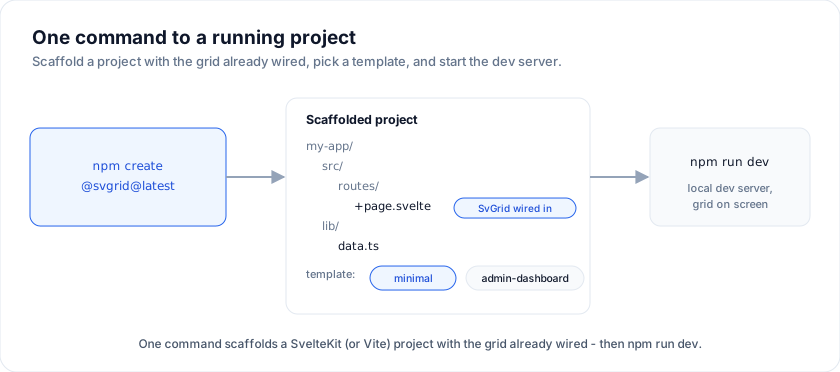
npm create @svgrid
# npm
npm create @svgrid@latest

# pnpm
pnpm create @svgrid

# yarn
yarn create @svgrid
Run with no arguments and it walks you through a project name and a template. Or pass them directly:
# Minimal Vite + Svelte 5 starter
npm create @svgrid@latest my-app -- --template minimal

# Full SvelteKit admin dashboard
npm create @svgrid@latest my-admin -- --template admin-dashboard

# Pivot cube + linked chart + drill-through (needs @svgrid/enterprise)
npm create @svgrid@latest my-cube -- --template pivot-dashboard

# The engine only - your own markup and CSS
npm create @svgrid@latest my-table -- --template headless
Then:
cd my-app
npm install
npm run dev
Templates
| Template | Stack | Best for |
|---|---|---|
minimal |
Vite + Svelte 5 + @svgrid/grid, one page |
Dropping a grid into something quickly |
sveltekit |
SvelteKit + @svgrid/grid: server load, URL-driven sort, form-action edits, cookie sessions with role gating |
Server-rendered pages; the app from the SvelteKit guide |
admin-dashboard |
SvelteKit + Tailwind + @svgrid/grid, deploy to Vercel |
A real dashboard / internal tool |
pivot-dashboard |
SvelteKit + @svgrid/enterprise: a pivot cube, a linked chart and a drill-through rail over one fact table |
Reporting screens where a number has to be traceable to its rows |
headless |
Vite + Svelte 5 + @svgrid/grid/core: the engine driving a hand-written <table> |
Your own renderer and your own CSS |
The four <SvGrid> templates start on the Ember theme, the same one the demos
and svgrid.com use, unless you pass --theme <id>. headless loads no grid
stylesheet at all, so it has no theme to pick.
Options
| Flag | Alias | Description |
|---|---|---|
--template <name> |
-t |
minimal, sveltekit, pivot-dashboard, admin-dashboard, or headless |
--theme <id> |
One of the 20 presets (default ember). Ignored by headless |
|
--dark / --light |
Pin the starting mode. Left out, minimal and sveltekit follow the visitor's OS and admin-dashboard starts dark |
|
--force |
-f |
Scaffold into a non-empty directory |
--help |
-h |
Show usage |
Every template uses the free MIT @svgrid/grid core. Add
@svgrid/enterprise for export, import, print, and pivot.
The AI helpers (natural-language filter, smart fill, summarize, classify) are part of
the free core - you register your own model provider.
The admin dashboard starter
The admin-dashboard template is a production-shaped SvelteKit app you
can fork directly from
the repo:
- App shell - sidebar nav + top bar (
src/routes/+layout.svelte) - Overview - KPI cards + a recent-orders grid (
src/routes/+page.svelte) - Orders - full grid: sort, filter, row selection, inline editing, pagination
- Customers - grid with column grouping (drag a column to the group bar)
- Prerendered to static HTML for SEO and instant first paint; grids
hydrate on the client (
prerender = trueinsrc/routes/+layout.ts) - Sample data in
src/lib/data.ts- swap for your API or a SvelteKitloadfunction
Deploy to Vercel
The starter ships with @sveltejs/adapter-vercel and a one-click deploy
button in its README. From a forked or scaffolded copy:
npm run build    # static + serverless output
npm run preview  # preview the production build
If you're deploying the template straight from this monorepo's
subfolder, set the Vercel Root Directory to
templates/sveltekit-admin-dashboard. Scaffolding a standalone copy
first (above) avoids that step.
The pivot dashboard starter
pivot-dashboard is the one template built on @svgrid/enterprise rather than the
free package, because the pivot designer is a paid feature. No key is needed to try it: without one it runs and displays the
watermark and the console message about the Enterprise package, so you
can evaluate it before buying.
It puts three panes over a single fact table:
- a pivot cube you can re-shape by dragging fields between wells,
- a chart that re-aggregates the same facts along the first row dimension,
- a drill-through rail that opens when you click any aggregated cell and lists the exact rows behind that number.
The point is that they cannot disagree. The rail recomputes its total from the rows it lists rather than reading the grid, so if the two ever diverged the drill filter and the pivot aggregation would have drifted apart.
The drill maths lives in src/lib/drill.ts, deliberately free of Svelte and of the
grid packages, so you can unit-test your own reporting rules against it.
The headless starter
headless is the one template that does not render <SvGrid>. It imports
createSvGrid from @svgrid/grid/core - the engine, with no DOM code, no ARIA,
and no CSS - and feeds a <table> written by hand in src/App.svelte:
- The row pipeline is explicit -
coreRowModel->filteredRowModel->sortedRowModel, listed inApp.svelte. Add grouping, pagination, or tree data by adding their row models to the same object. - Features are registered, not inferred -
tableFeatures({ rowSortingFeature, columnFilteringFeature }). What you leave out never enters the bundle; the built starter is about 17 KB gzipped, including the Svelte runtime. - State is controlled -
sortingandcolumnFiltersare plain Svelte 5$state, typed as the engine's ownSortingStateandColumnFiltersState. See Controlled state. - The stylesheet is yours -
src/app.csshas no preset import and no--sg-*token.--themeis accepted but ignored here, because there is nothing for it to write to.
Start there when you need a renderer the component does not give you: a plain
table for print or email, a card list on mobile, an SVG, or a custom virtualized
view. For the common case, minimal and <SvGrid> are less work. Background:
Headless overview and
Build a table from scratch.
Starters for Bolt.new and Lovable
Two more starters live in the repository rather than in the scaffolder, because they open straight from GitHub:
templates/bolt-svelte-grid- Svelte 5 on Vite 7, the version Bolt's WebContainer can run. The scaffolder's templates are on Vite 8 and fail to install there.templates/lovable-react-grid- React with@svgrid/grid-wc, and theDataGridcomponent that keeps a server-rendered Lovable app working.
SvGrid in AI app builders walks through both.
Adding the grid to an existing app
Already have a Svelte or SvelteKit project? Skip the scaffolder and install directly - see Install and First grid.
Frequently asked questions
What's the fastest way to start a SvGrid project?
Run npm create @svgrid@latest (or pnpm create @svgrid). It scaffolds a
Vite + Svelte or SvelteKit project with the grid already wired up, then
npm install and npm run dev.
Is there a SvelteKit admin dashboard template?
Yes. npm create @svgrid@latest my-admin -- --template admin-dashboard
scaffolds a SvelteKit + Tailwind admin with multiple grids, prerendered
for SEO, and a one-click Deploy-to-Vercel button.
Can I scaffold a headless project, without the grid's CSS?
Yes. npm create @svgrid@latest my-table -- --template headless scaffolds a
Vite + Svelte 5 app built on createSvGrid, the engine behind <SvGrid>. It
ships a hand-written <table> and a stylesheet with no grid tokens in it, so
sorting and filtering come from SvGrid and every pixel is yours.
Do the starters require a Enterprise license?
No. Every template uses the free MIT @svgrid/grid core. Enterprise
features (export, import, print, pivot, AI) are an optional add-on that
runs in evaluation without a key.
See also
- Install - add SvGrid to an existing project
- First grid - the minimum runnable example
- Going to production - SSR, virtualization, a11y
Related articles
- Building an Admin Dashboard in Svelte 5 - A practical walkthrough for wiring SvGrid into an admin layout - correct sizing, reactive bulk actions, inline edits with optimistic saves, and a clean handoff to server-side data.