Headless overview
<SvGrid> is the renderer. createSvGrid is the engine that powers it.
They're independent: you can use the engine on its own to build a custom UI,
render a plain <table> for print or email, run the row pipeline in a Web
Worker or on a server, or unit-test sort / filter / aggregation logic with no
DOM at all.
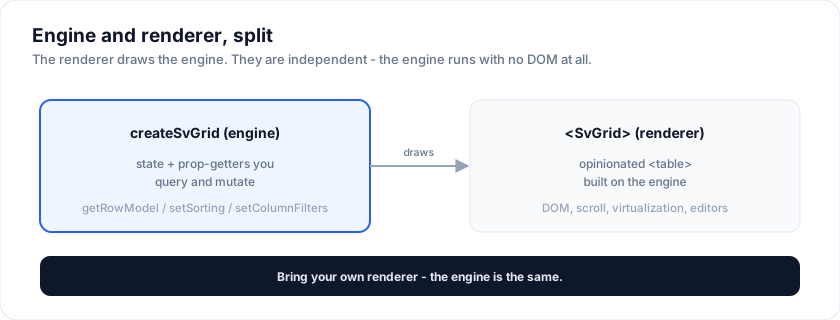
your data ─▶ createSvGrid (engine) ─▶ row model ─▶ your markup
                     ▲                                  │
                controlled state  ◀──── change events ──┘
What the engine gives you
createSvGrid(options) returns a table object with:
getRowModel(): { rows: Row<TData>[] }- the final, post-pipeline rows (filtered → sorted → grouped → expanded → paginated),getHeaderGroups(): HeaderGroup<TData>[]- the multi-level column-header tree,getAllColumns(): Column<TData>[]- every column with its metadata (id, visible, pinned, width),- imperative setters (
setColumnFilters,setPagination,setGrouping,setExpanded,setRowSelection,setActiveCell) that push into the engine's store. Sorting has no setter - drive it from thesortingstate you pass in, or from a header'sgetToggleSortingHandler().
No DOM, no CSS, no virtualization - those live in the renderer. Here's the
engine rendering a plain, hand-styled <table> (sort + filter are the engine's;
the markup is the demo's):
When to reach for headless
| You want to… | Use |
|---|---|
| A rich grid in a Svelte app | <SvGrid> (start here) |
Render as a plain <table> (print / email / RSC) |
Headless |
| Drive a server-side row model from Node | Headless, via createSvGridCore |
| Unit-test sort / filter / aggregator logic | Headless |
| Build a custom virtualized renderer | Headless + the virtualizer exports |
| Share one state object across two grids | Headless + createGridState |
For the common case, use <SvGrid> - it wires all
of this for you. Reach for the engine when you need a different renderer or to
run the pipeline where there is no DOM.
The three ideas
- Row models are a pipeline. You opt into the steps you need
(
coreRowModel,filteredRowModel,sortedRowModel, …); unused steps are tree-shaken. See Row models. - State is controlled. You pass
statein and getonXxxChangeevents out - the engine never mutates your state. This is what makes it click with Svelte 5$state. See Controlled state. - Rendering is yours. The engine hands you rows + header groups; you emit the markup. See Build a table from scratch.
createSvGrid vs createSvGridCore
Both build the same engine and expose the same getRowModel() /
getHeaderGroups() surface. The difference is reactivity:
createSvGrid |
createSvGridCore |
|
|---|---|---|
| State | Svelte 5 runes | plain objects |
| Needs the Svelte compiler | Yes | No |
| Runs under | Vite, SvelteKit, vitest | anywhere Node runs |
Inside a component, use createSvGrid - runes are what make $derived re-run
the pipeline when your state changes. Outside one - a Node service, a worker, a
CLI, a plain unit test with no Svelte in the pipeline - use createSvGridCore
and rebuild it yourself when the state changes:
// plain node script.mjs - no bundler, no compiler
import {
  createSvGridCore,
  createCoreRowModel,
  createSortedRowModel,
  tableFeatures,
  rowSortingFeature,
} from '@svgrid/grid/core'

const features = tableFeatures({ rowSortingFeature })
const table = createSvGridCore({
  _features: features,
  _rowModels: {
    coreRowModel: createCoreRowModel(),
    sortedRowModel: createSortedRowModel(),
  },
  data,
  columns,
  state: { sorting: [{ id: 'salary', desc: true }] },
  onSortingChange: () => {},
})

const rows = table.getRowModel().rows   // sorted, no DOM involved
createSvGrid imported into a bare Node process throws
ReferenceError: $state is not defined - that is the compiler missing, not a
bug. Reach for the core function there.
The engine with no grid
No <SvGrid> anywhere. The engine owns sorting and hands back a row model;
every element below is markup you wrote, which is the whole proposition.
<script lang="ts">
  import {
    createSvGrid,
    createCoreRowModel,
    createSortedRowModel,
    tableFeatures,
    rowSortingFeature,
    type ColumnDef,
  } from '@svgrid/grid/core'

  type Repo = { name: string; lang: string; stars: number }

  const data: Repo[] = [
    { name: 'svelte',   lang: 'JavaScript', stars: 78000 },
    { name: 'vite',     lang: 'TypeScript', stars: 68000 },
    { name: 'sv-grid',  lang: 'TypeScript', stars: 172 },
    { name: 'rollup',   lang: 'JavaScript', stars: 25000 },
    { name: 'esbuild',  lang: 'Go',         stars: 38000 },
  ]

  const features = tableFeatures({ rowSortingFeature })

  const columns: ColumnDef<typeof features, Repo>[] = [
    { field: 'name',  header: 'Repo' },
    { field: 'lang',  header: 'Language' },
    { field: 'stars', header: 'Stars' },
  ]

  let sorting = $state([{ id: 'stars', desc: true }])

  const table = createSvGrid({
    _features: features,
    _rowModels: {
      coreRowModel: createCoreRowModel<Repo>(),
      sortedRowModel: createSortedRowModel<Repo>(),
    },
    data,
    columns,
    state: { sorting },
    onSortingChange: (u) => (sorting = typeof u === 'function' ? u(sorting) : u),
  })

  // Touch the state this component owns so the derived re-runs:
  // the engine's store is framework-free and not a rune.
  const rows = $derived.by(() => {
    sorting
    return table.getRowModel().rows
  })
</script>

<table>
  <thead>
    {#each table.getHeaderGroups() as hg (hg.id)}
      <tr>
        {#each hg.headers as h (h.id)}
          <th onclick={h.column.getToggleSortingHandler()}>{h.column.columnDef.header}</th>
        {/each}
      </tr>
    {/each}
  </thead>
  <tbody>
    {#each rows as r (r.id)}
      {@const repo = r.original as Repo}
      <tr>
        <td>{repo.name}</td>
        <td>{repo.lang}</td>
        <td>{repo.stars.toLocaleString()}</td>
      </tr>
    {/each}
  </tbody>
</table>
Adding a stage
Each row model is a pipeline stage you opt into. Register the filtered model and a filter starts applying; leave it out and the code for it never ships.
<script lang="ts">
  import {
    createSvGrid,
    createCoreRowModel,
    createFilteredRowModel,
    tableFeatures,
    columnFilteringFeature,
    type ColumnDef,
  } from '@svgrid/grid/core'

  type Repo = { name: string; lang: string; stars: number }

  const data: Repo[] = [
    { name: 'svelte',   lang: 'JavaScript', stars: 78000 },
    { name: 'vite',     lang: 'TypeScript', stars: 68000 },
    { name: 'sv-grid',  lang: 'TypeScript', stars: 172 },
    { name: 'rollup',   lang: 'JavaScript', stars: 25000 },
    { name: 'esbuild',  lang: 'Go',         stars: 38000 },
  ]

  const features = tableFeatures({ columnFilteringFeature })

  const columns: ColumnDef<typeof features, Repo>[] = [
    { field: 'name',  header: 'Repo' },
    { field: 'lang',  header: 'Language' },
  ]

  let columnFilters = $state<Array<{ id: string; value: unknown }>>([])

  const table = createSvGrid({
    _features: features,
    _rowModels: {
      coreRowModel: createCoreRowModel<Repo>(),
      filteredRowModel: createFilteredRowModel<Repo>(),
    },
    data,
    columns,
    state: { columnFilters },
    onColumnFiltersChange: (u) =>
      (columnFilters = typeof u === 'function' ? u(columnFilters) : u),
  })

  // Touch the state this component owns so the derived re-runs:
  // the engine's store is framework-free and not a rune.
  const rows = $derived.by(() => {
    columnFilters
    return table.getRowModel().rows
  })
</script>

<input
  placeholder="Filter language"
  oninput={(e) => (columnFilters = [{ id: 'lang', value: e.currentTarget.value }])}
/>

<ul>
  {#each rows as r (r.id)}
    {@const repo = r.original as Repo}
    <li>{repo.name} - {repo.lang}</li>
  {/each}
</ul>
See also
- Build a
<table>from scratch - a complete 30-line renderer - Styling a headless table - three looks from one engine
- Row models - the pipeline, step by step
- Server-side data - paging, sorting, filtering, load on demand
- Controlled state -
createGridState/subscribeGrid - Headless virtualization - render 100k rows yourself
- Why headless? - the design rationale
- Svelte headless table - the landing page, with the measured size of the engine
- Bundle size - every entry, measured on each release
- Architecture - the three-layer model
Related articles
- SvGrid Tips and Tricks: Get More from Your Svelte Data Grid - Practical SvGrid tips - fitColumns, cellFlash, Kanban board mode, server-side data, theming tokens and headless rendering - each with a code snippet and docs link.