Tutorial: a Postgres CRUD grid
The one page that wires a data grid to a PostgreSQL database with full create / read / update / delete - sorting, filtering, search, and paging included. SQL runs on the server (a driver and credentials can't live in the browser), so this has a server route plus the page. Copy the four files and run.
Shortcut:
npx @svgrid/studio add customers --db postgres --url "$DATABASE_URL"generates everything below from a live table in one command - see The Studio CLI. This tutorial shows what it produces so you can write or edit it by hand.
You need a SvelteKit app and a Postgres database (local, or hosted - the same steps work for Supabase, Neon, RDS, and so on).
Step 1 - The table
In your database, create and seed a customers table:
create table customers (
  id     bigint generated always as identity primary key,
  name   text not null,
  email  text not null,
  tier   text,
  mrr    integer,
  active boolean default true
);

insert into customers (name, email, tier, mrr, active) values
  ('Ada Lovelace', '[email protected]',   'enterprise', 1200, true),
  ('Alan Turing',  '[email protected]', 'pro',         240, true),
  ('Grace Hopper', '[email protected]',    'enterprise',  980, true);
Step 2 - Install
npm i @svgrid/grid @svgrid/enterprise pg
Set your connection string in the server environment (never in client code):
DATABASE_URL="postgres://user:password@localhost:5432/app"
Step 3 - Describe the table once
One EntitySchema drives the grid columns, the edit form, and validation. Create
src/lib/customers.schema.ts:
import type { EntitySchema } from '@svgrid/enterprise'

export type CustomersRow = {
  id: number
  name: string
  email: string
  tier: 'free' | 'pro' | 'enterprise'
  mrr: number
  active: boolean
}

export const customersSchema: EntitySchema<CustomersRow> = {
  name: 'customers',
  idField: 'id',
  fields: [
    { field: 'id', type: 'number', primaryKey: true, readonly: true },
    { field: 'name', type: 'text', required: true, minLength: 2 },
    { field: 'email', type: 'text', label: 'Email', required: true, format: 'email' },
    { field: 'tier', type: 'enum', options: [
      { value: 'free', label: 'Free' },
      { value: 'pro', label: 'Pro' },
      { value: 'enterprise', label: 'Enterprise' },
    ] },
    { field: 'mrr', type: 'number', label: 'MRR ($)', min: 0 },
    { field: 'active', type: 'boolean' },
  ],
}
Step 4 - The server route
createSqlDataSource turns the grid's sort / filter / page request into safe,
parameterized SQL; createKitHandlers exposes it as a single POST endpoint.
Create src/routes/api/customers/+server.ts:
import pg from 'pg'
import { createSqlDataSource, createKitHandlers } from '@svgrid/enterprise'
import { customersSchema, type CustomersRow } from '$lib/customers.schema'

const pool = new pg.Pool({ connectionString: process.env.DATABASE_URL })

const source = createSqlDataSource<CustomersRow>({
  schema: customersSchema,
  table: 'customers',
  dialect: { placeholders: '#39;, ilike: true },   // Postgres: $1, ILIKE
  execute: async (text, params) => (await pool.query(text, params)).rows,
})

export const { POST } = createKitHandlers({ schema: customersSchema, source })
Values are always bound ($1, $2, ...) and identifiers come from the
schema-whitelisted plan, so the data layer has no SQL-injection surface. For a
different database, change the driver and dialect (MySQL ?, SQL Server @p1,
SQLite ?) - see Databases.
Step 5 - The grid + CRUD page
The browser talks to your route through createKitDataSource - it never sees the
database. Create src/routes/customers/+page.svelte:
<script lang="ts">
  import { SvGrid, createServerDataSource, type ServerState } from '@svgrid/grid'
  import { SvGridEditPanel, createKitDataSource, schemaToColumns } from '@svgrid/enterprise'
  import { customersSchema, type CustomersRow } from '$lib/customers.schema'

  const source = createKitDataSource<CustomersRow>({ endpoint: '/api/customers' })
  const columns = schemaToColumns(customersSchema)

  let view = $state<ServerState<CustomersRow>>({
    rows: [], total: 0, loading: false, saving: false, error: null,
    pageIndex: 0, pageSize: 10, pageCount: 1, sortModel: [], filterModel: {},
  })
  let editing = $state<CustomersRow | null | undefined>(undefined)
  let selectedRows = $state<CustomersRow[]>([])

  const controller = createServerDataSource(source, {
    pageSize: 10, optimistic: true, getRowId: (r) => String(r.id),
    onChange: (s) => (view = s),
  })
  controller.refresh()

  async function save({ mode, id, values }) {
    if (mode === 'create') await controller.createRow(values)
    else if (id != null) await controller.updateRow(String(id), values)
    editing = undefined
  }
  async function removeSelected() {
    for (const row of selectedRows) await controller.deleteRow(String(row.id))
    selectedRows = []
  }
</script>

<div style="display:flex; gap:8px; margin-bottom:8px;">
  <button onclick={() => (editing = null)}>+ New customer</button>
  <button disabled={selectedRows.length === 0} onclick={removeSelected}>Delete selected</button>
</div>

<SvGrid
  data={view.rows} {columns} loading={view.loading}
  fitColumns enableRowSummaries={false}
  selectionMode="row" onRowSelectionChange={(_, rows) => (selectedRows = rows)}
  sortable externalSort onSortingChange={(s) => controller.setSort(s)}
  filterable filterMode="row" showGlobalFilter externalFilter
  onFiltersChange={(f) => controller.setFilter({
    global: f.global || undefined,
    columns: Object.fromEntries(f.columns.map((c) => [c.id, { operator: c.operator, value: c.value, valueTo: c.valueTo, selectedValues: c.selectedValues }])),
  })}
  onRowClick={(e) => (editing = e.row)}
  showPagination externalPagination
  rowCount={view.total} pageIndex={view.pageIndex} pageSize={view.pageSize}
  onPaginationChange={({ pageIndex, pageSize }) =>
    pageSize !== view.pageSize ? controller.setPageSize(pageSize) : controller.setPage(pageIndex)}
/>

{#if editing !== undefined}
  <SvGridEditPanel schema={customersSchema} row={editing} presentation="modal"
    onSubmit={save} onCancel={() => (editing = undefined)} />
{/if}
Step 6 - Run it
npm run dev
Open /customers:
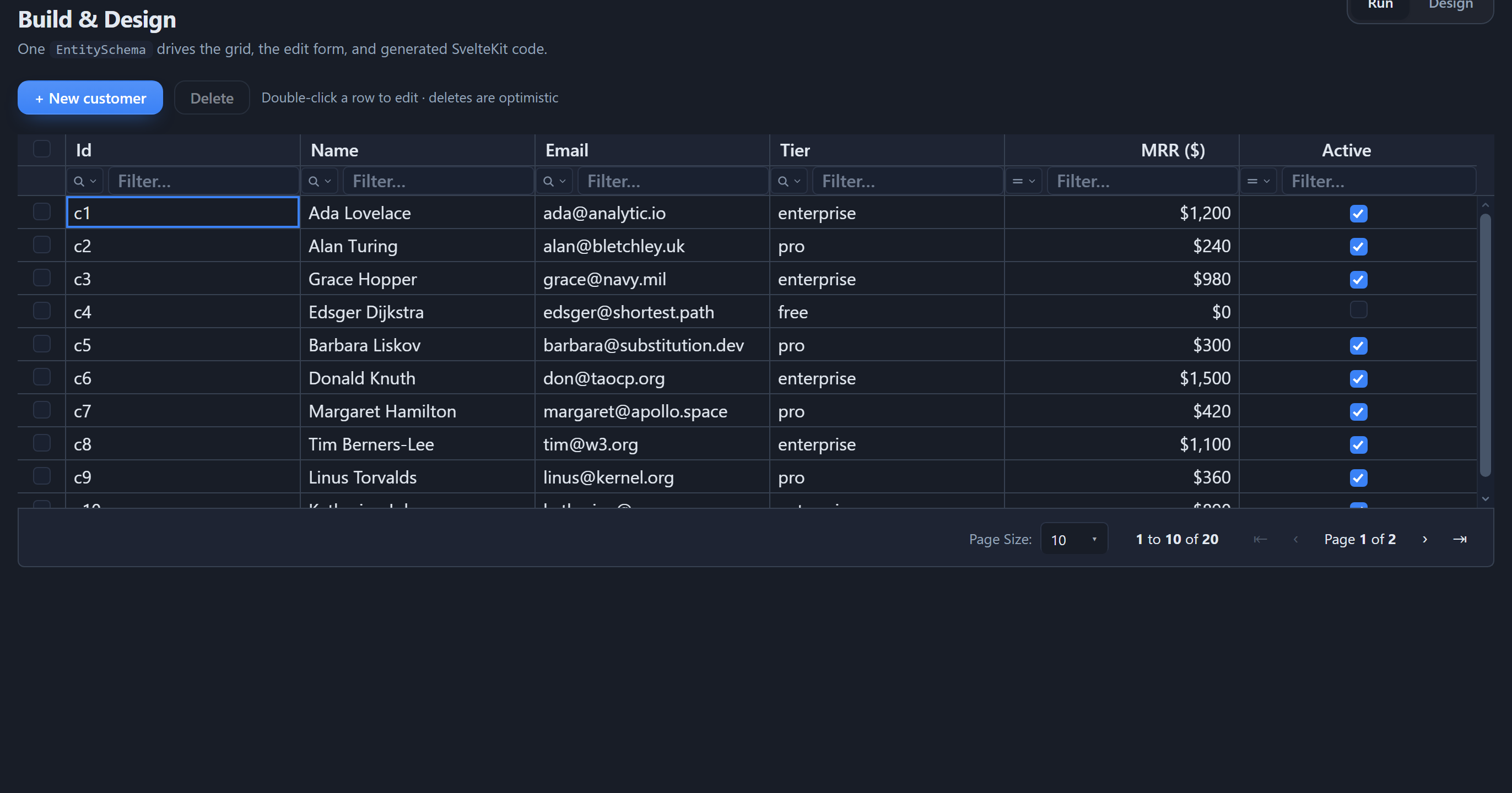
- Read - the grid fetches one page; sorting, filtering, and search become
ORDER BY/WHERE/ILIKEagainst Postgres, not client-side passes. - Create / Update - + New customer and click-to-edit open a validated
form; saving runs a parameterized
INSERT/UPDATE. - Delete - tick rows and Delete selected to
DELETEthem.
The footer shows the real total (1 to 10 of 240) from a COUNT query.
What made this work
- One schema described the table; grid, form, and validation came from it.
createSqlDataSourceturned the grid's request into parameterized SQL;createKitHandlersexposed it as one endpoint;createKitDataSourcelet the page talk to it - all over the same ServerDataSource contract.
Next steps
- Secure it - add an auth check to the
POSThandler, and scope rows per user - see Deploying a Studio app. - Another database - swap the driver and
dialectfor MySQL, SQL Server, or SQLite - see Databases. - From the browser instead - Supabase can run client-side with RLS - see the Supabase CRUD grid tutorial.
- Skip the typing -
npx @svgrid/studio add customers --db postgres --url ...generates all of this from your live table. See The Studio CLI.
See also
- Databases - every dialect + the generated code
- Data binding - the
ServerDataSourcecontract - Getting started - the same screen over in-memory data