Data binding
Every Studio screen binds to data through one small, uniform contract:
ServerDataSource. Read a page of rows, and (optionally) create, update, and
delete. Because sorting, filtering, pagination, and the edit form all speak to
this one interface, the grid works the same whether your data comes from
PostgreSQL, a REST API, or an in-memory array.
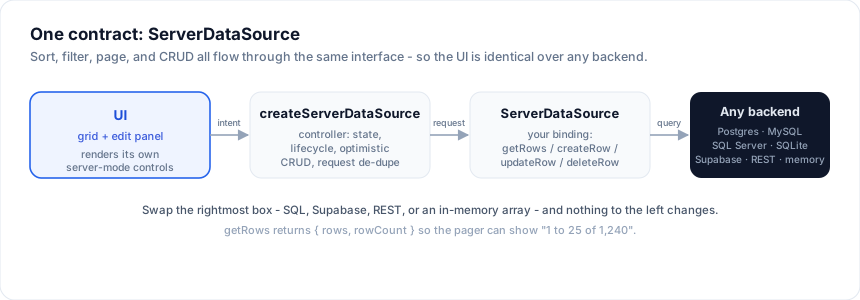
 UI (grid + edit panel)
        │  sort / filter / page / create / update / delete
        ▼
 createServerDataSource   ← controller: state + lifecycle + optimistic CRUD
        │  getRows(request) / createRow / updateRow / deleteRow
        ▼
 ServerDataSource         ← YOUR binding (SQL, REST, in-memory, ...)
        │
        ▼
 PostgreSQL · MySQL · SQL Server · SQLite · Supabase · REST · memory
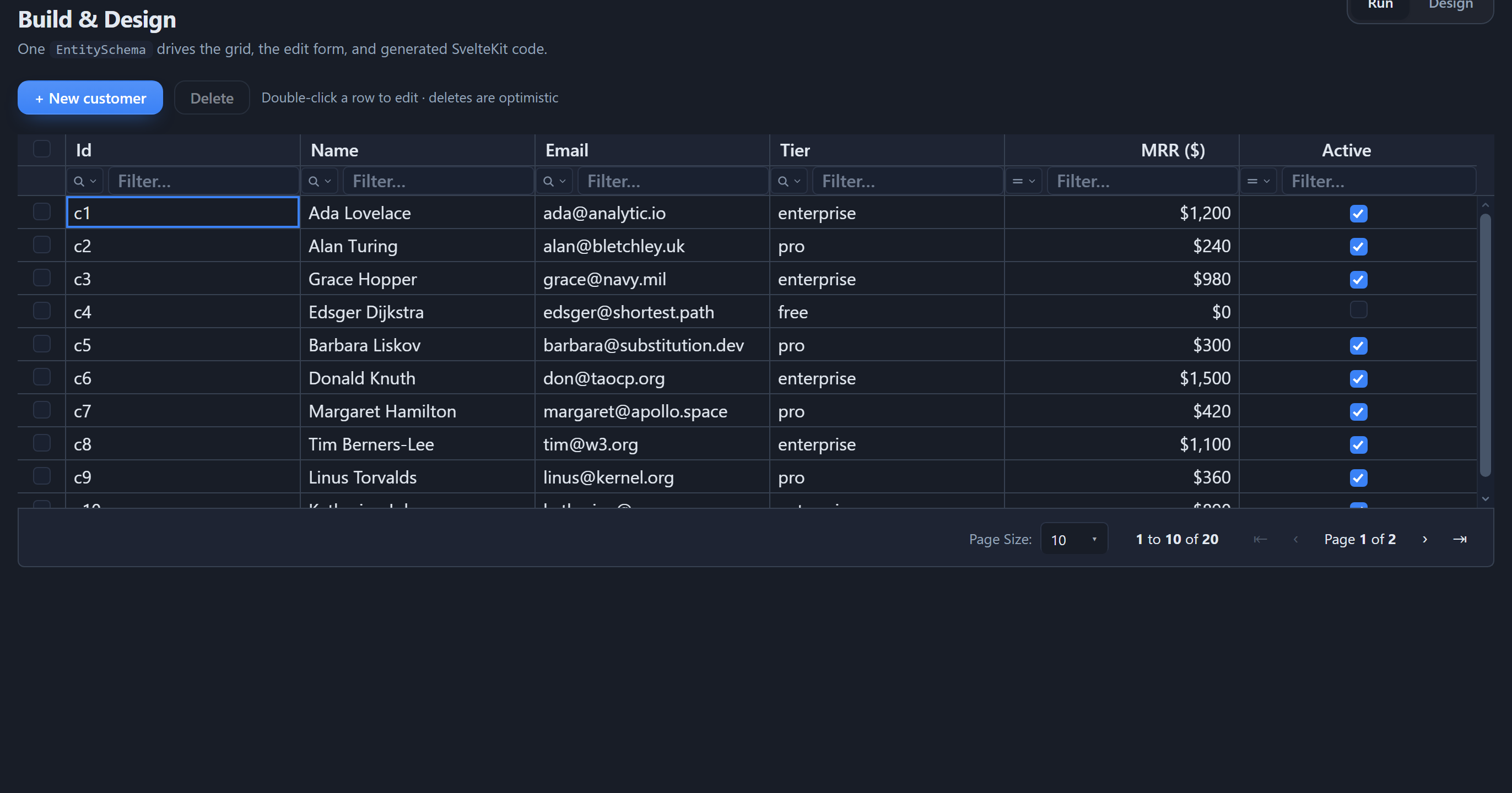
Whatever backend you pick, the screen is the same - a full CRUD grid with server-side sort, filter, search, and paging over that one contract:
The contract
import type { ServerDataSource, ServerRequest } from '@svgrid/grid'

type ServerDataSource<TData> = {
  // Read one page. `request` carries paging + the sort and filter state.
  getRows(request: ServerRequest): Promise<{ rows: TData[]; rowCount: number }>

  // Optional writes - implement the ones your backend supports.
  createRow?(input: Partial<TData>): Promise<TData>
  updateRow?(id: string, patch: Partial<TData>): Promise<TData>
  deleteRow?(id: string): Promise<void>
}
The request your getRows receives:
type ServerRequest = {
  startRow: number        // first row index (inclusive)
  endRow: number          // last row index (exclusive)
  pageIndex: number
  pageSize: number
  sortModel: Array<{ id: string; desc: boolean }>
  filterModel: {
    global?: string       // free-text search
    columns?: Record<string, {
      operator: string; value: string; valueTo?: string; selectedValues?: string[]
    }>
  }
}
Return the rows for that page plus the total rowCount (so the pager can
show "1 to 10 of 240").
The controller
createServerDataSource wraps any ServerDataSource into a reactive controller
that owns the request lifecycle - it de-dupes in-flight requests, tracks
loading / saving / error, and exposes the methods the grid calls:
import { createServerDataSource } from '@svgrid/grid'

const controller = createServerDataSource(source, {
  pageSize: 25,
  optimistic: true,               // update/delete apply instantly, roll back on error
  getRowId: (r) => String(r.id),
  onChange: (state) => (view = state),
})
controller.refresh()

// controller.setSort(...) / setFilter(...) / setPage(...) / setPageSize(...)
// controller.createRow(...) / updateRow(id, ...) / deleteRow(id)
Wire it to the grid's native server-mode UI and you are done:
<SvGrid data={view.rows} {columns}
  sortable externalSort onSortingChange={(s) => controller.setSort(s)}
  filterable externalFilter onFiltersChange={mapFilters}
  showPagination externalPagination rowCount={view.total}
  pageIndex={view.pageIndex} pageSize={view.pageSize}
  onPaginationChange={({ pageIndex, pageSize }) => ...} />
Choose a binding
| Option | Guide |
|---|---|
| SQL databases (Postgres, Supabase, MySQL, SQL Server, SQLite) | Databases |
A Drizzle schema.ts file |
Drizzle schema |
| An existing REST API, or any custom backend | REST & custom APIs |
| Static / in-memory data | In-memory |
For SQL sources you rarely write getRows yourself:
createSqlDataSource turns a plan into parameterized SQL and
runs it through your client. For REST or bespoke backends you implement the four
methods above directly - see REST & custom APIs.