Databases
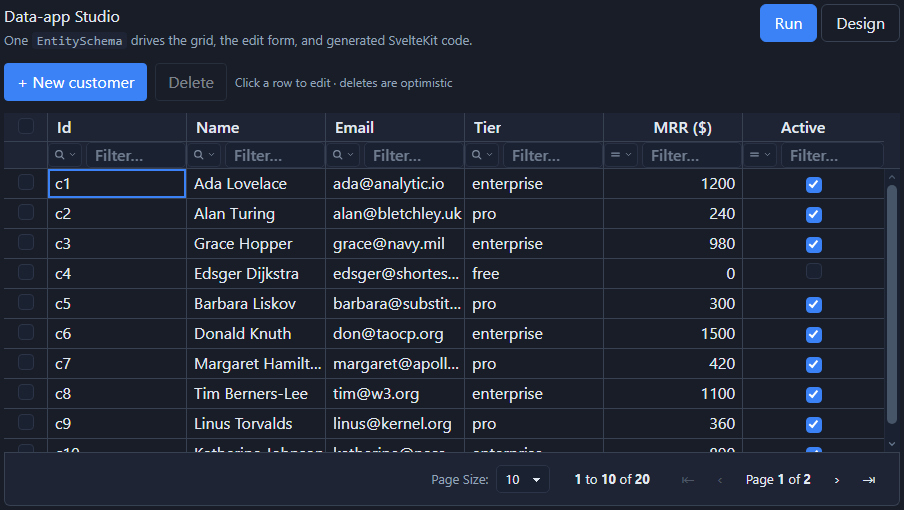
Studio connects directly to your relational database, reads a table's columns from the catalog, and scaffolds a connected CRUD screen. Supported: PostgreSQL, Supabase, MySQL / MariaDB, SQL Server, SQLite.
How it works
- You install the driver for your database (no driver is bundled).
npx @svgrid/studio add <table> --db <dialect> --url <conn>reads the table's columns - types, primary key,NOT NULL, and foreign keys - into anEntitySchema. FK columns becomerelationfields (Relations).- It generates three files; the API route is wired to that driver via
process.env.DATABASE_URL.
| Database | Install | --db |
Placeholders |
|---|---|---|---|
| PostgreSQL | pg |
postgres |
$1 + ILIKE |
| Supabase | pg |
supabase |
$1 + ILIKE |
| MySQL / MariaDB | mysql2 |
mysql |
? |
| SQL Server | mssql |
mssql |
@p1 |
| SQLite | better-sqlite3 |
sqlite |
? |
The generated +server.ts uses createSqlDataSource,
which turns the grid's sort / filter / page request into safe, parameterized
SQL (values are always bound; identifiers come from the schema-whitelisted plan).
PostgreSQL
npm i pg
export DATABASE_URL="postgres://user:pass@localhost:5432/app"
npx @svgrid/studio add customers --db postgres --url "$DATABASE_URL"
npm run dev
Connection string parts: postgres://USER:PASSWORD@HOST:PORT/DATABASE.
The generated code
src/routes/api/customers/+server.ts:
import pg from 'pg'
import { createKitHandlers, createSqlDataSource } from '@svgrid/enterprise'
import { customersSchema, type CustomersRow } from '$lib/customers.schema'

const pool = new pg.Pool({ connectionString: process.env.DATABASE_URL })
const source = createSqlDataSource<CustomersRow>({
  schema: customersSchema,
  table: 'customers',
  dialect: { placeholders: '#39;, ilike: true },
  execute: async (text, params) => (await pool.query(text, params)).rows,
})
export const { POST } = createKitHandlers({ schema: customersSchema, source })
Supabase
Step-by-step walkthrough: see the dedicated Supabase guide - create the table, set up Row-Level Security, and connect from the browser or a SvelteKit server route. It matches the live Supabase demo.
Supabase is Postgres, so use the same pg driver with your Supabase connection
string. In the Supabase dashboard: Project Settings -> Database -> Connection
string. For serverless / edge, use the connection pooler URL (port 6543).
npm i pg
export DATABASE_URL="postgres://postgres.[ref]:[password]@aws-0-[region].pooler.supabase.com:6543/postgres"
npx @svgrid/studio add customers --db supabase --url "$DATABASE_URL"
The generated route is identical to PostgreSQL above.
With the supabase-js client (RLS + auth)
Prefer the Supabase client so row-level security and auth are enforced per user?
Keep the schema, grid, and form, and back them with a ServerDataSource built on
supabase-js:
import { createClient } from '@supabase/supabase-js'
import type { ServerDataSource, ServerRequest } from '@svgrid/grid'

const supabase = createClient(SUPABASE_URL, SUPABASE_ANON_KEY)

export const customersSource: ServerDataSource<Customer> = {
  async getRows(req: ServerRequest) {
    let q = supabase.from('customers').select('*', { count: 'exact' })
    if (req.filterModel.global) q = q.ilike('name', `%${req.filterModel.global}%`)
    for (const s of req.sortModel) q = q.order(s.id, { ascending: !s.desc })
    const { data, count } = await q.range(req.startRow, req.endRow - 1)
    return { rows: data ?? [], rowCount: count ?? 0 }
  },
  createRow: (input) => supabase.from('customers').insert(input).select().single().then((r) => r.data),
  updateRow: (id, patch) => supabase.from('customers').update(patch).eq('id', id).select().single().then((r) => r.data),
  deleteRow: (id) => supabase.from('customers').delete().eq('id', id).then(() => undefined),
}
RLS policies then apply automatically. See REST & custom APIs for the pattern in full.
MySQL / MariaDB
npm i mysql2
export DATABASE_URL="mysql://user:pass@localhost:3306/app"
npx @svgrid/studio add customers --db mysql --url "$DATABASE_URL"
Generated route:
import mysql from 'mysql2/promise'
import { createKitHandlers, createSqlDataSource } from '@svgrid/enterprise'
import { customersSchema, type CustomersRow } from '$lib/customers.schema'

const pool = mysql.createPool(process.env.DATABASE_URL ?? '')
const source = createSqlDataSource<CustomersRow>({
  schema: customersSchema,
  table: 'customers',
  execute: async (text, params) => {
    const [rows] = await pool.query(text, params)
    return rows as Record<string, unknown>[]
  },
})
export const { POST } = createKitHandlers({ schema: customersSchema, source })
SQL Server
npm i mssql
npx @svgrid/studio add customers --db mssql \
  --url "Server=localhost;Database=app;User Id=sa;Password=Your_Pass;Encrypt=true;TrustServerCertificate=true"
The generated route uses the mssql package with @p1 placeholders (bound as
p1, p2, ...) and reads its connection from process.env.DATABASE_URL.
SQLite
npm i better-sqlite3
npx @svgrid/studio add todos --db sqlite --url ./data.db
--url is the database file path. The generated route opens it with
better-sqlite3 (synchronous, no pool).
Postgres in the browser (PGlite)
You can even run real Postgres entirely in the browser with
PGlite - a WASM build of Postgres, under 3 MB. No server,
no connection string. Point createSqlDataSource's execute at PGlite's
query:
import { PGlite } from '@electric-sql/pglite'
import { createSqlDataSource } from '@svgrid/enterprise'

const db = new PGlite() // in-memory; use `new PGlite('idb://app')` to persist
await db.exec('CREATE TABLE customers (id serial primary key, name text, email text)')

const source = createSqlDataSource<Customer>({
  schema: customersSchema,
  table: 'customers',
  dialect: { placeholders: '#39;, ilike: true },
  execute: async (text, params) => (await db.query(text, params)).rows,
})
Every sort, filter, page, and edit runs actual parameterized SQL against the in-browser Postgres. Great for demos, offline / local-first apps, and tests.
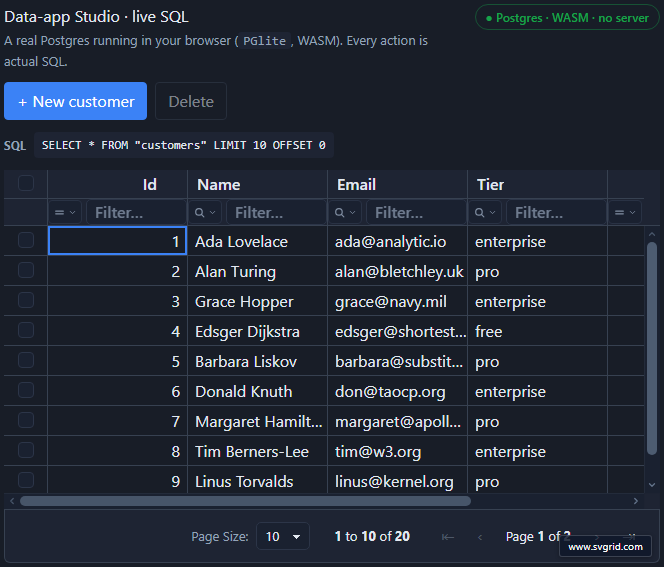
Live demo: Data-app Studio · live SQL - a full CRUD screen over PGlite; watch the SQL update as you sort and filter.
Scaffold every table at once
npx @svgrid/studio add --all --db postgres --url "$DATABASE_URL"
This lists the base tables and generates a screen (and route) for each.
Notes
- Schema drift: re-run
addafter a migration - only thesvgrid:managedregions regenerate, so your customizations survive. - Types: catalog types map to grid types automatically (int/numeric -> number, bool/bit -> boolean, timestamp -> datetime, date -> dateString, json -> json, else text). Refine anything in the schema file or the visual designer.
- Security: reads and writes are fully parameterized; the table name and columns come from the schema, never from request input.
Common gotchas
| Symptom | Cause and fix |
|---|---|
Cannot find module 'pg' (or mysql2 / mssql / better-sqlite3) |
No driver is bundled - install the one for your dialect (see the table above). |
| Grid empty, server logs a connection error | DATABASE_URL is not set in the server environment (not client code, not PUBLIC_). Set it in your host's env. |
| Numbers arrive as strings | Postgres numeric comes back as text over some drivers. Use integer / bigint for numeric columns, or cast in a view. |
| Works locally, times out on Vercel / Netlify | Serverless functions exhaust direct connections. Use a pooler URL (Supabase port 6543, PgBouncer) and keep the pool small - see Deployment. |
SSL required / self-signed cert |
Add SSL to the pool (ssl: { rejectUnauthorized: false } for managed hosts) or the connection string's sslmode. |
| A column is missing from the grid | Re-run add after a migration - only the svgrid:managed regions regenerate, so new columns come in and your edits survive. |
See also
- Data binding - the underlying contract
- Drizzle schema · REST & custom APIs · In-memory