Building a Kanban Board in Svelte 5 (Without a Board Library)
How to turn a Svelte data grid into a drag-and-drop Kanban board with one prop - lanes, WIP limits, swimlanes, keyboard moves, and virtualized lanes for large boards.
Most Kanban boards in a Svelte app start the same way: you pull in a drag-and-drop library, write lane components, wire pointer handlers, discover that keyboard users cannot move a card, and then find out the board and the table view of the same data disagree about what "in progress" means.
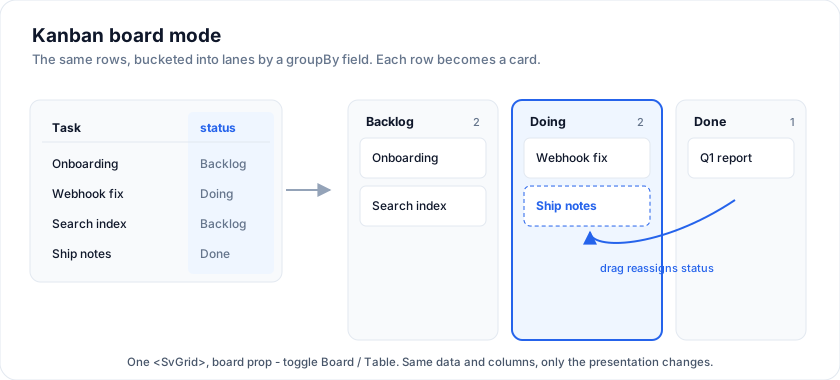
The alternative is to treat the board as a way of rendering rows you already have. Same data, same column definitions, different presentation. That is what board does in SvGrid.
The smallest board that works
Point groupBy at the field that decides which lane a row belongs to. Lanes are derived from the distinct values found in the data, and each row renders as a card built from your columns.
<SvGrid {data} {columns} board={{ groupBy: 'status' }} />
That is a working board: cards are draggable between lanes and within a lane, and the move is applied for you.
One setup note. The board prop and its config types ship in the free @svgrid/grid package, but the renderer itself is an Enterprise component that plugs into the grid through a registration seam. Register it once at the top of your app:
<script>
  import { enableBoardView } from '@svgrid/enterprise'
  enableBoardView()
</script>
Without that call, <SvGrid board={...}> renders a note telling you which package to install rather than failing silently.
Real lanes: order, colour, and WIP limits
Deriving lanes from the data is fine for a prototype, but real boards need a fixed order and lanes that exist even when empty. Pass an explicit lanes array. A lane id matches the groupBy value of the cards it holds.
<script>
  const lanes = [
    { id: 'backlog',     title: 'Backlog' },
    { id: 'in_progress', title: 'In progress', color: '#f59e0b', wipLimit: 3 },
    { id: 'review',      title: 'Review',      color: '#8b5cf6' },
    { id: 'done',        title: 'Done',        color: '#22c55e' },
  ]
</script>

<SvGrid {data} {columns} board={{ groupBy: 'status', lanes }} />
Every lane header shows its card count. When a lane has a wipLimit, the header shows count/limit and flags itself once the count goes over. That flag is advisory by default. Add enforceWip and the limit becomes hard: a drag or keyboard move that would push a lane past its limit is rejected, the card snaps back, and the rejection is announced to screen readers.
<SvGrid {data} {columns} board={{ groupBy: 'status', lanes, enforceWip: true }} />
Who owns the move
This is the part that usually leaks complexity into application code, so it is worth being precise about.
The board applies moves itself. It reassigns the lane, reorders within the lane, and tracks the result as an overlay keyed by row id. It does not mutate your rows. You write no move code.
onCardMove is an optional notification that fires after a move. Use it to persist to a backend, or to mirror the new lane onto your own data when another view reads the same array:
<script>
  function onCardMove(e) {
    // e = { row, fromLane, toLane, toIndex }
    e.row.status = e.toLane
  }
</script>

<SvGrid {data} {columns}
  getRowId={(r) => String(r.id)}
  board={{ groupBy: 'status', lanes, onCardMove }} />
Pass getRowId whenever your rows can be added, removed, or replaced. The move overlay is keyed by that id, so without it the board falls back to object identity, which breaks the moment you swap row objects wholesale after a refetch.
Keyboard moves are built in
A board that only responds to a mouse is not finished. Focus a card and:
- Space or Enter grabs it, and a second press drops it.
- Arrow Left and Arrow Right move a grabbed card to the previous or next lane.
- Arrow Up and Arrow Down reorder it within its lane.
- Escape cancels and restores the original position.
Each step is announced through an ARIA live region. When lanes are virtualized, moving focus to an off-screen card scrolls it into view before landing on it.
Swimlanes
Set swimlaneBy to split the board into horizontal bands by a second field. Each band shows the full lane set with only its own cards. Dragging a card into a lane under a different band reassigns the swimlane field too, and onCardMove then carries fromSwimlane and toSwimlane.
<SvGrid {data} {columns}
  board={{
    groupBy: 'status',
    swimlaneBy: 'assignee',
    collapsibleSwimlanes: true,
    onCardMove: (e) => {
      e.row.status = e.toLane
      if (e.toSwimlane != null) e.row.assignee = e.toSwimlane
    },
  }} />
Status lanes crossed with a per-person swimlane is the common sprint-board shape. Status crossed with priority gives you a triage board instead.
Roll-ups in the lane header
laneSummary receives the lane's cards and returns a short string for the header. Story points, a deal total, a count of anything you like. swimlaneSummary does the same for a whole band.
<SvGrid {data} {columns}
  board={{
    groupBy: 'status',
    laneSummary: (rows) => `${rows.reduce((s, r) => s + r.points, 0)} pts`,
  }} />
Filters and search come from the grid
The board renders the grid's filtered and sorted row model rather than the raw array. Column filters, the grid's sort, and the built-in search box all flow through to the lanes without extra wiring. The search box appears above the board by default; set searchable: false to hide it.
For board-native filtering, facets renders a chip bar of distinct values for the fields you list, including array fields such as tags:
<SvGrid {data} {columns} sortable
  board={{ groupBy: 'status', facets: ['tags', 'assignee'] }} />
Cards that carry real information
The default card can show a full badge row from configuration alone, so a custom snippet is not the price of a useful card:
<SvGrid {data} {columns}
  board={{
    groupBy: 'status',
    labelsField: 'labels',           // string[] or { text, color }[] -> chips
    dueField: 'due',                 // red once overdue
    assigneesField: 'assignees',     // avatar initials
    commentsField: 'comments',       // badge that expands to a thread
    attachmentsField: 'attachments', // count badge
    coverField: 'cover',             // CSS colour strip across the top
    ageField: 'created',             // relative age badge, e.g. 3d
    subtasks: 'items',               // checklist with a progress bar
  }} />
Two of these do more than decorate. subtasks renders a checklist you can tick and add to inline, tracked in the same overlay. flagField marks a card as blocked with a red corner, and a blocked card is locked from moving until it is unblocked, so the flag actually enforces something. Set flagBlocksMoves: false if you want the marker without the lock.
When you do want full control, pass a card snippet. The configured badges still render below it.
Editing without leaving the board
Set editable for an inline card editor on double-click or F2, built from the columns that declare an editorType. For a fuller form, set drawer and the board opens a detail drawer rendered from your columns:
<SvGrid {data} {columns}
  board={{ groupBy: 'status', drawer: true, onCardCommit: (e) => save(e) }} />
onCardCommit fires with { row, changes, values } after the board has applied the edit. Precedence runs onCardEdit first, then drawer, then the inline editor, so passing onCardEdit lets you route to your own screen instead.
Large boards
Lanes with thousands of cards need windowing. Set virtualized so each lane keeps only the cards in view in the DOM, and set cardHeight to match your card size, since the windowing assumes a uniform height:
<SvGrid {data} {columns}
  board={{ groupBy: 'status', virtualized: true, cardHeight: 72 }} />
Drag-and-drop, keyboard moves, and search keep working across the whole set. Leave virtualized off for boards of a few hundred cards, where it buys nothing and costs you variable card heights.
Saving the layout
persistKey saves card positions, order, inline edits, sub-task state, and collapsed lanes to localStorage, and restores them on load. It needs getRowId so the saved keys line up with the right rows after a reload:
<SvGrid {data} {columns}
  getRowId={(r) => String(r.id)}
  board={{ groupBy: 'status', persistKey: 'sprint-board' }} />
The layout is an overlay on top of your data. To store it somewhere other than localStorage, use onLayoutChange(layout) and write it yourself.
Changing the board's shape at runtime
groupBy is reactive, so switching the lane axis is a state change rather than a rebuild. Bind it to a selector and the board re-buckets:
<script>
  let groupBy = $state('status') // Status / Assignee / Priority selector
</script>

<SvGrid {data} {columns}
  board={{ groupBy, reorderableLanes: true }} />
reorderableLanes lets users drag lane headers to reorder columns, and the order is saved with persistKey.
Keeping a table view of the same data
Because the board is a rendering of the grid's rows, a Board and Table toggle is two branches over one array:
<script>
  let view = $state('board')
</script>

<button onclick={() => (view = 'board')}>Board</button>
<button onclick={() => (view = 'table')}>Table</button>

{#if view === 'board'}
  <SvGrid {data} {columns} getRowId={(r) => String(r.id)}
    board={{ groupBy: 'status', lanes, onCardMove }} />
{:else}
  <SvGrid {data} {columns} getRowId={(r) => String(r.id)}
    sortable filterable enableInlineEditing />
{/if}
This is why onCardMove mirrors the lane back onto the row in the examples above. The board's overlay is its own; mirroring is what keeps the table branch agreeing with it.
Frequently asked questions
Do I need a drag-and-drop library for a Svelte Kanban board?
No. Dragging cards between and within lanes is built into board mode, along with keyboard moves and an insertion marker. You do not install a DnD library or write pointer handlers, and you do not write the move logic - the board applies the move and reports it through the optional onCardMove callback.
Is the Kanban board keyboard accessible?
Yes. Focus a card, press Space or Enter to grab it, use the arrow keys to move it between lanes or reorder it within one, and press Escape to cancel. Each step is announced through an ARIA live region, so the board is usable without a mouse.
Can the board handle thousands of cards?
Yes, with virtualized: true, which keeps only the in-view cards of each lane in the DOM. Set cardHeight to match your cards, because the windowing assumes a uniform height. Below a few hundred cards per lane you do not need it.
Does the board mutate my data when a card moves?
No. Moves, inline edits, sub-task state, and collapsed lanes are tracked in an overlay keyed by row id, and your rows are left alone. If another view reads the same array, mirror the change yourself in onCardMove or onCardCommit.
Can I show the same data as both a board and a table?
Yes. Board mode is a presentation of the grid's filtered and sorted row model, so you can render a <SvGrid> with the board prop and one without it over the same data and columns, and switch between them with a piece of state.
Is Kanban board mode free?
The board prop and its configuration types are part of the free MIT-licensed @svgrid/grid package. The board renderer ships in @svgrid/enterprise and is registered with enableBoardView().
Where to go next
The Kanban board documentation covers the full BoardConfig surface. These runnable demos each isolate one part of it:
- Kanban board mode - the starting point, with a Board and Table toggle.
- Sprint board - swimlanes per assignee, enforced WIP, story-point roll-ups.
- Sales pipeline - stage lanes with a deal-value total per lane.
- Large board - 1k to 50k cards with virtualized lanes.
- Support triage - status crossed with a priority swimlane.
- Content calendar - stage lanes crossed with a channel swimlane.
- Cards with sub-tasks and badges - the rich default card plus the detail drawer.
- Group-by switch and reorderable lanes - changing the board's axis at runtime.
- Board power tools - facets, multi-select bulk move, context menus.
- Epics and stories - hierarchical cards that expand into sub-cards.