Building an Order Management Dashboard in Svelte
How to wire up an order management grid with master-detail line items, status workflows, server-side data, and bulk fulfillment actions using SvGrid.
Most e-commerce operations teams spend more time in their order grid than anywhere else. They need to read status at a glance, drill into line items, bulk-mark shipments, and occasionally pull a report. That is a lot to pack into one view - but it maps almost directly to SvGrid's feature set.
This post walks through the full order dashboard: server-side data with filters and pagination, a status workflow in editable cells, master-detail line items loaded on demand, and bulk fulfillment actions. Each section shows real code you can adapt.
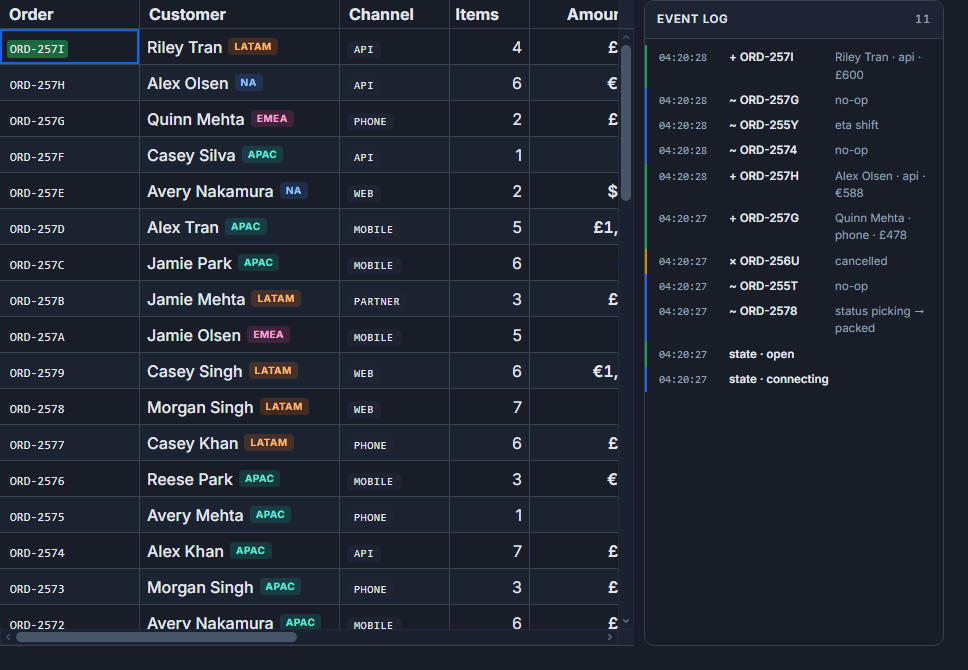 A live order-management grid in SvGrid.
Columns that communicate order state
The column definition is where most of the UI work happens. A good order grid shows what operators actually need: order ID, customer name, total value, current status, and a created-at timestamp. Status and totals get special treatment.
<script lang="ts">
  import SvGrid from '@svgrid/grid'
  import type { ColumnDef, SvGridApi, SvGridOptions, TableFeatures } from '@svgrid/grid'
  import {
    tableFeatures, rowSortingFeature, columnFilteringFeature,
    rowSelectionFeature, rowPaginationFeature, rowExpandingFeature,
    createServerDataSource
  } from '@svgrid/grid'

  type Order = {
    id: string
    customer: string
    total: number
    status: 'pending' | 'paid' | 'fulfilled' | 'shipped'
    createdAt: string
  }

  const features = tableFeatures({
    rowSortingFeature,
    columnFilteringFeature,
    rowSelectionFeature,
    rowPaginationFeature,
    rowExpandingFeature,
  })

  const columns: ColumnDef<typeof features, Order>[] = [
    { id: 'id', field: 'id', header: 'Order', width: 110, pinned: 'left' },
    { id: 'customer', field: 'customer', header: 'Customer', width: 200 },
    {
      id: 'total',
      field: 'total',
      header: 'Total',
      type: 'number',
      width: 110,
      cell: totalCell,
    },
    {
      id: 'status',
      field: 'status',
      header: 'Status',
      width: 130,
      editable: true,
      cell: statusCell,
      conditionalFormat: [
        { condition: ({ value }) => value === 'pending', style: { color: '#b45309' } },
        { condition: ({ value }) => value === 'paid', style: { color: '#1d4ed8' } },
        { condition: ({ value }) => value === 'fulfilled', style: { color: '#15803d' } },
        { condition: ({ value }) => value === 'shipped', style: { color: '#6b7280' } },
      ],
    },
    { id: 'createdAt', field: 'createdAt', header: 'Created', width: 150, type: 'date' },
    { id: 'actions', header: '', width: 60, cell: actionsCell, pinned: 'right' },
  ]

  let api: SvGridApi | undefined

  {#snippet totalCell({ value }: { value: number })}
    <span class="font-mono">${value.toFixed(2)}</span>
  {/snippet}

  {#snippet statusCell({ value }: { value: Order['status'] })}
    <span class="status-badge status-{value}">{value}</span>
  {/snippet}

  {#snippet actionsCell({ row }: { row: Order })}
    <button onclick={() => openDetail(row)}>...</button>
  {/snippet}
</script>
The conditional formatting on status is worth calling out: it runs per-cell with zero extra render cost. Operators see red/amber/green immediately, without needing to parse labels.
Server-side data with filters operators actually use
Order tables grow fast. Even a modest shop accumulates tens of thousands of orders within a year. Server-side filtering is not optional here - it is the only approach that stays responsive.
<script lang="ts">
  import { createServerDataSource } from '@svgrid/grid'

  const ds = createServerDataSource({
    fetch: async ({ page, pageSize, sort, filters }) => {
      const params = new URLSearchParams({
        page: String(page),
        size: String(pageSize),
      })

      if (sort.length > 0) {
        params.set('sortBy', sort[0].id)
        params.set('sortDir', sort[0].desc ? 'desc' : 'asc')
      }

      for (const f of filters) {
        if (f.id === 'status' && f.value) params.set('status', String(f.value))
        if (f.id === 'createdAt' && f.value) params.set('from', String(f.value))
        if (f.id === 'customer' && f.value) params.set('customer', String(f.value))
      }

      const res = await fetch(`/api/orders?${params}`)
      const json = await res.json()
      return { rows: json.data, total: json.total }
    },
  })
</script>

<SvGrid
  data={ds}
  {columns}
  {features}
  pageable
  filterable
  sortable
  showFilterRow={true}
  rowHeight={36}
  onApiReady={(a) => { api = a }}
/>
The filter row gives operators direct column-level filtering. Status gets a dropdown, date fields get range inputs, and customer gets a text search. All of it goes back to the server on change - the grid handles the debounce.
Line items as expandable detail
The master-detail pattern fits orders perfectly. The order is the master row; its line items are the detail. Load them lazily so a 5000-row grid does not pre-fetch 50,000 line item records.
<script lang="ts">
  type LineItem = {
    sku: string
    name: string
    qty: number
    unitPrice: number
    subtotal: number
  }

  const lineItemColumns: ColumnDef<typeof features, LineItem>[] = [
    { id: 'sku', field: 'sku', header: 'SKU', width: 100 },
    { id: 'name', field: 'name', header: 'Product', width: 240 },
    { id: 'qty', field: 'qty', header: 'Qty', type: 'number', width: 70 },
    { id: 'unitPrice', field: 'unitPrice', header: 'Unit Price', type: 'number', width: 110,
      cell: priceCell },
    { id: 'subtotal', field: 'subtotal', header: 'Subtotal', type: 'number', width: 110,
      cell: priceCell },
  ]

  {#snippet priceCell({ value }: { value: number })}
    <span class="font-mono">${value.toFixed(2)}</span>
  {/snippet}

  {#snippet orderDetail({ row }: { row: Order })}
    {#await fetch(`/api/orders/${row.id}/items`).then(r => r.json()) then items}
      <div class="detail-panel">
        <SvGrid
          data={items}
          columns={lineItemColumns}
          {features}
          rowHeight={30}
        />
      </div>
    {:catch}
      <p class="error">Failed to load line items.</p>
    {/await}
  {/snippet}
</script>

<SvGrid
  data={ds}
  {columns}
  {features}
  detail={orderDetail}
  pageable
  filterable
  sortable
  onApiReady={(a) => { api = a }}
/>
One thing to get right: the {:catch} branch. Network requests fail, especially in operations tools that run all day. A blank or stuck expand state looks like a bug; an error message looks like the system is working correctly.
Bulk fulfillment via row selection
Selection plus a toolbar is where the grid stops being a read-only table and becomes a tool. The selection API is straightforward, but there is one important detail: with server-side data, "select all" means select all matching records on the server, not just the current page.
<script lang="ts">
  async function fulfillSelected() {
    if (!api) return
    const selected = api.getSelectedRows()
    const ids = selected.map((r) => r.id)

    await fetch('/api/orders/fulfill', {
      method: 'POST',
      headers: { 'Content-Type': 'application/json' },
      body: JSON.stringify({ orderIds: ids }),
    })

    // Reflect the change locally without a full refetch
    api.applyTransaction({
      update: selected.map((r) => ({ ...r, status: 'fulfilled' })),
    })

    api.clearRowSelection()
  }

  function exportSelected() {
    if (!api) return
    const rows = api.getSelectedRows()
    const csv = [
      ['Order', 'Customer', 'Total', 'Status'],
      ...rows.map((r) => [r.id, r.customer, r.total, r.status]),
    ]
      .map((row) => row.join(','))
      .join('\n')

    const blob = new Blob([csv], { type: 'text/csv' })
    const url = URL.createObjectURL(blob)
    const a = document.createElement('a')
    a.href = url
    a.download = 'orders.csv'
    a.click()
    URL.revokeObjectURL(url)
  }
</script>

{#if api && api.getSelectedRows().length > 0}
  <div class="bulk-toolbar">
    <span>{api.getSelectedRows().length} orders selected</span>
    <button onclick={fulfillSelected}>Mark Fulfilled</button>
    <button onclick={exportSelected}>Export CSV</button>
    <button onclick={() => api?.clearRowSelection()}>Clear</button>
  </div>
{/if}
The applyTransaction call is the right move after a bulk action. It updates the local state optimistically without triggering a full server round-trip. If the server call fails, you can reverse it - but in most fulfillment workflows, success is the default.
Status advancement and edge cases
Editable status cells need a bit of guard logic. An operator should not be able to move an order from "shipped" back to "pending". The cell editor can enforce this:
{#snippet editableStatus({ value, row, stopEditing })}
  {@const allowed = nextStatuses(value)}
  <select
    value={value}
    onchange={(e) => {
      const next = e.currentTarget.value as Order['status']
      if (allowed.includes(next)) {
        updateOrderStatus(row.id, next)
      }
      stopEditing()
    }}
  >
    {#each allowed as s}
      <option value={s}>{s}</option>
    {/each}
  </select>
{/snippet}

function nextStatuses(current: Order['status']): Order['status'][] {
  const transitions: Record<Order['status'], Order['status'][]> = {
    pending: ['paid'],
    paid: ['fulfilled'],
    fulfilled: ['shipped'],
    shipped: [],
  }
  return [current, ...transitions[current]]
}
Showing only valid transitions in the dropdown prevents data integrity errors without needing server-side validation to bubble back a rejection. The operator never sees an option that would fail.
What this approach handles well
The combination of server-side data, master-detail rows, and bulk selection covers the core of operations work. The grid itself does the heavy lifting: virtualization keeps large lists smooth, the filter row reduces the need for a separate filter panel, and selection state persists across page changes.
Where this needs extension: if you need real-time updates (new orders coming in, status changed by a different operator), wire a WebSocket or SSE feed into api.applyTransaction. The grid handles incremental updates cleanly - you push changes in, it re-renders only the affected rows.
Audit trails are the other common addition. Most order systems need a log of who changed a status and when. That is backend work, but hooking into the grid's cell edit callback gives you the right event to emit.
Related reading
- Building an E-commerce Product Catalog Grid in Svelte
- Building a SaaS Billing and Usage Table in Svelte
- Building a Real-Time Trading Grid in Svelte
- Building a Project / Task Board with a Svelte Data Grid
- Building a Logistics / Fleet Tracking Grid in Svelte
Tagged: Master-detail