Visual designer
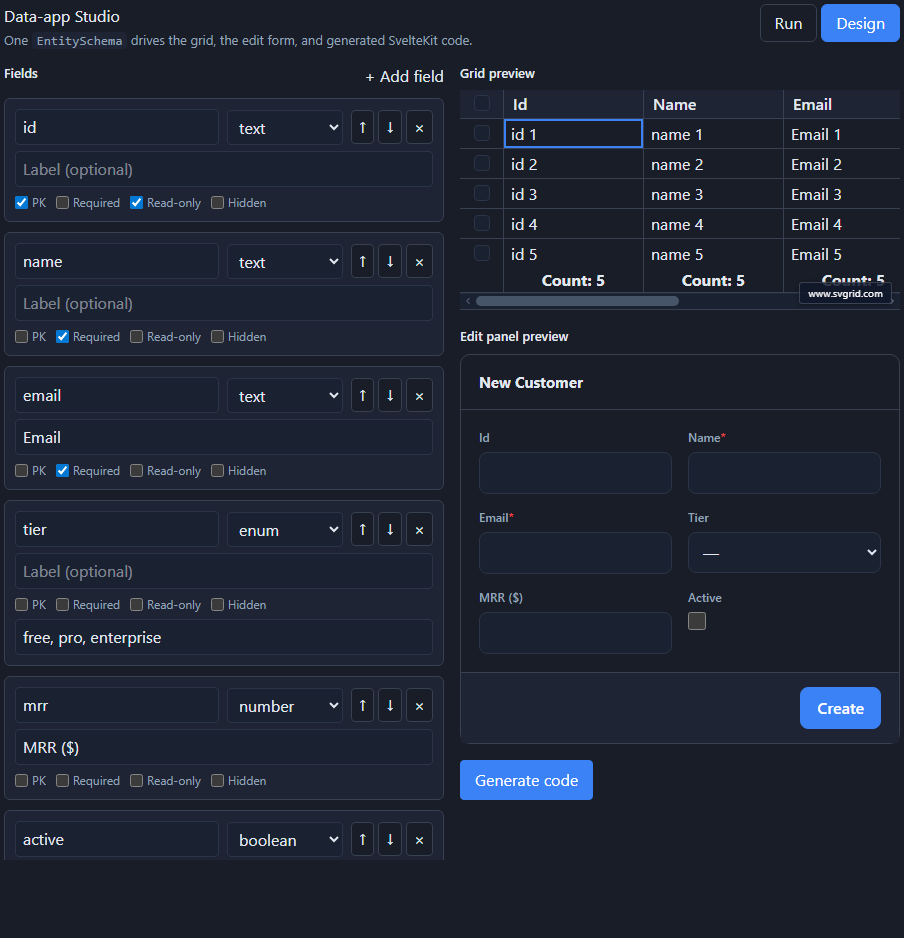
SvSchemaDesigner is the human-in-the-loop surface over the Studio engine.
Author an EntitySchema visually, see the grid and edit form update live, and
click Generate code to emit the same SvelteKit files the CLI and AI paths
produce.
Usage
<script lang="ts">
  import { SvSchemaDesigner, type EntitySchema } from '@svgrid/enterprise'

  let schema = $state<EntitySchema>({
    name: 'customers',
    idField: 'id',
    fields: [
      { field: 'id', type: 'text', primaryKey: true, readonly: true },
      { field: 'name', type: 'text', required: true },
      { field: 'email', type: 'text', format: 'email' },
    ],
  })
</script>

<SvSchemaDesigner {schema} onChange={(s) => (schema = s)} />
Props
| Prop | Type | Description |
|---|---|---|
schema |
EntitySchema<TData> |
The schema being designed. |
onChange |
(schema) => void |
Fires on every edit with the new schema. Omit for a read-only preview. |
showPreview |
boolean |
Show the live grid + edit-panel preview. Default true. |
What you can edit
- Add / remove / reorder fields.
- Per-field type (
text,number,boolean,date,datetime,enum,relation,json), label, and flags: primary key, required, read-only, hidden. - Enum options (comma-separated) and relation target for relation fields.
The right panel shows the resulting grid (schemaToColumns) and the edit form
(SvGridEditPanel) live, so you see exactly what the schema produces.
Save, load, import, export
The designer is controlled - it never persists anything itself. onChange
hands you the new EntitySchema; you decide where it lives (localStorage, a file,
your backend). Because an EntitySchema is plain JSON, "export" is
JSON.stringify and "import" is JSON.parse back into schema - no special
format:
<script lang="ts">
  import { SvSchemaDesigner, type EntitySchema } from '@svgrid/enterprise'

  const KEY = 'my-app.customers.schema'
  const blank: EntitySchema = {
    name: 'customers',
    idField: 'id',
    fields: [{ field: 'id', type: 'text', primaryKey: true, readonly: true }],
  }

  let schema = $state<EntitySchema>(
    JSON.parse(localStorage.getItem(KEY) ?? 'null') ?? blank,
  )

  function onChange(next: EntitySchema) {
    schema = next
    localStorage.setItem(KEY, JSON.stringify(next)) // persist every edit
  }
</script>

<SvSchemaDesigner {schema} {onChange} />

<button onclick={() => navigator.clipboard.writeText(JSON.stringify(schema, null, 2))}>
  Copy schema JSON
</button>
Drop an AI-introspected schema straight into schema and
refine it here, or omit onChange entirely for a read-only preview of a schema
you already have.
Generate code
The Generate code button runs the shared scaffold() and shows the emitted
files (schema module, +server.ts, +page.svelte) - the same output as the
CLI. Because it is one shared core, the designer, CLI, and
AI generator all produce identical code.
Human-in-the-loop with AI
A common flow: let the AI generator draft an
EntitySchema from your database, then refine it in the designer (tweak labels,
mark fields hidden, add validation) before generating - AI drafts, you approve.
See also
- The EntitySchema - the model the designer edits
- Edit forms & validation · Code generation