AI generation
The @svgrid/mcp server exposes Studio to AI coding agents (Claude Code, Cursor,
Codex, ...) through the Model Context Protocol. Ask your agent to build a screen
for a table and it introspects, scaffolds, and verifies - producing the same code
the CLI and designer do.
How it fits together
The MCP server makes no model calls of its own. It hands your agent a set of tools; the agent's own model decides when to call them. So the loop is:
you  ->  your agent (its model)  ->  svgrid MCP tools  ->  files on disk
                    ^                                          |
                    +--------  svelte-check verify  <----------+
Your schema and data stay on your machine; nothing is sent to our servers.
Configure the MCP server
Add it to your agent's MCP config (the key is passed as an env var, since the server runs in a Node process):
{
  "mcpServers": {
    "svgrid": {
      "command": "npx",
      "args": ["@svgrid/mcp"],
      "env": { "SVGRID_LICENSE_KEY": "SVENTERPRISE-..." }
    }
  }
}
The same block works across hosts - only the file it lives in differs:
| Host | Config location |
|---|---|
| Claude Code | .mcp.json at the project root, or claude mcp add |
| Cursor | .cursor/mcp.json |
| Windsurf | ~/.codeium/windsurf/mcp_config.json |
| Codex / other | the host's mcpServers config |
Restart (or reload) the agent so it picks up the server, then confirm the
svgrid tools are listed.
The tools
Alongside the read-only knowledge tools (examples, docs, API reference), the server exposes two generation tools:
| Tool | What it does |
|---|---|
introspect_source |
Infer an EntitySchema from a Drizzle schema file (kind:"drizzle") or sample JSON rows (kind:"json"). Returns a draft to review. |
scaffold_entity |
Generate the SvelteKit files from an EntitySchema. The output is compile-verified (the generated page is run through the Svelte compiler) before it comes back, and each file carries svgrid:managed markers. |
Step by step
- Point it at a source. A Drizzle schema file, or a handful of sample rows.
- Introspect. The agent calls
introspect_sourceand shows you the draftedEntitySchema- field names, types, primary key, guessed formats. - Refine (optional). Correct a type, mark a field hidden or read-only, add validation - in chat, or later in the visual designer.
- Scaffold. The agent calls
scaffold_entity; the files come back already run through the Svelte compiler. - Verify. The agent runs your project's
svelte-check; if anything fails it iterates. This is the loop that keeps AI output trustworthy.
Prompts that work
From a Drizzle schema:
"Using the svgrid MCP, build a CRUD screen for the
customerstable insrc/lib/db/schema.ts."
From sample data, when there is no schema yet:
"Here are five example rows of our invoices. Use the svgrid MCP to introspect a schema, then scaffold a CRUD screen at
/invoices."[{ "id": "INV-1", "customer": "Acme", "amount": 4200, "paid": true, "due": "2026-07-01" }]
Refining before you commit:
"Show me the drafted schema first. Mark
internalNoteshidden, makestatusto an enum of draft/sent/paid before scaffolding."
What comes back
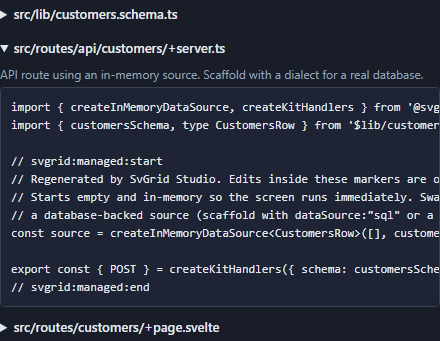
scaffold_entity writes three files (the same layout as the CLI and designer):
src/lib/customers.schema.ts     # the EntitySchema + row type
src/routes/api/customers/+server.ts  # createKitHandlers data endpoint
src/routes/customers/+page.svelte    # the grid + edit-panel screen
Each carries svgrid:managed markers so a re-generation updates the managed
regions and leaves your hand-written code untouched. See
code generation for the anatomy of each file.
Bring your own key
The generator uses your agent's model and API key - your schema and data never touch our servers. The MCP server itself makes no model calls; it provides introspection + scaffolding + verification tools that the host agent drives.
Licensing
Generation is soft-gated: it runs unlicensed and prepends a one-line commercial
notice, and the generated app carries the usual watermark until you call
setLicenseKey(). Set SVGRID_LICENSE_KEY in the MCP config to license it. See
licensing.
See also
- The Studio CLI - the deterministic, no-AI path
- Visual designer - refine an AI draft by hand before generating
- Code generation - the anatomy of the emitted files
- MCP server - full MCP reference