Edit forms & validation
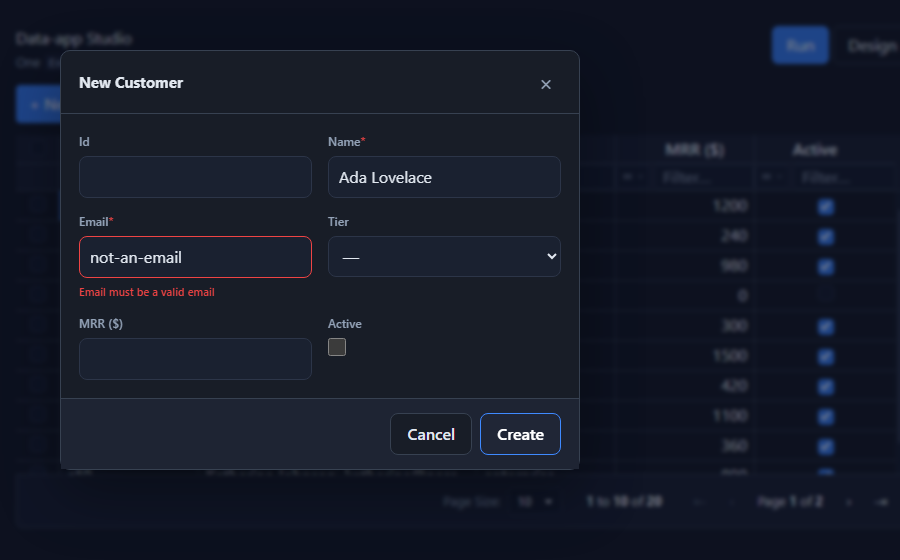
SvGridEditPanel is the create / edit form for a row. It renders itself from an
EntitySchema, validates input, and hands you a ready payload to save. It
presents as a right-hand drawer, a centered modal, or inline, and
follows the grid's light / dark theme.
Usage
<script lang="ts">
  import { SvGridEditPanel } from '@svgrid/enterprise'
  let editing = $state<Customer | null | undefined>(undefined) // undefined = closed, null = create

  async function save({ mode, id, values }) {
    if (mode === 'create') await controller.createRow(values)
    else if (id) await controller.updateRow(id, values)
    editing = undefined
  }
</script>

{#if editing !== undefined}
  <SvGridEditPanel
    {schema}
    row={editing}
    presentation="modal"
    onSubmit={save}
    onCancel={() => (editing = undefined)}
  />
{/if}
Props
| Prop | Type | Description |
|---|---|---|
schema |
EntitySchema<TData> |
Drives the fields, validation, and payload. |
row |
TData | null |
Row to edit; null to create. |
presentation |
'drawer' | 'modal' | 'inline' |
Default 'drawer' (right slide-over). |
title |
string |
Heading override. |
submitLabel |
string |
Save-button label override. |
onSubmit |
(payload) => void | Promise |
Called with a validated { mode, id, values }. Throw to surface an error. |
onCancel |
() => void |
Called on cancel / close (Esc, backdrop, or the X). |
Presentation
drawer(default) - slides in from the right, full height.modal- centered popup with a blurred backdrop.inline- renders in the page flow (used by the designer preview).
Drawer and modal animate in / out, close on Esc or backdrop click, and trap to a dialog role.
Validation
The panel validates on submit and blocks the save when anything fails, showing a message under each field. Three layers, in order:
- Required - non-empty for
requiredfields. - Built-in constraints - number validity +
min/max,minLength/maxLength,format: 'email' | 'url', andpattern(see The EntitySchema). - Standard Schema - any Zod / Valibot / ArkType validator on
field.validate.
{ field: 'email', type: 'text', required: true, format: 'email' }
{ field: 'mrr',   type: 'number', min: 0 }
{ field: 'name',  type: 'text', minLength: 2, maxLength: 60 }
No external library is required for the built-in rules - add a Standard Schema validator only when you need custom logic.
Controls
The form control follows the field type: text / number / date / datetime / time
inputs, a checkbox for booleans, a themed dropdown (SvGridDropdown) for
enums, and a textarea for JSON. Override per field with input.editorType.
File / image upload. Give a field an upload config and it renders
SvFileInput (a picker with an image preview). With no handler it stores an
inline data URL (no backend needed); pass an uploads handler that pushes to
storage and returns the URL:
{ field: 'avatar', type: 'text', upload: { image: true, accept: 'image/*' } }

<SvGridEditPanel {schema} row={editing}
  uploads={{ avatar: async (file) => await putToStorage(file) }} onSubmit={save} />
Cascading (dependent) fields. Compute a field's options from the current
values with dependentOptions - the field clears when it stops being valid
(e.g. City depends on Country):
<SvGridEditPanel {schema} row={editing}
  dependentOptions={{ city: (values) => citiesByCountry[values.country] ?? [] }}
  onSubmit={save} />
See the rich fields demo.
Enum and relation fields use a custom dropdown whose panel portals to
document.body (position: fixed), so it opens above a drawer or modal and
never grows the form (no scrollbar) - unlike a native <select> or an in-flow
popup.
The modal is a movable window
With presentation="modal", the panel is a floating window: drag it by the
header, resize it from its edges (the content resizes with it), maximize /
restore, and pin it to any edge (left / top / bottom / right) - handy for
keeping the form docked beside the grid while you work. Pin again to unpin.
Set persistKey to remember the window layout (pin / size / maximized) in
localStorage, so it reopens where the user left it:
<SvGridEditPanel {schema} row={editing} presentation="modal" persistKey="customers" ... />
Open the editor on double-click (onRowDoubleClick), not single-click, so a
click can still select or interact with a row without popping the form.
See also
- The EntitySchema - fields + validation constraints
- Master-detail · Data binding