Master-detail
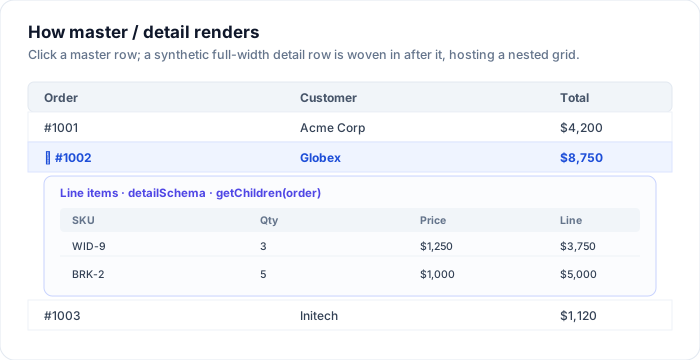
SvGridMasterDetail expands a master row into a nested grid of related records -
orders and their line items, customers and their invoices, and so on. It is a
feature of the grid's data stack (built on the grid's own isDetailRow /
renderDetailRow), not a separate widget. Click a master row to expand or
collapse its detail region.
Usage
<script lang="ts">
  import { SvGridMasterDetail } from '@svgrid/enterprise'
  import { orderSchema, lineItemSchema } from '$lib/schemas'

  const orders = [/* ... */]
  const lineItems = [/* ... */]
</script>

<SvGridMasterDetail
  schema={orderSchema}
  data={orders}
  detailSchema={lineItemSchema}
  getChildren={(order) => lineItems.filter((li) => li.orderId === order.id)}
/>
Props
| Prop | Type | Description |
|---|---|---|
schema |
EntitySchema<TParent> |
The master entity. |
data |
TParent[] |
Master rows. |
detailSchema |
EntitySchema<TChild> |
The detail entity, rendered in the nested grid. |
getChildren |
(parent) => TChild[] |
Return the child rows for a master row. |
containerHeight |
number | string |
Height of the outer grid. Default 320. |
detailHeight |
number | string |
Height of each nested detail grid. Default 200. |
A complete example
Two schemas and two flat arrays joined by a foreign key is all it takes. The
detail grid inherits the child schema's columns, types, and formatting, so a
currency field renders as currency in the nested grid with no extra work.
<script lang="ts">
  import { SvGridMasterDetail, type EntitySchema } from '@svgrid/enterprise'

  type Order = { id: string; customer: string; placed: string; total: number }
  type LineItem = { id: string; orderId: string; sku: string; qty: number; price: number }

  const orderSchema: EntitySchema<Order> = {
    name: 'orders',
    idField: 'id',
    fields: [
      { field: 'id', type: 'text', primaryKey: true, readonly: true },
      { field: 'customer', type: 'text' },
      { field: 'placed', type: 'date' },
      { field: 'total', type: 'number' },
    ],
  }

  const lineItemSchema: EntitySchema<LineItem> = {
    name: 'lineItems',
    idField: 'id',
    fields: [
      { field: 'sku', type: 'text', label: 'SKU' },
      { field: 'qty', type: 'number' },
      { field: 'price', type: 'number' },
    ],
  }

  const orders: Order[] = [
    { id: '1001', customer: 'Acme Corp', placed: '2026-06-02', total: 4200 },
    { id: '1002', customer: 'Globex',    placed: '2026-06-09', total: 8750 },
    { id: '1003', customer: 'Initech',   placed: '2026-06-14', total: 1120 },
  ]

  const lineItems: LineItem[] = [
    { id: 'a', orderId: '1002', sku: 'WID-9', qty: 3, price: 1250 },
    { id: 'b', orderId: '1002', sku: 'BRK-2', qty: 5, price: 1000 },
    { id: 'c', orderId: '1001', sku: 'CBL-1', qty: 8, price: 525 },
  ]
</script>

<SvGridMasterDetail
  schema={orderSchema}
  data={orders}
  detailSchema={lineItemSchema}
  getChildren={(order) => lineItems.filter((li) => li.orderId === order.id)}
  containerHeight={360}
  detailHeight={180}
/>
How it works
The component tracks which parent rows are expanded and weaves a synthetic detail
row in after each expanded parent. The grid renders that row full-width using the
detailSchema's columns. Because both grids derive from an EntitySchema, the
detail grid gets the same formatting, types, and columns for free.
Only expanded rows render a detail grid, and the outer grid stays virtualized, so a 10,000-row master list with a couple of open details costs about the same as a plain grid.
Lazy / async children
getChildren is synchronous - ideal when the children are already loaded (a
joined query, or a small dataset). Because it is called when a detail row renders
(that is, on expand), you can still make it lazy: return from a cache, and fill
that cache the first time it is asked for a parent.
<script lang="ts">
  let cache = $state<Record<string, LineItem[]>>({})
  const pending = new Set<string>() // plain Set, not $state - just a guard

  function childrenOf(order: Order): LineItem[] {
    if (!(order.id in cache) && !pending.has(order.id)) {
      pending.add(order.id)
      fetch(`/api/orders/${order.id}/items`)
        .then((r) => r.json())
        .then((rows) => { cache = { ...cache, [order.id]: rows } })
        .finally(() => pending.delete(order.id))
    }
    return cache[order.id] ?? []
  }
</script>

<SvGridMasterDetail
  schema={orderSchema}
  data={orders}
  detailSchema={lineItemSchema}
  getChildren={childrenOf}
/>
The first expand shows an empty detail for a moment; when the fetch resolves and
reassigns cache (in a microtask, not during render), the detail grid fills in.
Keep the in-flight guard a plain Set so touching it never re-triggers a render.
Detail from a data source
When the master list is itself served by a ServerDataSource,
the pattern is the same - the master rows come from the controller, and
getChildren reads a per-parent cache you fill from the same source (or a related
endpoint) on expand. Nothing about SvGridMasterDetail changes; only where the
rows come from does.
Nesting deeper
A detail grid can itself be a master. Render a SvGridMasterDetail inside a
custom detail (via the grid's renderDetailRow) to go three levels deep -
customer -> orders -> line items. Keep the nesting shallow in practice; two levels
covers almost every real screen and stays readable.
Styling
The nested grid is a normal <SvGrid>, so the --sg-*
theme tokens style it - the detail grid picks up the same theme
as the master automatically. Set detailHeight to match the typical child count,
or fix a height and let the nested grid scroll for long child lists.
See also
- The EntitySchema - the model both grids derive from
- Edit forms & validation · Data binding
- Live demo: Master / detail (nested grid)