Render 100,000 Rows Smoothly with Grid Virtualization
A practical look at how SvGrid keeps a Svelte data grid at 60fps with 100k rows - what virtualization actually does, the one layout requirement that breaks it silently, and why $state.raw matters at scale.
Ten million DOM nodes will not fit in a viewport. This is the whole problem with naive table rendering at scale - you create a <tr> for every row whether the user can see it or not, and at 100,000 rows with 100 columns, Chrome is busy constructing and styling 10 million elements before it paints a single pixel. The scroll interaction that follows is a slideshow.
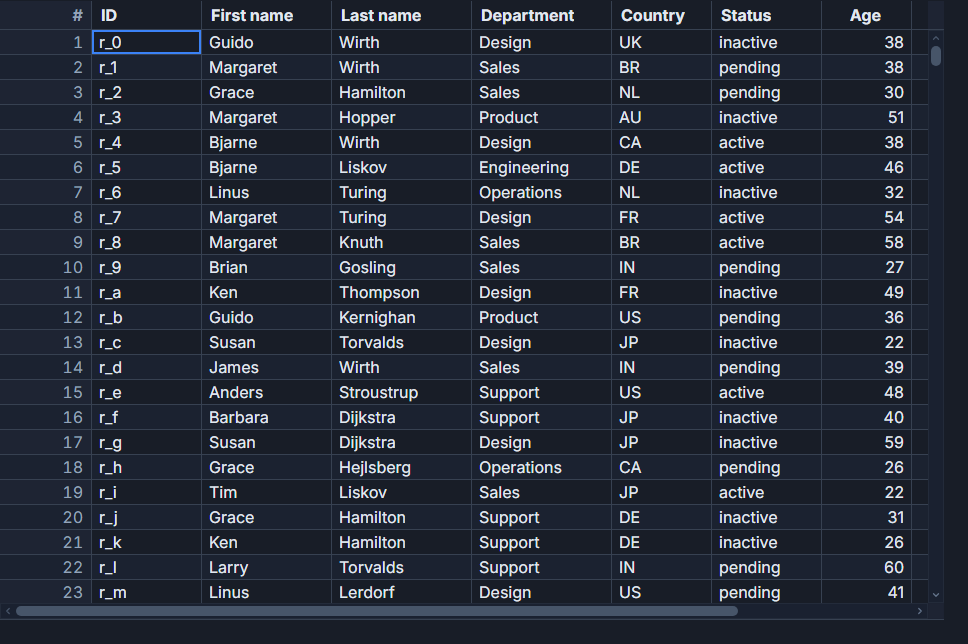
The fix is conceptually simple: only render what the user can actually see. SvGrid does this automatically for both rows and columns. What is less obvious is that virtualization has one hard requirement that breaks silently if you miss it, and Svelte 5 adds a wrinkle that costs you hundreds of milliseconds if you use the wrong state primitive. Both of those deserve more attention than the "add virtualization: true" bullet point they usually get in docs.
What the virtualizer actually renders
When you mount a <SvGrid> inside a bounded container, the grid measures the container height and computes the visible row window from the current scrollTop and the configured rowHeight. It renders that slice plus a small overscan buffer (typically 3-5 rows per side) to avoid blank flickers during fast scrolls.
The key detail: the rendered rows are not destroyed and recreated on scroll. SvGrid maintains a fixed pool of DOM rows, repositions them with transform: translateY(...) relative to a spacer element that holds the full scroll height, and swaps the bound data. The scrollbar sees the correct total height - 100,000 rows worth - but the DOM never holds more than about 40 rows at a time.
Column virtualization mirrors this. From scrollLeft, the grid determines which column indices intersect the viewport, renders only that horizontal slice, and always keeps pinned columns outside the virtual window.
The upshot: initial paint time is proportional to visible rows, not total rows. On a mid-range laptop, 100,000 rows with 95 metric columns mounts in under 16 ms because it paints roughly 30 rows.
The bounded-height requirement
Virtualization only engages when the grid container has a bounded height. If the container grows to fit its content - which is the default block behavior - the grid's viewport height is effectively infinite, and every row gets rendered.
The failure mode is quiet. There is no warning. The symptom is a several-second first paint and document.querySelectorAll('tr').length equaling your row count.
The most common way to break it accidentally is using a flex column layout without min-height: 0 on the grid's parent:
<!-- This breaks virtualization - the inner div grows unbounded -->
<div style="display: flex; flex-direction: column; height: 100vh;">
  <header>My App</header>
  <div style="flex: 1;">
    <SvGrid {data} {columns} />
  </div>
</div>

<!-- This works - min-height:0 prevents the flex child from overflowing -->
<div style="display: flex; flex-direction: column; height: 100vh;">
  <header>My App</header>
  <div style="flex: 1; min-height: 0;">
    <SvGrid {data} {columns} />
  </div>
</div>
The min-height: 0 rule overrides the flex default that allows items to grow past their container. Without it, flex: 1 makes the child expand to fit content rather than constrain to the remaining space.
Why $state.raw matters at 100k rows
Svelte 5's $state() wraps every object in a reactive proxy. For a 100,000-row array that is 100,000 proxies created synchronously on assignment. On a modern laptop this takes 300-500 ms before the grid gets the data. For reference, the grid itself paints in under 16 ms.
Use $state.raw for the rows array and trigger reactivity by replacing the array reference rather than mutating elements. The grid receives the raw array, skips proxy traversal on every cell access, and reads values at native object speed.
<script lang="ts">
  import {
    SvGrid,
    tableFeatures,
    rowSortingFeature,
    columnFilteringFeature,
    type ColumnDef,
    type SvGridApi,
  } from '@svgrid/grid'

  const features = tableFeatures({ rowSortingFeature, columnFilteringFeature })

  type Row = {
    id: number
    firstName: string
    lastName: string
    department: string
    [metric: string]: number | string
  }

  // $state.raw - no deep proxy, critical at 100k rows
  let rows    = $state.raw<Row[]>([])
  let columns = $state.raw<ColumnDef<typeof features, Row>[]>([])
  let api     = $state<SvGridApi | undefined>(undefined)

  function generateRows(count: number, metricCols: number): Row[] {
    const FIRST = ['Ada', 'Grace', 'Alan', 'Linus', 'Margaret', 'Barbara']
    const LAST  = ['Lovelace', 'Hopper', 'Turing', 'Torvalds', 'Hamilton', 'Liskov']
    const DEPTS = ['Engineering', 'Design', 'Product', 'Sales', 'Operations']

    return Array.from({ length: count }, (_, i) => {
      const row: Row = {
        id:         i,
        firstName:  FIRST[i % FIRST.length]!,
        lastName:   LAST[i % LAST.length]!,
        department: DEPTS[i % DEPTS.length]!,
      }
      for (let m = 0; m < metricCols; m++) {
        row[`metric_${m}`] = Math.round(Math.random() * 10_000) / 100
      }
      return row
    })
  }

  function buildColumns(metricCols: number): ColumnDef<typeof features, Row>[] {
    const base: ColumnDef<typeof features, Row>[] = [
      { field: 'firstName',  header: 'First name',  width: 160 },
      { field: 'lastName',   header: 'Last name',   width: 160 },
      { field: 'department', header: 'Department',  width: 160 },
    ]
    for (let m = 0; m < metricCols; m++) {
      base.push({
        field:  `metric_${m}` as keyof Row,
        header: `Metric ${m}`,
        width:  140,
        format: { type: 'number', options: { maximumFractionDigits: 2 } },
      })
    }
    return base
  }

  // Build columns once - separate from row data to avoid unnecessary re-renders
  columns = buildColumns(95)

  async function load(rowCount: number) {
    // Replace the reference - this is the correct way to trigger reactivity with $state.raw
    rows = generateRows(rowCount, 95)
  }

  // Initial load
  $effect(() => { load(100_000) })
</script>

<div style="height: 100vh; display: flex; flex-direction: column;">
  <div class="toolbar" style="height: 40px; flex-shrink: 0;">
    <button onclick={() => load(10_000)}>10k rows</button>
    <button onclick={() => load(50_000)}>50k rows</button>
    <button onclick={() => load(100_000)}>100k rows</button>
  </div>

  <!-- flex:1 + min-height:0 - the bounded-height pattern -->
  <div style="flex: 1; min-height: 0;">
    <SvGrid
      {rows}
      {columns}
      {features}
      rowHeight={32}
      onApiReady={(a) => { api = a }}
    />
  </div>
</div>
There is one more subtle point in that code: buildColumns runs once, outside $effect, and is not tied to row data changes. Column identity drives header and cell memoization inside the grid. If you compute columns in the same reactive scope that also fires on row changes, you force a full header and cell re-render on every data update. Keep column definitions stable.
Programmatic scroll and adding rows at runtime
Once you have 100k rows virtualized, two operations need a bit of care.
Scrolling to a specific row uses api.scrollToRow(index). The index is into the displayed row set after sorting and filtering, not the original data array. If you want to jump to a specific data record, find its displayed index first:
// Jump to a known row by data id after sorting/filtering may have reordered things
function scrollToId(targetId: number) {
  const displayed = api!.getDisplayedRows()
  const idx = displayed.findIndex((r) => r.id === targetId)
  if (idx !== -1) api!.scrollToRow(idx)
}

// Adding rows at runtime without replacing the whole array
function appendRows(newRows: Row[]) {
  // applyTransaction is efficient - it patches the internal model, not the full array
  api!.applyTransaction({ add: newRows })
}

// Remove by matching a field value
function removeByDept(dept: string) {
  const toRemove = api!.getDisplayedRows().filter((r) => r.department === dept)
  api!.applyTransaction({ remove: toRemove })
}
applyTransaction is the right tool for incremental updates. Reassigning the full rows reference on every update triggers a full virtual list reconciliation, which is fine for batch loads but wasteful for live feeds where you are appending a few rows per second.
When client-side filtering hits its ceiling
With 100,000 rows in memory, columnFilteringFeature handles filter evaluation in a tight JavaScript loop - no DOM involved, just array iteration. That is fast enough for interactive filtering at typing speed, as long as you let SvGrid own the filter state rather than recomputing a pre-filtered array on every keystroke and reassigning rows.
The ceiling shows up with complex multi-column filters on computed fields, or when the dataset grows past memory budget. At that point the right answer is createServerDataSource, which offloads sort, filter, and pagination to the backend so the browser holds only one page of rows:
import { createServerDataSource } from '@svgrid/grid'

const ds = createServerDataSource({
  fetch: async ({ page, pageSize, sort, filters }) => {
    const params = new URLSearchParams({
      page:     String(page),
      pageSize: String(pageSize),
    })
    if (sort.length) params.set('sort', JSON.stringify(sort))
    if (filters.length) params.set('filters', JSON.stringify(filters))

    const res  = await fetch(`/api/employees?${params}`)
    const json = await res.json()
    return { rows: json.data, total: json.total }
  },
})

// Data source replaces the rows array entirely
// <SvGrid data={ds} {columns} {features} pageable sortable filterable />
The trade-off: server-side mode adds network latency on sort and filter changes, and requires backend support for the query contract. For datasets that genuinely cannot live in the browser, the latency is acceptable. For datasets that can, client-side virtualization with $state.raw is faster and simpler.
Variable row heights
SvGrid's default virtualizer assumes uniform row height for O(1) scroll-position-to-index mapping. If you render rows with content that changes their height - multiline text, expandable details panels, embedded charts - the scrollbar position estimate will drift.
The practical solution is to set rowHeight to the tallest possible row. You lose some vertical density but keep accurate scroll behavior. True dynamic measurement (where each row reports its own height back to the virtualizer) is on the roadmap but involves significantly more scroll-calculation complexity.
For most business grids with text and numbers, uniform row height is the right default. Set it explicitly with rowHeight={32} or rowHeight={40} rather than relying on the CSS default, because consistent row height also improves the browser's paint batching.
Related reading
- Live demo: 1 million rows
- Docs: Performance benchmarks
- Building a Log Viewer for Large Logs in Svelte
- Lazy-Loading Master-Detail Content in SvGrid
- Immutable Grid Updates Without Killing Performance
- Performance Tips for SvGrid with Svelte 5 Runes
- Bundle Size of Svelte Data Grids - How to Compare
Tagged: Virtualization, Performance